1. Увод
This manual provides essential information for the installation, operation, and maintenance of the Cisco Catalyst 9800-L Copper Uplink Wireless LAN Controller (Model C9800-L-C-K9). Please read this manual thoroughly before using the device to ensure proper functionality and safety.
2. Важне информације о безбедности
Придржавајте се следећих мера безбедности како бисте спречили повреде и оштећења уређаја:
- Уверите се да је уређај инсталиран у добро проветреном простору како бисте спречили прегревање.
- Користите само напајање које је наведено за овај уређај.
- Не излажите уређај влази или екстремним температурама.
- Искључите напајање пре него што извршите било какво одржавање или чишћење.
- Све сервисирање препустите квалификованом сервисном особљу.
3. Садржај пакета
Проверите да ли су све ставке присутне у пакету:
- Cisco Catalyst 9800-L Wireless LAN Controller
- CD (који садржи документацију или софтвер)
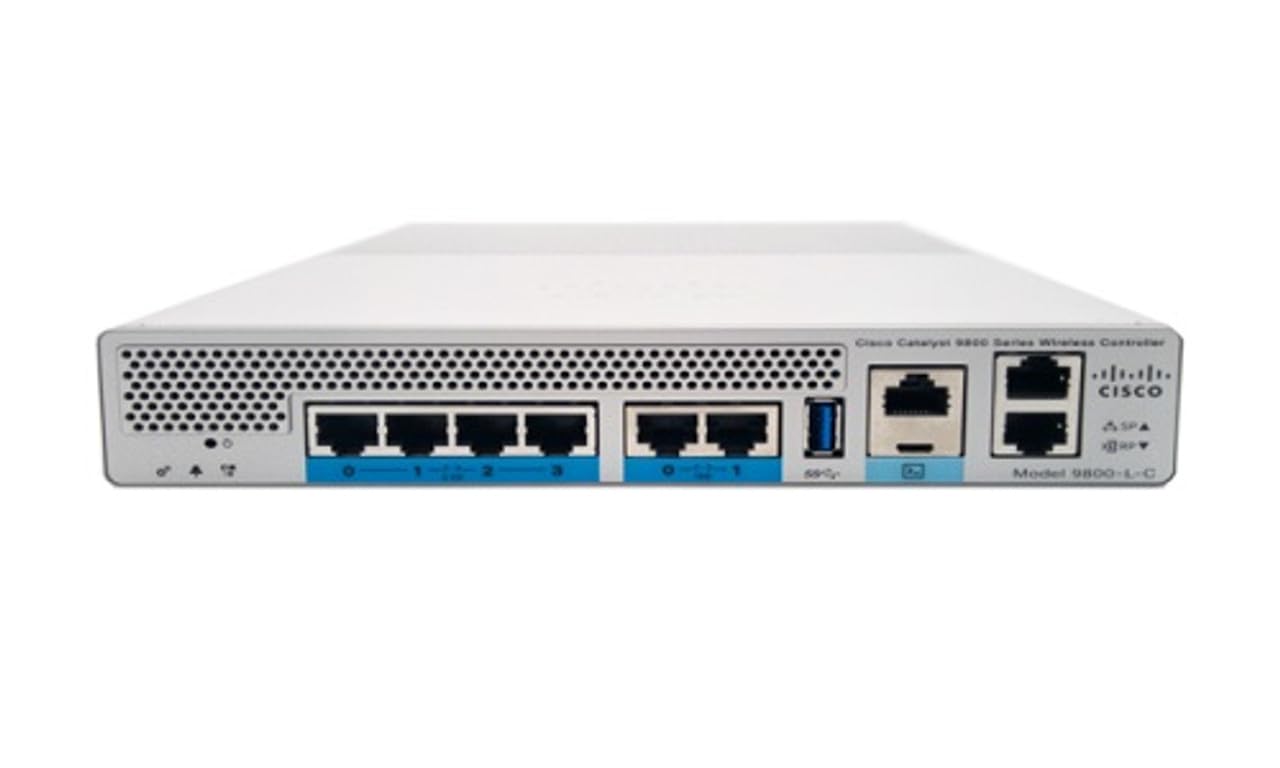
Слика 1: Предња страна view of the Cisco Catalyst 9800-L Wireless LAN Controller. This image shows the compact design and port layout of the device.
4. Производ је готовview
The Cisco Catalyst 9800-L is a compact, fixed-configuration wireless LAN controller designed for small to medium-sized deployments. It provides centralized control for Cisco Aironet access points, offering robust wireless network management capabilities.
Кључне карактеристике:
- Managed, Layer 2.5 (Wireless Controller) functionality
- Copper uplink interfaces
- RJ45 interface type
- 11 ports for connectivity
- Designed for desktop environments
5. Подешавање
5.1 Распакивање и преглед
- Carefully remove the controller from its packaging.
- Inspect the device for any signs of physical damage. If damage is found, contact your supplier immediately.
5.2 Физичка инсталација
- Place the controller on a stable, flat surface, such as a desktop.
- Ensure adequate clearance around the device for proper airflow and ventilation.
5.3 Прикључак за напајање
- Connect the power cord to the power input on the rear of the controller.
- Plug the other end of the power cord into a grounded electrical outlet (220 Volts).
5.4 Мрежна веза
- Connect Ethernet cables from your network infrastructure to the RJ45 uplink ports on the controller.
- Connect access points to the appropriate downlink ports as required by your network design.
5.5 Приступ почетној конфигурацији
- Refer to the included CD or Cisco's official documentation for detailed instructions on initial console access and software configuration.
- Typically, this involves connecting a console cable to the device and using a terminal emulator.
6. Управљање контролером
6.1 Основни рад
Once powered on and initially configured, the controller will begin managing connected access points. Monitor the status indicators on the device for operational status.
6.2 Access Point Management
The Cisco Catalyst 9800-L automatically discovers and provisions Cisco Aironet access points. Use the controller's management interface (CLI or GUI) to configure wireless networks, security policies, and guest access.
6.3 Конфигурација мреже
Detailed network configuration, including VLANs, QoS, and routing, is performed through the controller's operating system. Consult Cisco's official documentation for advanced configuration guides.
7. Смернице за одржавање
- Ажурирања фирмвера: Regularly check for and apply the latest firmware updates from Cisco to ensure optimal performance and security.
- Чишћење: Одржавајте уређај чистим и без прашине. Користите меку, суву крпу за чишћење. Не користите течна или аеросолна средства за чишћење.
- Услови животне средине: Ensure the operating environment remains within specified temperature and humidity ranges to prevent hardware failure.
- Конфигурација резервне копије: Periodically back up your controller's configuration to prevent data loss.
КСНУМКС. Решавање проблема
Овај одељак се бави уобичајеним проблемима на које можете наићи:
| Проблем | Могући узрок | Решење |
|---|---|---|
| Контролер се не укључује | Power cable disconnected; Power outlet failure | Check power cable connections; Test power outlet with another device. |
| Access points not connecting | Incorrect network configuration; APs not discovered | Verify network settings on the controller; Ensure APs are on the same network segment or reachable via IP. |
| Slow wireless performance | Interference; Overloaded channels; Outdated firmware | Perform a site survey to identify interference; Optimize channel selection; Update controller and AP firmware. |
9. Техничке спецификације
| Спецификација | Детаљ |
|---|---|
| Бранд | Цисцо |
| Број модела | C9800-L-C-K9 |
| Број портова | 11 |
| Интерфејс | РЈ45 |
| Тип прекидача | Managed, Layer 2.5 (Wireless Controller) |
| Платформа | Зета |
| Тип материјала кућишта | Бакар |
| Волtage | 220 Волтс |
| Компатибилни уређаји | Десктоп |
| Боја | Плава |
| Тежина артикла | 3.09 килограма |
| УПЦ | 657768416101 |
| ASIN | B0C3FQPCY4 |
10. Информације о гаранцији
This Cisco Catalyst 9800-L Wireless LAN Controller (Renewed) comes with a 90 дана ограничене гаранције. For specific terms and conditions, please refer to the warranty documentation provided with your purchase or contact your reseller.
11. Корисничка подршка
For technical assistance, troubleshooting, or further inquiries regarding your Cisco Catalyst 9800-L Wireless LAN Controller, please visit the official Cisco support website or contact your authorized Cisco reseller. Ensure you have your model number (C9800-L-C-K9) and serial number available when seeking support.


