Увод
Thank you for choosing the Technics EAH-AZ60M2 Wireless in-Ear Noise-Cancelling Headphones. This manual provides essential information for the proper setup, operation, and maintenance of your new headphones. Please read this manual thoroughly before use to ensure optimal performance and longevity of the product.

Image: The Technics EAH-AZ60M2 wireless in-ear headphones, shown alongside their compact black charging case.
Шта је у кутији
Upon opening the packaging, please verify that all the following components are included:
- Technics EAH-AZ60M2 Wireless In-Ear Noise-Cancelling Headphones (Left and Right earbuds)
- Футрола за пуњење
- УСБ-Ц кабл за пуњење
- Multiple sizes of Earpieces (7 pairs)
- Кориснички приручник (овај документ)
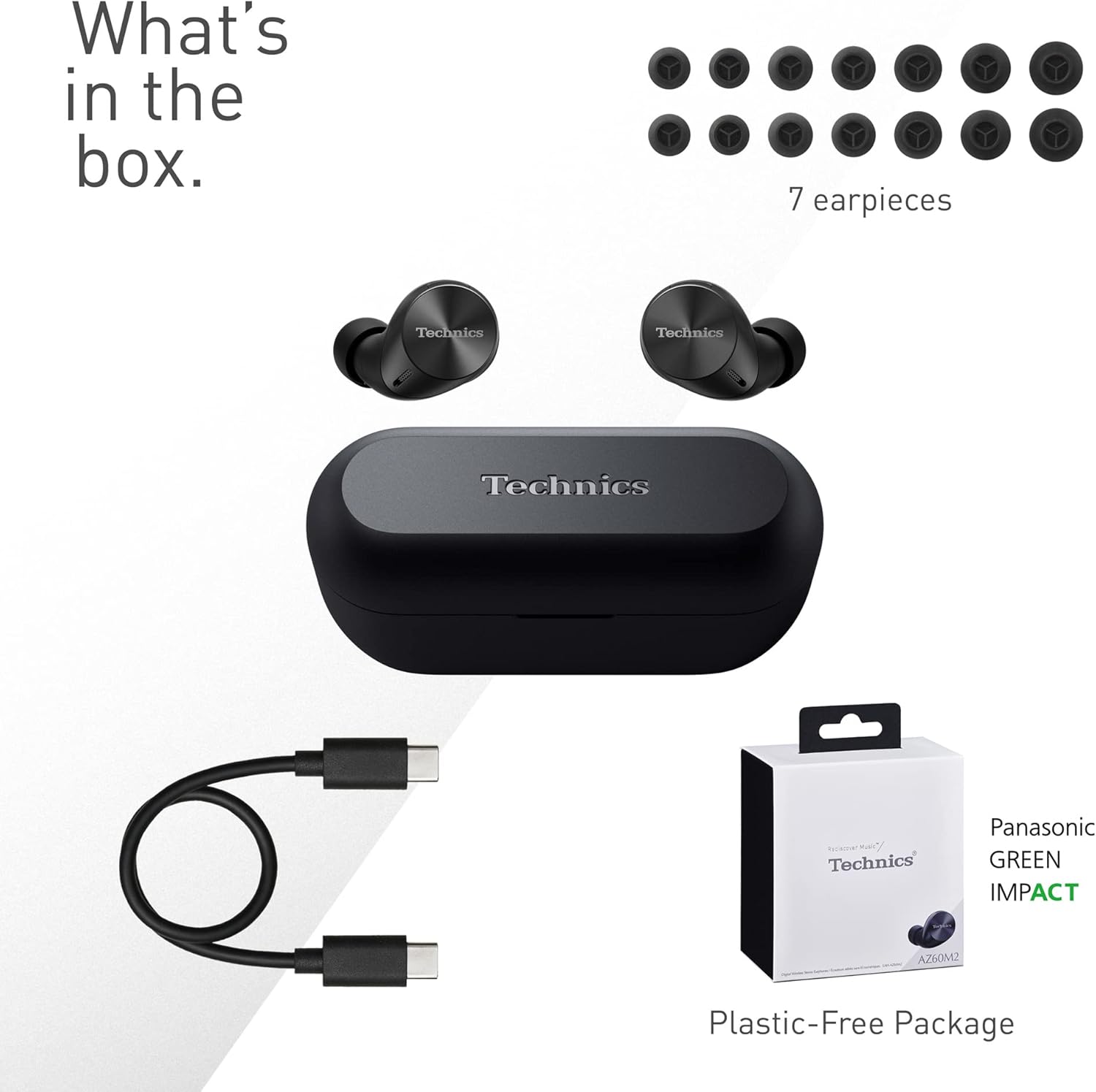
Image: A visual representation of the items included in the product packaging: the two earbuds, the charging case, a USB-C charging cable, and a selection of seven different earpiece sizes.
Сетуп
Почетно пуњење
Пре прве употребе, потпуно напуните слушалице и кућиште за пуњење.
- Ставите обе слушалице у футролу за пуњење.
- Повежите USB-C кабл за пуњење са портом за пуњење на кућишту и са USB извором напајања.
- The indicator lights on the case will show charging status. A full charge typically takes approximately 2.5 hours for the case and earbuds.
Упаривање са уређајем
The EAH-AZ60M2 headphones use Bluetooth for wireless connection.
- Отворите кућиште за пуњење са слушалицама унутра. Слушалице ће аутоматски ући у режим упаривања.
- На свом уређају (паметном телефону, таблету, рачунару) омогућите Блутут и потражите доступне уређаје.
- Select "EAH-AZ60M2" from the list of found devices.
- Once connected, a confirmation sound will play from the headphones.
Апликација Тецхницс Аудио Цоннецт
For enhanced control and customization, download the "Technics Audio Connect" app from your device's app store (Google Play for Android 6.0+ or App Store for iOS 12+). The app allows you to:
- Проверите нивое батерије.
- Select EQ sound modes.
- Adjust noise cancelling levels.
- Customize touch sensor functions.
- Извршите ажурирања фирмвера.
Упутство за употребу
Ношење слушалица
Select the earpieces that provide the most comfortable and secure fit for optimal sound quality and noise cancellation. The app can assist in finding the best fit. Insert the earbuds gently into your ears and rotate them slightly to ensure a snug seal.

Image: A person wearing the Technics EAH-AZ60M2 headphones, illustrating their comfortable, low-profile design. The image also displays the wide range of eartip sizes available for a customized fit.
Додирните контроле
The headphones feature touch-sensitive panels on each earbud for controlling playback, calls, and noise modes. Functions can be customized via the Technics Audio Connect App.
| Акција | Лева слушалица | Десна слушалица |
|---|---|---|
| Сингле Тап | Пусти/паузирај, одговори на позив | Пусти/паузирај, одговори на позив |
| Двапут додирните | Прескочи праћење унапред | Волуме Уп |
| Трипле Тап | Прескочи траку уназад | Утишавање звука |
| Дуги притисак | Toggle Noise Cancelling/Ambient Mode | Гласовни асистент |
Режими контроле буке
The EAH-AZ60M2 features Dual Hybrid Active Noise Cancelling for immersive listening and Ambient Sound Modes for situational awareness.
- Активно поништавање буке (АНЦ): Смањује спољашњу буку за фокусирано слушање.
- Natural Ambient Mode: Allows you to hear surrounding sounds naturally.
- Attention Mode: Focuses on human voices, making it easier to hear announcements or conversations without removing the headphones.
Toggle between these modes by long-pressing the left earbud's touch sensor, or adjust settings precisely using the Technics Audio Connect App.

Image: A close-up of a single Technics EAH-AZ60M2 earbud, highlighting its key audio features including Hi-Res Audio Wireless support, LDAC compatibility, 8mm drivers, and Noise Cancelling capabilities.
Мултипоинт Цоннецтион
The headphones support multipoint connection, allowing simultaneous pairing with up to three devices (e.g., a smartphone, tablet, and PC). This enables seamless switching between audio sources without re-pairing.
- To switch audio, simply play content on the desired device. The headphones will automatically connect to the active audio source.
- Note: LDAC playback is not possible when connected to three devices simultaneously.

Image: A person sitting at a desk, demonstrating the smart 3-device switching feature of the Technics EAH-AZ60M2 headphones, with connection lines illustrating simultaneous pairing to a smartphone, tablet, and laptop.
Making and Receiving Calls (JustMyVoice Technology)
The EAH-AZ60M2 incorporates JustMyVoice Technology, utilizing 8 separate microphones and advanced wind noise reduction to isolate and amplify your speech while minimizing background noise during calls.
- Одговори на позив: Једном додирните било коју слушалицу.
- Заврши позив: Једном додирните било коју слушалицу током позива.
- Одбиј позив: Дуго притисните било коју слушалицу.
- Single Earphone Use: You can use one earbud independently while the other is charging or stored.

Image: A person outdoors, demonstrating the JustMyVoice Technology feature of the Technics EAH-AZ60M2 headphones, with visual cues indicating sound pickup and voice isolation.
Пуњење и век трајања батерије
The EAH-AZ60M2 headphones offer extended listening times with the included charging case.
- Трајање батерије слушалица: Up to 7 hours of playback with Active Noise Cancelling (ANC) enabled.
- Total Playback with Case: Up to 24 hours of total playback time with multiple charges from the case.
- Брзо пуњење: A 15-minute quick charge provides approximately 70 minutes of playback.
Ки бежично пуњење
The charging case supports Qi wireless charging. Simply place the case on a compatible Qi wireless charger (sold separately) to charge.

Image: An illustration depicting the battery life of the Technics EAH-AZ60M2 headphones, showing 7 hours of listening time for the earbuds and an additional 24 hours of backup with the charging case.
Одржавање
Чишћење
- Regularly clean the earbuds, especially the earpieces and mesh grilles, with a soft, dry, lint-free cloth.
- Remove earpieces and clean them with mild soap and water if necessary, ensuring they are completely dry before reattaching.
- Очистите контакте за пуњење на слушалицама и унутар кућишта сувим памучним штапићем.
- Не користите абразивна средства за чишћење, алкохол или раствараче.
Отпорност на воду
The EAH-AZ60M2 earbuds are IPX4 water resistant, meaning they are protected against splashing water from any direction. This makes them suitable for light rain or intensive workouts.
- Кутија за пуњење није водоотпорна.
- Не потапајте слушалице у воду.
- Ensure earbuds are dry before placing them back into the charging case.
Складиштење
Када се не користе, чувајте слушалице у њиховој футроли за пуњење како бисте их заштитили и одржали напуњеним. Чувајте на хладном и сувом месту, даље од директне сунчеве светлости и екстремних температура.
Решавање проблема
| Проблем | Могући узрок | Решење |
|---|---|---|
| Нема звука из слушалица. | Headphones not paired or connected. Low battery. Volume too low. | Ensure headphones are paired and connected to your device. Charge headphones. Increase volume on both headphones and device. |
| Cannot pair headphones. | Headphones not in pairing mode. Device Bluetooth off. Interference. | Ensure earbuds are in the case and lid is open to enter pairing mode. Turn device Bluetooth off and on. Move closer to device. Forget device and re-pair. |
| Noise cancelling not effective. | Poor earbud fit. ANC mode not active. | Try different earpiece sizes for a better seal. Ensure ANC is enabled via touch control or app. |
| Квалитет позива је лош. | Environmental noise. Single earbud use. | Ensure both earbuds are used for optimal call quality. Move to a quieter environment. |
| Слушалице се не пуне. | Poor contact. Faulty cable/charger. | Ensure earbuds are correctly seated in the case. Clean charging contacts. Try a different USB-C cable or power source. |
For further assistance, refer to the Technics Audio Connect App or visit the official Technics support webсајту.
Спецификације
| Феатуре | Детаљ |
|---|---|
| Назив модела | ЕАХ-АЗ60М2 |
| Број модела ставке | EAH-AZ60M2EK |
| Бранд | Тецхницс |
| Боја | Црно |
| Технологија повезивања | бежични (Блуетоотх) |
| Форм Фацтор | Ин-Еар |
| Контрола буке | Active Noise Cancellation (Dual Hybrid) |
| Дривер Сизе | 8мм |
| Микрофони | 8 (for JustMyVoice Technology) |
| Мултипоинт Цоннецтион | До 3 уређаја |
| Отпорност на воду | ИПКС4 (само слушалице) |
| Earbud Battery Life (ANC On) | До 7 сати |
| Укупно трајање батерије са кућиштем | До 24 сати |
| Батерија кућишта за пуњење | 24 Hours average life |
| Пуњење | USB-C, Qi бежично пуњење |
| Тежина ставке (слушалице) | 7 грама (приближно 0.247 унци) |
| Тежина торбе | 28 грама |
| Димензије производа | 1.1 x 0.91 x 1.02 инча (слушалице) |
Гаранција и подршка
For information regarding warranty coverage, terms, and conditions, please refer to the warranty card included with your product or visit the official Technics webсајту.
For technical support, product registration, or frequently asked questions, please visit the Technics support page or contact their customer service.
- Technics Official Webсајт: ввв.тецхницс.цом
- Апликација Тецхницс Аудио Цоннецт: Доступно у Гоогле Плаи продавници и Аппле Апп Сторе-у.


