1. Увод
This manual provides detailed instructions for the setup, operation, and maintenance of your KiiBoom Phantom 81 V2 Mechanical Gaming Keyboard. Please read this manual thoroughly before using the product to ensure optimal performance and longevity.

Image: The KiiBoom Phantom 81 V2 Mechanical Gaming Keyboard, showcasing its transparent design and RGB backlighting.
2. Садржај пакета
Проверите да ли су све ставке присутне у пакету:
- KiiBoom Phantom 81 V2 Mechanical Gaming Keyboard
- УСБ кабл
- Кеицап Пуллер
- Switch Puller (often integrated with keycap puller)
- Extra Switches (typically 2)
3. Кључне карактеристике
The KiiBoom Phantom 81 V2 keyboard incorporates several advanced features:
- 75% Распоред: Compact design retaining essential keys.
- Transparent Acrylic Frame: Durable and aesthetically unique.
- Дизајн носача заптивке: Побољшава осећај и звук куцања.
- PC Mounting Plate: Optimized for flexibility and sound profile.
- Full-key Hot-swappable PCB: Омогућава једноставну замену прекидача без лемљења.
- South-facing RGB LEDs: Provides vibrant backlighting with reduced glare.
- Троструки режим повезивања: Supports Type-C Wired, Bluetooth 5.0, and 2.4GHz wireless connections.
- Пуњива батерија: 4000mAh capacity for extended wireless use.
- Компатибилност: Fully compatible with Mac and Windows operating systems.

Слика: Оверview graphic highlighting the KiiBoom Phantom 81 V2's main features including 75% layout, tri-mode, hot-swappable, gasket-mounted, PC plate, plate-mounted stabilizers, south-facing RGB, and acrylic design.

Image: A detailed exploded diagram illustrating the internal gasket structure of the KiiBoom Phantom 81 V2 keyboard, showing components like the metal knob, acrylic top case, switches, PC plate, sandwich cotton, switch pad, PCB, acrylic bottom case, metal nameplate, and keyboard pads.

Image: A close-up of the KiiBoom Phantom 81 V2 keyboard highlighting its transparent acrylic case and PC keycaps with an ASA profile, емисијаasing the clear design.
4. Подешавање
4.1 Почетно пуњење
Before first use, connect the keyboard to a USB power source using the provided USB-C cable. The keyboard will charge automatically. A full charge is recommended for optimal battery life.
4.2 Режими повезивања
The Phantom 81 V2 supports three connection modes:
- Type-C Wired Mode: Connect the USB-C cable directly to your computer. Switch the mode selector on the back of the keyboard to "USB".
- Режим Bluetooth 5.0:
- Switch the mode selector on the back of the keyboard to "BT".
- Притисните Фн + КСНУМКС, Фн + КСНУМКС, или Фн + КСНУМКС да бисте изабрали Bluetooth професионалцаfile. The indicator light will flash, indicating pairing mode.
- On your device (computer, tablet, smartphone), search for Bluetooth devices and select "KiiBoom Phantom 81".
- Once connected, the indicator light will stop flashing.
- 2.4 ГХз бежични режим:
- Switch the mode selector on the back of the keyboard to "2.4G".
- Уметните 2.4 GHz USB пријемник у слободан USB порт на рачунару.
- Притисните Фн + КСНУМКС. The keyboard will automatically connect to the receiver. The indicator light will stop flashing once connected.

Image: A close-up of the KiiBoom Phantom 81 V2's side, showing the USB-C port and the physical switches for selecting between USB, Win/Mac, Bluetooth, and 2.4G wireless modes.
4.3 Компатибилност оперативног система
The keyboard is compatible with both Windows and macOS. Use the dedicated switch on the back of the keyboard to select the appropriate operating system mode (WIN/MAC) for optimal key mapping.

Image: A visual representation of the KiiBoom Phantom 81 V2 keyboard being used with various operating systems, including macOS, Windows, and Android, indicating broad compatibility.
5. Упутство за употребу
5.1 RGB контрола позадинског осветљења
The Phantom 81 V2 features south-facing RGB LEDs for customizable backlighting. Use the following key combinations to adjust the lighting effects:
- Fn + \ |: Toggle Backlight Mode
- Fn + DEL: Toggle Backlight Direction
- Фн + ↑: Осветљеност +
- Фн + ↓: Brightness -
- Фн + →: Speed +
- Фн + ←: Speed -

Image: A diagram illustrating the key combinations for controlling the south-facing RGB backlights on the KiiBoom Phantom 81 V2 keyboard, including mode, direction, brightness, and speed adjustments.
5.2 Surrounding Sidelights Control
The keyboard also features customizable sidelights. Use the following key combinations to adjust them:
- Фн + П: Toggle Sidelight Mode
- Фн + Б: Toggle Sidelight Color
- Фн + Кс: Sidelight Brightness +
- Фн + З: Sidelight Brightness -
- Фн + В: Sidelight Speed +
- Фн + Ц: Sidelight Speed -

Image: A diagram illustrating the key combinations for controlling the surrounding sidelights on the KiiBoom Phantom 81 V2 keyboard, including mode, color, brightness, and speed adjustments.
5.3 Мултифункционално дугме
The knob located on the top right of the keyboard provides quick access to media controls and can be customized:
- Rotate clockwise: Volume +
- Rotate counter-clockwise: Volume -
- Притисните: Искључи/Укључи звук
- Long Press: Customizable Functions (refer to software for configuration)

Image: A close-up of the KiiBoom Phantom 81 V2's multifunctional knob, detailing its functions for volume control, mute, and customizable options.
5.4 Checking Battery Power
Да бисте проверили тренутни ниво напуњености батерије, притисните Фн + Бацкспаце. The indicator lights will display the approximate battery percentage.

Image: A diagram showing how to check the battery power of the KiiBoom Phantom 81 V2 keyboard by pressing Fn+Backspace, with visual indicators for 20%, 50%, and 100% charge levels.
5.5 Прекидачи са могућношћу замене током рада
The Phantom 81 V2 features a full-key hot-swappable PCB, allowing you to change mechanical switches without soldering. This keyboard is compatible with both 3-pin and 5-pin mechanical switches.
- Користите приложену алатку за извлачење капица тастера да бисте пажљиво уклонили жељену капицу тастера.
- Use the provided switch puller to gently grasp the switch from its top and bottom clips. Pull straight up to remove the switch from the PCB.
- Поравнајте пинове новог прекидача са отворима на штампаној плочи. Уверите се да су пинови прави како бисте избегли савијање.
- Чврсто притисните нови прекидач на место док не кликне.
- Поново причврстите поклопац тастера.

Слика: Крупни план view of the KiiBoom Phantom 81 V2 keyboard with a keycap and switch removed, demonstrating the hot-swappable PCB plate compatible with 3-pin or 5-pin mechanical switches.

Image: A hand using a switch puller tool to remove a switch from the KiiBoom Phantom 81 V2 keyboard, illustrating the hot-swappable feature.
Different switch types offer varying typing experiences:
- KiiBoom Pink Switch: Linear type, Actuation Force: 38±15gf, Bottom Force: 42±15gf, Total Travel: 3.80±0.2mm, Pre Travel: 1.6±0.4mm.
- KiiBoom Purple Switch: Linear type, Actuation Force: 45±15gf, Bottom Force: 55±15gf, Total Travel: 3.80±0.2mm, Pre Travel: 1.6±0.4mm.
- KiiBoom Crystal Switch: Linear type, Actuation Force: 55±15gf, Bottom Force: 60±15gf, Total Travel: 3.60±0.2mm, Pre Travel: 1.6±0.4mm.

Image: A close-up of KiiBoom Purple Switches, illustrating their transparent design.

Image: A close-up of KiiBoom Pink Switches, illustrating their transparent design.

Image: A close-up of KiiBoom Crystal Switches, illustrating their transparent design.
5.6 Прилагођавање софтвера
Advanced customization for key remapping, macro creation, and lighting effects can be achieved through the dedicated KiiBoom software. Please visit the official KiiBoom website to download the latest software version for your keyboard model.
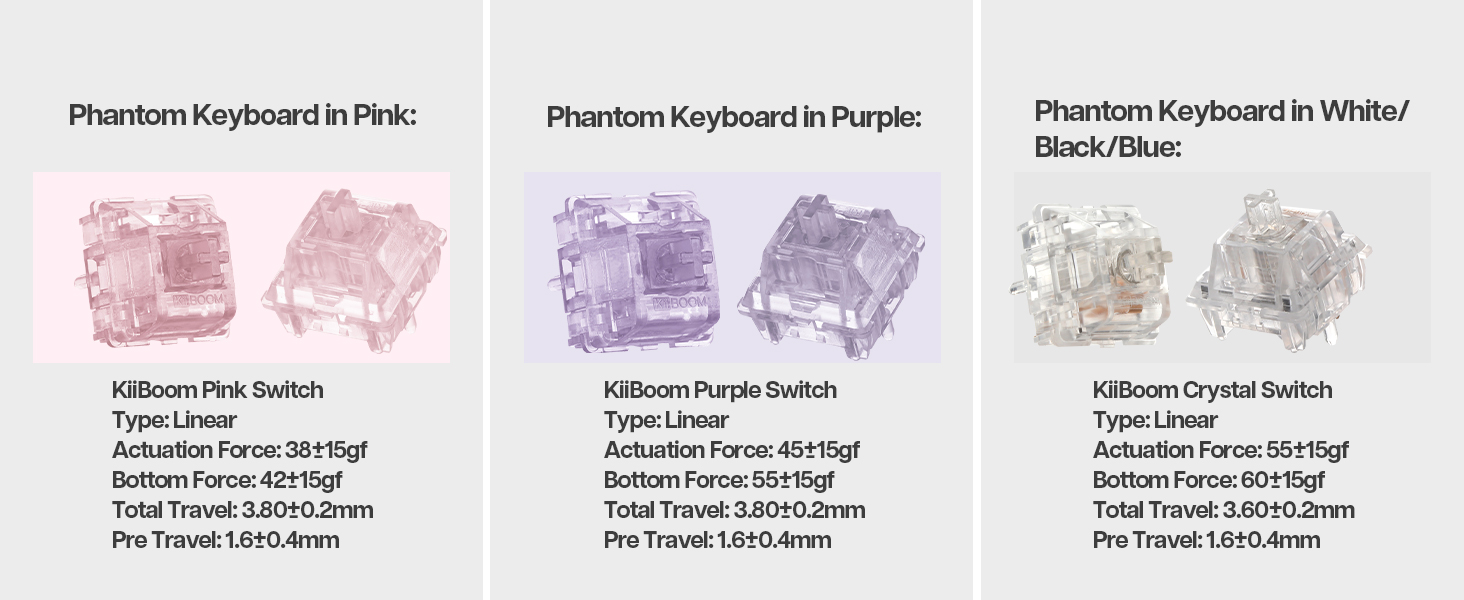
Image: A laptop screen displaying the KiiBoom software interface for customizing key settings, lighting, and other functions of the Phantom 81 V2 keyboard.
6. Одржавање
6.1 Чишћење
- Тастери: Use the keycap puller to remove keycaps. Clean them with a mild soap solution and a soft cloth. Ensure they are completely dry before reattaching.
- Тело тастатуре: Користите меку крпу која не оставља влакна, благо навлаженуampened with water or a mild cleaning solution, to wipe the acrylic body. Avoid abrasive materials or harsh chemicals.
- Између кључева: Користите компримовани ваздух да уклоните прашину и остатке између прекидача.
6.2 Општа нега
- Avoid exposing the keyboard to extreme temperatures, direct sunlight, or high humidity.
- Do not spill liquids on the keyboard. If a spill occurs, immediately disconnect power and allow it to dry completely before attempting to use it again.
- Handle with care to prevent drops or impacts that could damage the transparent acrylic.
КСНУМКС. Решавање проблема
| Иссуе | Могуће решење |
|---|---|
| Тастатура не реагује у бежичном режиму. |
|
| RGB осветљење не ради или је неисправно. |
|
| Тастери се не региструју или се куцају двапут. |
|
| Батерија се брзо празни. |
|
8. Спецификације
| Феатуре | Детаљ |
|---|---|
| Модел | Phantom 81 V2 |
| Лаиоут | 75% |
| Повезивање | 2.4 GHz бежична веза, Bluetooth 5.0, USB-C жична веза |
| Капацитет батерије | 4000mAh (V2 version) |
| Позадинско осветљење | South-facing RGB |
| Хот-свапабле | Yes, compatible with 3-pin/5-pin mechanical switches |
| Материјал кућишта | Акрил |
| Плате Материал | Поликарбонат (ПЦ) |
| Тежина артикла | 4.53 фунти (приближно 2.05 кг) |
| Димензије пакета | 16.61 к 10.91 к 2.91 инча |
| Компатибилни уређаји | Играчка конзола, лаптоп, рачунар, паметни телефон, таблет |
9. Гаранција и подршка
For warranty information and technical support, please refer to the official KiiBoom webсајт или директно контактирајте њихову корисничку службу. Сачувајте доказ о куповини за евентуалне рекламације по гаранцији.
Official KiiBoom Webсајт: KiiBoom Store on Amazon (for general brand information and potential support links).


