1. Увод и безбедносне информације
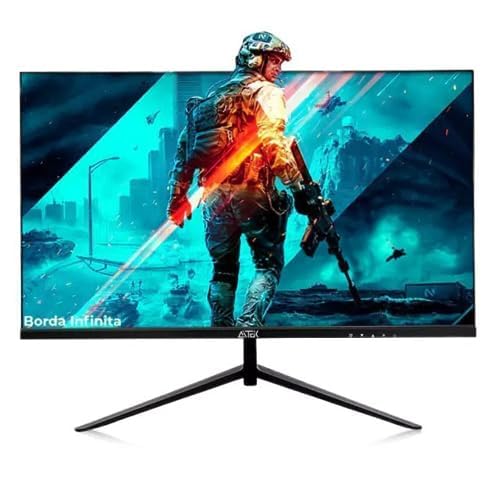
Thank you for choosing the AITEK DELTA-M2410 23.8-inch Full HD Gaming Monitor. This manual provides essential information for setting up, operating, and maintaining your monitor. Please read it carefully before use and retain it for future reference.
Важна безбедносна упутства:
- Увек искључите кабл за напајање из електричне утичнице пре чишћења монитора.
- Не излажите монитор киши или влази како бисте избегли опасност од пожара или струјног удара.
- Не отварајте монитор цasinг. Унутра нема делова које корисник може сам да поправи. Сво сервисирање препустите квалификованом сервисном особљу.
- Поставите монитор на стабилну, равну површину како бисте спречили његов пад.
- Обезбедите одговарајућу вентилацију око монитора. Не блокирајте вентилационе отворе.
- Користите само адаптер за напајање који се испоручује са монитором.
2. Садржај пакета
Молимо вас да проверите пакет за следеће ставке:
- AITEK DELTA-M2410 23.8" Full HD Gaming Monitor
- Постоље за монитор (база и врат)
- Повер Адаптер
- ХДМИ кабл
- Кориснички приручник (овај документ)
3. Подешавање
3.1 Састављање постоља
- Пажљиво извадите монитор из паковања, штитећи екран.
- Причврстите врат постоља на панел монитора тако што ћете поравнати језичке и чврсто притиснути док не кликне на место.
- Attach the stand base to the stand neck. Secure it with the provided screw, usually located at the bottom of the base.
- Place the assembled monitor on a stable, level desk or table.
3.2 Повезивање монитора
- Прикључак за напајање: Connect the power adapter to the monitor's power input port, then plug the other end into a suitable electrical outlet (110/220V compatible).
- Видео веза:
- For optimal Full HD quality, connect one end of the provided HDMI cable to the monitor's HDMI port and the other end to the HDMI output port on your computer or gaming console.
- Alternatively, you can use a VGA cable to connect to the monitor's VGA port and your computer's VGA output.
Слика 1: Задња страна view of the AITEK DELTA-M2410 monitor showing power and video connections.
4. Упутство за употребу
4.1 Укључивање/искључивање
- Притисните дугме за напајање, које се обично налази у доњем десном или задњем углу монитора, да бисте га укључили или искључили.
- Индикаторска лампица напајања ће светлети када је монитор укључен.
4.2 Приказ на екрану (ОСД) мени
The OSD menu allows you to adjust various monitor settings. Use the control buttons (joystick or individual buttons) on the monitor to navigate and select options.
- Изаберите улаз: Choose between HDMI and VGA inputs.
- Подешавања слике: Подесите осветљеност, контраст, оштрину и температуру боје.
- Подешавања боја: Fine-tune RGB levels or select preset color modes.
- аудио: Adjust volume if external speakers are connected to the monitor's audio output (if available).
- Карактеристике игара: Access specific gaming modes or settings (e.g., response time, crosshair overlay if supported).
4.3 Подешавање дисплеја
The monitor stand allows for tilt adjustment to find a comfortable viewing angle. Gently tilt the monitor panel forward or backward to your preferred position.
5. Одржавање
5.1 Чишћење монитора
- Увек искључите монитор пре чишћења.
- Лагано користите меку крпу која не оставља длачице дampводом или благим, неабразивним средством за чишћење екрана.
- Не прскајте средство за чишћење директно на екран.
- Avoid using benzene, thinner, ammonia-based cleaners, or abrasive materials.
5.2 Складиштење
When storing the monitor for an extended period, ensure it is powered off, unplugged, and stored in a cool, dry place away from direct sunlight and extreme temperatures. Use the original packaging if available for best protection.
КСНУМКС. Решавање проблема
| Проблем | Могуће решење |
|---|---|
| Нема слике на екрану |
|
| Слика је мутна или искривљена |
|
| Боје су нетачне |
|
7. Спецификације
| Феатуре | Детаљ |
|---|---|
| Модел | DELTA-M2410 |
| Бранд | АИТЕК |
| Величина екрана | 23.8 инча |
| Резолуција | 1920 x 1080 (Full HD 1080p) |
| Аспецт Ратио | 16:9 |
| Повезивање | 1к ХДМИ, 1к ВГА |
| Повер Инпут | 110/220В |
| Тежина | 3.69 килограма |
| Боја | Црно |
| Панел Сурфаце | Глосси |
8. Гаранција и подршка
AITEK provides a limited warranty for this product. Please refer to the warranty card included in your package for detailed terms and conditions, including coverage period and service procedures. Keep your purchase receipt as proof of purchase.
For technical support or service inquiries, please contact AITEK customer service through the contact information provided on the warranty card or the official AITEK webсајту.
9. Интеграција медија
Видео снимци производа
No official product videos from the seller for the AITEK DELTA-M2410 monitor were found in the provided data. If available, relevant videos would be embedded here to demonstrate features or setup processes.


