Важна безбедносна упутства
Please read these instructions carefully before operating the unit and retain them for future reference.
- Не излажите овај уређај капању или прскању воде.
- Не стављајте предмете напуњене течностима, као што су вазе, на уређај.
- Обезбедите одговарајућу вентилацију. Не блокирајте вентилационе отворе.
- Не постављајте у близини извора топлоте као што су радијатори, грејни регистри, пећи или други уређаји (укључујући ampлифиерс) који производе топлоту.
- Користите само додатке/прибор које је навео произвођач.
- Искључите овај уређај из струје током олуја са грмљавином или када га не користите дуже време.
- Упућивање свих сервиса квалификованом сервисном особљу. Сервисирање је потребно ако је апарат на било који начин оштећен.
Производ је завршенview
The Muse M17CB is a compact dual PLL FM/MW digital alarm clock radio designed for reliable timekeeping and audio playback. It features a clear 0.9-inch white LED display with a dimmer function and a 24-hour time format. Users can set two independent alarms, choosing to wake up to either the radio or a buzzer. The digital tuner allows for 6 preset stations (3 FM and 3 MW) for quick access to your favorite broadcasts. Additional functions include SNAP, SLEEP, and SNOOZE for enhanced user convenience.
Фронт View

Опис слике: This image displays the front of the Muse M17CB alarm clock radio. It features a prominent 0.9-inch white LED display showing "12:00". Above the display are various control buttons and two rotary knobs. The buttons include P.1, P.2, P.3, DIM., O/SOURCE, and a large SNOOZE button. The left rotary knob is for VOLUME, and the right is for TUNING/SET. A small "muse" logo tag is visible on the left side.
Контроле горње плоче

Опис слике: Ова слика пружа поглед одозго надоле view of the Muse M17CB alarm clock radio, highlighting the control panel. It shows two large rotary knobs for Volume and Tuning/Set, along with several push buttons: P.1, P.2, P.3 (for radio presets), DIM. (dimmer), O/SOURCE (power/source selection), and a large circular SNOOZE button. The layout is clear and intuitive.
Прикључци задњег панела

Опис слике: This image shows the rear panel of the Muse M17CB alarm clock radio. It clearly displays the "AC~" power input socket, the "FM ANT." wire antenna, and an "AUX IN" 3.5mm jack for connecting external audio devices. A speaker grille is also visible on the right side.
Сетуп
Повер Цоннецтион
- Unpack the Muse M17CB unit and all accessories.
- Connect the AC power cord to the "AC~" input on the rear of the unit.
- Укључите други крај кабла за напајање у стандардну зидну утичницу.
- ЛЕД дисплеј ће се упалити, што указује да уређај прима напајање.
Антенна Сетуп
- For optimal FM reception, fully extend the FM wire antenna located at the back of the unit.
- Adjust the position of the antenna for the best possible signal reception.
Упутство за употребу
Подешавање времена
- Уверите се да је јединица укључена.
- Притисните и држите TUNING/SET knob for approximately 2 seconds until the hour digits flash on the display.
- Ротирајте TUNING/SET дугме за подешавање сата.
- Притисните тастер TUNING/SET knob once to confirm the hour; the minute digits will flash.
- Ротирајте TUNING/SET knob to adjust the minutes.
- Притисните тастер TUNING/SET knob again to confirm the minutes and exit time setting mode.
- Време се приказује у 24-часовном формату.
Setting the Alarm (Alarm 1 and Alarm 2)
Уређај има два независна аларма (Аларм 1 и Аларм 2).
- Притисните тастер П.КСНУМКС дугме (за аларм 1) или П.КСНУМКС button (for Alarm 2) once. The alarm icon and hour digits will flash.
- Ротирајте TUNING/SET knob to adjust the alarm hour.
- Притисните тастер TUNING/SET knob to confirm the hour; the minute digits will flash.
- Ротирајте TUNING/SET knob to adjust the alarm minutes.
- Притисните тастер TUNING/SET knob to confirm the minutes. The alarm source (radio or buzzer) will flash.
- Ротирајте TUNING/SET knob to select either Радио or Зујалица as the alarm sound.
- Притисните тастер TUNING/SET knob to confirm the alarm source. The alarm volume will flash (if radio is selected).
- Ротирајте ВОЛУМЕ knob to set the desired alarm volume (for radio alarm).
- Притисните тастер TUNING/SET knob to save the alarm settings. The corresponding alarm icon will appear on the display, indicating the alarm is active.
Да бисте деактивирали аларм, притисните одговарајуће П.КСНУМКС or П.КСНУМКС button until the alarm icon disappears from the display.
Radio Operation (FM/MW)
- Притисните тастер O/SOURCE button to turn on the radio. Press it repeatedly to cycle between FM, MW, and AUX modes.
- Ротирајте TUNING/SET knob to manually tune to a desired frequency.
- To auto-scan for stations, press and hold the TUNING/SET knob for 2 seconds. The radio will scan and stop at the next available station.
Setting and Recalling Presets (P.1, P.2, P.3)
- Да бисте сачували предефинисану поставку: Tune to the desired station. Press and hold one of the preset buttons (П.КСНУМКС, П.КСНУМКС, или П.КСНУМКС) for 2 seconds until the display confirms the preset is saved.
- Да бисте позвали унапред подешену вредност: Briefly press the desired preset button (П.КСНУМКС, П.КСНУМКС, или П.КСНУМКС) to tune to the stored station.
Диммер Функција
Притисните тастер ЗАМУТИТИ. button repeatedly to adjust the brightness of the LED display to your preference (e.g., High, Medium, Low, Off).
Функција одлагања
Када се огласи аларм, притисните велико СНООЗЕ дугме да бисте привремено искључили аларм. Аларм ће се поново огласити након отприлике 9 минута.
Функција спавања
Функција спавања вам омогућава да заспите уз радио, који ће се аутоматски искључити након одређеног периода.
- Док радио свира, притисните дугме П.КСНУМКС button (often doubles as SLEEP function) repeatedly to cycle through available sleep timer durations (e.g., 90, 60, 30, 15 minutes, or OFF).
- Радио ће се аутоматски искључити након изабраног времена.
SNAP Function
The specific operation of the SNAP function is not detailed in the provided product description. Please refer to the full printed manual included with your device for instructions on using the SNAP feature.
Помоћни улаз (AUX IN)
Повежите екстерни аудио уређај (нпр. MP3 плејер, паметни телефон) са АУКС ИН jack on the rear of the unit using a 3.5mm audio cable. Press the O/SOURCE button repeatedly until "AUX" appears on the display to switch to auxiliary input mode. Audio from the connected device will play through the alarm clock's speaker.
Одржавање
- Чишћење: Користите меку, суву крпу за чишћење спољашњости уређаја. Не користите абразивна средства за чишћење, воскове или раствараче.
- Складиштење: If the unit is not used for an extended period, unplug it from the power outlet and store it in a cool, dry place.
- Избегавајте влагу: Keep the unit away from water and high humidity.
Решавање проблема
| Проблем | Могући узрок | Решење |
|---|---|---|
| Нема напајања / Екран је искључен | Кабл за напајање није правилно повезан. | Ensure the AC power cord is securely plugged into the unit and a working wall outlet. |
| Лош радио пријем | FM antenna not extended or positioned correctly. | Fully extend and adjust the position of the FM wire antenna for better reception. Try moving the unit to a different location. |
| Аларм се не оглашава | Аларм није активиран или је погрешно подешен. | Verify that the alarm icon is displayed. Recheck alarm time and source settings. Ensure alarm volume is not set to minimum if radio alarm is selected. |
| Екран је превише светао/там | Dimmer setting needs adjustment. | Притисните тастер ЗАМУТИТИ. више пута притисните дугме да бисте мењали нивое осветљености. |
Спецификације
- Модел: М17ЦБ
- Приказ: 0.9-inch White LED with Dimmer
- Формат времена: 24-сатни
- тјунер: Digital FM/MW PLL
- Пресетс: 6 (3 FM + 3 MW)
- Алармс: Dual Alarm (Radio or Buzzer)
- Функције: SNAP, SLEEP, SNOOZE
- Извор напајања: АЦ Повер
- Димензије: 13 цм (дужина) к 11 цм (ширина) к 6.5 цм (висина)
- Боја: Тиркизна
- Материјал: Resin or Plastic
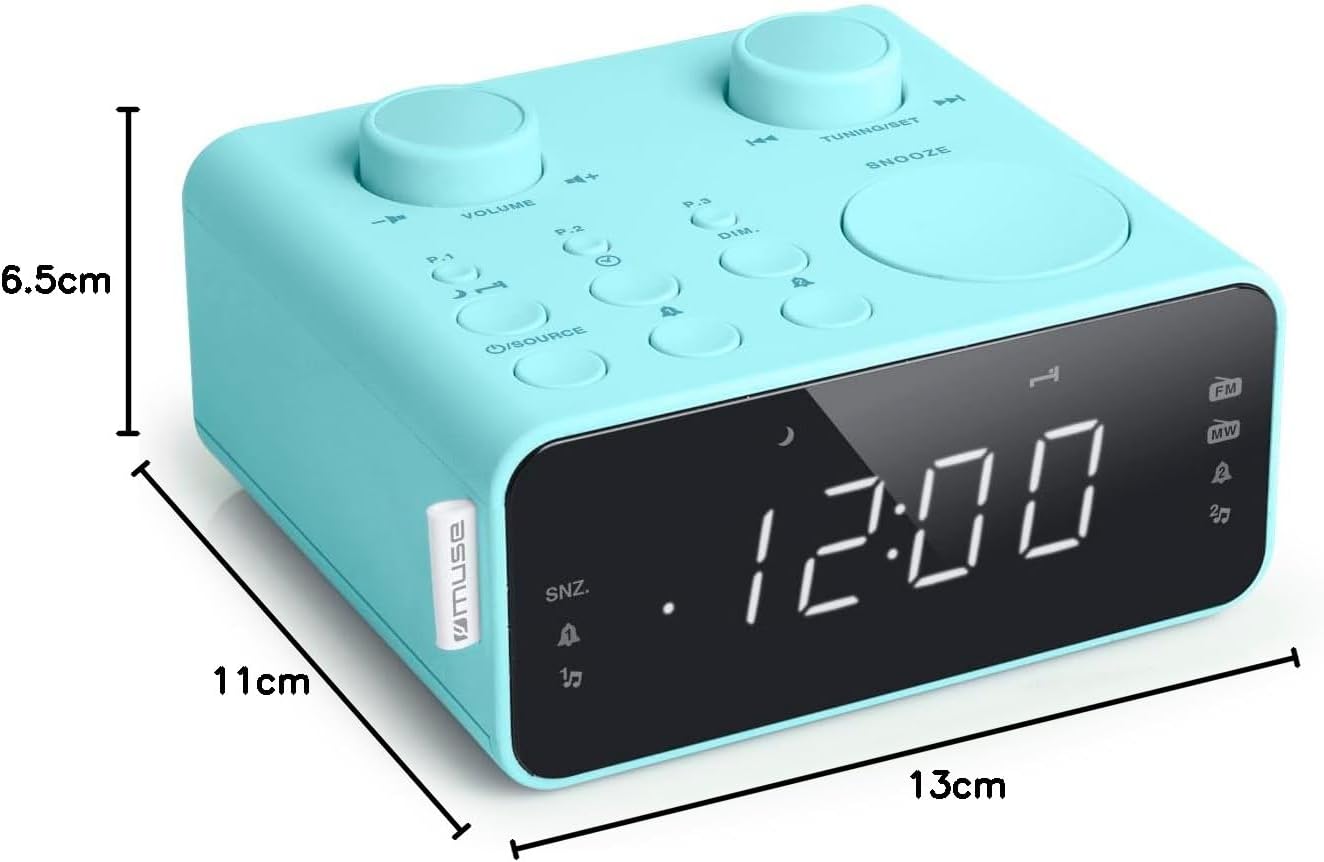
Опис слике: This image illustrates the dimensions of the Muse M17CB alarm clock radio. It shows the unit with measurements indicating a length of 13cm, a width of 11cm, and a height of 6.5cm.
Гаранција и подршка
For warranty information and technical support, please refer to the warranty card included with your product or visit the official Muse webсајт. Сачувајте рачун као доказ о куповини.
The product includes a user manual (as indicated by "Pièces incluses: Manuel du propriétaire").


