1. Увод
This manual provides detailed instructions for the installation, operation, and maintenance of your COMMAX CDV-77M 7-inch Fine View Monitor. Please read this manual thoroughly before using the product to ensure proper function and safety. Keep this manual for future reference.
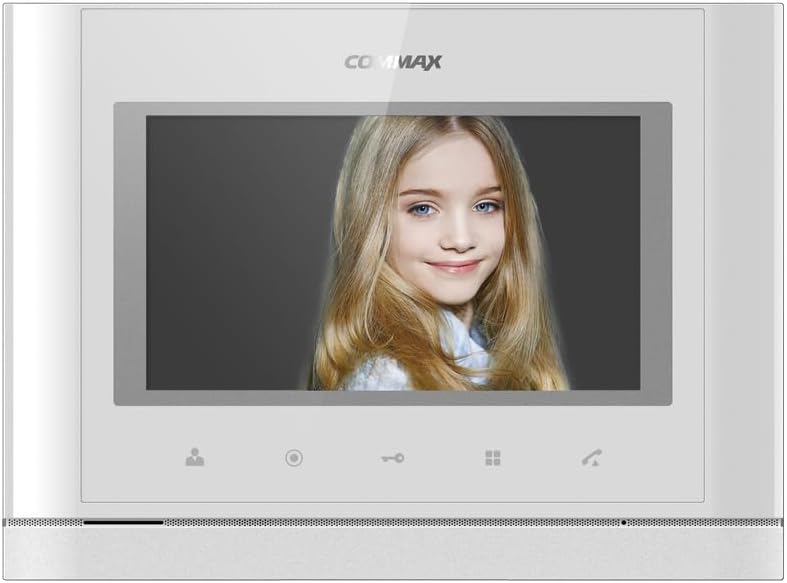
Фронт view of the COMMAX CDV-77M monitor, showcasing its 7-inch TFT LCD screen and sleek design. The screen is active, displaying an image.
2. Карактеристике производа
- 7-inch TFT LCD screen for clear video display.
- Supports video communication and door lock release functions.
- Expandable system: Connects with up to 2 door cameras, 2 additional monitors, and 2 interphones.
- PAL/NTSC video format conversion capability.
- Hand-free operation for convenience.
- Wall-mounted design for easy installation.
3. Безбедносне информације
Please observe the following safety precautions to prevent damage to the product and ensure user safety:
- Не излажите уређај води или прекомерној влази.
- Избегавајте постављање уређаја на директно сунчево светло или близу извора топлоте.
- Не покушавајте сами да отворите или поправите уређај. Све сервисне радове препустите квалификованом особљу.
- Уверите се да извор напајања одговара наведеној јачини звукаtage (AC 100-240V, 50/60Hz).
- Држите уређај даље од јаких магнетних поља.
- Operate within the specified temperature range of 0℃ to 40℃.
4. Инсталација
4.1 Садржај пакета
Проверите да ли су све компоненте присутне:
- COMMAX CDV-77M Monitor Unit
- Зидни носач
- Монтажни завртњи и анкери
- Кориснички приручник (овај документ)
- Повер Цабле
4.2 Монтирање монитора
The CDV-77M monitor is designed for wall-mounted installation. Choose a suitable location indoors, away from direct sunlight and moisture.
- Secure the wall mounting bracket to the desired location using the provided screws and anchors.
- Ensure the bracket is level and securely fastened.
- Refer to the dimensions diagram for proper spacing and fit:

Technical drawing showing the dimensions of the COMMAX CDV-77M monitor: 244 mm width and 180 mm height.
4.3 Ожичење
Before making any connections, ensure the power supply is disconnected.
- Door Camera Connection: Connect the door camera using a 4-wire cable. The maximum recommended distance is 28 meters (using 0.5Ø wire).
- Interphone Connection: Connect the interphone unit using a 4-wire cable.
- Additional Monitor Connection: If connecting additional monitors, refer to the specific wiring diagram provided with your system.
- Прикључак за напајање: Connect the AC 100-240V, 50/60Hz power cable to the monitor and a suitable power outlet.
After all connections are made, carefully attach the monitor unit to the wall mounting bracket.
5. Упутство за употребу
Familiarize yourself with the monitor's controls:

Detailed diagram illustrating the front panel of the COMMAX CDV-77M monitor, with labels for the TFT LCD, Speaker, Microphone, Power Switch, and control buttons: Monitoring, Interphone, Door Release, Menu, and Talk.
- Укључивање/искључивање: Use the Power Switch located on the side/bottom of the unit.
- Пријем позива: When a visitor calls from the door camera, the monitor will display their image and ring. Press the Дугме за разговор to communicate.
- Надгледање: Притисните тастер Дугме за надгледање да view the feed from the connected door camera at any time.
- Отпуштање врата: During a call or while monitoring, press the Дугме за отпуштање врата to unlock the connected door.
- Interphone Communication: Притисните тастер Interphone Button to initiate communication with another connected interphone or monitor.
- Навигација у менију: Користите Дугме менија to access settings and adjustments for the monitor.
6. Одржавање
- Чишћење: Use a soft, dry cloth to clean the monitor screen and casinг. Не користите абразивна средства за чишћење или раствараче.
- Уклањање прашине: Regularly dust the unit to prevent accumulation, especially around ventilation areas.
- Избегавајте течности: Не прскајте течности директно на монитор.
КСНУМКС. Решавање проблема
| Проблем | Могући узрок | Решење |
|---|---|---|
| No power to the monitor. | Power cable disconnected; power outlet faulty; power switch off. | Check power cable connection; test outlet with another device; ensure power switch is on. |
| No video from door camera. | Camera cable loose or damaged; camera faulty. | Check camera wiring connections; ensure camera is powered and functioning. |
| No audio during communication. | Microphone/speaker faulty; wiring issue. | Check audio wiring; ensure volume settings are appropriate. |
| Door lock not releasing. | Door lock wiring issue; lock mechanism faulty. | Verify door lock wiring; test door lock mechanism independently. |
Ако проблем и даље постоји након покушаја ових решења, обратите се корисничкој подршци.
8. Спецификације
| Феатуре | Детаљ |
|---|---|
| Модел | CDV-77M |
| Величина екрана | 7 инча ТФТ ЛЦД |
| Извор напајања | АЦ 100-240В, 50/60Хз |
| Моунт Типе | Зидни тип |
| Радна температура | 0℃ ~ 40℃ |
| Wiring (Door Camera) | 4 wires (Distance: 28m with 0.5Ø wire) |
| Wiring (Interphone) | 4 жица |
| Макс. Везе | 2 Cameras, 2 Monitors, 2 Interphones |
| Потрошња | Max. 15W / Standby 3W |
| Димензије (Ш×В×Д) | 244 мм × 180 мм × 18 мм |
| Видео Формат | PAL/NTSC convertible |
9. Гаранција и подршка
For warranty information, please refer to the warranty card included with your product or contact your local COMMAX distributor. For technical support or service inquiries, please visit the official COMMAX webсајту или се обратите њиховом одељењу за корисничку подршку.
Произвођач: ЦОММАКС
Датум прве доступности: 7. август 2023


