
1. Увод
Thank you for choosing the FLEXISPOT L-Shaped Electric Standing Desk. This manual provides essential information for the safe assembly, operation, and maintenance of your new desk. Please read these instructions carefully before use and retain them for future reference. This desk is designed to provide a versatile and ergonomic workspace, allowing seamless transitions between sitting and standing positions.
2. Безбедносна упутства
Да бисте осигурали безбедан рад и спречили повреде или оштећења, молимо вас да се придржавате следећих безбедносних смерница:
- Уверите се да су све компоненте добро причвршћене пре употребе.
- Држите децу и кућне љубимце даље од стола током рада.
- Do not place hands or other body parts near moving parts of the desk frame.
- Avoid overloading the desk. The maximum load capacity is 80 kg.
- Не седите или стојте на столу.
- Only use the desk indoors in a dry environment.
- Искључите напајање пре чишћења или одржавања.
- If any parts are damaged or missing, contact customer support immediately. Do not attempt to repair the desk yourself.
3. Садржај пакета
Please verify that all parts are present and undamaged before beginning assembly. Refer to the assembly diagram for a complete list of components.
- L-Shaped Desktop (2 parts)
- 4-Leg Frame (Dual Motor Mechanism)
- Интелигентна контролна табла
- Адаптер за напајање и каблови
- Assembly Hardware (screws, tools, etc.)
- Упутство за употребу
4. Подешавање и монтажа
Склапање обично захтева две особе. Пажљиво пратите ове кораке:
- Распакујте компоненте: Пажљиво извадите све делове из паковања и положите их на меку, чисту површину како бисте спречили огреботине.
- Assemble the 4-Leg Frame: Connect the frame components according to the included diagram. Ensure all bolts are tightened securely. The 4-leg design provides enhanced stability.
- Install Dual Motor Mechanism: The dual motor system is integrated into the frame. Ensure all motor connections are secure. This mechanism allows for smooth and precise height adjustments.
- Причврстите панеле радне површине: Carefully place the two desktop panels onto the assembled frame. Align the pre-drilled holes and secure the desktop to the frame using the provided screws. The L-shaped design offers ampрадни простор.
- Монтирајте контролну таблу: Attach the intelligent control panel to the underside of the desktop in an easily accessible location. Connect the control panel cable to the main control box.
- Прикључите напајање: Plug the power adapter into the control box, then plug the power cord into a standard electrical outlet.
- Initial Reset: After connecting power, perform an initial reset. Press and hold the 'Reset' button (usually marked with a circular arrow) until the desk reaches its lowest position and then slightly rises. This calibrates the desk.
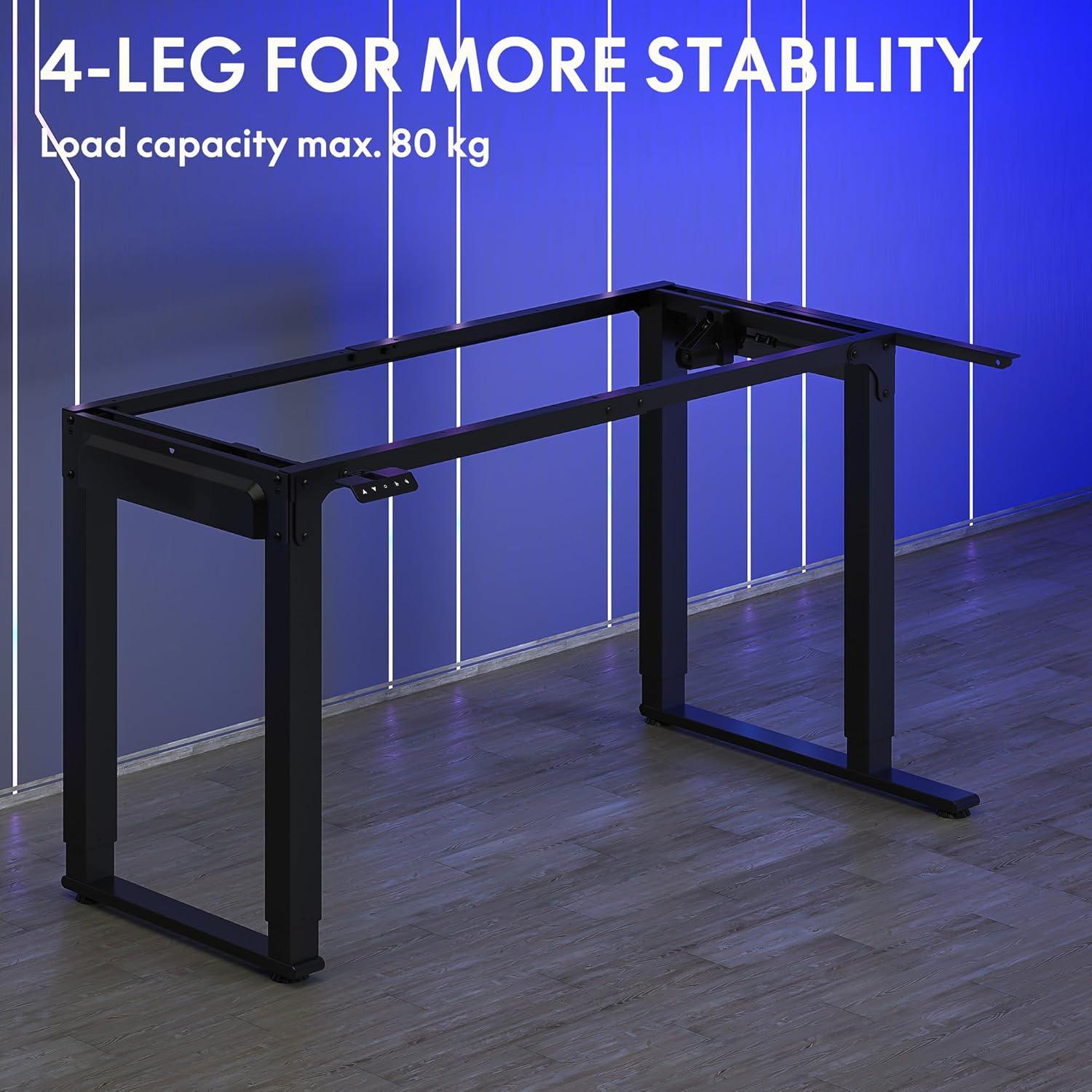
Image: The robust 4-leg frame provides superior stability for the L-shaped standing desk.

Image: Detail of the dual-motor mechanism, ensuring accurate and smooth height positioning.
5. Упутство за употребу
Your FLEXISPOT L-Shaped Electric Standing Desk features an intelligent control panel for easy height adjustment and memory presets.
5.1 Функције контролне табле

Image: The intelligent control panel with clearly labeled buttons for desk operation.
- Дугмад горе/доле (▲ / ▼): Press and hold to continuously adjust the desk height up or down. Release to stop at the desired height.
- Reset Button (↺): Used for initial calibration or to reset the desk if an error occurs. Press and hold until the desk moves to its lowest point and slightly rises.
- Sitting Preset Button (👭): Press to automatically move the desk to your programmed sitting height.
- Standing Preset Button (👭 with upward arrow): Press to automatically move the desk to your programmed standing height.
5.2 Подешавање пресета меморије
To save your preferred sitting or standing height:
- Подесите сто на жељену висину помоћу дугмади горе/доле.
- Press and hold the desired preset button (Sitting or Standing) for approximately 3-5 seconds until you hear a beep or see the display flash. This indicates the height has been saved.

Image: The desk can be adjusted from a minimum height of 72cm to a maximum of 117cm.

Image: The spacious L-shaped desktop (180cm x 110cm) provides ample room for multiple computers and accessories.
6. Одржавање
Regular maintenance ensures the longevity and optimal performance of your desk.
- Чишћење: Обришите радну површину и оквир меком крпомamp крпу. Избегавајте јаке хемикалије или абразивна средства за чишћење.
- инспекција: Периодично проверавајте све завртње и спојеве да бисте били сигурни да су чврсто затегнути. По потреби поново затегните.
- Управљање кабловима: Ensure power cables and other device cables are properly managed to prevent entanglement or damage during height adjustments.
- Нега мотора: The dual motors are designed for durability. Avoid obstructing the desk's movement or exceeding the weight limit to prevent strain on the motors.

Image: The desk features safe and stylish rounded corners.
КСНУМКС. Решавање проблема
Ако наиђете на проблеме са својим столом, погледајте следеће уобичајене проблеме и решења:
| Проблем | Могући узрок | Решење |
|---|---|---|
| Радни сто се не помера. | Power cable disconnected; Control panel cable loose; Overload protection activated. | Check power connections; Ensure control panel cable is secure; Reduce weight on desk and perform a reset. |
| Сто се помера неравномерно или производи необичну буку. | Unbalanced load; Loose connections; Obstruction. | Distribute weight evenly; Check and tighten all frame connections; Remove any obstructions. Perform a reset. |
| Height presets are not working. | Presets not saved correctly. | Re-save the desired height by holding the preset button until confirmation. |
| Сто се зауставља усред покрета. | Overload protection; Overheating protection. | Reduce weight on the desk. Allow the desk to cool down for 20-30 minutes if it has been used continuously. |
If the problem persists after attempting these solutions, please contact FLEXISPOT customer support.
8. Спецификације
| Феатуре | Детаљ |
|---|---|
| Број модела | QS2LB-1811 |
| Бранд | ФЛЕКСИСПОТ |
| Тип стола | Електрични стојећи сто у облику слова Л |
| Тип мотора | Дуал Мотор |
| Фраме Типе | 4-Leg Frame |
| Опсег подешавања висине | 72 цм до 117 цм |
| Desktop Dimensions (L x W) | 180 цм к 110 цм |
| Максимални капацитет оптерећења | 80 кг |
| Ниво буке | < 50 дБ |
| Материјал | Alloy Steel (Frame) |
| Боја | Црно |
| Тежина артикла | 30 килограма |
9. Гаранција и подршка
FLEXISPOT products are designed for quality and durability. For specific warranty information, please refer to the warranty card included with your purchase or visit the official FLEXISPOT website. If you require technical assistance, have questions about assembly, or need to report a missing/damaged part, please contact FLEXISPOT customer support directly. Ensure you have your model number (QS2LB-1811) and purchase details available when contacting support.
Контакт информације: Please refer to the contact details provided on the FLEXISPOT official webсајт или вашу документацију о куповини за најновије канале подршке.