
1. Увод
This manual provides detailed instructions for the assembly, operation, and maintenance of your FLEXISPOT Height-Adjustable Electric Desk, Model QS2LW-1811. Please read this manual thoroughly before use to ensure proper function and safety. This L-shaped desk features a robust 4-leg design with dual motors for stable height adjustment, offering a versatile workspace for various activities.

Figure 1: FLEXISPOT L-shaped Height-Adjustable Electric Desk.
2. Безбедносна упутства
To prevent injury or damage to the product, please adhere to the following safety guidelines:
- Напајање: Use only AC100-240V, Frequency 50/60Hz.
- Радно окружење: Suitable for indoor use only, within a temperature range of 0-40°C.
- Опасност од пожара: Keep the desk away from open flames and heat sources.
- Чишћење: Always unplug the desk before cleaning. Use a damp cloth and avoid water entering electrical components. Regularly check and tighten all screws.
- Инсталација: Ensure correct installation using only manufacturer-provided accessories. Maintain a safety gap around moving parts.
- Безбедност деце: Држите мале делове даље од деце како бисте спречили опасност од гушења.
- Средства за чишћење: Use only non-corrosive, non-abrasive cleaners.
- Паковање: Handle packaging cautiously to avoid suffocation risks. Retain packaging for future reference.
- превоз: For transportation, secure all parts, unplug the desk, and use multiple people for lifting.

Figure 2: Important safety warnings in multiple languages.
3. Подешавање и монтажа
The FLEXISPOT Height-Adjustable Electric Desk is designed for quick and straightforward assembly. It comes with detailed step-by-step instructions and a complete set of tools. Pre-drilled holes simplify the process significantly.
3.1 Садржај пакета
Before beginning assembly, ensure all components are present and undamaged. The package typically includes:
- Desktop sections (L-shaped)
- Lifting columns (4 legs)
- Feet for the lifting columns
- Компоненте пречке/рама
- Контролна кутија
- Hand control panel
- Адаптер за напајање и каблови
- Опрема за монтажу (шрафови, вијци итд.)
- Алати за монтажу
3.2 Кораци монтаже
Follow the included graphical instructions for precise assembly. A general overview процеса је како следи:
- Attach the feet to the bottom of each lifting column.
- Connect the lifting columns to the main crossbar and frame components.
- Secure the control box to the designated area on the frame.
- Carefully place the desktop sections onto the assembled frame and secure them using the provided screws and pre-drilled holes.
- Connect all necessary cables from the motors to the control box and then to the hand control panel.
- Mount the hand control panel in an easily accessible location on the desk.

Figure 3: Assembly diagram for the desk frame and desktop.
The desk features strong steel legs and a solid 4-leg structure, ensuring stability even at its highest settings.

Figure 4: Detail of the headphone hook and robust steel legs.

Figure 5: The desk's dual-stage legs provide continuous height adjustment.

Figure 6: The 4-leg solid structure ensures stability and safety, tested for over 20,000 cycles.
4. Упутство за употребу
Your FLEXISPOT electric desk offers flexible height adjustment and smart control features.
4.1 Подешавање висине
The desk's height can be adjusted from 72 cm to 117 cm (approximately 28.3 inches to 46 inches). This range allows for comfortable sitting or standing positions for various users and activities.
4.2 Smart Hand Control Panel
The intelligent hand control panel allows for precise height adjustments and memory presets.
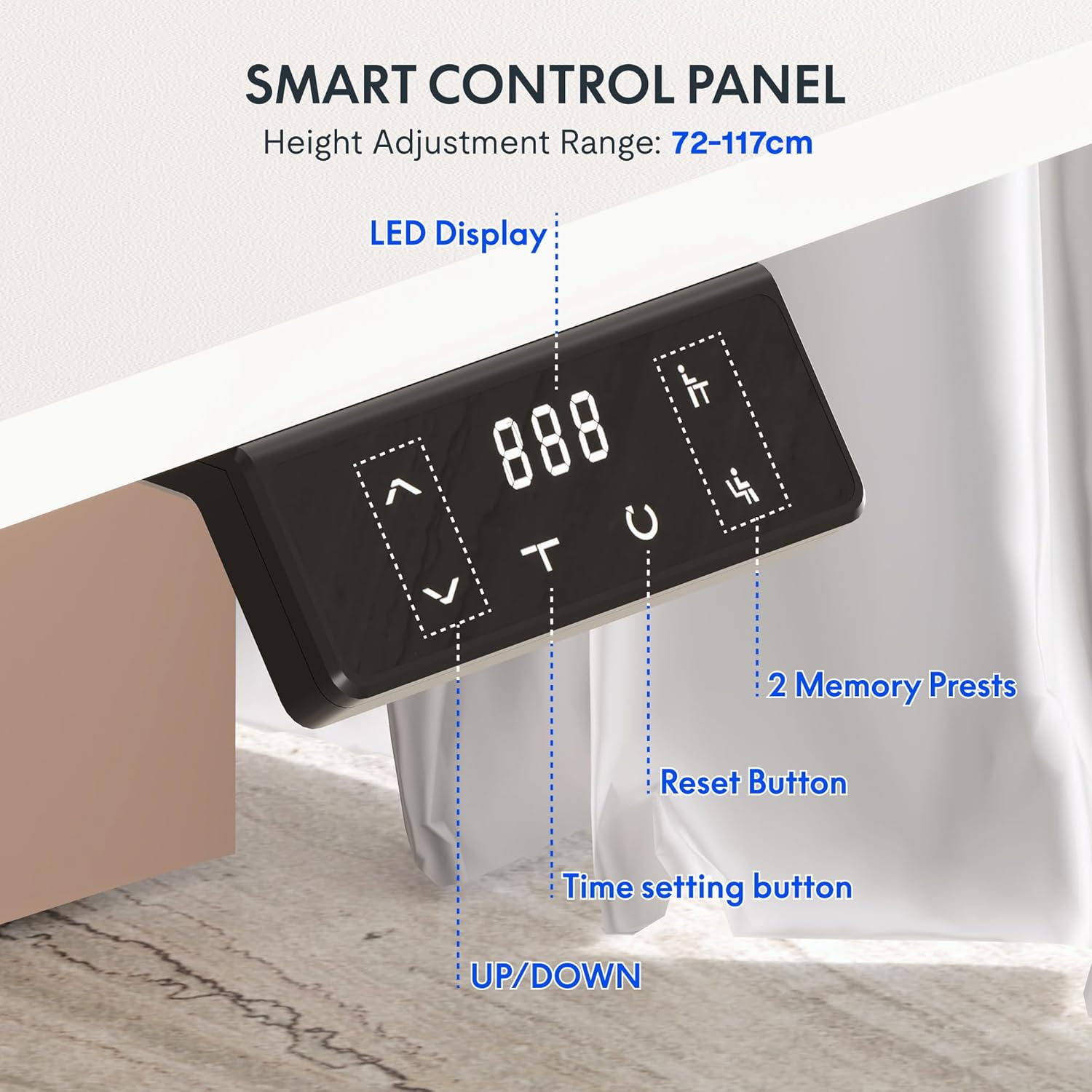
Figure 7: Smart Control Panel features.
- ЛЕД дисплеј: Shows the current desk height in centimeters.
- UP/DOWN Buttons (< / >): Press and hold to move the desk up or down to your desired height.
- Memory Presets (1, 2): To save a preferred height, adjust the desk to the desired position, then press and hold one of the memory buttons (1 or 2) until the display flashes or beeps. To recall a saved height, simply press the corresponding memory button.
- Reset Button (C): Used to reset the desk to its lowest position or clear error codes. Typically, press and hold until the desk moves to its lowest point and resets.
- Time Setting Button (T): This button may be used for setting reminders to stand or sit, depending on the specific model's features. Refer to the detailed manual for specific time setting functions.
4.3 Dual Motor Stabilization
The desk is equipped with advanced dual motor technology, providing an impressive load capacity of up to 80 kg. This ensures smooth, even, and stable height adjustment, even when the desk is fully loaded with equipment.
5. Одржавање
Regular maintenance ensures the longevity and optimal performance of your electric desk.
- Чишћење: Unplug the desk before cleaning. Use a soft, damp cloth to wipe down surfaces. Avoid harsh chemicals or abrasive cleaners.
- Затегнутост завртња: Periodically check and tighten all screws and bolts to ensure structural integrity.
- Управљање кабловима: Ensure all cables are neatly organized and not pinched or strained.
- Капацитет тежине: Do not exceed the maximum weight recommendation of 80 kg to prevent damage to the motors and frame.
The desktop features protective rounded edges, which also contribute to durability and user safety.

Figure 8: Protective rounded edges of the desktop.
КСНУМКС. Решавање проблема
Ако наиђете на проблеме са својим столом, погледајте следеће уобичајене проблеме и решења:
- Сто се не помера:
- Проверите да ли је кабл за напајање безбедно прикључен и на сто и у зидну утичницу.
- Уверите се да су сви каблови мотора правилно повезани са контролном кутијом.
- Press the Reset button (C) and hold until the desk moves to its lowest position and resets.
- Неравномерно кретање:
- Perform a reset procedure as described above.
- Уверите се да сто није преоптерећен и да је тежина равномерно распоређена.
- Код грешке на екрану:
- Refer to the specific error code in the detailed manual provided with your product. Often, a reset (pressing and holding 'C') can clear minor errors.
- Unplug the desk for 10 minutes, then plug it back in and try again.
- Бука током рада:
- A slight motor sound is normal during adjustment.
- If the noise is excessive or unusual, check for loose screws or obstructions.
If problems persist after attempting these solutions, please contact FLEXISPOT customer support.
7. Спецификације
| Феатуре | Спецификација |
|---|---|
| Бранд | ФЛЕКСИСПОТ |
| Број модела | QS2LW-1811 |
| Величина радне површине | 180 x 110 cm (L-shaped) |
| Опсег подешавања висине | 72 цм - 117 цм |
| Димензије производа (укупно) | 110 x 180 x 71 cm (at lowest height) |
| Тежина артикла | 30 килограма |
| Препорука за максималну тежину | 80 килограма |
| Основни материјал | легирани челик |
| Посебне карактеристике | Electric Height Adjustment, Dual Motors, Memory Presets |
| Боја | Бела |
| Рекуиред Ассембли | Да |

Figure 9: Desk dimensions and adjustable height range.
8. Гаранција и подршка
8.1 Информације о гаранцији
For detailed warranty information, please refer to the warranty card included with your product or visit the official FLEXISPOT website. Warranty terms typically cover manufacturing defects and motor malfunctions under normal use conditions.
8.2 Корисничка подршка
If you have any questions, require technical assistance, or need to report an issue, please contact FLEXISPOT customer support through their official website or the retailer from whom you purchased the product. Please have your model number (QS2LW-1811) and purchase date ready when contacting support.