Увод
Thank you for choosing the OLEVS XBC-G1106GH-HH Men's Chronograph Analog-Digital Watch. This timepiece combines a classic analog display with modern digital functions, including chronograph, alarm, day, and date. This manual provides detailed instructions for setting up and operating your watch to ensure optimal performance and longevity.

Image: The OLEVS XBC-G1106GH-HH watch featuring a black band and black dial, showcasinг његов робустан дизајн.
Производ је завршенview
Familiarize yourself with the main components and controls of your OLEVS watch.
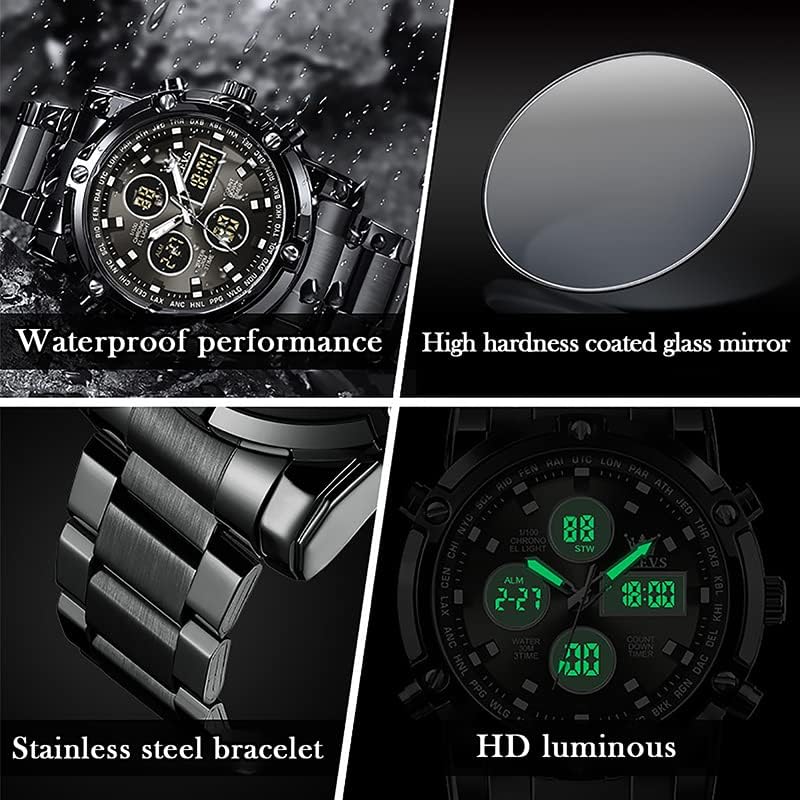
Image: Detailed diagram illustrating the various buttons and digital display functions of the OLEVS watch, including time, date, alarm, and chronograph indicators.
Watch Components and Functions:
- круна: Used for setting analog time (pull out to adjust).
- Buttons (Pushers): Control digital functions such as mode selection, setting adjustments, and chronograph operations.
- Аналогни екран: Traditional hour, minute, and second hands.
- Дигитални дисплеји: Multiple digital screens showing time, date, day, alarm, stopwatch, and countdown timer.
- Позадинско осветљење: Illuminates the digital display for visibility in low light conditions.
- Недељни приказ: Indicates the current day of the week (MON, TUE, WED, THU, FRI, SAT, SUN).
- Индикатори режима: AL (Alarm mode), ST (Stopwatch mode), TR (Countdown mode).
Сетуп
1. Подешавање аналогног времена
- Pull out the crown located on the right side of the watch.
- Окрените круницу да бисте померили казаљке за сате и минуте на жељено време.
- Гурните круну назад да бисте осигурали подешавање времена.
2. Setting Digital Time and Date
The digital display allows for precise time, date, and day settings. Refer to the product overview image for button locations.
- Уђите у режим подешавања: Press and hold the button labeled "Long press to enter settings" (typically bottom-right) until the digital display starts flashing.
- Изаберите ставку за подешавање: Press the button labeled "Convert hours, minutes when setting week, month, day, etc." (typically top-left) to cycle through the settings: seconds, hours, minutes, year, month, day, and week.
- Прилагоди вредност: Use the button labeled "Increment value when setting" (typically top-right) to increase the selected value.
- Потврди и изађи: Once all settings are correct, press the button labeled "Long press to enter settings" again to exit the setting mode.
3. Подешавање аларма
- Уђите у режим аларма: Press the mode button (typically bottom-left, labeled "Convert seconds, timing Functions such as normal time" or similar) until "AL" (Alarm mode) is displayed on the digital screen.
- Унесите подешавање аларма: Press and hold the button labeled "Long press to enter settings" until the alarm time starts flashing.
- Подесите време аларма: Use the button labeled "Convert hours, minutes when setting week, month, day, etc." to select hours or minutes, and the button labeled "Increment value when setting" to adjust the values.
- Активирај/деактивирај аларм: While in Alarm mode (AL), press the button labeled "Alarm on" (typically bottom-right) to toggle the alarm on or off. An alarm icon will appear when activated.
- Exit Alarm Setting: Press the button labeled "Long press to enter settings" to save and exit.
Оперативне функције
1. Using the Chronograph (Stopwatch)
Хронографска функција вам омогућава да мерите протекло време.
- Enter Stopwatch Mode: Press the mode button (typically bottom-left) until "ST" (Stopwatch mode) is displayed.
- Старт/Стоп: Press the button labeled "Convert seconds, timing functions such as normal time" (typically bottom-left) to start the stopwatch. Press it again to stop.
- Ресетовати: While the stopwatch is stopped, press the button labeled "Increment value when setting" (typically top-right) to reset the stopwatch to zero.
2. Using the Countdown Timer
The countdown timer allows you to set a specific duration and will alert you when it reaches zero.
- Enter Countdown Mode: Press the mode button (typically bottom-left) until "TR" (Countdown mode) is displayed.
- Set Countdown Time: Press and hold the button labeled "Long press to enter settings" until the countdown time flashes. Use the button labeled "Convert hours, minutes when setting week, month, day, etc." to select hours or minutes, and the button labeled "Increment value when setting" to adjust the values. Press the button labeled "Long press to enter settings" again to save.
- Старт/Стоп: Press the button labeled "Convert seconds, timing functions such as normal time" to start the countdown. Press it again to pause/resume.
- Ресетовати: While the countdown is paused, press the button labeled "Increment value when setting" to reset to the preset time.
3. Функција позадинског осветљења
To illuminate the digital display in dark conditions, press the button labeled "Backlit keys" (typically top-left). The backlight will typically stay on for a few seconds.
Смернице за отпорност на воду
Your OLEVS XBC-G1106GH-HH watch is rated for 30 meters (3ATM) water resistance. This means it is suitable for daily use and can withstand splashes, rain, and brief immersion in water. However, it is не погодно за пливање, роњење или туширање топлом водом, јер пара и промене температуре могу оштетити заптивке.
- немој operate any buttons or pull out the crown while the watch is wet or submerged.
- Избегавајте излагање сата екстремним температурним променама.
- Ако сат дође у контакт са сланом водом, исперите га слатком водом и добро осушите.

Image: The OLEVS watch demonstrating its water-resistant capabilities, suitable for splashes and rain.
Одржавање
Proper care will extend the life and maintain the appearance of your watch.
- Чишћење: Wipe the watch case and strap regularly with a soft, dry cloth. For stainless steel, a slightly damp може се користити крпа, након чега следи одмах сушење.
- Избегавајте хемикалије: Не излажите сат растварачима, детерџентима, парфемима или козметичким спрејевима, јер они могу оштетити кућиште, каиш или заптивке.
- температура: Избегавајте излагање сата екстремним температурама (изнад 60°C / 140°F или испод 0°C / 32°F) или наглим променама температуре.
- Магнетна поља: Држите сат даље од јаких магнетних поља, која могу утицати на тачност кварцног механизма.
- Замена батерије: When the watch battery runs low, the digital display may dim or the watch may stop. Have the battery replaced by a qualified watch technician to ensure water resistance is maintained.
Решавање проблема
| Проблем | Могући узрок | Решење |
|---|---|---|
| Аналогне казаљке се не померају | Батерија је испражњена; Круница је ишчупана; Механички проблем. | Check if crown is pushed in. Replace battery. Contact service if issue persists. |
| Дигитални дисплеј је празан или туман | Батерија је празна. | Замените батерију. |
| Incorrect time/date displayed | Time/date not set correctly; Watch exposed to strong magnetic fields. | Reset time and date according to instructions. Keep watch away from magnets. |
| Дугмад не реагују | Watch is wet; Internal malfunction. | Ensure watch is dry before operating buttons. If issue persists, contact service. |
Спецификације
- Бренд: ОЛЕВС
- Број модела: XBC-G1106GH-HH
- Тип приказа: Аналогно-Дигитални
- Кретање: кварц
- Извор напајања: Баттери Поверед
- Материјал кућишта: нерђајући челик
- Материјал бенда: нерђајући челик
- Кристал: Хардлек
- Пречник кућишта: 48 милиметара
- Дебљина кућишта: 16 милиметара
- Ширина појаса: 23 милиметара
- Дубина водоотпорности: 30 Metres (3ATM)
- Тип копче: Сигурносна копча на преклоп на дугме
- Функције: Chronograph, LED Backlight, Day, Date, Alarm, Stopwatch, Countdown Timer
Гаранција и подршка
For warranty information and customer support, please refer to the documentation provided with your purchase or contact the retailer where you purchased the OLEVS XBC-G1106GH-HH watch. Keep your proof of purchase for any warranty claims.
For further assistance, you may also visit the official OLEVS webсајт или директно контактирајте њихову службу за кориснике.


