1. Производ је готовview
The REDTIGER F7N is a dual-channel dash camera system designed to record video footage from both the front and rear of your vehicle. It features 4K resolution for the front camera and 1080P for the rear, utilizing a STARVIS 2 sensor for enhanced low-light performance. The device includes a 3.18-inch touch screen, voice control capabilities, 5.8GHz WiFi for smartphone connectivity, built-in GPS, and various recording modes such as loop recording, G-sensor activated emergency recording, and 24-hour parking monitoring.

Слика 1.1: Готовоview of the REDTIGER F7N dash cam's dual recording capabilities and STARVIS 2 technology.
2. Садржај пакета
Verify that all items are present in the package before installation.
- REDTIGER F7N Front Dash Camera
- Rear Camera with connection cable
- Кабл за напајање возила
- Усисни носач
- Circular Polarizing Lens (CPL)
- МикроСД картица од 128 ГБ (унапред инсталирана или укључена засебно)
- Hardwire Kit (for parking monitoring functionality)
- Упутство за употребу

Image 2.1: The included Circular Polarizing Lens (CPL) helps reduce glare and reflections.
3. Кључне карактеристике
- Двоструко снимање: Simultaneous 4K (front) and 1080P (rear) video capture.
- STARVIS 2 Sensor: Advanced sensor technology for superior low-light performance and clarity.
- 3.18" Touch Screen: Intuitive interface for settings adjustment and video playback.
- Контрола гласом: Hands-free operation for common commands to minimize driving distractions.
- 5.8ГХз ВиФи: Fast wireless connection to the REDTIGER app for video management and firmware updates.
- Уграђени ГПС: Records speed, location, and route data for playback.
- WDR & HDR Technology: Enhances video quality in varying light conditions.
- Лооп Рецординг: Аутоматски преписује старије footagе да би се обезбедило непрекидно снимање.
- Г-сензор: Detects impacts and sudden movements, automatically locking and protecting incident footage.
- 24-часовни надзор паркинга: Offers G-Sensor and Time-Lapse parking modes (requires hardwire kit).

Image 3.1: Details of STARVIS 2 Super Night Vision technology, including F/1.5 aperture and 6-layer lens.
4. Подешавање и инсталација
4.1 Инсталација предње камере
- Очистите подручје ветробранског стакла где ће бити монтирана камера на инструмент табли.
- Причврстите вакуумски носач на предњу камеру.
- Securely press the suction mount onto the windshield, ensuring it does not obstruct the driver's view. Position the camera to capture the road ahead clearly.
- Adjust the camera lens angle as needed.
4.2 Инсталација задње камере
- Mount the rear camera on the rear windshield, typically inside the vehicle, ensuring a clear view позади.
- Route the rear camera cable to the front camera, tucking it along the vehicle's headliner and A-pillars to keep it tidy.
- Повежите кабл задње камере са одређеним портом на предњој камери на инструмент табли.
4.3 Прикључак за напајање
- Insert the 128GB MicroSD card into the dash cam's card slot.
- Connect the vehicle power cable to the dash cam's power input port.
- Укључите други крај кабла за напајање у утичницу од 12 V у вашем возилу (прикључак за упаљач за цигарете).
- For 24-hour parking monitoring, install the included hardwire kit according to its separate instructions.
4.4 Initial Setup (Touch Screen)
Upon first power-on, the dash cam will guide you through initial settings using its touch screen interface.
- Изаберите жељену Језик.
- Поставите исправно Временска зона.
- Confirm other basic settings as prompted.

Image 4.1: The touch screen interface for initial setup, including language and time zone selection.
5. Операција
5.1 Основно снимање
Once powered on, the dash cam will automatically begin recording. A red indicator light or icon on the screen typically confirms recording is active.
5.2 Управљање гласом
The F7N supports voice commands for hands-free operation. Speak clearly and directly to the dash cam. Common commands include:
- "Lock the Video": Locks the current recording segment to prevent overwriting.
- "Take Picture": Captures a still image.
- "Open Screen": Turns on the display.
- "Turn On Wifi": Activates the Wi-Fi function.
- "Turn Off Recording": Stops the current recording.
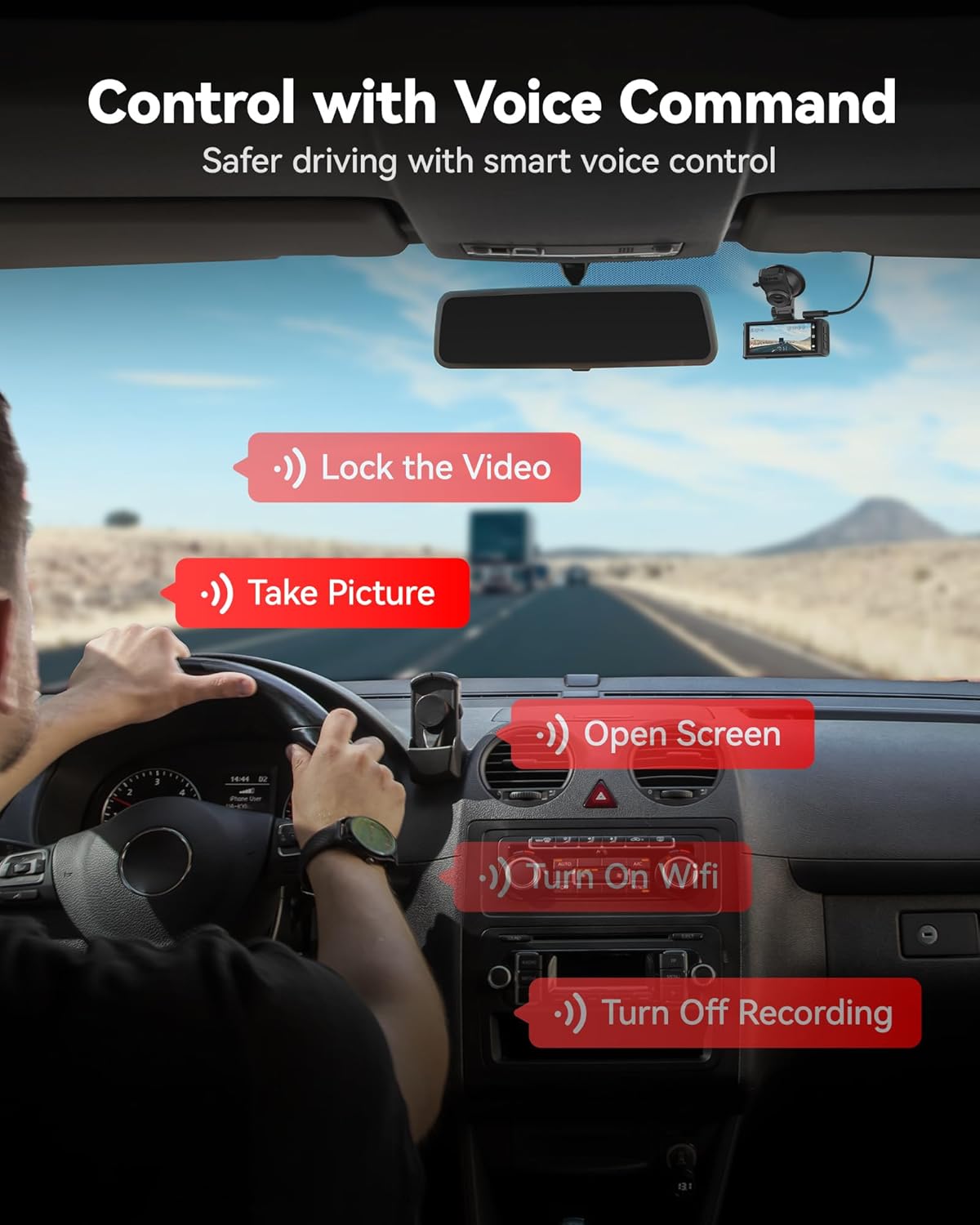
Слика 5.1: Примерamples of voice commands for controlling the dash cam.
5.3 Touch Screen Functions
The 3.18-inch touch screen allows for direct interaction with the dash cam's menus and functions. Tap icons to:
- Подешавања приступа.
- Review снимљених видео записа и фотографија.
- Manually lock emergency video.
- Toggle Wi-Fi on/off.
5.4 WiFi Connectivity and App
The dash cam features 5.8GHz WiFi for fast connection to the REDTIGER app (available on Android and iOS). This allows you to:
- View ливе фооtage.
- Репродукција снимљених видео записа.
- Download videos to your smartphone.
- Подесите подешавања камере.
- Perform firmware updates (OTA Update).

Image 5.2: Illustration of 5.8GHz WiFi connectivity for smooth phone synchronization and download via the REDTIGER app.
5.5 GPS функционалност
The built-in GPS module records your vehicle's location, speed, and route data. This information can be viewed during video playback using the REDTIGER app or a compatible desktop player.

Image 5.3: GPS route tracking showing speed, location, and route on a map during video playback.
6. Recording and Maintenance Features
6.1 Снимање у петљи
The dash cam continuously records in short segments (e.g., 1, 3, or 5 minutes). When the memory card is full, the oldest unlocked footage is automatically overwritten by new recordings. This ensures that recording never stops due to a full memory card.
6.2 Г-сензор (снимање у хитним случајевима)
The integrated G-sensor detects sudden impacts or rapid acceleration/deceleration. When triggered, the current video segment is automatically locked and saved to a protected folder, preventing it from being overwritten by loop recording. The sensitivity of the G-sensor can typically be adjusted in the settings.
6.3 24-hour Parking Monitoring
To enable continuous surveillance while your vehicle is parked, the dash cam offers two parking monitoring modes:
- G-Sensor Parking Mode: The camera remains in standby and automatically begins recording if an impact or sudden motion is detected.
- Тиме-Лапсе Паркинг режим: The camera continuously records at a low frame rate, condensing hours of footagпретворите у минуте за ефикасно реview.
Напомена: The 24-hour parking monitoring function requires the included hardwire kit to be properly installed to provide continuous power to the dash cam when the vehicle is off.

Image 6.1: Illustration of G-sensor mode and Time-lapse mode for 24-hour parking monitoring.
КСНУМКС. Решавање проблема
| Проблем | Могуће решење |
|---|---|
| Камера у аутомобилу се не укључује. |
|
| Снимање се зауставља или се заустављаtagе је оштећено. |
|
| Проблеми са Wi-Fi везом. |
|
| Гласовна контрола не реагује. |
|
| Монитор за паркирање не ради. |
|
8. Спецификације
| Феатуре | Детаљ |
|---|---|
| Назив модела | ФКСНУМКСН |
| Резолуција предње камере | 4К УХД |
| Реар Цамера Ресолутион | КСНУМКСП ФХД |
| Сензор | СТАРВИС 2 |
| Дисплаи | 3.18" Touch Screen |
| Предње поље View | 170 степени |
| Задње поље View | 140 степени |
| Повезивање | 5.8GHz Wi-Fi, GPS |
| Контролни метод | Додир, глас |
| Складиштење | MicroSD Card (up to 256GB, 128GB included) |
| Тип монтаже | Усисни носач |
| Укључене компоненте | Hardwire Kit, CPL, 128GB Card |
9. Гаранција и подршка
REDTIGER products are covered by a limited warranty. For detailed warranty information, product support, or technical assistance, please refer to the official REDTIGER webсајт или директно контактирајте њихову корисничку службу. Сачувајте рачун као доказ о куповини за потребе гаранције.
Подршка на мрежи: Visit the official REDTIGER webсајт за често постављана питања, ажурирања фирмвера и контакт информације.


