1. Производ је готовview
The AOPUTTRIVER AP-5000A is a professional digital light meter designed for accurate measurement of illumination in various environments. It supports measurement of fluorescent, incandescent, and LED lamps up to 400,000 Lux (40,000 FC). Key features include a 270-degree rotatable detector, data logging capabilities, and connectivity for real-time monitoring.

Figure 1: AOPUTTRIVER AP-5000A Digital Light Meter highlighting its main features.
2. Садржај пакета
Verify that all items listed below are present and in good condition upon opening the package. If any items are missing or damaged, please contact customer support.
- AP-5000A Light Meter x 1
- Торба за ношење к 1
- ААА батерије к 2
- Одвијач к 1
- Упутство за употребу к 1

Figure 2: All items included in the AP-5000A package.
3. Компоненте производа
Familiarize yourself with the different parts of your AP-5000A Digital Light Meter:
- фотодетектор: Sensor for light measurement.
- Дисплеј са течним кристалом (ЛЦД): Displays measurement readings and settings.
- Дугме за укључивање/искључивање: Укључује или искључује уређај.
- Дугме ХОЛД: Замрзава тренутно мерење на екрану.
- Дугме МЕМ: Accesses data logging memory.
- Дугме ЛУКС/ФЦ: Toggles between Lux and Foot-Candle measurement units.
- Дугме МАКС/МИН: Displays maximum or minimum recorded values.
- Backlight Switch Button: Активира или деактивира позадинско осветљење ЛЦД-а.

Figure 3: Labeled components of the AP-5000A Digital Light Meter.
4. Подешавање
4.1 Инсталација батерије
- Пронађите одељак за батерију на задњој страни уређаја.
- Користите приложени одвијач да бисте отворили поклопац одељка за батерије.
- Уметните две ААА батерије, водећи рачуна о исправном поларитету (+/-).
- Вратите поклопац одељка за батерије и причврстите га завртњем.
4.2 Почетно укључивање
Притисните тастер ОН/ОФФ button to power on the device. The LCD will illuminate and display the current light and temperature readings.
5. Упутство за употребу
5.1 Мерења
Remove the protective cap from the photodetector. Point the photodetector towards the light source you wish to measure. The current light intensity will be displayed on the LCD.
5.2 Unit Selection (Lux/FC)
Притисните тастер LUX/FC button to switch between Lux and Foot-Candle measurement units. The selected unit will be indicated on the LCD.
5.3 Избор јединице температуре (°C/°F)
The device also measures temperature. Refer to the manual for specific button combinations to switch between Celsius (°C) and Fahrenheit (°F) temperature units.
5.4 Задржавање података
Притисните тастер ХОЛД button to freeze the current reading on the display. Press it again to release and resume live measurement.
5.5 MAX/MIN Measurement
Притисните тастер МАКС/МИН button to cycle through maximum, minimum, and real-time values recorded during a measurement session. This helps identify peak and lowest light levels.
5.6 Рад позадинског осветљења
Притисните тастер Прекидач позадинског осветљења button to turn the LCD backlight on or off, improving readability in low-light conditions.
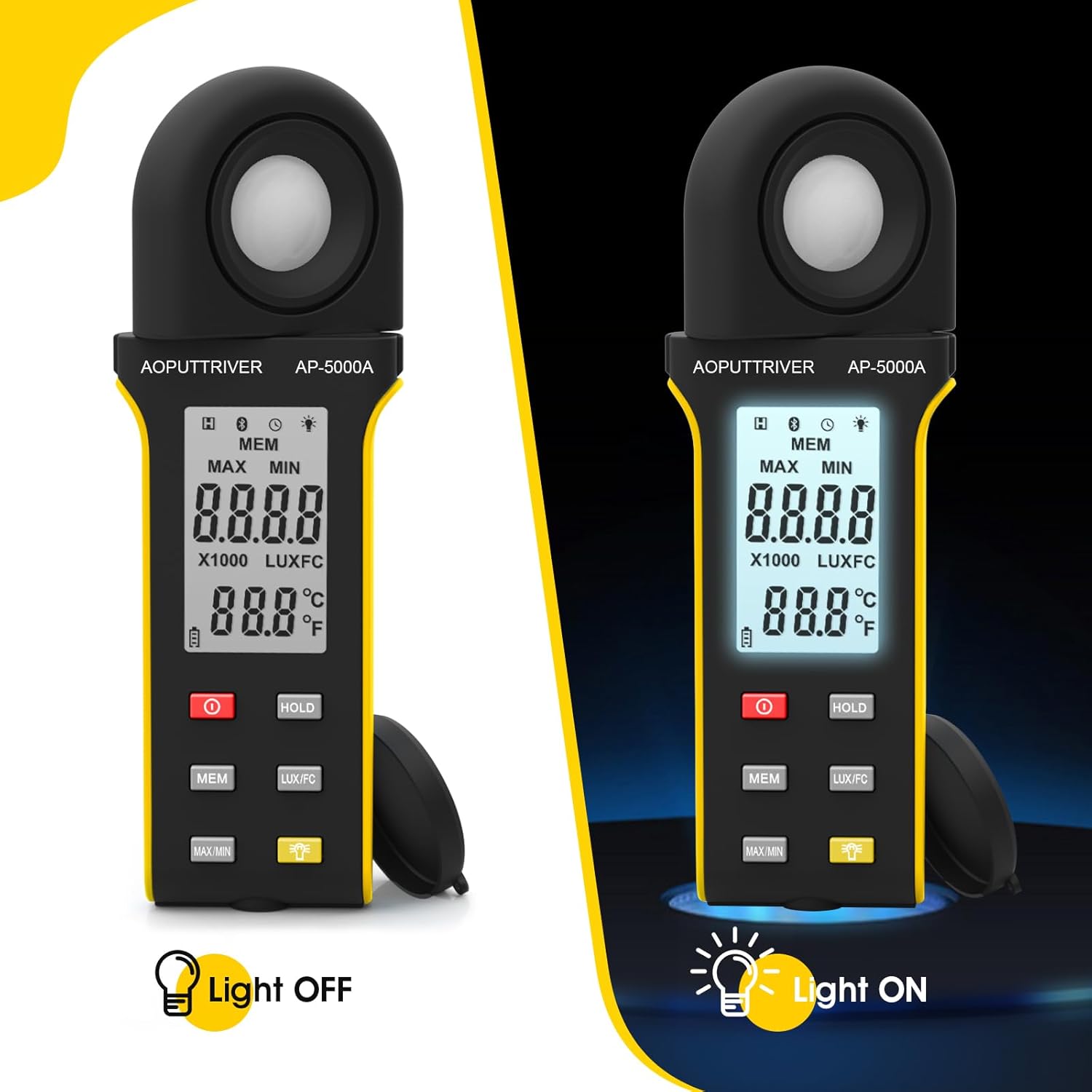
Figure 4: Comparison of the AP-5000A with backlight off and on.
6. Rotatable Detector
The AP-5000A features a 270-degree rotatable silicon filter diode sensor. This design allows you to measure photometric intensity from various angles without needing to reposition the entire meter. Simply rotate the sensor to face the light source while keeping the display visible for easy reading.
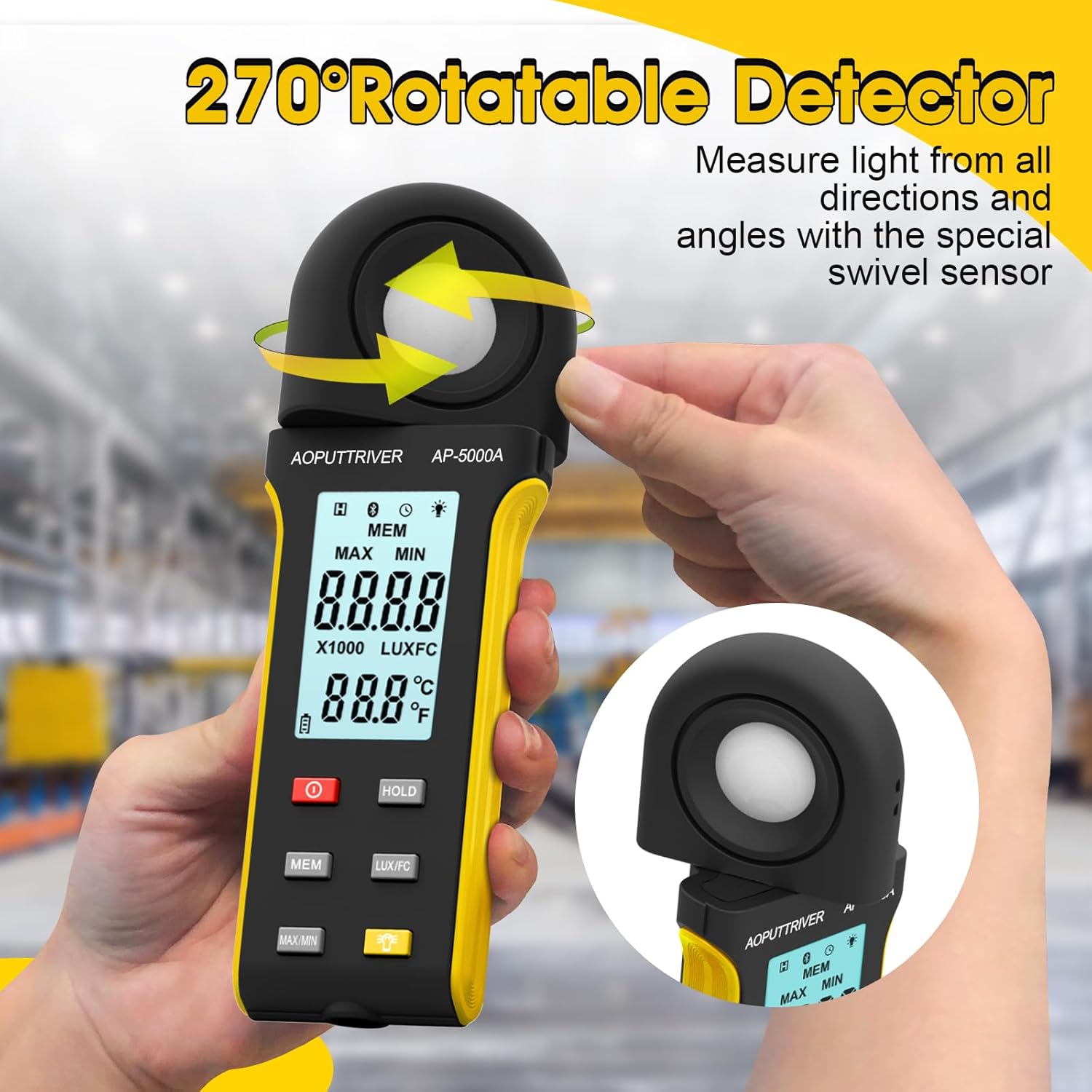
Figure 5: The 270-degree rotatable detector for flexible measurement.
7. Прикупљање података
The meter supports data logging for up to 30 groups of measurements. This feature allows you to record and review light level data over time, which is useful for monitoring changes in lighting conditions for applications like plant growth or aquarium environments. Refer to the detailed instructions in the full user manual for specific steps on how to initiate, save, and recall data logs using the МЕМ дугме.
8. Повезивање апликација
The AP-5000A can connect to a smartphone application via Bluetooth. This allows for real-time tracking of data, remote control of certain functions, and advanced data analysis. Download the official AOPUTTRIVER app from your device's app store and follow the in-app instructions to pair your light meter.
9. Пријаве
The AOPUTTRIVER AP-5000A is a versatile tool suitable for a wide range of applications requiring precise light measurement:
- Indoor Plant Growing: Optimizing light levels for various plant species.
- акваријуми: Ensuring appropriate lighting for aquatic life.
- Фотографија и видео слика: Setting up ideal lighting conditions.
- Workplace and School Environments: Assessing illumination for comfort and productivity.
- Јавни простори: Measuring light in libraries, stages, and street lighting.
- Индустријска подешавања: Monitoring lighting in factories and warehouses.

Figure 6: Diverse applications of the AP-5000A Light Meter.
10. Одржавање и њега
- Чишћење: Use a soft, dry cloth to clean the device. Do not use abrasive cleaners or solvents. Ensure the photodetector is kept clean and free of dust for accurate readings.
- Складиштење: When not in use, store the meter in its carrying bag with the protective cap on the photodetector. Store in a cool, dry place away from direct sunlight and extreme temperatures.
- Замена батерије: Replace batteries when the low battery indicator appears on the LCD to ensure continuous accurate operation.
- Аутоматско искључивање: The device features an automatic shutdown function after 15 minutes of inactivity to conserve battery life.
КСНУМКС. Решавање проблема
- Нема дисплеја/Укључено: Проверите да ли су батерије инсталиране и уверите се да нису празне. Замените их ако је потребно.
- Нетачна очитавања: Ensure the photodetector is clean and unobstructed. Verify that the correct measurement unit (Lux/FC) is selected. Avoid measuring in rapidly changing light conditions.
- Проблеми са везом апликације: Ensure Bluetooth is enabled on your smartphone and the meter. Restart both the app and the meter. Check that the app is up to date.
- „OL“ дисплеј: Indicates an overload, meaning the measured light intensity exceeds the meter's maximum range.
12. Спецификације
| Феатуре | Спецификација |
|---|---|
| Број модела | АП-5000А |
| Меасуринг Ранге | 0.1 ~ 400,000 Lux (0.1 ~ 40,000 FC) |
| Резолуција | 0.1 LUX/FC |
| Прецизност | ≤10000Lux: +/-4% rgd+/-1.0% f.s. ≥10,000Lux: ±5% rgd+/-1.5% f.s ≥200,000Lux: +/-8% rdg+/-2.0%f.s |
| Detector Rotation | 270 степени |
| Капацитет евидентирања података | До 30 групе |
| Аутоматско искључивање | После 15 минута неактивности |
| Дисплаи | HD Backlight LCD |
| Извор напајања | 2 к ААА батерије |
| Тежина артикла | 7.8 унци |
| Димензије пакета | 7.99 к 3.43 к 1.93 инча |
13. Гаранција и подршка
AOPUTTRIVER products are manufactured to high-quality standards. For warranty information, technical support, or service inquiries, please refer to the contact details provided on the product packaging or visit the official AOPUTTRIVER webсајт. Сачувајте рачун као доказ о куповини за потребе гаранције.


