Увод
This manual provides detailed instructions for the safe and efficient operation of your boAt Partypal 390 Bluetooth Speaker. Please read this manual thoroughly before using the product and retain it for future reference. The Partypal 390 is a powerful portable speaker designed for various audio needs, featuring 160W boAt Signature Sound, multiple connectivity options, and integrated LED lighting.
Безбедносне информације
- Не излажите звучник екстремним температурама, директној сунчевој светлости или високој влажности.
- Избегавајте испуштање или излагање звучника јаким ударима.
- Do not attempt to disassemble, repair, or modify the speaker yourself. Contact qualified service personnel for assistance.
- Keep the speaker away from water and other liquids. Although it is waterproof, prolonged submersion or exposure to high-pressure water jets should be avoided.
- Користите само кабл за пуњење који је приложен или сертификовани еквивалент.
- Обезбедите одговарајућу вентилацију приликом рада са звучником.
- Очистите звучник меком, сувом крпом. Не користите абразивна средства за чишћење или раствараче.
Садржај пакета
Проверите да ли се у вашем пакету налазе све ставке наведене у наставку:
- boAt Partypal 390 Speaker
- Кабл за пуњење
- Упутство за употребу
- Гарантни лист
Производ је завршенview
The boAt Partypal 390 is a versatile Bluetooth speaker featuring powerful audio output and dynamic LED lighting. Below are key visual references and descriptions of its components.
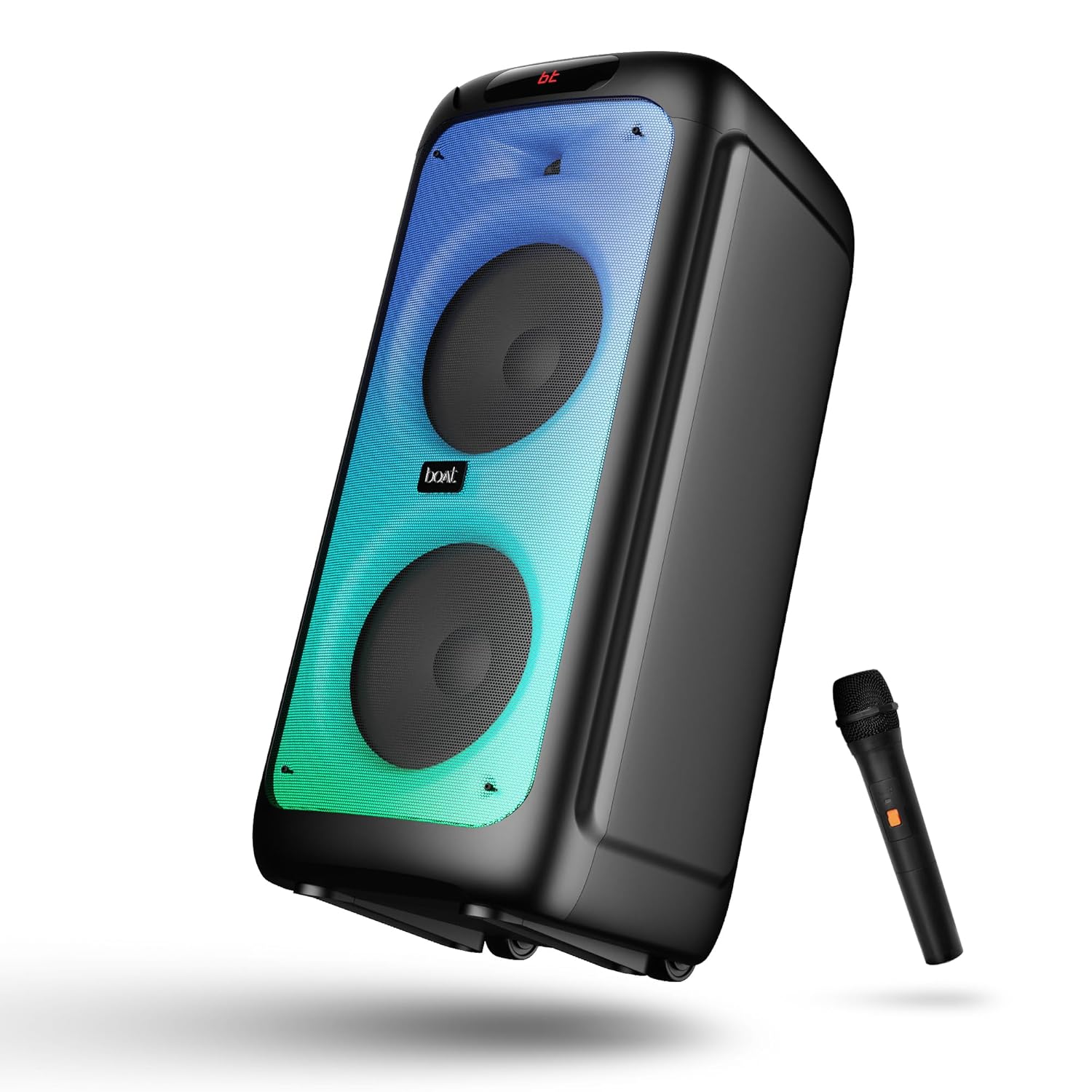
Слика 1: Фронт view of the boAt Partypal 390 speaker, showcasing its dual speaker design, integrated flame LEDs, and the included wired microphone.

Слика 2: Top panel of the speaker displaying the control buttons and various input ports including USB, AUX, Guitar In, Mic 1, Mic 2, and the USB Type-C charging port. Also shown are dedicated controls for Bass/Treble, LED modes, and volume.
Кључне карактеристике:
- 160W boAt карактеристичан звук: Delivers powerful and clear audio.
- Flame LEDs: Dynamic lighting effects to enhance the listening experience.
- Вишеструко повезивање: Bluetooth v5.3, AUX, USB, and TF card support.
- Функционалност караоке: Two microphone input ports for vocal performances.
- Улаз за гитару: Dedicated port for connecting a guitar.
- ЕК режими: Pre-set sound modes (Normal, Party, Pop, Rock, Jazz) for different audio preferences.
- ТВС режим: Allows wireless connection of two Partypal speakers for stereo sound.
- Контроле баса и високих тонова: Adjustable audio settings for personalized sound.
- Long Playback: До 6 сати трајања батерије.
Сетуп
1. Пуњење звучника
Before first use, fully charge the speaker. Connect the provided USB Type-C charging cable to the speaker's charging port and the other end to a compatible USB power adapter (not included). The charging indicator will show the charging status. A full charge provides up to 6 hours of playback.

Слика 3: The speaker in an outdoor setting, illustrating its portability and battery life.
2. Укључивање/искључивање
- To power on, press and hold the Power button located on the control panel until the display illuminates.
- Да бисте искључили напајање, поново притисните и држите дугме за напајање док се екран не искључи.
3. Почетно упаривање путем Bluetooth-а
- Ensure the speaker is powered on and in Bluetooth mode. The display will show "bt" and the Bluetooth indicator will flash, indicating it's ready for pairing.
- На свом мобилном уређају омогућите Блуетоотх и потражите доступне уређаје.
- Select "boAt Partypal 390" from the list of devices.
- Once paired, the speaker will emit a confirmation sound, and the Bluetooth indicator will stop flashing.
Упутство за употребу
1. Избор режима
Press the "Mode" button on the control panel to cycle through available input modes: Bluetooth, AUX, USB, and TF Card.
2. Блуетоотх режим
- Након успешног упаривања, звук са повезаног уређаја ће се репродуковати кроз звучник.
- Use the volume knob on the speaker or your connected device to adjust the volume.
- Use the Previous/Next buttons to skip tracks.
- Press the Play/Pause button to control playback.
3. АУКС режим
- Connect an audio device to the AUX input port using a 3.5mm audio cable.
- Switch the speaker to AUX mode using the "Mode" button.
- Контролишите репродукцију и јачину звука са повезаног уређаја.
4. Режим USB/TF картице
- Insert a USB flash drive into the USB port or a TF card into the TF card slot.
- Звучник ће се аутоматски пребацити у режим USB-а или TF картице и почети да репродукује звук files. If not, switch manually using the "Mode" button.
- Use the Previous/Next buttons to navigate tracks and Play/Pause for playback control.
5. Karaoke Function (Microphone Input)
- Connect up to two wired microphones to the "MIC 1" and "MIC 2" input ports.
- Adjust microphone volume using the dedicated MIC VOL knob.
- Adjust microphone echo effect using the ECHO knob.
6. Улаз за гитару
- Connect a guitar to the "GUITAR IN" port.
- Adjust guitar volume using the dedicated GUITAR VOL knob.
7. Режими еквилајзера
The speaker offers several pre-set equalizer modes to optimize audio for different content types. Press the "EQ" button to cycle through:
- Нормално
- Забава
- Поп
- Роцк
- Јазз

Слика 4: Visual representation of the available EQ modes for sound customization.
8. TWS (Прави бежични стерео) режим
To connect two Partypal 390 speakers for a stereo audio experience:
- Ensure both speakers are powered on and in Bluetooth mode, but not yet paired to any device.
- On one speaker (this will be the primary speaker), press and hold the TWS button. The speaker will emit a sound indicating it's searching for another speaker.
- Два звучника ће се аутоматски повезати један са другим. Звучни сигнал потврде ће означити успешно TWS упаривање.
- Now, pair your mobile device to the primary speaker via Bluetooth as described in the "Initial Bluetooth Pairing" section. Audio will play in stereo through both speakers.

Слика 5: Two Partypal 390 speakers wirelessly connected, demonstrating the TWS feature.
9. LED kontrola
Press the "LED Mode" button to cycle through different flame LED lighting effects or to turn them off.
10. Bass and Treble Controls
Use the dedicated Bass and Treble knobs on the control panel to adjust the low and high frequencies of the audio output according to your preference.
Одржавање
- Чишћење: Use a soft, dry, lint-free cloth to clean the speaker's exterior. Do not use liquid cleaners, aerosols, or solvents.
- Складиштење: Када се звучник не користи дуже време, чувајте га на хладном и сувом месту, даље од директне сунчеве светлости и екстремних температура.
- Одржавање батерије: Да бисте продужили век трајања батерије, избегавајте често потпуно пражњење звучника. Редовно га пуните, чак и ако га не користите.
Решавање проблема
| Проблем | Могући узрок | Решење |
|---|---|---|
| Звучник се не укључује. | Слаба батерија; Дугме за напајање није правилно притиснуто. | Потпуно напуните звучник. Притисните и држите дугме за напајање неколико секунди. |
| Нема звука. | Јачина звука је прениска; Неисправан режим уноса; Уређај није повезан. | Increase speaker and device volume. Ensure correct mode is selected (Bluetooth, AUX, USB, TF). Re-pair Bluetooth device or check cable connections. |
| Блуетоотх упаривање није успело. | Звучник није у режиму упаривања; Уређај је предалеко; Сметње. | Ensure speaker is in Bluetooth pairing mode (flashing "bt"). Move device closer to speaker. Turn off other Bluetooth devices. Forget "boAt Partypal 390" on your device and try pairing again. |
| Микрофон не ради. | Microphone not connected properly; MIC VOL too low. | Ensure microphone is securely plugged into MIC 1 or MIC 2 port. Increase the MIC VOL knob. |
| TWS веза не успева. | Звучници су већ упарени са уређајем; Звучници су превише удаљени. | Ensure both speakers are not connected to any Bluetooth device. Place speakers within close proximity. Repeat TWS pairing steps. |
Спецификације
Below are the technical specifications for the boAt Partypal 390 speaker:
| Назив модела | Partypal 390 |
| Спеакер Типе | Multimedia, Floor Standing |
| Аудио излазна снага | 160 Ваттс |
| Технологија повезивања | Bluetooth v5.3, AUX, USB, TF Card |
| Блуетоотх домет | До 10 метара |
| Трајање батерије | До 6 сати |
| Капацитет батерије | 7500 mAh (Lead Acid) |
| Димензије производа (Д x Ш x В) | 70 Д x 32 Ш x 32 В центиметара |
| Тежина артикла | 10.8 кг |
| Ниво отпорности на воду | Водоотпоран |
| Укључене компоненте | Speaker, Charging Cable, User Manual, Warranty Card |

Слика 6: Diagram illustrating the physical dimensions of the Partypal 390 speaker.
Гаранција и подршка
Your boAt Partypal 390 speaker comes with a limited warranty. Please refer to the included Warranty Card for specific terms and conditions, including the warranty period and coverage details. For technical support, service, or warranty claims, please contact boAt customer service through their official webсајт или контакт информације наведене на вашем гарантном листу.
For more information, visit the official boAt store: boAt Store on Amazon