Увод
This manual provides detailed instructions for the installation, operation, and maintenance of your KiriNavi Qualcomm Android 11 Car Radio. Please read this manual thoroughly before using the product to ensure proper functionality and safety.
This head unit is designed as a stereo replacement for Ford Expedition Limited models from 2018 to 2023, specifically compatible with the SYNC3 system. It features a 14.4-inch display, built-in Wireless Carplay, and Wired Android Auto, powered by a Qualcomm Octa-Core CPU with 8GB RAM and 128GB ROM for high performance and stability.
Садржај пакета
Проверите да ли су све компоненте присутне у пакету:
- KiriNavi Car Radio Head Unit (14.4 Inch)
- Повер Цаблес
- Кориснички приручник (овај документ)
- Additional necessary installation accessories (if applicable, not specified in input)
Подешавање и инсталација
The KiriNavi Car Radio is designed for factory OEM fit, requiring no modification for installation in compatible Ford Expedition models (2018-2023) with SYNC3. Professional installation is recommended.
Контролна листа пре инсталације:
- Пре почетка инсталације, уверите се да је паљење возила искључено и да је акумулатор искључен.
- Gather all necessary tools (e.g., trim removal tools, screwdrivers, wire strippers).
- Familiarize yourself with the vehicle's existing dashboard layout and wiring.
Кораци инсталације:
- Carefully remove the existing head unit and dashboard trim. Refer to your vehicle's service manual for specific instructions.
- Connect the provided power cables and other necessary wiring harnesses to the new KiriNavi head unit. Ensure all connections are secure.
- Integrate the new head unit with the vehicle's existing systems. This unit is designed to retain original features such as Sirius XM radio, Microsoft SYNC System, Heated Steering Wheel Control, Massage Seat Control, Physical Climate Control, 360 Cameras and Reverse Camera, Sound System, and Steering Wheel Control.
- Carefully mount the new 14.4-inch display into the dashboard opening.
- Reconnect the vehicle's battery and test the unit's functionality before fully reassembling the dashboard.
- Поново саставите облогу инструмент табле.

Слика 1: Comparison showing the vehicle's dashboard before and after the installation of the KiriNavi 14.4-inch head unit. The new unit seamlessly integrates into the existing console, replacing the original display and controls.
Упутство за употребу
Основна операција:
The unit operates on Android 11, providing a familiar smartphone-like interface. Navigate using the 14.4-inch QHD 2K 2560 x 1440 IPS Touch Screen.
Повезивање:
- Wireless CarPlay & Wired Android Auto: Connect your compatible smartphone for seamless integration of navigation, music, and communication apps.
- Блуетоотх КСНУМКС: Pair your phone for hands-free calling and audio streaming. The Bluetooth connection is designed for stability.
- Wi-Fi & 4G Network: Connect to a Wi-Fi hotspot or insert a 4G SIM card (if supported by the specific model) to access online content, navigation, and app downloads (e.g., YouTube, Netflix, Facebook).

Слика 2: The KiriNavi head unit displaying the user interface for Wireless CarPlay and Android Auto, demonstrating voice command integration for tasks like playing music or finding a restaurant.

Слика 3: The KiriNavi head unit's screen showing the Bluetooth phone interface for making calls and a separate image illustrating internet browsing via Wi-Fi, with various app icons.
Навигација:
The unit features built-in GPS + GLONASS for high-precision navigation. It supports both online and offline maps, including popular applications like Apple Maps, Google Maps, and Waze. Ensure the GPS antenna is properly installed for optimal signal reception.
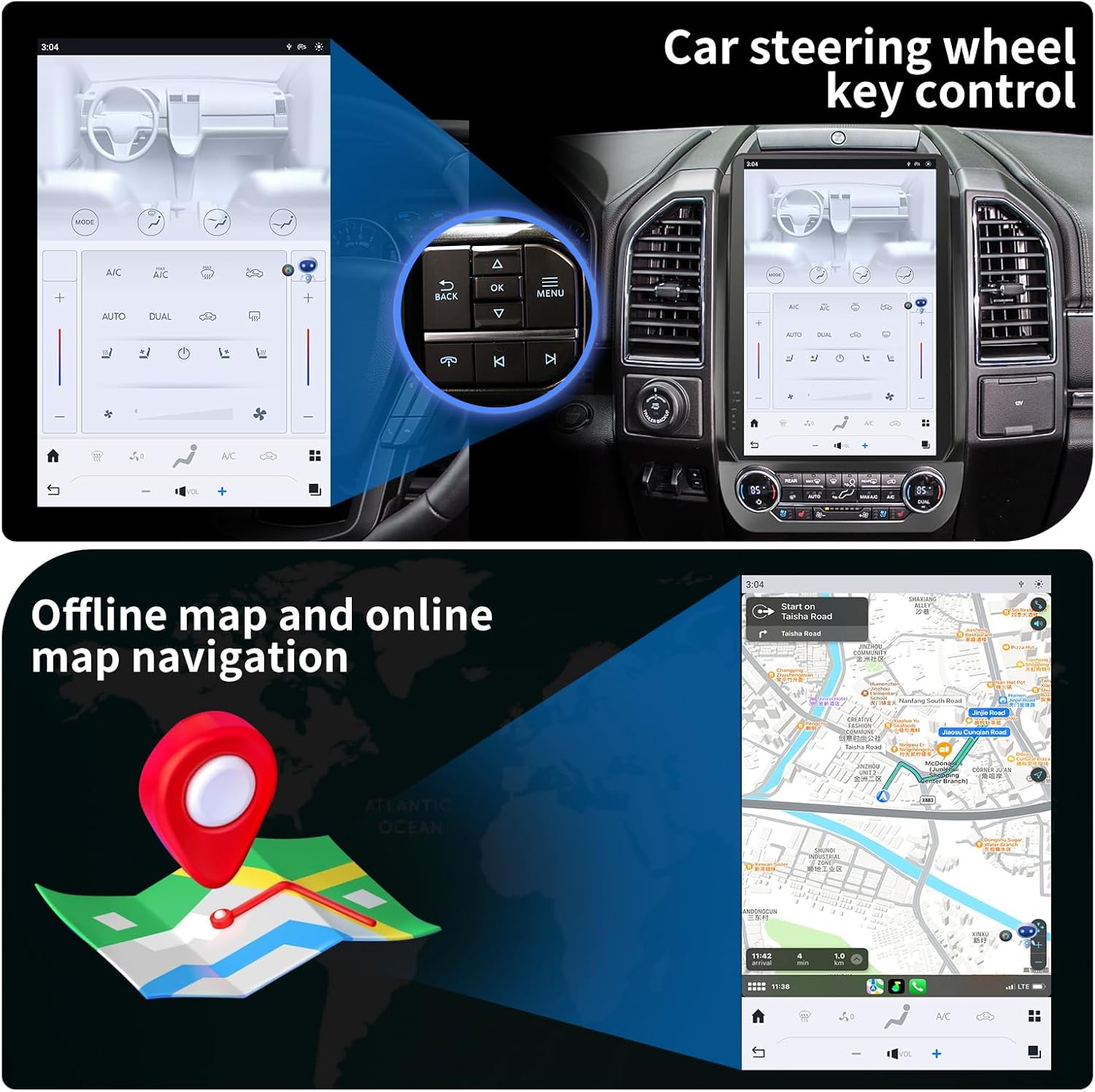
Слика 4: The KiriNavi head unit showing a navigation map on the screen, alongside an inset image highlighting the vehicle's steering wheel controls, which can be configured to operate the head unit.
Мултимедијална репродукција:
Enjoy music and videos via USB, AUX IN, or streaming services. The unit supports various audio and video formats. You can save your favorite FM radio stations for easy access.
Контрола на волану:
The unit supports learning original steering wheel buttons, allowing for convenient remote control of functions such as volume, track changes, and hands-free calling.
Функционалност подељеног екрана:
The 14.4-inch display supports split-screen mode, enabling you to run two applications simultaneously, such as navigation and video playback.

Слика 5: The KiriNavi head unit demonstrating its split-screen capability, showing a navigation map on one side and a video playing on the other, allowing for simultaneous use of two applications.
Одржавање
- Чишћење: Користите меку, суву крпу за чишћење екрана и спољашњости. Избегавајте абразивна средства за чишћење или раствараче.
- Ажурирања софтвера: Периодично проверавајте да ли постоје ажурирања софтвера како бисте осигурали оптималне перформансе и приступ новим функцијама. Ажурирања се обично могу обавити путем Wi-Fi мреже.
- Услови животне средине: Избегавајте излагање уређаја екстремним температурама, директној сунчевој светлости током дужег периода или прекомерној влази.
Решавање проблема
| Проблем | Могући узрок | Решење |
|---|---|---|
| Јединица се не укључује. | Лабав прикључак за напајање; Прегорели осигурач; Проблем са акумулатором возила. | Проверите све спојеве каблова за напајање. Проверите осигураче возила. Уверите се да је акумулатор возила напуњен. |
| Нема звука. | Јачина звука је прениска; активирано је искључивање звука; проблем са ожичењем звучника; погрешан извор звука. | Increase volume. Check if mute is active. Verify speaker connections. Select correct audio input. |
| GPS сигнал је слаб или нетачан. | GPS antenna not properly installed or obstructed; Poor satellite reception area. | Уверите се да је GPS антена безбедно повезана и да има јасан view неба. Пређите на отворен простор. |
| Проблеми са Bluetooth везом. | Device not in pairing mode; Interference; Out of range. | Ensure Bluetooth is enabled on both devices and in pairing mode. Reduce distance between devices. Restart both devices. |
| Екран осетљив на додир не реагује. | Software glitch; Screen damage. | Perform a soft reset (refer to device settings for reset option). If issue persists, contact support. |
Спецификације
| Феатуре | Детаљ |
|---|---|
| Назив модела | For Ford Expedition Interceptor 2018-2023 |
| Оперативни систем | Андроид 11 |
| ЦПУ | Qualcomm Octa Core |
| РАМ | 8ГБ |
| РОМ | 128ГБ |
| Величина екрана | 14.4 инча |
| Резолуција екрана | QHD 2K 2560 x 1440 IPS Touch Screen |
| Повезивање | Bluetooth 5.0, Wi-Fi, 4G LTE (SIM card support), USB |
| Навигација | GPS + GLONASS, Supports Apple Maps, Google Maps, Waze |
| Интеграција аутомобила | Wireless CarPlay, Wired Android Auto, Retains SYNC3, Sirius XM, Heated Steering Wheel, Massage Seat, Climate Control, 360/Reverse Cameras, Sound System, Steering Wheel Control |
| Укључене компоненте | Car Radio Head Unit, Power Cables |
| Тежина артикла | 9.61 фунти |
| Димензије пакета | 17.87 к 12.56 к 7.87 инча |
Информације о гаранцији
This KiriNavi Car Radio comes with a 1-годишња гаранција from the date of purchase. This warranty covers manufacturing defects and malfunctions under normal use. It does not cover damage caused by improper installation, accident, misuse, abuse, neglect, or unauthorized modification.
Сачувајте доказ о куповини за гаранцијске захтеве.
Корисничка подршка
For technical assistance, troubleshooting, or warranty inquiries, please contact KiriNavi customer support. Refer to the contact information provided with your product packaging or visit the official KiriNavi webсајту.
When contacting support, please have your product model number (For Ford Expedition Interceptor 2018-2023) and purchase details ready.