1. Увод
This manual provides detailed instructions for the installation, operation, and maintenance of your Kwikset 780 Single Cylinder Deadbolt Lock. Please read these instructions carefully before installation and use to ensure proper function and security.
The Kwikset 780 Deadbolt is designed for exterior-facing doors, offering enhanced security with its single-cylinder operation and SmartKey Rekey Security technology.
2. Производ је готовview и компоненте
Your Kwikset 780 Deadbolt Lock includes the following components:
- External Deadbolt Assembly (Keyed Side)
- Internal Deadbolt Assembly (Thumbturn Side)
- Подесива брава
- Стрике Плате
- Монтажни завртњи
- 2 Кеис
- Алат за ресетовање SmartKey-а
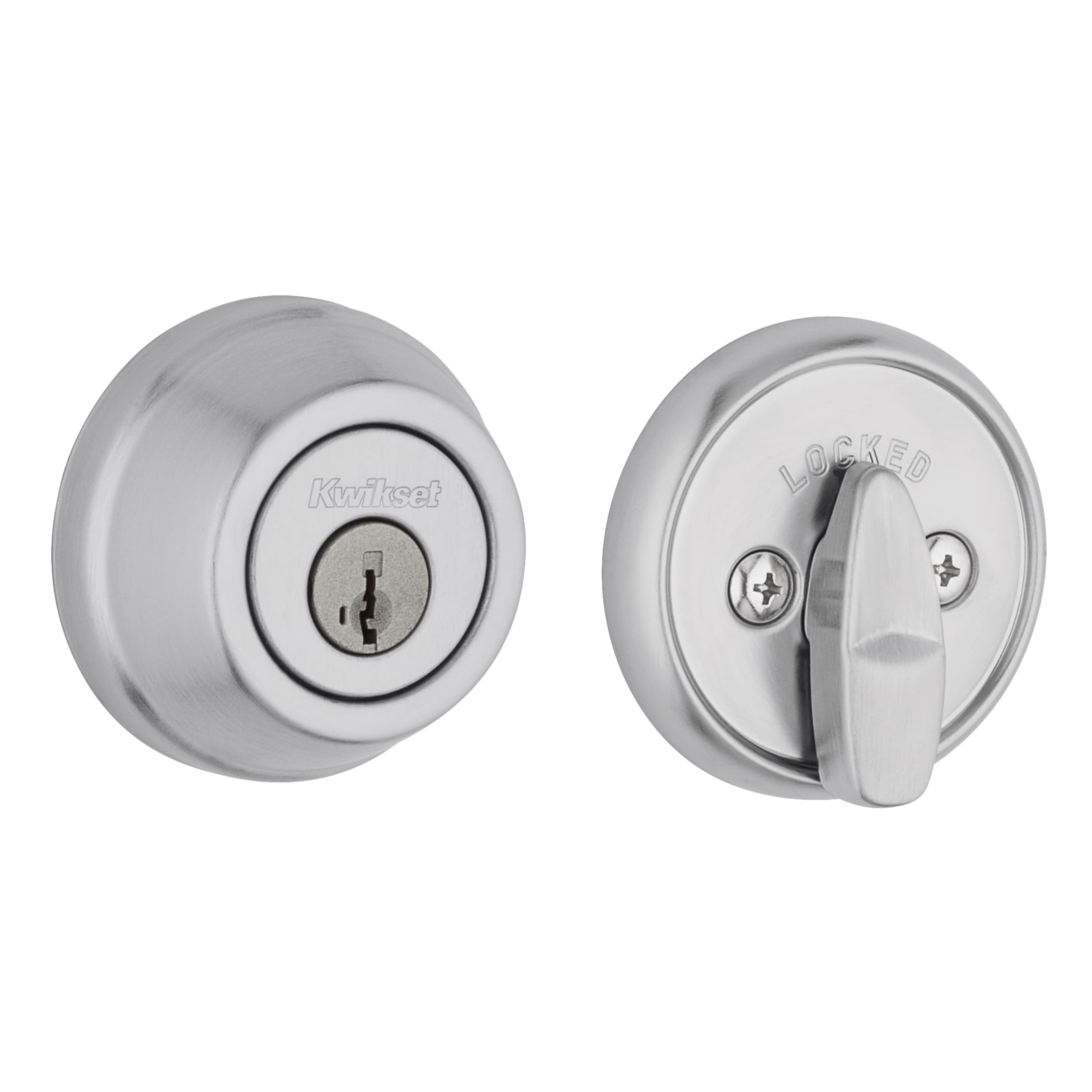
Слика 1: Спољашњост view of the Kwikset 780 Deadbolt Lock in Satin Chrome.

Слика 2: Унутрашњост view of the Kwikset 780 Deadbolt Lock with thumbturn.
3. Упутства за инсталацију
Installation typically requires only a Phillips head screwdriver. Ensure your door is between 1-3/8" and 1-3/4" thick. The latch backset is adjustable from 2-3/8" to 2-3/4".
- Припремите врата: Verify that the door has standard bore holes for a deadbolt. If installing on a new door, follow the template provided with the lock for drilling.
- Adjust the Latch: If necessary, twist the latch mechanism to adjust the backset to either 2-3/8" (60mm) or 2-3/4" (70mm) to match your door's existing bore hole.
- Инсталирајте браву: Insert the latch into the edge of the door, ensuring the bolt faces the door frame. Secure it with the provided screws.
- Install the Exterior Deadbolt: Insert the exterior deadbolt assembly (with the key cylinder) through the door, aligning the tailpiece with the slot in the latch mechanism.
- Install the Interior Deadbolt: Place the interior deadbolt assembly over the tailpiece and align the mounting holes. Secure both assemblies with the long mounting screws.
- Инсталирајте заштитну плочу: Attach the strike plate to the door frame, ensuring it aligns with the deadbolt. Secure with screws.
- Пробни рад: Insert a key into the exterior cylinder and turn to ensure the deadbolt extends and retracts smoothly. Test the interior thumbturn as well.

Image 3: Diagram illustrating adjustable latch backset and compatible door thickness (1-3/8" to 1-3/4").

Image 4: A person installing a Kwikset lock using a screwdriver, demonstrating ease of installation.
4. Упутство за употребу
The Kwikset 780 is a single cylinder deadbolt, meaning it is operated by a key from the exterior and a thumbturn from the interior.
- За закључавање споља: Insert the key into the keyway and turn it to extend the deadbolt. Remove the key.
- За откључавање споља: Insert the key into the keyway and turn it to retract the deadbolt. Remove the key.
- За закључавање изнутра: Turn the thumbturn on the interior side to extend the deadbolt.
- За откључавање из унутрашњости: Turn the thumbturn on the interior side to retract the deadbolt.
5. SmartKey Rekeying Instructions
Kwikset's SmartKey Security allows you to rekey your lock to a new Kwikset key in seconds, without removing the lock from the door. This is useful if you lose a key, move, or want all your Kwikset locks to use the same key.
Video 1: Official Kwikset video demonstrating the SmartKey Security rekeying process. This video explains how to rekey your lock quickly and easily.
- Уметни тренутни кључ: Уметните тренутно исправан кључ у потпуности у цилиндар.
- Turn 90 Degrees Clockwise: Turn the key 90 degrees clockwise to the horizontal position.
- Insert SmartKey Reset Tool: While holding the key in the horizontal position, insert the SmartKey Reset Tool firmly into the small hole next to the keyway. You will feel a click.
- Уклони тренутни кључ: Уклоните тренутни кључ док држите алатку за ресетовање уметнуту.
- Уметни нови кључ: Insert the new Kwikset key you wish to use fully into the cylinder.
- Remove Reset Tool: Remove the SmartKey Reset Tool.
- Turn New Key 180 Degrees Counter-Clockwise: Turn the new key 180 degrees counter-clockwise back to the vertical position.
- Тестирајте нови кључ: Test the new key several times to ensure it operates the lock smoothly.
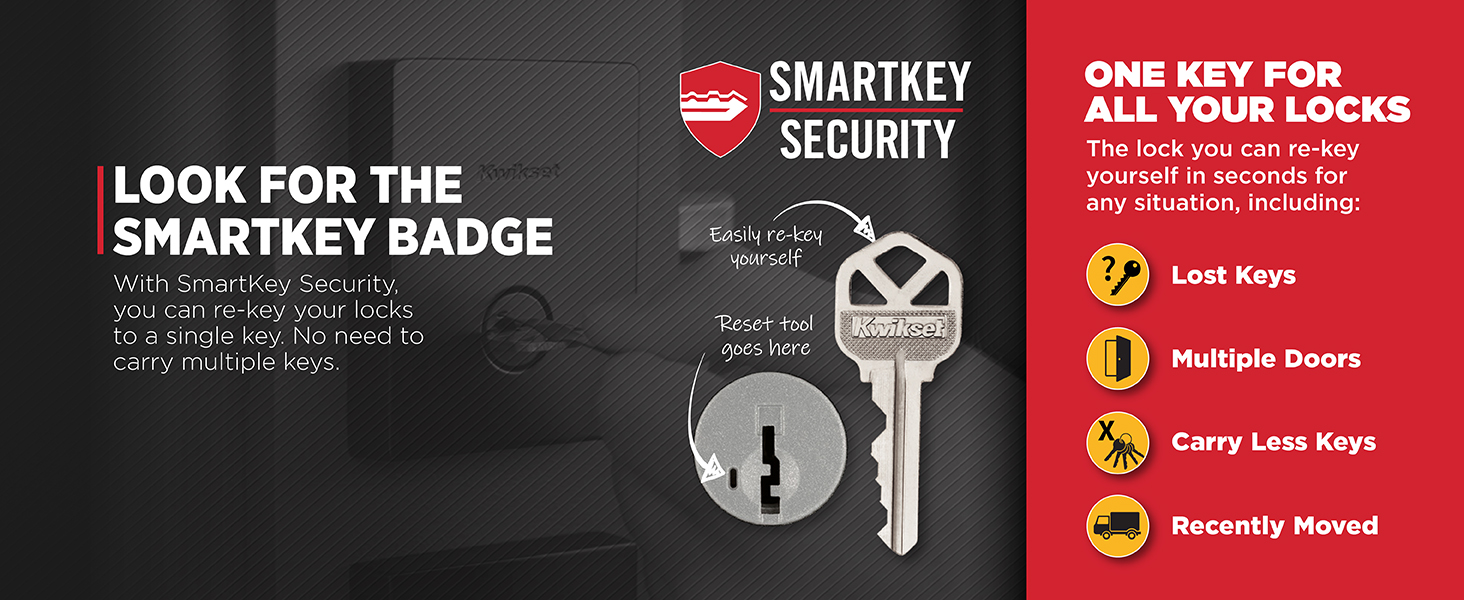
Image 5: Diagram illustrating the SmartKey Security rekeying process, showing the key and reset tool insertion points.
6. Одржавање
To ensure the longevity and smooth operation of your Kwikset deadbolt, follow these maintenance guidelines:
- Чишћење: Очистите браву меком крпомamp крпом. Избегавајте абразивна средства за чишћење или раствараче, јер могу оштетити завршну обраду.
- подмазивање: Periodically apply a graphite-based lubricant to the keyway if the lock feels stiff. Do not use oil-based lubricants, as they can attract dirt and debris.
- инспекција: Regularly check all screws for tightness and ensure the deadbolt operates freely without binding.
The lock features Microban Protection, which inhibits the growth of bacteria on the surface, contributing to a cleaner product.
КСНУМКС. Решавање проблема
| Проблем | Могући узрок | Решење |
|---|---|---|
| Кључ се не окреће или је тврд. | Misaligned key, debris in keyway, or lack of lubrication. | Ensure the correct key is used and fully inserted. Apply graphite lubricant to the keyway. |
| Затварач се не извлачи/увлачи у потпуности. | Misaligned latch, strike plate, or loose screws. | Check latch and strike plate alignment. Tighten all mounting screws. Ensure door frame is not warped. |
| Поновно кодирање SmartKey-а не успева. | Incorrect key insertion, improper use of reset tool, or non-Kwikset key. | Ensure the current key is fully inserted and turned 90 degrees. Insert the reset tool firmly until a click is felt. Use only Kwikset keys for rekeying. |
8. Спецификације
- Назив модела: 780 Deadbolt Series
- Број дела: 97800-222
- Тип браве: Једноструки цилиндрични вијак
- Материјал: Метал
- завршити: Сатин Цхроме
- Компатибилност дебљине врата: 1-3/8" to 1-3/4"
- Подесиви наслони за затварање: 2-3/8" or 2-3/4"
- Посебне карактеристике: SmartKey Rekey Security, Anti-Bump, Microban Protection
- Сертификати: Grade 2 BHMA certified for Security, Durability, and Finish
- Укључене компоненте: Internal and External Deadbolt, Adjustable Latch, 3 Faceplates, 2 Keys
- Тежина артикла: 1.6 фунти
- Димензије производа: 1.03 к 2.63 к 2.63 инча
9. Гаранција и подршка
Kwikset products are backed by a limited lifetime mechanical and finish warranty, and a 1-year electronics warranty (if applicable). For detailed warranty information or technical support, please visit the official Kwikset website or contact Kwikset customer service.
Подршка на мрежи: www.kwikset.com/support
Телефонска подршка: Погледајте Квиксет webсајт за регионалне контакт бројеве.


