Увод
Хвала вам на куповиниasing the Baseus S-09 Pro Series Car FM Transmitter. This device allows you to stream audio from your smartphone or other devices to your car's FM radio, and also provides fast charging capabilities. Please read this manual carefully before use to ensure proper operation and to maximize the product's lifespan.
Производ је завршенview
The Baseus S-09 Pro Series Car FM Transmitter is designed to enhance your in-car audio experience and provide convenient charging. Key features include:
- FM Transmitter Functionality: Broadcasts audio to your car's FM radio.
- Блуетоотх 5.3 повезивање: For stable wireless audio streaming from compatible devices.
- Flash Drive Playback: Supports audio playback directly from a flash drive (up to 512GB).
- Брзо пуњење: Equipped with a USB-C port supporting PD 18W (Max) fast charging.
- Dual-Mic System: Provides premium sound quality and clear calls.
- Large LED Screen with Dual Display: Shows frequency band and battery voltage alternately.
- Троструки портови за пуњење: Offers multiple charging options.
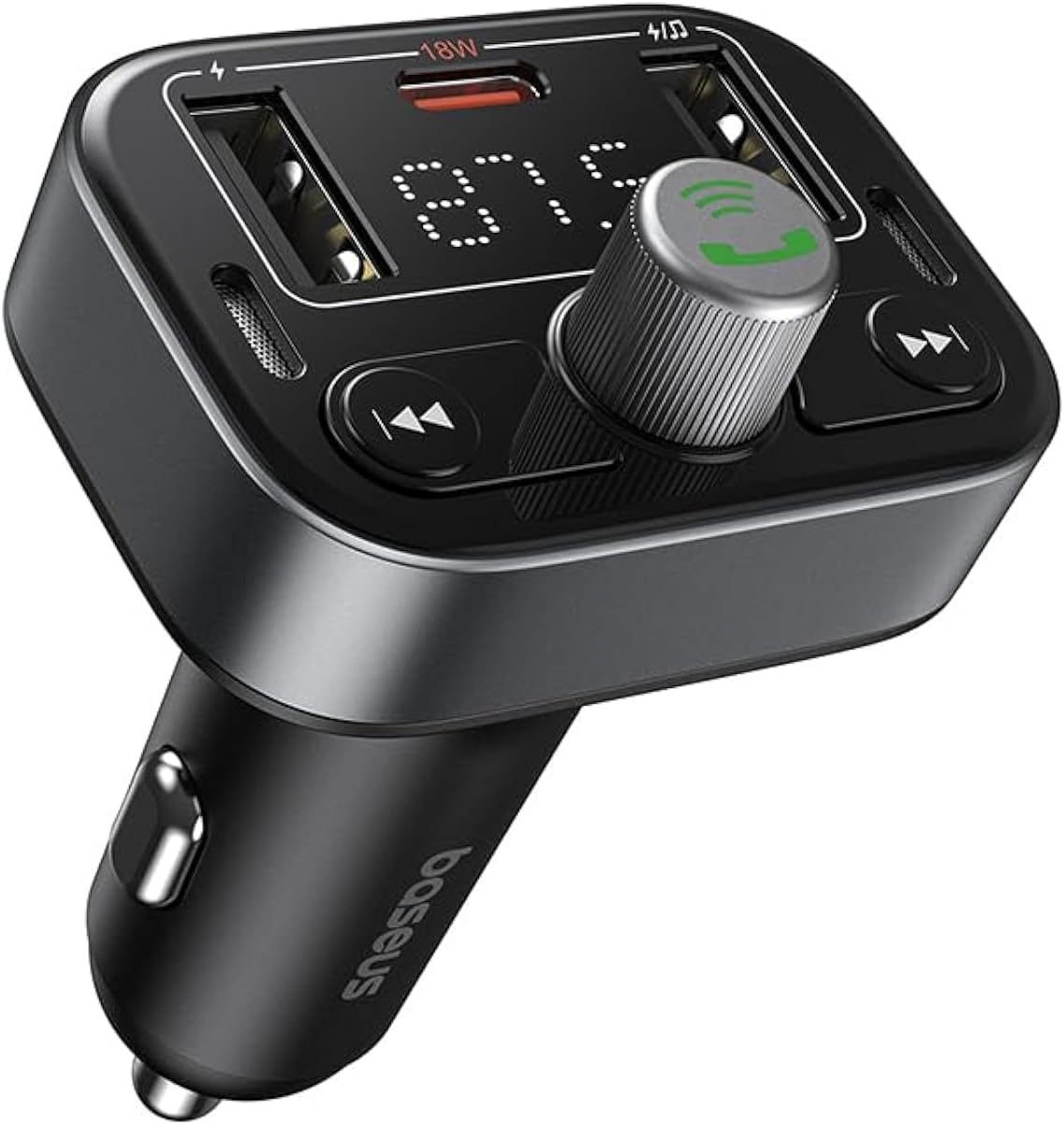
Слика 1: Предња страна view of the Baseus S-09 Pro Series Car FM Transmitter, showing the display, control knob, and USB ports.
Садржај пакета
Молимо вас да проверите пакет за следеће ставке:
- Baseus S-09 Pro Series Car FM Transmitter
- Упутство за употребу (овај документ)

Figure 2: The Baseus S-09 Pro Series Car FM Transmitter shown in its retail packaging.
Сетуп
- Уметните у утичницу за упаљач у аутомобилу: Plug the Baseus S-09 Pro Series Car FM Transmitter firmly into your car's 12V/24V cigarette lighter socket. The device will power on automatically, and the LED display will light up.
- Tune FM Frequency:
- On the FM Transmitter, press and hold the multi-function knob (the large central knob) until the FM frequency on the LED display starts flashing.
- Rotate the multi-function knob left or right to adjust the frequency. Choose an empty FM frequency (one with no radio station broadcasting) to minimize interference.
- On your car's FM radio, tune to the exact same empty frequency you selected on the transmitter.
- Once matched, the transmitter is ready to broadcast audio to your car stereo.
- Блуетоотх упаривање:
- After the device powers on, it will automatically enter Bluetooth pairing mode. The Bluetooth icon on the display may flash.
- On your smartphone or Bluetooth-enabled device, open the Bluetooth settings and search for available devices.
- Select "Baseus S-09 Pro" (or similar name) from the list to connect. Once connected, the Bluetooth icon on the transmitter's display will stop flashing and remain solid.

Figure 3: Illustration showing connection options: via flash drive and Bluetooth 5.3 pairing with a smartphone.
Упутство за употребу
Аудио репродукција
- Блуетоотх аудио: Once paired, play music or audio from your smartphone. The audio will be transmitted to your car's FM radio.
- Flash Drive Audio: Insert a USB flash drive (up to 512GB, formatted to FAT32) containing MP3 audio files into the designated USB port on the transmitter. The device will automatically detect and play the audio files.
- Контролна дугмад:
- Вишенаменско дугме: Rotate to adjust volume. Press once to play/pause.
- Previous Track Button (◀◀): Притисните за прелазак на претходну нумеру.
- Next Track Button (▶▶): Притисните за прелазак на следећу нумеру.
Хандс-фрее позивање
- Одговори/заврши позив: Press the multi-function knob once to answer an incoming call or end an ongoing call.
- Одбиј позив: Притисните и држите вишефункционално дугме 2 секунде да бисте одбили долазни позив.
- Поновно бирање последњег броја: Двапут притисните вишефункционално дугме да бисте поново позвали последњи бирани број.
- Пребаци позив на телефон: During a call, press and hold the multi-function knob for 2 seconds to switch the call between the transmitter and your phone.

Figure 4: The device highlighting its dual-mic system for premium sound quality during calls and music playback.
Уређаји за пуњење
- The transmitter features multiple USB ports for charging your devices.
- УСБ-Ц порт: Supports Power Delivery (PD) 18W (Max) fast charging. Use a compatible USB-C to USB-C or USB-C to Lightning cable for fast charging supported devices.
- УСБ-А портови: Provide standard charging for various devices.

Figure 5: The transmitter connected via its USB-C port to an iPhone for fast charging.
Прикажи информације
- The large LED screen alternately displays the current FM frequency and the car battery voltage.
- ФМ фреквенција: Indicates the frequency the transmitter is broadcasting on.
- Баттери Волtage: Приказује волtage of your car's battery, allowing you to monitor its health.

Figure 6: The LED screen displaying both the FM frequency (87.5) and the car battery voltagе (12.5В).
Одржавање
- Keep the device dry. Do not expose it to moisture or extreme temperatures.
- Очистите уређај меком, сувом крпом. Не користите јаке хемикалије или абразивна средства за чишћење.
- Избегавајте испуштање или излагање уређаја јаким ударима.
- Чувати на хладном и сувом месту када се не користи.
Решавање проблема
| Проблем | Могући узрок | Решење |
|---|---|---|
| Нема напајања/Екран је искључен | Not properly inserted into cigarette lighter; Car socket fuse blown. | Ensure firm connection. Check car's fuse box. |
| Static/Poor audio quality | FM frequency interference; Volume too low. | Change to a different, empty FM frequency. Increase volume on both transmitter and car stereo. |
| Не може се упарити Блуетоотх | Device not in pairing mode; Bluetooth disabled on phone. | Ensure transmitter is in pairing mode. Enable Bluetooth on your phone and search again. |
| Брзо пуњење не ради | Cable not compatible; Device does not support fast charging. | Use a certified fast-charging cable. Ensure your device supports PD 18W. |
Спецификације
- Назив модела: S-09 Pro Series
- Број модела: Ц10762200113-00
- Хардверски интерфејс: Блуетоотх
- Компатибилни уређаји: Car Stereo System, Smartphone, Tablet
- Посебне карактеристике: ФМ предајник
- Аудио улаз: 3.5 мм АУКС
- Режим аудио излаза: Стерео
- Тип аудио излаза: ФМ радио, Блуетоотх
- Волtage: 12 волти (ДЦ)
- Извор напајања: Цордед Елецтриц
- Бежични тип: Блуетоотх
- Блуетоотх верзија: 5.3
- Media Type Supported: MP3 (from flash drive)
- Димензије пакета: 17 к 11.6 к 3.9 цм
- Тежина артикла: 80 грама
- Боја: Црно
Гаранција и подршка
Baseus products typically come with a standard manufacturer's warranty. Please refer to the warranty card included in your product packaging or visit the official Baseus webсајт за детаљне услове гаранције.
For technical support, troubleshooting assistance, or warranty claims, please contact Baseus customer service through their official channels or the retailer from whom you purchased the product.
Више информација и подршке можете пронаћи на Басеус продавница на Амазону.


