1. Увод
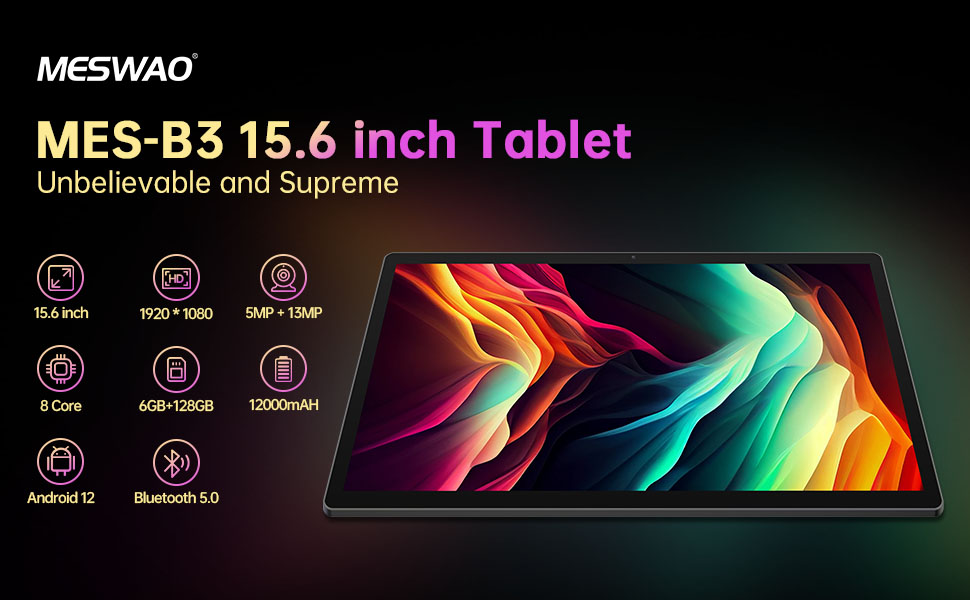
Welcome to the user manual for your MESWAO MES-B3 15.6-inch Android 13 Tablet. This document provides essential information for setting up, operating, maintaining, and troubleshooting your device. The MES-B3 tablet features a large 15.6-inch IPS HD display, an Octa-Core processor, 6GB RAM, 128GB internal storage (expandable), and a 12000mAh battery, designed for a versatile user experience.

Figure 1: MESWAO MES-B3 Tablet Overview
2. Безбедносне информације
Please read all safety instructions carefully before using your tablet to prevent injury or damage to the device. Keep this manual for future reference.
- Безбедност батерије: Do not attempt to replace the battery yourself. Do not expose the tablet to extreme temperatures, direct sunlight, or fire. Do not puncture, drop, or disassemble the battery.
- Вода и влага: This tablet is not waterproof. Avoid exposing it to water, rain, or high humidity.
- Чишћење: Use a soft, dry cloth to clean the tablet. Do not use liquid cleaners or aerosols.
- Руковање: Избегавајте испуштање таблета или његово излагање јаким ударцима.
- Заштита слуха: When using headphones, set the volume to a moderate level to avoid hearing damage.
3. Садржај пакета
Проверите да ли су све ставке присутне у пакету:
- MESWAO MES-B3 15.6-inch Android 13 Tablet
- Повер Адаптер
- УСБ-Ц кабл
- Кориснички приручник (овај документ)
4. Девице Оверview
Familiarize yourself with the physical components of your MESWAO MES-B3 tablet.

Figure 2: Buttons and Connectors
- Дугме за напајање: Press and hold to turn the tablet on or off. Press briefly to turn the screen on or off.
- Дугмад за јачину звука: Подесите јачину звука.
- Предња камера: For video calls and selfies (5MP).
- Rear Camera with Flashlight: For taking photos and videos (13MP).
- Порт типа Ц: За пуњење таблета и повезивање са рачунаром.
- Слот за ТФ картицу: Insert a MicroSD card to expand storage.
- Стерео звучници: Обезбедите аудио излаз.
5. Подешавање
5.1 Пуњење таблета
Before first use, fully charge your tablet. Connect the USB-C cable to the tablet's Type-C port and the other end to the power adapter. Plug the adapter into a wall outlet. The battery indicator on the screen will show charging status.
5.2 Укључивање/искључивање
- За укључивање: Press and hold the Power Button until the MESWAO logo appears.
- За искључивање: Press and hold the Power Button until the power options appear, then select 'Power off'.
- Рестартовати: Press and hold the Power Button until the power options appear, then select 'Restart'.
5.3 Чаробњак за почетно подешавање
При првом укључивању, таблет ће вас водити кроз процес почетног подешавања:
- Изаберите жељени језик.
- Повежите се на Ви-Фи мрежу.
- Пријавите се помоћу свог Google налога или креирајте нови.
- Review и прихватите услове и одредбе.
- Подесите закључавање екрана (ПИН, шаблон, лозинка).
5.4 Уметање MicroSD картице
To expand the tablet's storage, you can insert a MicroSD card (up to 256GB, as per some product information, though 1TB is also mentioned in images, please verify with product packaging for exact maximum). Locate the TF card slot on the side of the tablet. Gently insert the MicroSD card with the gold contacts facing down until it clicks into place.

Figure 3: Storage Expansion with MicroSD Card
6. Управљање таблетом
6.1 Основна навигација
The MESWAO MES-B3 runs on Android 13, offering an intuitive touch interface.
- Додирните: Изаберите ставку или отворите апликацију.
- Превуците: Крећите се кроз екране, листајте листе или одбаците обавештења.
- Зумирање штипкањем прстију: Увећајте или смањите садржај на екрану.
- Почетни екран: Access your apps and widgets. Swipe down from the top for notifications and quick settings.
Слика 4: Интерфејс Андроида 13
6.2 Ви-Фи веза
- Иди на Подешавања > Мрежа и интернет > Интернет.
- Укључите Ви-Фи.
- Изаберите жељену мрежу са листе и унесите лозинку ако се то од вас затражи.
6.3 Блуетоотх упаривање
Таблет подржава Блутут 5.0 за повезивање бежичних додатака.
- Иди на Подешавања > Повезани уређаји > Поставке везе > Блуетоотх.
- Укључите Блуетоотх.
- Уверите се да је ваш Bluetooth уређај у режиму упаривања.
- Select your device from the 'Available devices' list and follow on-screen prompts to pair.
6.4 Управљање апликацијама
- Инсталирајте апликације: Отворите апликацију Google Play продавница, потражите жељену апликацију и додирните „Инсталирај“.
- Деинсталирајте апликације: Press and hold an app icon on the home screen or app drawer, then drag it to 'Uninstall' or select 'App info' and choose 'Uninstall'.
- Manage Apps: Иди на Подешавања > Аппс да view, force stop, or clear data for installed applications.
6.5 Подешавања екрана
Прилагодите свој viewискуство:
- Иди на Подешавања > Дисплаи.
- Подесите Ниво осветљености.
- Сет Истекање екрана (sleep duration).
- Промена Величина фонта и Величина екрана.
- Омогући Тамна тема for reduced eye strain.
6.6 Управљање батеријом
The MES-B3 features a 12000mAh battery for extended use.

Слика 5: Продужени век трајања батерије
- Иди на Подешавања > Батерија да view usage and optimize settings.
- Омогући Уштеда батерије mode to extend battery life when needed.
- Затворите некоришћене апликације које раде у позадини.
- Смањите осветљеност екрана.
7. Одржавање
7.1 Чишћење
- Користите меку крпу која не оставља влакна да нежно обришете екран и кућиште.
- За тврдокорне мрље, благо дampОперите крпу водом или средством за чишћење екрана посебно дизајнираним за електронику.
- Avoid using abrasive materials, alcohol, or chemical solvents.
7.2 Складиштење
- Таблет чувати на хладном и сувом месту, заштићено од директне сунчеве светлости и екстремних температура.
- If storing for an extended period, ensure the battery is charged to about 50% to prolong its lifespan.
7.3 Ажурирања софтвера
Редовно проверавајте ажурирања софтвера како бисте осигурали оптималне перформансе и безбедност.
- Иди на Подешавања > Систем > Ажурирање система.
- The tablet will check for available updates. Follow the on-screen instructions to download and install any updates.
КСНУМКС. Решавање проблема
Ево решења за уобичајене проблеме на које можете наићи:
| Проблем | Решење |
|---|---|
| Таблет се не укључује | Ensure the tablet is charged. Connect it to the charger for at least 30 minutes, then try powering it on again. |
| Проблеми са Ви-Фи везом | Restart your Wi-Fi router and the tablet. Go to Settings > Network & internet > Internet, forget the network, and reconnect. |
| Споро перформансе | Close unused apps. Clear cache for frequently used apps (Settings > Apps > [App Name] > Storage & cache > Clear cache). Restart the tablet. |
| Батерија се брзо празни | Reduce screen brightness. Disable Wi-Fi/Bluetooth when not in use. Close background apps. Check battery usage in Settings > Battery to identify power-hungry apps. |
| Апликације се руше или замрзавају | Force stop the app (Settings > Apps > [App Name] > Force stop). Clear the app's cache. If the problem persists, uninstall and reinstall the app. |
9. Спецификације
Detailed technical specifications for the MESWAO MES-B3 tablet:

Слика 6: Кључне карактеристике и спецификације
| Феатуре | Спецификација |
|---|---|
| Бранд | МЕСВАО |
| Број модела | МЕС-Б3 |
| Оперативни систем | Андроид 13 |
| Процесор | MediaTek Octa-Core (MTK6789) |
| РАМ | 6 ГБ |
| Интерна меморија | 128 ГБ |
| Екпандабле Стораге | Up to 256 GB (via TF/MicroSD card) |
| Величина екрана | 15.6 инча |
| Резолуција екрана | 1920 x 1080 Pixels (IPS HD) |
| Предња камера | 5 МП |
| Задња камера | 13 МП |
| Капацитет батерије | 12000 мАх |
| Трајање батерије | Приближно 10 сати (у зависности од употребе) |
| Повезивање | Bluetooth 5.0, Wi-Fi (802.11ac, 2.4G/5G) |
| Портс | USB Type-C, TF Card Slot |
| Боја | Греи |
| Димензије (Д к Ш к В) | 36.85 к 22.25 к 0.93 цм |
| Тежина | 1.1 килограма |
10. Гаранција и подршка
Your MESWAO MES-B3 tablet is covered by a standard manufacturer's warranty. Please refer to the warranty card included in your package for specific terms and conditions, including warranty duration and coverage details.
For technical support, troubleshooting assistance beyond this manual, or warranty claims, please contact MESWAO customer service through the retailer where you purchased the product or visit the official MESWAO webсајт за контакт информације.


