1. Производ је готовview
The Irfora SZ305 is a professional digital multimeter designed for accurate and rapid measurement of various electrical parameters. It features a high-definition backlit LCD display for clear readings in diverse environments and a retractable stand for convenient use.
Кључне функције укључују:
- АЦ/ДЦ Волtagе и Мерење струје
- Diode, Resistance, and Capacitance testing
- Мерење фреквенције
- Buzzer continuity test
- hFE Triode testing for NPN/PNP transistors
- Нон-Цонтацт Волtagе (НЦВ) детекција
- Battery detection (1.5V, 3V, 9V, 12V)

Image 1.1: The Irfora SZ305 Digital Multimeter highlighting its various measurement functions including AC/DC voltage/current, diode, capacitance, frequency, buzzer, resistance, NCV induction, hFE, and battery detection.
2. Безбедносне информације
Please read and understand all safety instructions before operating the multimeter. Failure to follow these instructions may result in electric shock, fire, or damage to the device.
- Always ensure the multimeter is set to the correct function and range before making any measurements.
- Не покушавајте да мерите волtages or currents exceeding the maximum specified limits for the device.
- Будите изузетно опрезни када радите са струјним колима под напоном. Висока јачина звукаtagес може бити опасно.
- Inspect test leads for damage before each use. Do not use if insulation is cracked or damaged.
- Do not operate the multimeter if it appears damaged or is not functioning properly.
- Избегавајте коришћење мултиметра у влажним срединама или током електричних олуја.
- Одмах замените батерије када се појави индикатор празне батерије како бисте осигурали тачна очитавања.
- Always disconnect test leads from the circuit before changing functions or ranges.
3. Подешавање и почетна употреба
3.1 Инсталација батерије
Мултиметар захтева батерије за рад. Да бисте инсталирали или заменили батерије:
- Уверите се да је мултиметар искључен и да су мерни каблови одспојени.
- Пронађите поклопац одељка за батерију на задњој страни уређаја.
- Користите шрафцигер да отворите одељак.
- Уметните нове батерије, водећи рачуна о исправном поларитету (+ и -).
- Вратите поклопац одељка за батерије и причврстите га завртњем.
3.2 Using the Retractable Support Stand
The multimeter is equipped with a retractable stand on its back for convenient viewтоком мерења.
- To deploy the stand, gently pull it outwards from the back of the device until it locks into position.
- Place the multimeter on a flat surface.
- To retract the stand, push it back into its original position until it is flush with the device body.
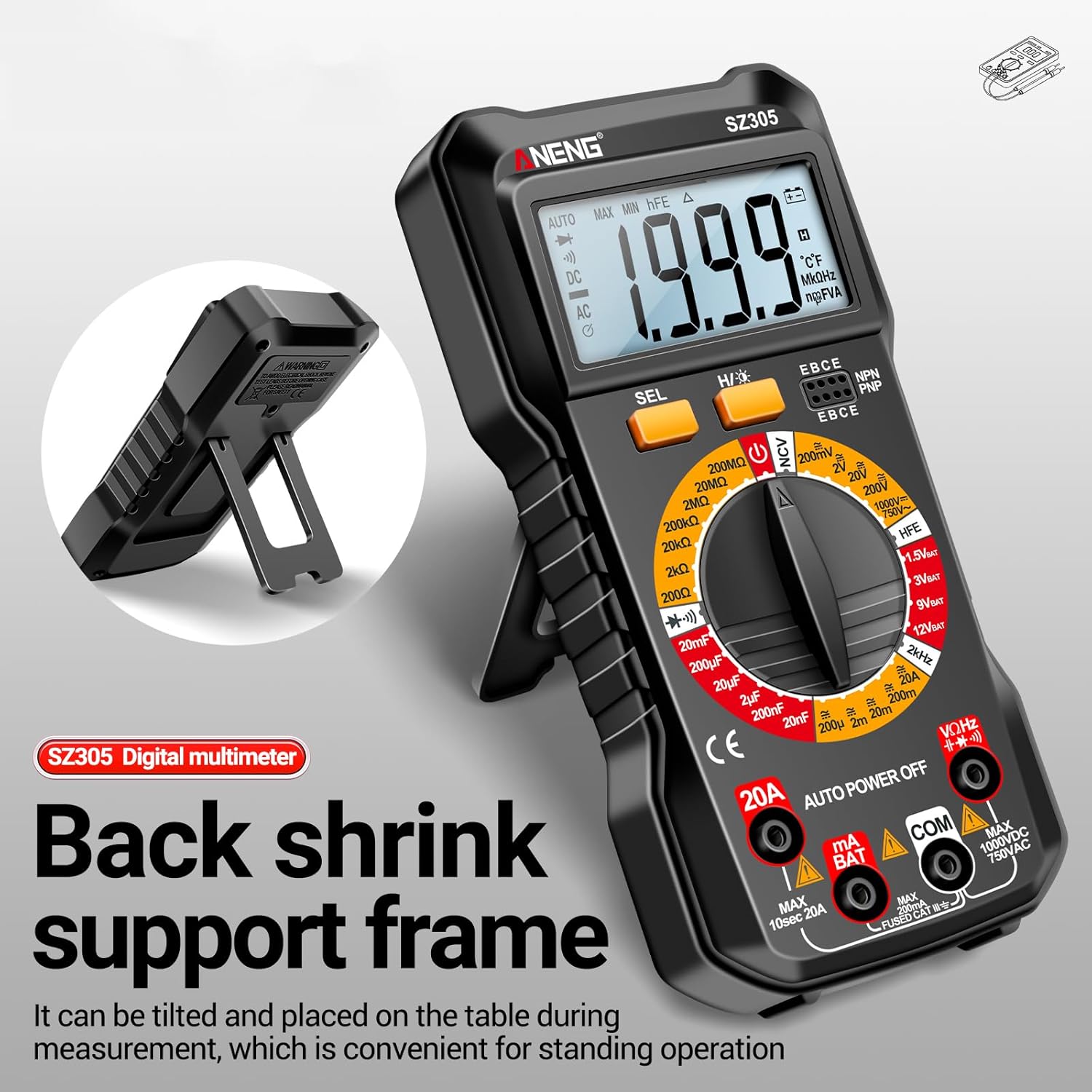
Image 3.1: The Irfora SZ305 Digital Multimeter demonstrating its retractable back support frame for angled viewing on a table.
4. Упутство за употребу
This section details how to perform various measurements with your Irfora SZ305 Digital Multimeter.
4.1 Укључивање/искључивање и позадинско осветљење
- To power on the device, rotate the rotary switch from "AUTO POWER OFF" to any desired measurement function.
- To power off, rotate the switch back to "AUTO POWER OFF". The device also features an auto-power-off function after a period of inactivity.
- To activate the LCD backlight, press and hold the "H/☝" button. The backlight will illuminate, improving visibility in dark environments. Press and hold again to turn off.

Image 4.1: The Irfora SZ305 Digital Multimeter displaying its high-definition backlit LCD screen, enhancing readability in low-light conditions.
4.2 АЦ/ДЦ Волtagе Мерење
- Insert the red test lead into the "VHz" jack and the black test lead into the "COM" jack.
- Rotate the rotary switch to the "V~" (AC Voltagе) или "V=" (DC Voltage) range.
- Повежите мерне сонде преко кола или компоненте коју треба мерити.
- Прочитајте књtagе вредност приказана на ЛЦД екрану.

Image 4.2: A user measuring AC voltage with the Irfora SZ305 Digital Multimeter in an electrical panel, demonstrating proper probe placement.
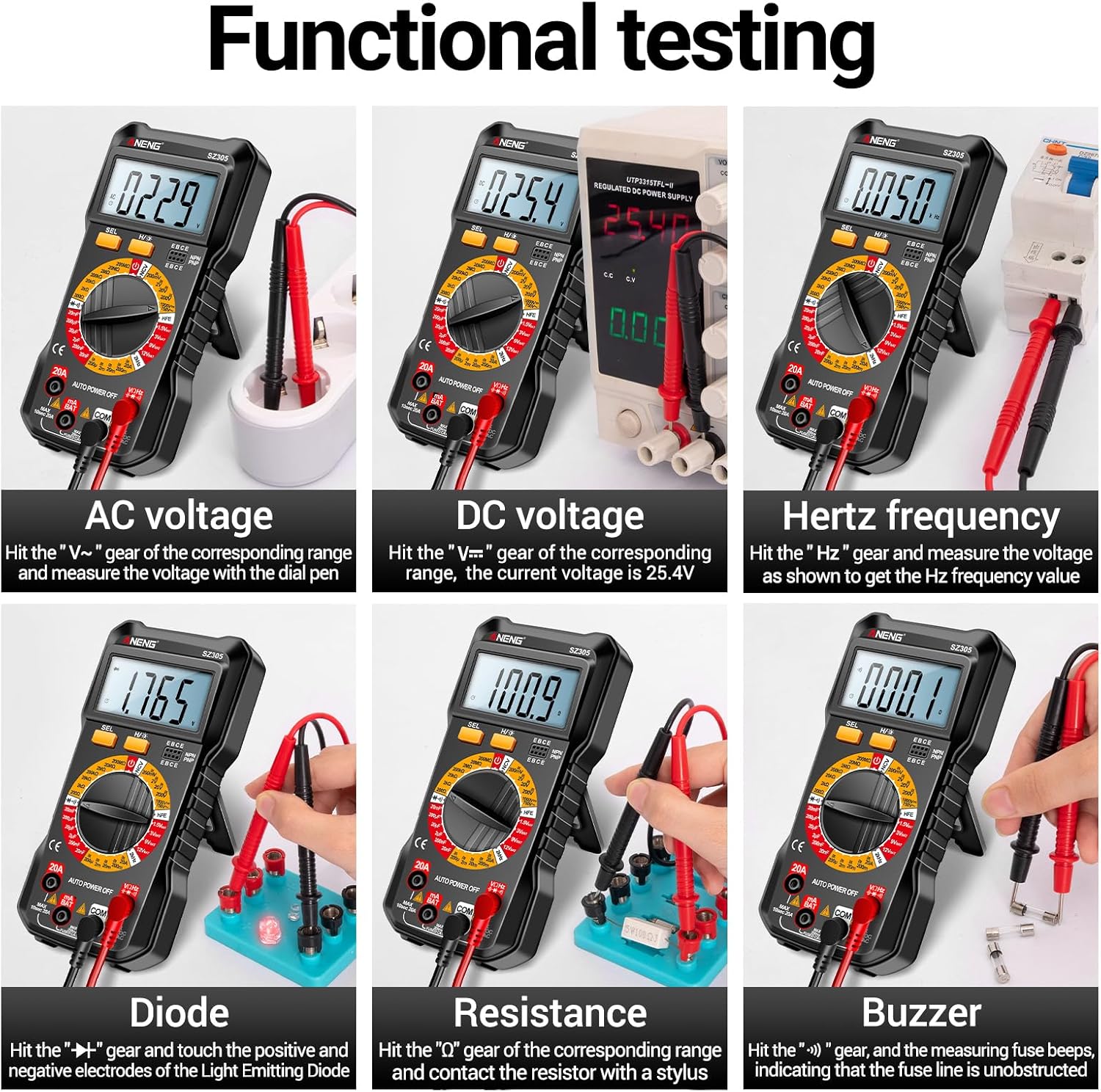
Слика 4.3: Примерamples of functional testing with the Irfora SZ305, showing measurements for AC voltagе, ДЦ волtage, Hertz frequency, diode, resistance, and continuity (buzzer).
4.3 Мерење наизменичне/једносмерне струје
Опрез: Ensure the circuit is de-energized before connecting the multimeter in series for current measurement. Incorrect connection can blow the fuse or damage the meter.
- Insert the red test lead into the "mA" or "20A" jack (depending on expected current) and the black test lead into the "COM" jack.
- Rotate the rotary switch to the appropriate "mA~" / "mA=" or "20A~" / "20A=" range.
- Отворите коло у којем треба мерити струју и повежите мултиметар серијски.
- Прикључите напајање на коло и очитајте вредност струје.

Слика 4.4: Примерamples of functional testing with the Irfora SZ305, showing measurements for 9V, 3V, 1.5V, and 12V batteries, hFE, capacitance, AC current, and DC current.
4.4 Мерење отпора
- Insert the red test lead into the "VHz" jack and the black test lead into the "COM" jack.
- Rotate the rotary switch to the "Ω" (Resistance) range.
- Ensure the component to be measured is de-energized. Connect the test probes across the component.
- Прочитајте вредност отпора.
4.5 Мерење капацитивности
- Insert the red test lead into the "VHz" jack and the black test lead into the "COM" jack.
- Rotate the rotary switch to the "F" (Capacitance) range.
- Уверите се да је кондензатор потпуно испражњен пре мерења како бисте спречили оштећење мерача.
- Спојите мерне сонде преко кондензаторских терминала.
- Очитајте вредност капацитета.
4.6 Diode Test and Continuity (Buzzer)
- Insert the red test lead into the "VHz" jack and the black test lead into the "COM" jack.
- Rotate the rotary switch to the "Diode/Buzzer" symbol.
- For Diode Test: Connect the red probe to the anode and the black probe to the cathode of the diode. A forward voltage drop will be displayed. Reverse the probes; an open circuit ("OL") should be displayed.
- За тест континуитета: Connect the probes across the circuit or component. If resistance is below a certain threshold, the buzzer will sound, indicating continuity.
4.7 Мерење фреквенције (Hz)
- Insert the red test lead into the "VHz" jack and the black test lead into the "COM" jack.
- Rotate the rotary switch to the "Hz" range.
- Повежите тест сонде преко извора сигнала.
- Read the frequency value displayed.
4.8 hFE Triode Test
This function measures the DC current gain (hFE) of transistors.
- Rotate the rotary switch to the "hFE" position.
- Identify whether the transistor is NPN or PNP type.
- Insert the transistor leads (Emitter, Base, Collector) into the corresponding sockets on the multimeter's hFE test port.
- Read the hFE value displayed on the screen.

Image 4.5: The Irfora SZ305 Digital Multimeter conducting an hFE test, showing a transistor inserted into the dedicated test socket.
4.9 Нон-Цонтацт Волtagе (НЦВ) Детекција
Функција NCV омогућава детекцију AC волуменаtagбез директног контакта, што повећава безбедност.
- Rotate the rotary switch to the "NCV" position.
- Bring the top front part of the multimeter close to the suspected AC voltage source (e.g., a live wire, outlet).
- The multimeter will emit an audible alarm and the NCV indicator will flash. The closer the device is to the voltage source, the more urgent the alarm will be.

Image 4.6: The Irfora SZ305 Digital Multimeter demonstrating its Non-Contact Voltage (NCV) detection feature near an electrical outlet, indicating the presence of AC voltage.
4.10 Battery Detection (1.5V, 3V, 9V, 12V)
The multimeter can test common battery voltagес.
- Rotate the rotary switch to the desired battery voltage range (e.g., "1.5V BAT", "3V BAT", "9V BAT", "12V BAT").
- Connect the red test lead to the positive terminal of the battery and the black test lead to the negative terminal.
- Прочитајте књtagе приказано на екрану.
5. Одржавање
5.1 Чишћење
Да бисте очистили мултиметар, обришите кућиште адamp крпом и благим детерџентом. Не користите абразивна средства или раствараче. Пре чишћења проверите да ли је уређај искључен из напајања и одвојен од свих струјних кола.
5.2 Замена батерије
Refer to section 3.1 for instructions on battery installation and replacement. Replace batteries when the low battery indicator appears on the display to maintain measurement accuracy.
5.3 Замена осигурача
If the current measurement function fails, the fuse may need replacement. This typically requires opening the back casing of the multimeter. Refer to the specifications for the correct fuse type and rating. If unsure, consult a qualified technician.
КСНУМКС. Решавање проблема
- No display or weak display:
- Проверите напуњеност батерије. Замените батерије ако су празне.
- Ensure the multimeter is powered on by rotating the switch from "AUTO POWER OFF".
- Нетачна очитавања:
- Ensure the correct function and range are selected for the measurement.
- Check test leads for proper connection and damage.
- Verify battery charge. Low batteries can affect accuracy.
- Ensure the circuit or component is properly prepared (e.g., capacitor discharged).
- Мерење струје не ради:
- Check if the fuse is blown. Replace if necessary (refer to section 5.3).
- Ensure test leads are connected to the correct current jacks ("mA" or "20A").
- Verify the multimeter is connected in series with the circuit.
- NCV function not responding:
- Ensure the rotary switch is set to "NCV".
- Confirm there is an AC voltage source present.
7. Спецификације
| Феатуре | Детаљ |
|---|---|
| Модел | СЗ305 |
| Бранд | Ирфора |
| Дисплаи | 1999 Counts, Backlit LCD |
| Функције | АЦ/ДЦ Волtage, AC/DC Current, Resistance, Capacitance, Frequency, Diode, Continuity, hFE, NCV, Battery Test |
| Аутоматско искључивање | Да |
| Боја | Црно |
| Референца произвођача | TYHDEE24863B |
Note: Detailed measurement ranges and accuracies are typically found in the full product datasheet.


