Увод
This manual provides comprehensive instructions for the operation and maintenance of your KOMERY 4K Digital Camera, Model X9-B. Please read this manual thoroughly before using the camera to ensure proper function and to maximize your photographic experience.
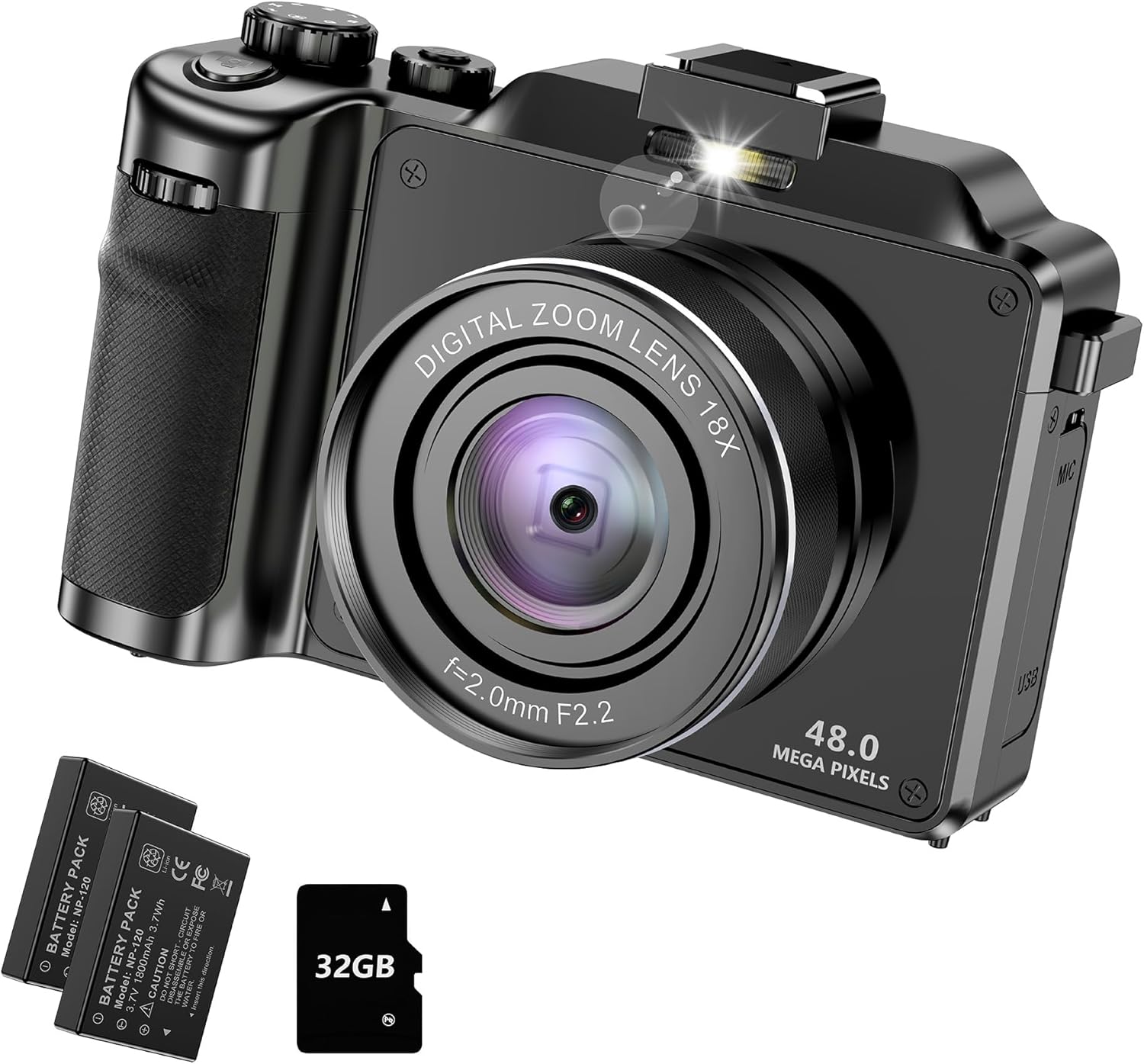
Слика 1: The KOMERY 4K Digital Camera X9-B, shown with its included accessories: two rechargeable batteries and a 32GB TF memory card.
Садржај пакета
Проверите да ли су све ставке наведене у наставку укључене у ваш пакет:
- KOMERY 4K Digital Camera (Model: X9-B)
- 2 x литијум-јонске батерије
- 32ГБ ТФ картица
- УСБ кабл за пуњење
- Блок пуњења
- Врист Страп
- Screwdriver (for changing covers)
- Упутство за употребу
Сетуп
1. Инсталација и пуњење батерије
The camera comes with two rechargeable Lithium Ion batteries. Ensure batteries are fully charged before first use.
- Locate the battery compartment on the bottom of the camera. Open the flap.
- Insert a charged battery into the compartment, ensuring correct polarity. Close the flap securely.
- To charge batteries, use the provided charging block and USB cable. The camera can also be charged directly via its Type-C USB port.

Слика 2: View of the camera's bottom, showing the battery compartment and the TF card slot. The Type-C USB port is located on the side.
2. Инсталација и форматирање TF картице
A 32GB TF card is included for storage. The camera supports up to 128GB TF cards.
- Locate the TF card slot on the bottom of the camera, next to the battery compartment.
- Уметните ТФ картицу у слот док не кликне на своје место.
- Важно: It is recommended to format the memory card before first use and periodically to ensure optimal performance and prevent data corruption. To format, navigate to the camera's settings menu, select "Format Memory Card," and confirm.
3. Причвршћивање каиша за зглоб
Attach the wrist strap to either side of the camera for secure handling and to prevent accidental drops.
Упутство за употребу
1. Цамера Оверview и контроле

Слика 3: Detailed diagram of the camera's components and controls.
- 1. TFT Display: Main screen for viewи навигација кроз мени.
- 2. Предња камера: For selfies and vlogging.
- 3. Микрофон: Built-in audio input.
- 4. Left Key/Camera Switch: Navigates left or switches to camera mode.
- 5. Right Key/DISP Key: Navigates right or changes display information.
- 6. Индикатор снаге: Shows camera power status.
- 7. Front/Delete Key: Navigates up or deletes files.
- 8. Back/WiFi Key: Navigates down or activates WiFi.
- 9. Playback/Mode Key: Enters playback mode or changes shooting mode.
- 10. OK/Menu Key: Confirms selection or opens menu.
- 11. T/W Key: Telephoto/Wide-angle zoom control.
- 12. Батеријска лампа: Provides illumination for photos/videos.
- 13. Задња камера: Главни објектив камере.
- 14. Слот за ТФ картицу: За уметање меморијске картице.
- 15. Screw Hole For Tripod: Standard tripod mount.
- 16. Поклопац батерије: Штити одељак за батерију.
- 17. Hot Shoe Interface: For external accessories like flashes or microphones.
- 18. Power Key: Укључује/искључује камеру.
- 19. Filter Turntable: Rotates to select different creative filters.
- 20. Photo Key: Shutter button to capture photos or start/stop video recording.
- 21. Интерфејс за микрофон: Улаз за спољни микрофон.
- 22. USB Interface: Тип-Ц порт за пуњење и пренос података.
2. Основна операција
- Укључивање/искључивање: Притисните тастер Power Key (18) on the top of the camera.
- Промена режима: Притисните тастер Playback/Mode Key (9) to switch between Photo, Video, and Playback modes.
- Снимање фотографија: У режиму фотографије притисните Photo Key (20) да се сликам.
- Снимање видео записа: У Видео режиму притисните Photo Key (20) to start recording. Press again to stop.
- Зумирање: Користите T/W Key (11) or the rolling wheel on the front to adjust the 18X digital zoom.

Слика 4: Visual representation of the 18X Digital Zoom capability.
- Навигација у менију: Притисните тастер OK/Menu Key (10) to access the menu. Use the arrow keys (4, 5, 7, 8) за навигацију и OK/Menu Key (10) потврдити.
3. Напредне функције
- Аутоматско фокусирање: The camera features autofocus for clear and sharp images.

Слика 5: Comparison showing the effectiveness of the camera's autofocus feature.
- Анти-Схаке: Activate the anti-shake function in the settings menu to reduce blur from camera movement.
- Детекција лица: Enable face detection for optimized portrait shots.
- Самоокидач: Set a delay (2, 5, or 10 seconds) before capturing a photo.
- Континуирано снимање: Снимите више фотографија у брзом низу.
- Светло за пуњење: Use the built-in flashlight for additional illumination in low-light conditions.
- Multiple Filters & Scene Modes: Ротирајте Filter Turntable (19) or select from various scene modes (e.g., Standard, Nostalgic, Monochrome, Vivid, Negative, Binary, Lomo, Dog Eye, Night Portrait, Landscape, Sports, Beach, Party) to enhance your photos.

Слика 6: The mode dial allows selection of various creative filters and scene modes.
- Webcam Function & Live Streaming: Connect the camera to a computer via the USB interface to use it as a webcam for video calls or live streaming.

Слика 7: Камера може да функционише као webcam for live streaming and video conferencing.
- ВиФи конекција: The camera supports direct WiFi connection to your smartphone for remote control and file transfer. Scan the QR code displayed on the camera screen to download the companion app (available for iOS and Android).
- Time Lapse & Slow Motion: Explore advanced video recording options such as time-lapse and slow-motion.
Одржавање
- Чишћење: Use a soft, dry cloth to clean the camera body. For the lens, use a specialized lens cleaning cloth and solution. Avoid abrasive materials.
- Складиштење: Чувајте камеру на хладном и сувом месту, даље од директне сунчеве светлости и екстремних температура. Извадите батерије ако је складиштите дуже време.
- Одржавање батерије: Fully charge batteries before storage and recharge them every few months to maintain battery health.
- Ажурирања фирмвера: Проверите произвођача website periodically for any available firmware updates to improve camera performance and add new features.
Решавање проблема
| Проблем | Могући узрок | Решење |
|---|---|---|
| Камера се не укључује. | Батерија је испражњена или неправилно уметнута. | Ensure batteries are fully charged and correctly inserted. Try the second battery. |
| Слике су мутне. | Anti-shake is off; insufficient light; dirty lens. | Activate anti-shake in settings. Ensure adequate lighting. Clean the lens. |
| Не могу да сачувам фотографије/видео записе. | TF card is full or corrupted; card not inserted. | Insert TF card. Delete unnecessary files or format the card (backup data first). Replace card if corrupted. |
| WiFi веза не успева. | Incorrect app or connection steps. | Ensure the correct app is installed via QR code. Follow the in-app instructions for connection. |
| Камера се замрзава. | Софтверски квар. | Извадите и поново уметните батерију да бисте ресетовали камеру. |
Спецификације
| Феатуре | Детаљ |
|---|---|
| Бранд | КОМЕРИ |
| Назив модела | X9 |
| Број модела ставке | Кс9-Б |
| Максимум Webцам Резолуција слике | 48 МП |
| Дигитални зум | 18Кс |
| Стабилизација слике | Анти-Схаке |
| Технологија фото сензора | ЦМОС |
| Подржано File Формат | ЈПЕГ |
| Батерије | 1 Lithium Ion batteries required. (included) - 2 included in package |
| Тежина артикла | 14.9 унци |
| Димензије пакета | 5.91 к 5.91 к 3.11 инча |
| Компатибилни носачи | Мицро Фоур Тхирдс |
| Први доступан датум | 18. јануара 2024. године |
Гаранција и подршка
For warranty information and customer support, please refer to the contact details provided on the product packaging or visit the official KOMERY webлокација. Планови заштите могу бити доступни и за проширену покривеност.
- Двогодишњи план заштите: Доступно за куповину.
- Двогодишњи план заштите: Доступно за куповину.


