Упутство за употребу за myPhone Flip LTE

Image: The myPhone Flip LTE, a blue flip phone, shown open with its display and large keypad visible. The back of the phone is also visible, showing the camera and SOS button.
1. Увод
Добродошли
Thank you for choosing the myPhone Flip LTE. This manual provides essential information on how to set up, operate, and maintain your new device. Please read it carefully to ensure optimal performance and longevity of your phone.
Производ је завршенview
The myPhone Flip LTE is a practical flip phone designed for clear communication and ease of use. Key features include:
- VoLTE Technology: Ensures high-quality audio for clear conversations.
- 2.8-инчни екран: Large and bright for easy readability of messages and information.
- СОС дугме: Provides quick access to emergency functions, including alarm, text message, and calling predefined contacts.
- Подршка за две СИМ картице: Allows the use of two SIM cards simultaneously.
- 1000 мАх батерија: Offers extended standby time, up to 6 days on a single charge.
- УСБ-Ц пуњење: Convenient and universal charging port.
- Интерфејс прилагођен кориснику: Features large, comfortable buttons and practical shortcuts for simple operation.

Image: A person, likely a senior, is shown smiling while holding the myPhone Flip LTE to their ear, demonstrating the phone's ease of use for its target demographic.
2. Подешавање
Садржај пакета
Пре него што почнете, уверите се да су све ставке присутне у пакету:
- myPhone Flip LTE Handset
- Батерија (1000 mAh)
- УСБ-Ц кабл за пуњење
- Кориснички приручник (овај документ)
Inserting SIM Card(s) and Battery
- Пажљиво уклоните задњу маску телефона.
- Locate the SIM card slots. The myPhone Flip LTE supports Dual SIM.
- Gently slide your Micro-SIM card(s) into the designated slot(s) until they click into place. Ensure the metal contacts face downwards. Exercise caution when handling the SIM card holders to avoid damage.
- Уметните батерију у њен одељак, поравнавајући златне контакте на батерији са контактима у телефону.
- Вратите задњи поклопац, чврсто притискајући док не шкљоцне на своје место.

Image: The back of the myPhone Flip LTE, a blue phone, featuring the camera lens and the prominent SOS button.
Почетно пуњење
Before first use, it is recommended to fully charge your phone. Connect the USB-C cable to the phone's charging port and the other end to a compatible USB power adapter or computer. The charging port is located at the bottom of the phone.

Слика: Крупни план view of the bottom edge of the myPhone Flip LTE, clearly showing the USB-C charging port and two small gold charging contacts.
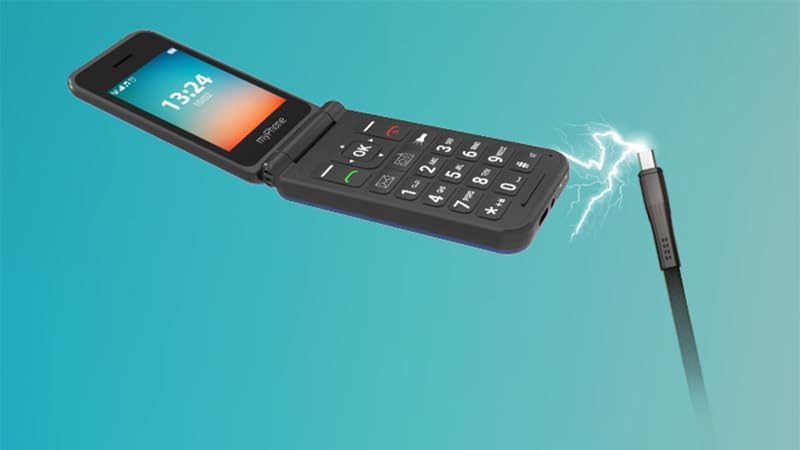
Image: An illustration depicting the myPhone Flip LTE being charged, with a USB-C cable connected to its port and a lightning bolt symbol indicating power transfer.
3. Operating Your myPhone Flip LTE
Основне функције
- Укључивање/искључивање: Press and hold the red call end button to power the phone on or off.
- Упућивање позива: Унесите број телефона помоћу тастатуре и притисните зелено дугме за позивање.
- Примање позива: Press the green call button to answer an incoming call. You can also configure the phone to answer by opening the flip.
- Слање порука: Navigate to the 'Messages' menu, select 'New Message', enter your text, and choose a recipient.
- Keypad and Navigation: The large, well-spaced buttons are designed for easy dialing and text input. Use the directional pad (up, down, left, right) and the 'OK' button for menu navigation.

Слика: Директни фронт view of the myPhone Flip LTE, open, clearly displaying its large screen with time and date, and the well-arranged, large-button keypad below.

Слика: Угаона view of the myPhone Flip LTE, open, with a focus on the large, clear keypad, highlighting its user-friendly design.
Посебне карактеристике
- СОС дугме: Located on the back of the phone. Press and hold this button to activate the emergency function. The phone will trigger an alarm, send a text message, and call predefined emergency contacts. Ensure you set up your emergency contacts in the phone settings.
- Лампа: The phone includes a built-in flashlight for convenience. Access it via a dedicated shortcut button on the keypad.
- ФМ радио: Enjoy your favorite radio stations. Note that headphones (not included) may be required to act as an antenna for optimal reception.
- VoLTE (Voice over LTE): This technology provides superior call quality, ensuring clear and crisp conversations. The myPhone Flip LTE supports 4G LTE for reliable communication.

Image: A close-up of the SOS button on the back of the myPhone Flip LTE, illuminated with a red glow, indicating its activation or readiness for emergency use.

Image: The myPhone Flip LTE is shown alongside the text '4G LTE VoLTE', emphasizing its advanced connectivity features for high-quality calls.
4. Одржавање
Чишћење
To keep your phone in good condition, wipe it regularly with a soft, dry cloth. Avoid using harsh chemicals or abrasive materials, as these can damage the phone's surface.
Баттери Царе
The 1000 mAh battery provides up to 6 days of standby time. To maximize battery life:
- Избегавајте екстремне температуре.
- Charge the phone regularly, but avoid overcharging or letting the battery completely drain too often.
- Use only the provided USB-C cable or a certified compatible charger.

Image: The myPhone Flip LTE is displayed next to the text '1000 mAh', highlighting its battery capacity.
Складиштење
When not in use for extended periods, store the phone in a cool, dry place away from direct sunlight and extreme temperatures. Ensure the battery has some charge before storing.
КСНУМКС. Решавање проблема
Уобичајени проблеми и решења
| Иссуе | Могући узрок | Решење |
|---|---|---|
| Телефон се не укључује | Слаба батерија; Дугме за напајање није довољно дуго притиснуто | Charge the phone for at least 30 minutes; Press and hold the power button for several seconds. |
| Лош квалитет позива | Weak signal; Network congestion | Move to an area with better network coverage; Try making the call again later. |
| Батерија не држи пуњење | Battery degradation; Improper charging | Ensure you are using the correct charger; Consider replacing the battery if it's old. |
| СИМ картица није откривена | SIM card improperly inserted; Damaged SIM card | Reinsert the SIM card carefully, ensuring it is correctly seated; Try a different SIM card to rule out a faulty SIM. |
6. Техничке спецификације
| Феатуре | Спецификација |
|---|---|
| Бранд | MP myPhone |
| Назив модела | Flip LTE |
| Број модела | IN-FL-TLMYFLIPNB |
| Величина екрана | 2.8 инча |
| Дисплаи Типе | ЛЦД |
| Резолуција | 240 к 320 пиксела |
| Величина инсталиране РАМ меморије | 48 МБ |
| Величина флеш меморије | 128 МБ |
| Капацитет батерије | 1000 mAh (литијум-јонска) |
| Просечно трајање батерије | До 6 дана |
| Целлулар Тецхнологи | 4G |
| Повезивање | Блуетоотх |
| Посебне карактеристике | Dual SIM, SOS Button, Flashlight |
| Оперативни систем | Други систем |
| Димензије | 11.9 x 8.7 x 5.3 cm; 107 g (Packaging) |
7. Гаранција и подршка
Информације о гаранцији
Your myPhone Flip LTE comes with a standard manufacturer's warranty. Please refer to the warranty card included in your package for specific terms and conditions, including coverage period and what is covered. Keep your proof of purchase for warranty claims.
Корисничка подршка
If you encounter any issues not covered in this manual or require further assistance, please contact myPhone customer support. Contact details can typically be found on the manufacturer's official webсајту или на паковању производа.


