Увод
This manual provides comprehensive instructions for the PowerA Enhanced Wireless Controller, designed for use with Nintendo Switch, Nintendo Switch Lite, Nintendo Switch – OLED Model, and Nintendo Switch 2. Please read this manual thoroughly before use to ensure proper setup and operation.
Садржај пакета
- PowerA Enhanced Wireless Controller (Pikachu Vibrant)
- 10фт (3м) УСБ-Ц кабл за пуњење
- Кориснички приручник (овај документ)
Карактеристике контролера
The PowerA Enhanced Wireless Controller offers a range of features for an optimized gaming experience:
- Бежична повезаност: Utilizes Bluetooth 5.0 technology for seamless connection.
- Пуњива батерија: Internal lithium-ion battery provides up to 30 hours of gameplay per charge.
- Advanced Gaming Buttons: Two mappable buttons for custom control configurations.
- Контроле покрета: Integrated motion sensors for intuitive gameplay.
- Ергономски дизајн: Superior ergonomics for extended comfortable gaming sessions.
- Smooth Thumbsticks: Embedded anti-friction rings ensure precise thumbstick control.
Напомена: This controller does not support HD rumble, IR camera, or Amiibo NFC functionality.
Распоред контролера
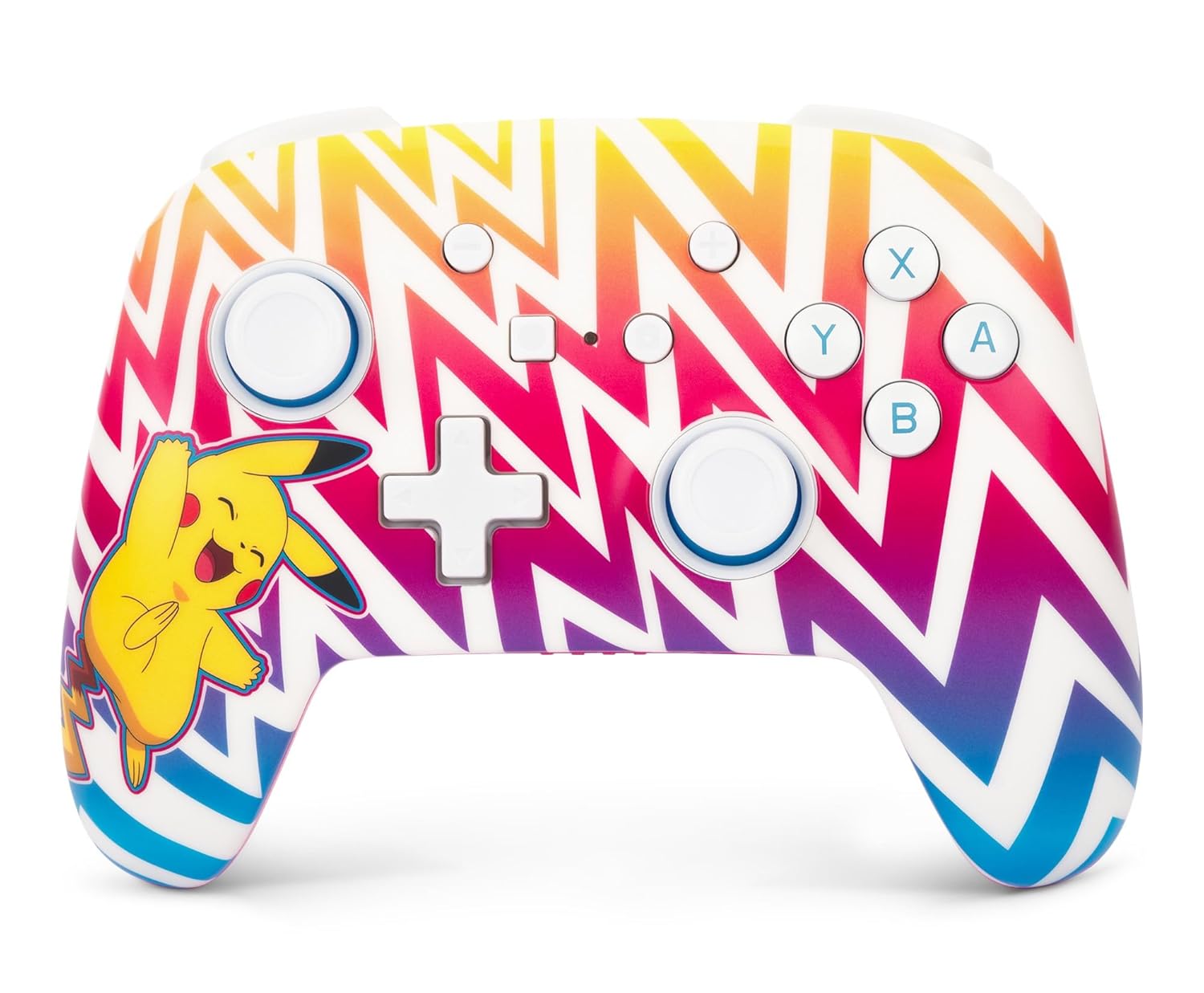
Слика 1: Фронт view of the PowerA Enhanced Wireless Controller, featuring a vibrant Pikachu design on a zigzag pattern. Shows the left and right analog sticks, D-pad, A/B/X/Y buttons, Home button, Capture button, Plus and Minus buttons, and indicator lights.

Слика 2: Назад view of the PowerA Enhanced Wireless Controller. This image highlights the two mappable Advanced Gaming Buttons (AGB) located on the grips, and the program button in the center.

Слика 3: Врх view of the PowerA Enhanced Wireless Controller. This perspective shows the L, R, ZL, and ZR shoulder buttons, along with the USB-C charging port located between the ZL and ZR buttons.
Сетуп
Пуњење контролера
- Connect the small end of the included USB-C cable to the USB-C port on the top of the controller.
- Connect the large end of the USB-C cable to a USB power source (e.g., Nintendo Switch dock, USB wall adapter, computer USB port).
- The LED indicator lights on the front of the controller will illuminate to show charging status. All four LEDs will be solid when fully charged.
- A full charge provides up to 30 hours of gameplay. Actual battery life may vary based on usage.

Слика 4: Сиде view of the controller with the USB-C charging cable connected to the port on the top edge.
Упаривање са Нинтендо Свитчем
Follow these steps to pair your PowerA Enhanced Wireless Controller with your Nintendo Switch console:
- Уверите се да је ваша Nintendo Switch конзола укључена и ажурирана на најновији системски софтвер.
- У менију ХОМЕ одаберите „Контролери“, онда "Промени хват/редослед".
- On the PowerA controller, press and hold the Дугме СИНЦ (small button next to the USB-C port) for at least three seconds. The LED indicator lights will begin to flash.
- Once the controller is successfully paired, the player LED(s) corresponding to the controller number will remain solid.
- Притисните тастер Дугме за почетак on the controller to return to the HOME Menu and begin playing.
The controller can be used whether the Nintendo Switch is docked or in handheld mode.
Упутство за употребу
Programming Advanced Gaming Buttons (AGB)
The controller features two mappable Advanced Gaming Buttons (AGB) on the back. These can be programmed on-the-fly:
- Притисните тастер Програм дугме (small white button on the back, between the AGBs). The Program LED will flash, indicating the controller is in programming mode.
- Press the button you wish to map (e.g., A, B, X, Y, L, R, ZL, ZR, D-pad directions, Left Stick Click, Right Stick Click).
- Притисните тастер Advanced Gaming Button (AGB L or AGB R) you want to assign the function to. The Program LED will stop flashing, indicating the AGB has been successfully programmed.
- To clear an AGB assignment, repeat steps 1-2, but instead of pressing a button to map, press the Program Button again to exit programming mode without assigning a new function.
Контроле покрета
This controller supports motion controls in compatible Nintendo Switch games. No special setup is required; motion controls will function automatically when supported by the game.
Одржавање
- Чишћење: Користите меку, суву крпу за чишћење контролера. Избегавајте употребу јаких хемикалија или абразивних материјала.
- Складиштење: Чувајте контролер на хладном и сувом месту, даље од директне сунчеве светлости и екстремних температура.
- Одржавање батерије: Да бисте продужили век трајања батерије, избегавајте често потпуно пражњење контролера. Редовно га пуните, чак и ако га не користите стално.
Решавање проблема
- Контролер се не повезује:
- Уверите се да је контролер потпуно напуњен.
- Verify the Nintendo Switch console is powered on and within range.
- Поновите поступак упаривања као што је описано у одељку „Упаривање са Nintendo Switch-ом“.
- If issues persist, try restarting both the controller and the Nintendo Switch console.
- Дугмад или џојстици не реагују:
- Check if the controller is properly connected to the console.
- Уверите се да никакве остатке не блокирају дугмад или џојстике.
- Test the controller in another game or on the Switch's controller test menu to isolate the issue.
- Kratko trajanje baterije:
- Ensure the controller is fully charged before use.
- Battery life can be affected by game intensity and environmental factors.
- If battery life significantly degrades over time, contact customer support.
Спецификације
| Број модела | НСГП0262-01 |
| Повезивање | Блуетоотх 5.0 |
| Тип батерије | Пуњиви литијум-јонски |
| Трајање батерије | Up to 30 hours per charge (approximate) |
| Димензије | 6.02 к 4.41 к 2.48 инча |
| Тежина | 8 унце (приближно 227 грама) |
| Компатибилност | Nintendo Switch, Switch Lite, Switch – OLED Model, Switch 2 |
| Укључен кабл | 10фт (3м) УСБ-Ц кабл за пуњење |
Информације о гаранцији
PowerA backs all products with a 2-годишња ограничена гаранција. For detailed warranty terms and conditions, please refer to the official PowerA webсајту или контактирајте корисничку подршку.
Подршка
For further assistance, technical support, or warranty claims, please visit the official PowerA support website or contact their customer service department. Contact information can typically be found on the PowerA webсајт или паковање производа.
Онлине ресурси: ввв.повера.цом/суппорт


