1. Увод
This manual provides essential information for the safe and efficient operation of your Metz MUD8500Z 43-inch 4K UHD Google Smart TV. Please read these instructions thoroughly before using the television and retain them for future reference. This television features a 43-inch Direct LED display with UHD 4K HDR resolution, integrated Google TV operating system, and a built-in soundbar with Wonder Audio technology.
2. Шта је у кутији
Пажљиво распакујте телевизор и проверите да ли су укључене све следеће ставке:
- Metz MUD8500Z 43-inch Smart TV
- Повер Адаптер
- Ремоте Цонтрол
- Кориснички приручник (овај документ)
- Компоненте ТВ постоља (ако је применљиво)
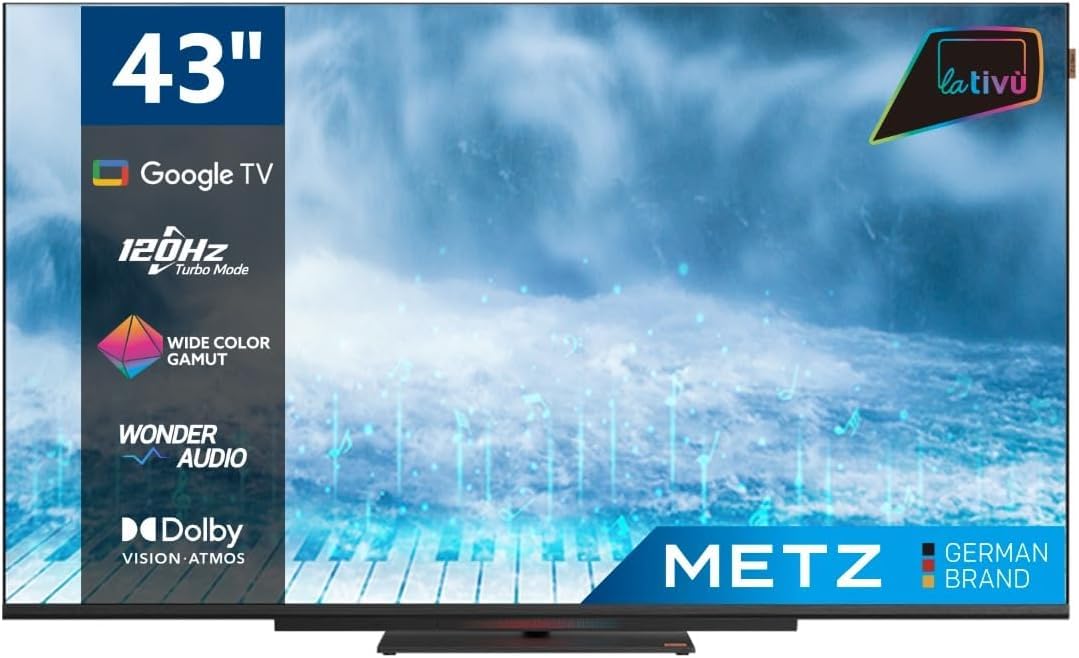
Слика: Фронт view of the Metz MUD8500Z 43-inch Smart TV.
3. Подешавање
3.1. Распакивање и постављање
Remove the TV from its packaging. Place the TV on a stable, flat surface or mount it on a wall using a compatible VESA mount (sold separately). Ensure adequate ventilation around the TV.

Image: Diagram showing the dimensions of the Metz MUD8500Z TV (96.6cm width, 57cm height, 11cm depth).
3.2. Повезивање напајања
Connect the power adapter to the TV's power input, then plug the adapter into a wall outlet. The TV will enter standby mode.
3.3. Почетно подешавање (Google TV)
При првом укључивању, телевизор ће вас водити кроз процес почетног подешавања. То укључује:
- Избор језика: Одаберите жељени језик.
- Мрежна конекција: Connect the TV to your home Wi-Fi network or via an Ethernet cable.
- Пријављивање на Google налог: Пријавите се помоћу свог Google налога да бисте приступили функцијама, апликацијама и персонализованим препорукама Google TV-а.
- Скенирање канала: Scan for available TV channels (Antenna/Cable).
4. Упутство за употребу
4.1. Basic TV Functions
- Укључивање/искључивање: Притисните дугме за напајање на даљинском управљачу или телевизору.
- Контрола јачине звука: Користите дугмад за појачавање/стишавање јачине звука на даљинском управљачу.
- Избор канала: Користите дугмад за пребацивање канала горе/доле или нумеричку тастатуру.
- Извор уноса: Press the 'Input' button to select HDMI, AV, or other connected devices.
4.2. Навигација на Google TV-у
The Google TV interface provides access to streaming services, apps, and live TV. Use the directional pad and 'OK' button on your remote to navigate menus and select items.

Image: Remote control for the Metz Smart TV, highlighting dedicated buttons for popular streaming services and Google Assistant.
4.3. Гоогле помоћник
Your TV has an integrated Google Assistant. Press the Google Assistant button on your remote or use the built-in microphone for voice commands to search for content, control smart home devices, and more.
4.4. App Access
Access a wide range of applications from the Google Play Store directly on your TV. Navigate to the 'Apps' section on the Google TV home screen to browse, download, and manage your applications.

Image: Screenshot of the Google TV interface displaying various streaming applications.
5. Карактеристике
5.1. UHD 4K Resolution and HDR
Experience stunning visuals with a resolution of 3840x2160 pixels, providing exceptional clarity and detail. The 4K HDR (High Dynamic Range) support enhances contrast and color accuracy for a more lifelike picture.
5.2. Wide Color Gamut
The Wide Color Gamut technology allows the TV to display a broader spectrum of colors, resulting in more vibrant and realistic images.

Image: A visual comparison demonstrating the enhanced color range with Wide Color Gamut versus normal display.
5.3. Wonder Audio Soundbar
The integrated soundbar with Wonder Audio technology delivers an immersive and clear audio experience. This advanced sound processing algorithm improves treble and bass, offering a more realistic virtual surround sound.

Image: Diagram illustrating the internal structure of the Surging Soundbar, showing increased diaphragm area and net sound cavity volume.
5.4. Google TV Operating System
Powered by Google TV, this television provides a personalized experience with easy access to your favorite movies, shows, live TV, and apps from across your subscriptions. It also offers smart recommendations based on your viewнавике.
5.5. 120Hz Turbo Mode
The 120Hz Turbo Mode enhances motion clarity, making fast-paced scenes and gaming content appear smoother and more fluid.

Image: Visual representation of the 120Hz Turbo Mode, illustrating enhanced smoothness for dynamic content.
5.6. Dolby Vision and Dolby Atmos
Enjoy cinematic picture quality with Dolby Vision, offering incredible brightness, contrast, and color. Dolby Atmos provides immersive, multi-dimensional audio that flows around you.
6. Везе
Your Metz MUD8500Z TV offers various ports for connecting external devices:
- HDMI (x3): Connect Blu-ray players, game consoles, set-top boxes, etc.
- УСБ 2.0 (к2): Повежите УСБ уређаје за складиштење података за репродукцију медија.
- ЛАН (Етернет): За жичану интернет везу.
- АВ ИН: Connect older devices with composite video and stereo audio outputs.
- RF Input (Antenna/Satellite): Connect your terrestrial or satellite antenna.
- Оптички излаз: For digital audio output to a sound system or soundbar.
- ЦИ слот: За модуле заједничког интерфејса (нпр. за услуге плаћене телевизије).

Слика: Детаљна view of the rear panel connections, including CI, AV IN, RF Input, USB 2.0, HDMI, Optical Out, and LAN ports.
7. Спецификације
| Параметар | Валуе |
|---|---|
| Број модела | MUD8500Z (S9147779) |
| Величина екрана | 43 инча (108 цм) |
| Дисплаи Тецхнологи | ЛЕД |
| Резолуција | 4K UHD (3840x2160) |
| Рефресх Рате | 60 Hz (with 120Hz Turbo Mode) |
| Аспецт Ратио | 16:9 |
| Повезивање | Ethernet, HDMI (x3), USB (x2), Wi-Fi |
| Посебне карактеристике | Flat Screen, Google TV, Google Assistant, Wonder Audio Soundbar, HDR, Wide Color Gamut |
| Димензије производа (ШкДкВ) | 96.6 к 10.9 к 56.9 цм |
| Тежина | 8.2 кг |
| Класа енергетске ефикасности (СДР) | F |
| Потрошња енергије (SDR) | 50.0 В |
| Класа енергетске ефикасности (ХДР) | G |
| Потрошња енергије (HDR) | 90.0 В |
| Снага у стању приправности | 0.4 В |
For detailed energy information, please refer to the official EU energy label: https://eprel.ec.europa.eu/qr/1530402
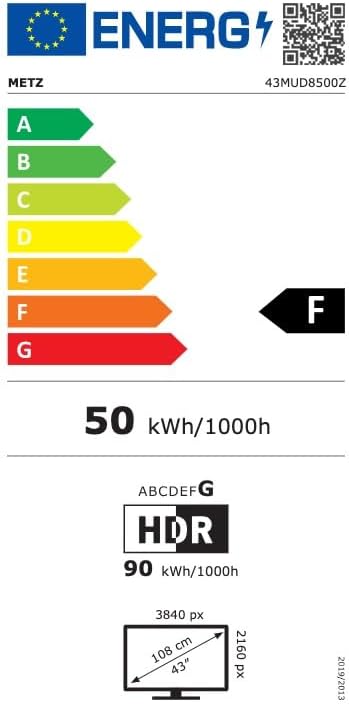
Image: EU Energy Label for the Metz MUD8500Z television, showing energy efficiency class F.
КСНУМКС. Решавање проблема
If you encounter issues with your TV, consult the following common problems and solutions:
- Нема напајања:
- Ensure the power cable is securely connected to both the TV and the wall outlet.
- Check if the wall outlet is functioning by plugging in another device.
- Press the power button on the remote or TV. - Нема слике/звука:
- Verify the correct input source is selected (e.g., HDMI 1, AV).
- Check all cable connections between the TV and external devices.
- For no sound, ensure volume is not muted or too low. - Даљински управљач не ради:
- Замените батерије у даљинском управљачу.
- Уверите се да нема препрека између даљинског управљача и инфрацрвеног сензора телевизора.
- Point the remote directly at the TV. - Проблеми са мрежном везом:
- Restart your Wi-Fi router.
- Check Wi-Fi password and ensure it is entered correctly.
- Try connecting via an Ethernet cable if Wi-Fi issues persist. - Проблеми са квалитетом слике (нпр. замућена, изобличена):
- Check the resolution settings of the input source.
- Ensure the signal source (antenna, cable box, streaming) is stable.
- Adjust picture settings in the TV menu (brightness, contrast, sharpness).
Ако проблем и даље постоји након што сте испробали ова решења, обратите се корисничкој подршци.
9. Одржавање
9.1. Чишћење екрана
Нежно обришите екран меком крпом која не оставља влакна. За тврдокорне мрље, лагано дampОперите крпу водом или специјализованим средством за чишћење екрана. Не користите јаке хемикалије или абразивне материјале.
9.2. Чишћење ормарића
Wipe the TV cabinet with a soft, dry cloth. Avoid using liquid cleaners directly on the TV.
9.3. Вентилација
Ensure that the ventilation openings on the back of the TV are not blocked. Proper airflow prevents overheating and prolongs the life of the TV.
10. Гаранција и подршка
The Metz MUD8500Z television comes with a standard manufacturer's warranty. According to specifications, the minimum general warranty duration provided by the supplier is 2 years.
For warranty claims, technical assistance, or further support, please refer to the contact information provided with your purchase documentation or visit the official METZ CONNECT webсајту.


