1. Увод
Thank you for choosing the Muse MH08MB Portable Radio. This device is designed for versatility and durability, offering multiple power sources, audio playback options, and emergency features. Please read this manual carefully to ensure proper use and maintenance of your device.

Слика 1: Muse MH08MB Portable Radio. This image displays the Muse MH08MB portable radio from a side angle, highlighting its integrated hand crank for dynamo charging, the solar panel on top, and the powerful LED flashlight on the front. A green lanyard is attached for portability.
2. Безбедносне информације
- Не излажите уређај екстремним температурама или директној сунчевој светлости током дужег периода.
- Избегавајте испуштање уређаја или излагање јаким ударима.
- Keep the device away from water and moisture, despite its splash-proof design, to prevent damage.
- Не покушавајте сами да растављате или поправљате уређај. Све сервисирање препустите квалификованом особљу.
- Use only the specified charging methods (USB-C, solar, dynamo) to power the device.
3. Садржај пакета
Молимо вас да проверите да ли су све ставке присутне:
- Muse MH08MB Portable Radio
- УСБ-Ц кабл за пуњење
- Повер Адаптер
- Кориснички приручник (овај документ)
4. Производ је готовview
Familiarize yourself with the various parts and controls of your Muse MH08MB radio.

Слика 2: Готовоview of Muse MH08MB Features. A detailed infographic summarizing all major features of the Muse MH08MB portable radio. It includes a jumbo display, FM radio with 5 presets, hands-free function, IP64 dust and splash resistance, siren, clock, 6 hours playtime, multiple charging options (USB-C, hand crank, solar), stereo pairing, LED flashlight, and an AUX-in jack.
Кључне компоненте:
- Дигитални екран: Shows frequency, time, and other indicators.
- Контролна дугмад: Power, Play/Pause, Skip, Preset selection (1-5).
- Телескопска антена: За бољи радио пријем.
- ЛЕД лампа: Интегрисани извор светлости.
- ручна ручица: For dynamo charging.
- Соларни панел: За соларно пуњење.
- УСБ-Ц порт: For charging the device and external devices.
- АУКС-ИН прикључак: За повезивање екстерних аудио извора.
- микрофон: За хандс-фрее позиве.
- сирена: Emergency alert function.

Слика 3: Врх View with Antenna and Controls. This view of the Muse MH08MB portable radio features its telescopic antenna fully extended for improved radio reception. The top panel shows various control buttons, and the digital display is active.
5. Пуњење уређаја
The Muse MH08MB offers multiple charging methods to ensure you always have power.
5.1. УСБ-Ц пуњење
- Connect the provided USB-C cable to the USB-C port on the radio.
- Повежите други крај кабла са адаптером за напајање и укључите га у зидну утичницу.
- Индикатор пуњења на екрану ће приказивати статус пуњења.
5.2. Соларно пуњење
Place the radio with the solar panel facing direct sunlight. The solar panel will convert sunlight into energy to charge the internal battery. This method is ideal for maintaining charge or slow charging in outdoor environments.
5.3. Dynamo (Hand Crank) Charging
Extend the hand crank located on the side of the radio. Rotate the crank clockwise or counter-clockwise at a steady pace. Continuous cranking will generate power to charge the internal battery, useful in emergency situations or when other power sources are unavailable.

Слика 4: Charging Options and IP64 Design. This infographic illustrates the versatile charging options of the Muse MH08MB, including solar power and hand-crank dynamo. It also points out the USB-C port for charging other devices and emphasizes its IP64 dust and splash-proof design.
6. Подешавање
6.1. Прво укључивање
Притисните и држите Повер button to turn on the device. The digital display will illuminate.
6.2. Подешавање сата
Када је уређај укључен, притисните Сат button (if available, or refer to the general controls for time setting). Use the Tune/Skip buttons to adjust the hour and minute. Press the Сат поново дугме за потврду.
7. Упутство за употребу
7.1. Укључивање/искључивање
Притисните и држите Повер button for approximately 2 seconds to turn the radio on or off.
7.2. Рад радија (AM/FM)
- Укључите радио.
- Извуците телескопску антену за оптималан ФМ пријем.
- Притисните тастер Режим дугме за одабир ФМ или АМ опсега.
- Користите Tune/Skip дугмад за ручно подешавање станице или притисните и држите за аутоматско скенирање следеће доступне станице.
- To save a preset, tune to your desired station, then press and hold one of the Унапред подешено (1-5) buttons until the display confirms it's saved. To recall a preset, simply press the corresponding Пресет дугме.
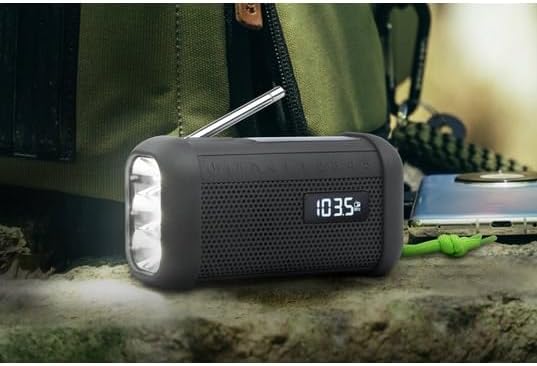
Слика 5: Digital Display in Radio Mode. The Muse MH08MB portable radio is shown resting on a surface, with its digital display clearly indicating "103.5 MHz", signifying active FM radio tuning. The speaker grille and flashlight are also visible.
7.3. Блуетоотх упаривање
- Turn on the radio and switch to Bluetooth mode using the Режим button. The display will show a Bluetooth indicator.
- На свом мобилном уређају омогућите Блуетоотх и потражите доступне уређаје.
- Select "MH08MB" from the list of devices.
- Once paired, the radio will confirm the connection, and you can play audio from your device.
7.4. Hands-Free Microphone
When connected via Bluetooth to a smartphone, the integrated microphone allows for hands-free calling. When a call comes in, the radio will pause playback. Press the Пусти/Паузирај дугме за одговарање или завршавање позива.
7.5. ЛЕД батерија
Притисните тастер Лампица button (or designated button) to turn the LED flashlight on or off. The flashlight features 3 ultra-bright LEDs.
7.6. Siren Function
In an emergency, press and hold the Сирена button to activate the emergency siren and flashing light. Press again to deactivate.
7.7. Stereo Pairing (TWS)
If you have two Muse MH08MB units, you can pair them for True Wireless Stereo (TWS) sound. Turn on both units and ensure they are in Bluetooth mode. On one unit, press and hold the Стерео Паир button (refer to controls for exact button). The units will connect, providing a wider stereo soundstage.
7.8. АУКС-ИН режим
Connect an external audio device (e.g., MP3 player) to the AUX-IN jack using a 3.5mm audio cable. Switch the radio to AUX mode using the Режим button. Audio from the external device will play through the radio's speaker.
8. Одржавање
- Чишћење: Обришите уређај меком, сувом крпом. Не користите абразивна средства за чишћење или раствараче.
- Складиштење: Store the radio in a cool, dry place away from direct sunlight when not in use for extended periods.
- Одржавање батерије: To prolong battery life, avoid fully discharging the battery frequently. Charge it regularly, especially if stored for a long time.
КСНУМКС. Решавање проблема
| Проблем | Могући узрок | Решење |
|---|---|---|
| Нема струје | Батерија је испражњена | Charge the device using USB-C, solar, or dynamo. |
| Лош радио пријем | Антена није извучена или сигнал је слаб | Extend the telescopic antenna fully. Try moving to a different location. |
| Блуетоотх се не повезује | Radio not in pairing mode or device too far | Ensure radio is in Bluetooth mode. Move your device closer. Forget and re-pair on your mobile device. |
| Нема звука | Volume too low or incorrect mode | Increase volume. Ensure the correct mode (Radio, Bluetooth, AUX) is selected. |
10. Спецификације
| Феатуре | Детаљ |
|---|---|
| Број модела | MH08MB |
| Бранд | МУСЕ |
| Боја | Црно |
| Повезивање | Блуетоотх |
| Радио Бандс | AM/FM (5 digital presets) |
| Извори напајања | USB-C, Solar, Dynamo (Hand Crank) |
| Батерија | 1 литијум-јонска (укључена) |
| Трајање батерије | Up to 6 hours (depending on volume/content) |
| Посебне карактеристике | Integrated Clock, Hands-free Microphone, LED Flashlight (3 ultra-bright LEDs), Siren, Stereo Pairing (TWS), NFC |
| Отпорност на воду | IP64 (Dust and Splash-proof) |
| Димензије (Д к Ш к В) | 15.8 к 6.4 к 8 цм |
| Укључене компоненте | Power adapter, USB-C Charging Cable, User manual |

Слика 6: Product Dimensions. A technical diagram showing the dimensions of the Muse MH08MB portable radio: 158mm length, 80mm height, and 64mm width.
11. Гаранција и подршка
Muse products are designed for reliability and performance. For warranty information and technical support, please refer to the warranty card included with your purchase or visit the official Muse webсајт. Сачувајте доказ о куповини за евентуалне рекламације по гаранцији.
For further assistance, please contact Muse customer service.


