1. Производ је готовview
The LIORQUE Digital Kitchen Timer Model YGH5249 is a multi-functional device designed to assist with various timing needs. It features a large LCD display, adjustable alarm volume, and multiple placement options. This timer can function as a countdown timer, a count-up stopwatch, and a digital clock.

Слика 1.1: Предња страна view of the LIORQUE Digital Kitchen Timer, highlighting its large LCD screen and control buttons.
Кључне карактеристике:
- 3-у-1 функционалност: Timer, Stopwatch, and Clock modes.
- Велики ЛЦД екран: Ensures clear readability of time.
- Подесива јачина звука аларма: Three levels (Mute, Low, High) to suit different environments.
- Обичај режим: Save frequently used countdown times for quick access.
- Разноврстан пласман: Magnetic back, foldable stand, and lanyard hole for flexible use.
- Delay Reminder: Automatically starts counting up after countdown finishes.
- Auto-Restore: Remembers the last set countdown time.

Image 1.2: Visual representation of the timer's main features and functions.
2. Подешавање и инсталација батерије
The timer requires 2 AAA batteries (included) for operation. Follow these steps to install them:
- Пронађите поклопац одељка за батерије на задњој страни тајмера.
- Отворите поклопац.
- Уметните две ААА батерије, водећи рачуна о исправном поларитету (+ и -) као што је назначено унутар одељка.
- Добро затворите поклопац одељка за батерије.
The timer will power on automatically once batteries are installed.
3. Упутство за употребу
3.1 Switching Modes (Timer/Stopwatch/Clock)
The LIORQUE timer offers three modes: Timer (countdown), Stopwatch (count-up), and Clock. To switch between Timer mode and Clock mode, press and hold the СТ/СП button for 2 seconds. The timer will display the current time in Clock mode or the timer interface in Timer mode.

Image 3.1: Switching between Counting Mode and Clock Mode.
3.2 Setting Countdown Timer
- Ensure the timer is in Timer mode (displaying H:M:S).
- Користите 1H, 5M, 1M, и 5S buttons to set the desired countdown time. Each press adds the corresponding time increment.
- Притисните тастер СТ/СП дугме за почетак одбројавања.
- Да бисте паузирали одбројавање, притисните СТ/СП поново. Притисните га још једном да бисте наставили.
- To reset the timer to zero, press the РЕСЕТ дугме.
- When the countdown reaches zero, the alarm will sound for 1 minute.
3.3 Using Stopwatch (Count-Up)
- Ensure the timer is in Timer mode and reset to 00:00:00.
- Притисните тастер СТ/СП button to start counting up.
- Да паузирате штоперицу, притисните СТ/СП поново. Притисните га још једном да бисте наставили.
- Да бисте ресетовали штоперицу на нулу, притисните РЕСЕТ дугме.

Image 3.2: Illustration of Count-up and Countdown modes.
3.4 Shortcut Setting
The timer allows for quick setting of common intervals:
- Притисните 1H за 1 сат.
- Притисните 5M за 5 минута.
- Притисните 1M за 1 минут.
- Притисните 5S за 5 секунде.

Слика 3.3: Примерamples of using shortcut buttons for quick time setting.
3.5 Прилагођени режим
The Custom Mode allows you to save a frequently used countdown time for instant recall.
- In Timer mode, set your desired countdown time using the 1H, 5M, 1M, и 5S дугмад.
- Притисните и држите ЦУСТОМ button for 2 seconds. The timer will remember this setting.
- Each subsequent short press of the ЦУСТОМ button will automatically load the saved time.

Image 3.4: Setting and recalling a custom timer value.
3.6 Подешавање јачине звука аларма
The timer features a 3-level alarm volume adjustment (Mute, Low, High). A switch on the side of the timer allows you to select the desired volume level.

Image 3.5: Volume adjustment switch and its three settings.
3.7 Опције пласмана
The LIORQUE timer offers flexible placement options:
- Магнетни: Attach the timer to metal surfaces like refrigerators using its strong magnetic back.
- Сталак: Use the integrated foldable stand to place the timer on any flat surface, such as a countertop or desk.
- Рупа за тракицу: Hang the timer using a rope through the designated lanyard hole.
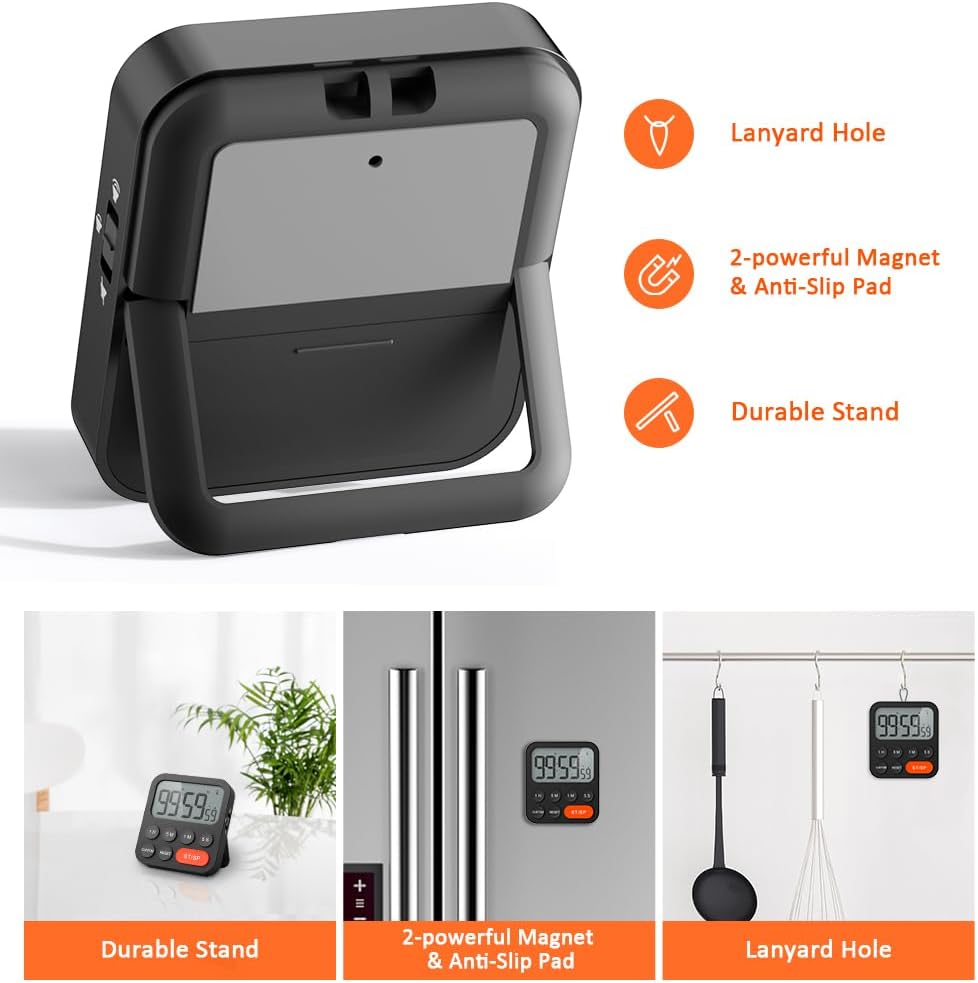
Image 3.6: Various ways to place and use the timer.
3.8 додатних функција
- Delay Reminder: After a countdown finishes, the timer will automatically start counting up, indicating the elapsed time since the alarm.
- Auto-Restore: Once a countdown is complete and the alarm has sounded, pressing the СТ/СП button will restore the timer to the last set countdown time, making it convenient for repetitive tasks.

Image 3.7: Explanation of Delay Reminder and Auto-restore features.
4. Одржавање
- Clean the timer with a soft, dry cloth. Do not use abrasive cleaners or immerse in water.
- Replace batteries when the display becomes dim or the timer functions erratically.
- Чувајте тајмер на хладном и сувом месту када га не користите дуже време.
КСНУМКС. Решавање проблема
- Тајмер не реагује: Проверите да ли су батерије правилно постављене и да ли су довољно напуњене. Замените их ако је потребно.
- Alarm too quiet/loud: Adjust the volume switch on the side of the timer to your preferred level.
- Екран је празан: Ensure batteries are installed and functional. If the issue persists, contact customer support.
6. Спецификације
| Феатуре | Детаљ |
|---|---|
| Бранд | ЛИОРКУЕ |
| Број модела | ИГХ5249 |
| Боја | Црно |
| Димензије производа | 0.94 cm D x 0.94 cm V |
| Тежина артикла | 4.2 унци |
| Извор напајања | 2 ААА батерија (укључено) |
| Број подешавања | 3 (волумен) |
| Величина екрана | 1Е+1 центиметра |
7. Гаранција и подршка
For warranty information or technical support, please refer to the product packaging or contact LIORQUE customer service through their official website or the retailer where the product was purchased. Keep your purchase receipt for warranty claims.