Увод
This manual provides detailed instructions for the EasySMX X15 Wireless Controller. It covers setup, operation, maintenance, and troubleshooting to ensure optimal performance and longevity of your device. The EasySMX X15 is designed for a versatile gaming experience across multiple platforms.
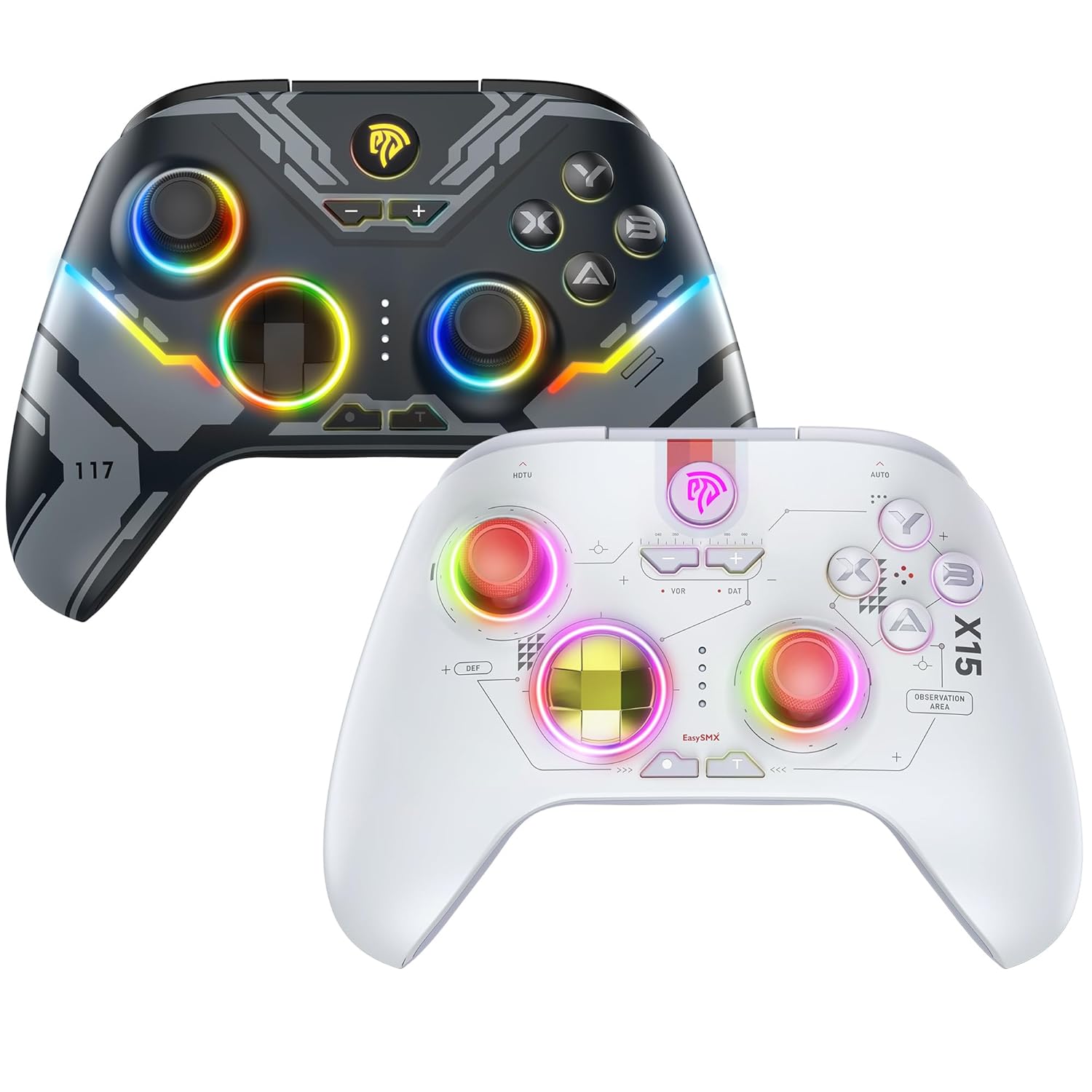
This image displays two EasySMX X15 wireless controllers. The dark gray controller is positioned behind and to the left, while the white controller is in the foreground on the right. Both controllers feature ergonomic designs with illuminated joysticks and face buttons, showcasing their customizable RGB lighting effects. The dark gray controller has a more angular, futuristic design, while the white controller has a cleaner, more minimalist aesthetic with visible circuit-like patterns.
Сетуп
1. Пуњење контролера
Before first use, fully charge the controller. Connect the supplied USB-C cable to the controller's charging port and the other end to a USB power source (e.g., computer, wall adapter). The indicator lights will show charging status and turn off or change color when fully charged.
2. Повезивање са уређајима
The EasySMX X15 controller supports both wireless (Bluetooth) and wired connections. Specific button combinations are required for pairing with different devices.
- Бежична веза (Блутут): To pair, press and hold the designated pairing button combination for your specific device (e.g., PC, Nintendo Switch, Android). Refer to the quick start guide included with your controller for exact button sequences for each platform. The controller's indicator lights will flash during pairing and become solid upon successful connection.
- Жична веза: Connect the controller directly to your device using the USB-C to USB cable. This method is suitable for PCs, PS3, and other compatible systems that support USB input. The controller should be automatically recognized by the system.
Напомена: For optimal performance, ensure your device's Bluetooth is enabled and updated to the latest drivers if connecting wirelessly to a PC.
Управљање контролером
Основне контроле
The X15 controller features standard gaming inputs:
- Двоструки аналогни стикови: За прецизно кретање и контролу камере.
- Д-Пад: За усмерени унос, често се користи у менијима или 2Д играма.
- Дугмад на лицу (A, B, X, Y): За акције у игри.
- Дугмад на рамену (L1, R1) и окидачи (L2, R2): For various actions, often shooting or accelerating.
- Дугме Старт/Мени: Typically opens in-game menus.
- Select/View Дугме: Often used for map or secondary functions.
- Хоме дугме: Returns to the system's main menu.
РГБ контрола осветљења
The X15 controller features customizable RGB lighting. To conserve battery life, you can typically toggle the RGB lights on or off using a dedicated button or a specific button combination. Refer to your controller's quick start guide for the exact method.
Одржавање
Proper maintenance ensures the longevity and performance of your EasySMX X15 controller.
- Чишћење: Користите меку, суву крпу за брисање контролера. За тврдокорну прљавштину, благо дampОбришите крпу водом или благим средством за чишћење електронике. Избегавајте јаке хемикалије или абразивне материјале.
- Складиштење: Чувајте контролер на хладном и сувом месту, даље од директне сунчеве светлости и екстремних температура.
- Одржавање батерије: Избегавајте често потпуно пражњење батерије. Редовно пуните контролер, чак и ако се не користи дуже време, како бисте одржали здравље батерије.
Решавање проблема
If you encounter issues with your EasySMX X15 controller, try the following solutions:
- Контролер се не повезује:
- Уверите се да је контролер напуњен.
- Verify you are using the correct button combination for pairing with your specific device.
- Restart your device and the controller.
- If using Bluetooth, try forgetting the device on your system and re-pairing.
- Try a wired connection to rule out wireless issues.
- Дугмад/џојстици не реагују:
- Уверите се да је контролер правилно повезан.
- Проверите да ли има физичких препрека или остатака око дугмади/џојстика.
- Test the controller on a different game or device to determine if the issue is game-specific.
- Кратак век трајања батерије:
- Ensure the controller is fully charged before use.
- Turn off RGB lighting to extend battery life.
- Reduce vibration intensity if applicable (check controller settings on your device).
Спецификације
| Модел | Кс15 |
| Произвођач | ЕасиСМКС |
| Повезивање | Бежично (Блутут), Жично (УСБ-Ц) |
| Компатибилност | PC, Steam, PS3, Android Mobile, TV BOX, Tesla, Nintendo Switch, Steam Deck |
| ASIN | B0CWP8V3T |
| Фирст Аваилабле | 2. децембра 2024. године |
Информације о гаранцији
EasySMX products typically come with a manufacturer's warranty. Please refer to the warranty card included in your product packaging or visit the official EasySMX website for detailed warranty terms and conditions specific to the X15 controller.
Корисничка подршка
For further assistance, technical support, or inquiries not covered in this manual, please contact EasySMX customer support through their official website or the contact information provided in your product packaging. When contacting support, please have your product model (X15) and purchase details ready.


