1. Увод
Thank you for choosing the Gosund SP111 Smart WiFi Plug. This device allows you to control your electronic appliances remotely via a smartphone application or voice commands, and to set schedules for automated operation. Please read this manual carefully before use to ensure proper installation and operation.
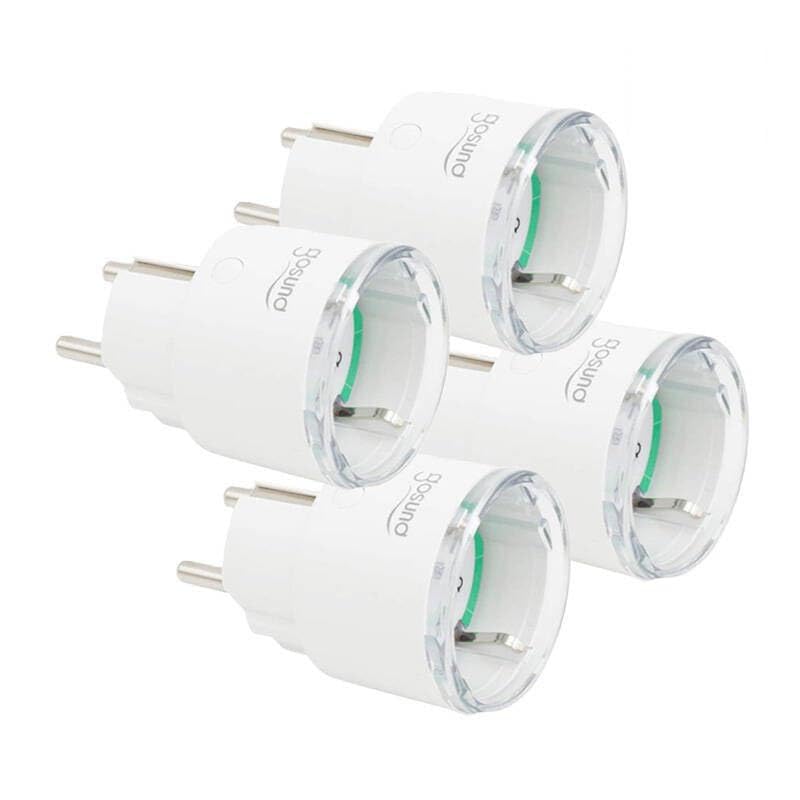
This image displays four white Gosund SP111 Smart WiFi Plugs. Each plug features a standard European Type F (Schuko) plug on one side and a corresponding socket on the other, with the Gosund logo printed on the side. A small indicator light and a button are visible on the top surface of each plug.
2. Безбедносне информације
- Do not exceed the maximum load current of 16A or power of 3680W.
- Немојте растављати или модификовати уређај.
- Држите уређај даље од воде, влаге и високих температура.
- Само за унутрашњу употребу.
- Уверите се да је утикач потпуно уметнут у зидну утичницу.
- Do not connect appliances that could cause a fire hazard if left unattended (e.g., irons, heaters).
3. Садржај пакета
Пакет укључује следеће ставке:
- 4 x Gosund SP111 Smart WiFi Plugs
- 1 x Упутство за употребу (овај документ)
4. Производ је готовview
Familiarize yourself with the components of your Gosund SP111 Smart WiFi Plug:
- Дугме за напајање: Press to manually turn the plug on/off. Press and hold for 5 seconds to enter pairing mode.
- Светло индикатора: Indicates the status of the plug (e.g., solid blue for ON, flashing blue for pairing mode, off for OFF).
- Type F (Schuko) Socket: За повезивање вашег уређаја.
- Type F (Schuko) Plug: For inserting into a wall outlet.
5. Подешавање
5.1 Преузмите апликацију
The Gosund SP111 Smart WiFi Plug works with the Tuya Smart or Smart Life app. Download the app from the App Store (iOS) or Google Play Store (Android).
- Тражи "Tuya Smart" or "Smart Life".
- Инсталирајте апликацију и региструјте налог.
5.2 Додајте уређај
- Plug the Gosund SP111 Smart WiFi Plug into a wall outlet.
- The indicator light should flash rapidly (approximately twice per second), indicating it's in pairing mode. If not, press and hold the power button for 5 seconds until it flashes rapidly.
- Отворите апликацију Туиа Смарт или Смарт Лифе.
- Додирните икону „+“ у горњем десном углу да бисте додали уређај.
- Select "Electrical Outlet" or "Socket (Wi-Fi)".
- Confirm that the indicator light is flashing rapidly.
- Enter your 2.4 GHz Wi-Fi network password (5 GHz Wi-Fi is not supported).
- Wait for the device to connect. Once connected, you can rename the plug.
6. Оперативни
6.1 Ручна контрола
Press the power button on the plug to manually turn the connected appliance on or off.
6.2 Контрола апликација
- Даљинско укључивање/искључивање: Tap the plug icon in the app to turn it on or off from anywhere.
- Заказивање: Set timers or schedules for the plug to turn on or off automatically at specific times.
- Одбројавање: Set a countdown timer for the plug to turn off after a set duration.
- Мониторинг енергије: (If supported by the specific SP111 variant) View real-time and historical power consumption.
6.3 Управљање гласом
The Gosund SP111 Smart WiFi Plug can be integrated with voice assistants like Amazon Alexa and Google Assistant via the Tuya Smart or Smart Life app. Follow the instructions within the app to link your smart home assistant account.
- Exampле команде:
- „Алекса, укључи [Назив утикача]“
- „Хеј Гугл, искључи [Назив утикача]“
7. Одржавање
- Искључите уређај пре чишћења.
- Обришите површину меком, сувом крпом. Не користите течна средства за чишћење или абразивне материјале.
- Чувати на хладном и сувом месту када се не користи дуже време.
КСНУМКС. Решавање проблема
| Проблем | Решење |
|---|---|
| Plug cannot connect to Wi-Fi. |
|
| Индикаторска лампица је искључена. |
|
| Appliance connected to the plug does not turn on. |
|
9. Спецификације
| Модел: | СПКСНУМКС-КСНУМКС |
| Улазни волtage: | АЦ 230В, 50/60Хз |
| Максимална струја оптерећења: | 16А |
| Максимална снага: | 3680В |
| Бежични тип: | Ви-Фи 2.4 ГХз (802.11 б/г/н) |
| Подршка за апликације: | Туиа Смарт / Смарт Лифе |
| Радна температура: | 0°Ц до 40°Ц (32°Ф до 104°Ф) |
10. Гаранција и подршка
Gosund products are designed and manufactured to the highest quality standards. For warranty information and technical support, please refer to the official Gosund webсајт или контактирајте продавца. Сачувајте рачун као доказ о куповини.
За даљу помоћ, посетите: www.gosund.com/support


