1. Увод
This manual provides comprehensive instructions for the installation, operation, and maintenance of your Lloyd's Smart Full HD 1080P Video Intercom System. This system is designed to provide secure access control for your home or office, allowing you to monitor, communicate with, and grant access to visitors remotely.
Please read this manual thoroughly before using the product to ensure proper function and safety. Keep this manual for future reference.
2. Безбедносне информације
Да бисте спречили оштећење производа или повреде себе или других, молимо вас да се придржавате следећих мера безбедности:
- Уверите се да је сва струја искључена пре инсталације или одржавања.
- Инсталацију треба да обави квалификовани електричар ако нисте упознати са електричним ожичењем.
- Не излажите производ екстремним температурама, влажности или директној сунчевој светлости.
- Користите само приложени адаптер за напајање и додатну опрему.
- Држите производ даље од воде и других течности.
- Не покушавајте сами да растављате или поправљате уређај. За помоћ контактирајте корисничку подршку.
3. Садржај пакета
Проверите да ли су све ставке присутне у пакету:
- 1 x Monitor (7'' Color LCD Touchscreen)
- 1 x Outdoor Unit (Doorbell with Camera and Keypad)
- 1 к Упутство за употребу
- 1 к кућиште
- 1 x Rain Cover Bracket
- 1 x Recessed Box
- 1 к АЦ/ДЦ адаптер
- 1 к носач за монтажу
- Wall Plugs and Mounting Screws
- 3 к конектора
- 1 x Allen Screwdriver
- 4 x Connection Cables

Слика 3.1: Завршеноview of the Lloyd's Smart Video Intercom System components and packaging.
4. Производ је готовview
4.1. Monitor (Indoor Unit)
- Приказ: 7-inch color LCD touchscreen with 1020 x 600 px resolution.
- Подесива подешавања: Brightness, contrast, and volume.
- Функције: Hands-free intercom, call transfer (requires additional monitor), date, time, and weather display.
- Складиштење: Integrated memory for up to 30 photos, supports up to 128 GB memory card (not included).
- Повезивање: 2.4 GHz Wi-Fi for stable connection in large areas.
4.2. Outdoor Unit (Doorbell)
- камера: 2MP Full HD (1920x1080) resolution.
- Ноћни вид: Yes, with LED numeric panel.
- Viewугао угла: 120 степени.
- Детекција покрета: Detection distance of less than or equal to 3 meters.
- аудио: 2-way audio with adjustable microphone and speaker volume.
- Контрола приступа: Works with a 12 VDC electric lock (not included), supports 4-6 digit password entry.
- Tamper Button: Sends alerts to your smartphone and triggers an alarm if the outdoor unit is forced.
- Трајност: IP65 rating for indoor or outdoor use.
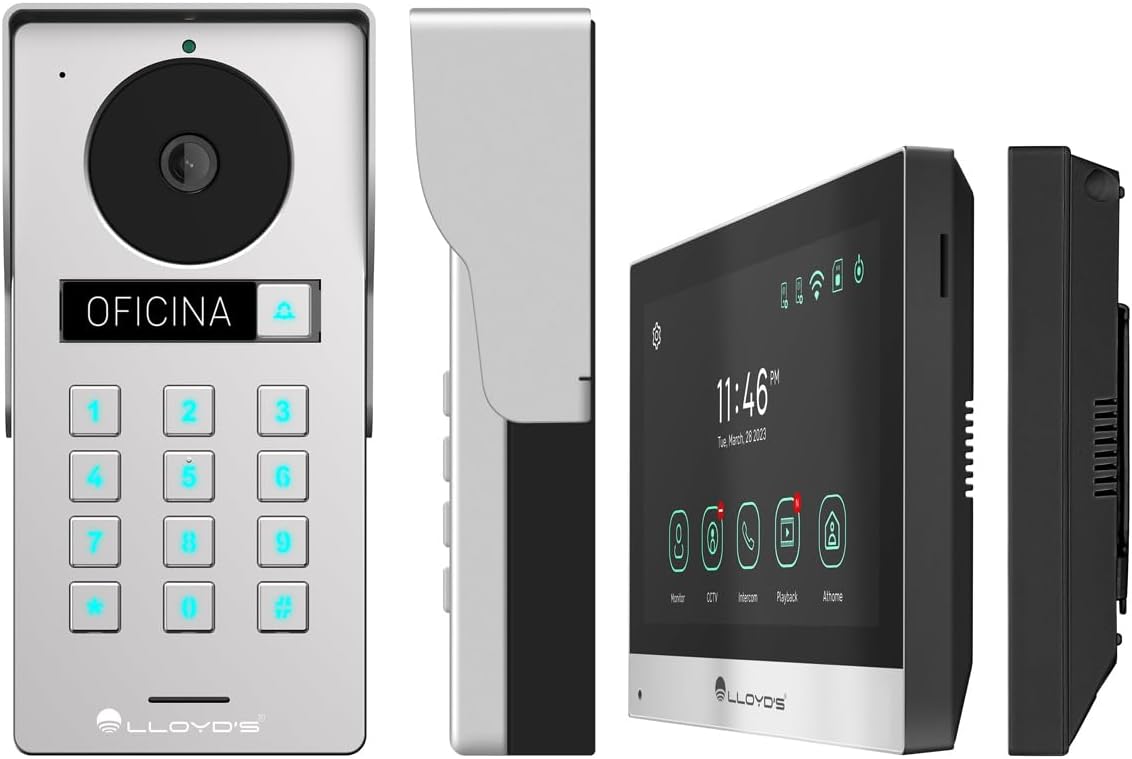
Слика 4.1: Детаљно views of the outdoor unit and monitor.

Figure 4.2: Key features of the Lloyd's Smart Video Intercom System.
5. Подешавање и инсталација
5.1. Wiring and Mounting
The system requires a wired connection between the monitor and the outdoor unit. The maximum operating distance is 50 meters using a 4-wire cable (0.5 mm² not included). Follow the wiring diagram provided in the quick start guide for correct connections.
- Монтажа спољне јединице: Choose a suitable location near your entrance, ensuring clear camera view and easy access to the keypad. Use the provided mounting bracket, wall plugs, and screws. The unit is IP65 rated for outdoor use.
- Монтажа монитора: Install the monitor indoors at a convenient height for viewing and interaction. Use the mounting bracket and screws.
- Прикључак за напајање: Connect the AC/DC adapter to the monitor and a power outlet.
- Electric Lock Connection (Optional): If using an electric lock (12 VDC, not included), connect it to the outdoor unit as per the wiring diagram.
5.2. App and Wi-Fi Connection
To utilize smart features, download the Lloyd's smart home application on your smartphone (compatible with Android 5.0+ and iOS 11+).
- Power on the monitor and outdoor unit.
- On the monitor, navigate to the Wi-Fi settings and connect to your 2.4 GHz Wi-Fi network.
- Open the Lloyd's app on your smartphone and create an account or log in.
- Follow the in-app instructions to add your new video intercom system. This typically involves scanning a QR code displayed on the monitor or manually entering device details.
- Once connected, you will receive notifications and can control the system remotely via the app.
6. Упутство за употребу
6.1. Answering Calls and Communication
- When a visitor presses the doorbell button, the monitor will ring, and you will receive a notification on your smartphone.
- On the monitor, tap the "Answer" icon to establish two-way audio and video communication.
- On your smartphone, open the app and tap the incoming call notification to answer.
- The intercom communication time is 60 seconds.

Figure 6.1: Communicate with visitors from anywhere using the app or monitor.

Figure 6.2: Receive instant notifications on your smartphone and monitor.
6.2. Door Opening
- Из апликације: During a call, tap the "Unlock" icon in the app to open the connected electric lock.
- From the Monitor: During a call, tap the "Unlock" icon on the monitor's touchscreen.
- From the Outdoor Unit: Visitors can enter a pre-set 4-6 digit password on the numeric keypad to open the door.
6.3. Motion Detection and Recording
- The system automatically captures photos and videos when motion is detected within 3 meters of the outdoor unit or when someone rings the doorbell.
- You will receive real-time alerts on your smartphone via the app when motion is detected.
- Review recorded events and snapshots through the app or on the monitor.
- The monitoring time for motion detection is 30 seconds.

Figure 6.3: Receive motion detection alerts directly on your smartphone app.

Figure 6.4: Automatic photo and video capture for events.
6.4. Проширење система
The system supports expansion for enhanced security and convenience:
- Up to 2 additional Outdoor Units (Doorbell)
- Up to 3 additional Monitors
- Up to 2 additional Cameras
- Up to 2 additional Sensors
(Additional units and sensors are not included and must be purchased separately.)
You can also integrate the system with other Lloyd's smart home products to create customized routines and share device access with family members.
7. Одржавање
- Чишћење: Use a soft, dry cloth to clean the monitor screen and outdoor unit. Do not use abrasive cleaners or solvents.
- Ажурирања софтвера: Periodically check the Lloyd's app for firmware updates to ensure optimal performance and security.
- Управљање складиштем: If using a memory card, regularly back up important recordings and delete old fileс да бисте ослободили простор.
КСНУМКС. Решавање проблема
| Проблем | Могући узрок | Решење |
|---|---|---|
| No image or sound from outdoor unit. | Loose wiring, power issue, unit malfunction. | Check all cable connections. Ensure power adapter is properly connected. Restart the system. |
| Wi-Fi connection unstable or disconnected. | Weak Wi-Fi signal, incorrect password, router issues. | Ensure the monitor is within Wi-Fi range. Re-enter Wi-Fi password. Restart your router. |
| Cannot open door via app/monitor. | Electric lock not connected, lock malfunction, wiring issue. | Verify electric lock connection and functionality. Check wiring between outdoor unit and lock. |
| Нема упозорења о детекцији покрета. | Motion detection disabled, incorrect sensitivity, app notification settings. | Enable motion detection in app settings. Adjust sensitivity. Check smartphone notification permissions for the app. |
| Лош квалитет видеа. | Dirty camera lens, poor lighting, network bandwidth. | Очистите сочиво камере. Обезбедите одговарајуће осветљење. Проверите брзину интернета. |
9. Спецификације
| Феатуре | Детаљ |
|---|---|
| Број модела | ЛЦ-1373 |
| Монитор дисплаи | 7-inch Color LCD Touchscreen |
| Резолуција монитора | 1020 к 600 пк |
| Outdoor Unit Camera Resolution | 2MP Full HD (1920x1080) |
| Viewинг Англе | 120 степени |
| Ноћни вид | До 10 метара |
| Опсег детекције покрета | ≤ 3 метара |
| Бежично повезивање | Ви-Фи од 2.4 ГХз |
| Складиштење | Integrated (30 photos), supports up to 128 GB MicroSD (not included) |
| Повер Суппли | 12 VDC (via AC/DC adapter) |
| Потрошња енергије (приправност) | 4W |
| Потрошња енергије (радна) | 10В |
| Operating Distance (Wired) | Up to 50m (with 0.5 mm² 4-wire cable) |
| Ingress Protection (Outdoor Unit) | ИП65 |
| Monitor Dimensions (H x W x D) | 12.4 цм к 18 цм к 2.1 цм |
| Outdoor Unit Dimensions (H x W x D) | 18 цм к 8.7 цм к 3.2 цм |
| Компатибилни уређаји | Андроид 5.0 или новији, иОС 11 или новији |

Figure 9.1: Dimensions of the Monitor and Outdoor Unit.
10. Гаранција и подршка
For warranty information, please refer to the warranty card included with your product or visit the official Lloyd's website. If you encounter any issues or require technical assistance, please contact Lloyd's customer support.
Корисничка подршка: Refer to the contact information provided on the product packaging or the official Lloyd's webсајту.
Онлине ресурси: Посетите Lloyd's Official Store on Amazon за додатне информације о производу и подршку.
11. Званични видео снимци производа
No official seller videos were provided for this product in the available data.


