Увод
The OLIGHT Perun 2 Mini is a compact and powerful LED headlamp designed for versatile lighting needs. It features a high output, long endurance, and a red light option, making it suitable for various activities from outdoor recreation to emergency signaling. This manual provides essential information for the safe and effective use of your Perun 2 Mini headlamp.
Производ је завршенview
The Perun 2 Mini headlamp is engineered for powerful performance in a miniature form factor. It delivers a maximum output of 1,100 lumens and offers extended runtimes. The device includes both white and red LED lighting options, a comfortable headband, and a magnetic charging system.

Image: The Perun 2 Mini headlamp, emphasizing its lightweight design and powerful 1,100 lumen output, 10-day max runtime, 150-meter max throw, customized rechargeable battery, 1.5-meter drop test rating, and IPX8 waterproof rating.

Image: A hand holding the compact Perun 2 Mini headlamp, illustrating its minimal weight of 1.9 ounces (54 grams), suitable for jogging, campинг, или планинарење.
Сетуп
Attaching to Headband
- Locate the silicone holder on the headband.
- Align the body of the Perun 2 Mini with the holder.
- Gently push the headlamp into the silicone holder until it is securely seated. Ensure the light can be rotated within the holder for directional adjustment.
Инсталација батерије
- Одврните задњи поклопац главеamp.
- Insert the customized rechargeable battery with the positive (+) end facing towards the head of the light.
- Screw the tail cap back on tightly to ensure water resistance and proper electrical contact.
Упутство за употребу
Укључивање/искључивање
- Да бисте укључили/искључили: Једном кликните на бочни прекидач.
Changing Brightness Levels (White Light)
- When the light is on, press and hold the side switch to cycle through Low, Medium, and High modes. Release the switch to select the desired brightness.
- Турбо режим: Двапут кликните на бочни прекидач да бисте активирали Турбо режим. Кликните поново двапут да бисте се вратили на претходни режим.
- Моонлигхт Моде: When the light is off, press and hold the side switch for approximately one second to activate Moonlight mode.
Red Light Operation
- To Activate Red Light: When the light is off, triple-click the side switch.
- Red Blinking Mode: While in Red Light mode, press and hold the side switch to switch to Red Blinking mode.

Image: The Perun 2 Mini demonstrating its dual white and red light sources for various applications, including outdoor lighting, power outages, night running, and emergency signaling.
Пуњење
The Perun 2 Mini utilizes a magnetic charging system for convenience. Use the provided MCC 1A Magnetic Charging Cable.
- Connect the USB end of the charging cable to a power source (e.g., USB adapter, computer USB port).
- Attach the magnetic end of the cable to the tail cap of the headlamp. The magnetic connection will snap into place.
- The indicator on the charging cable will show red during charging and turn green when fully charged.
Индикатор статуса батерије
Хеадлamp features a tri-color power indicator to display the remaining battery level:
- зелено: Батерија > 60%
- наранџаста: Battery 60%–10%
- црвено: Battery 10%–5%
- Трепери црвено: Батерија < 5%
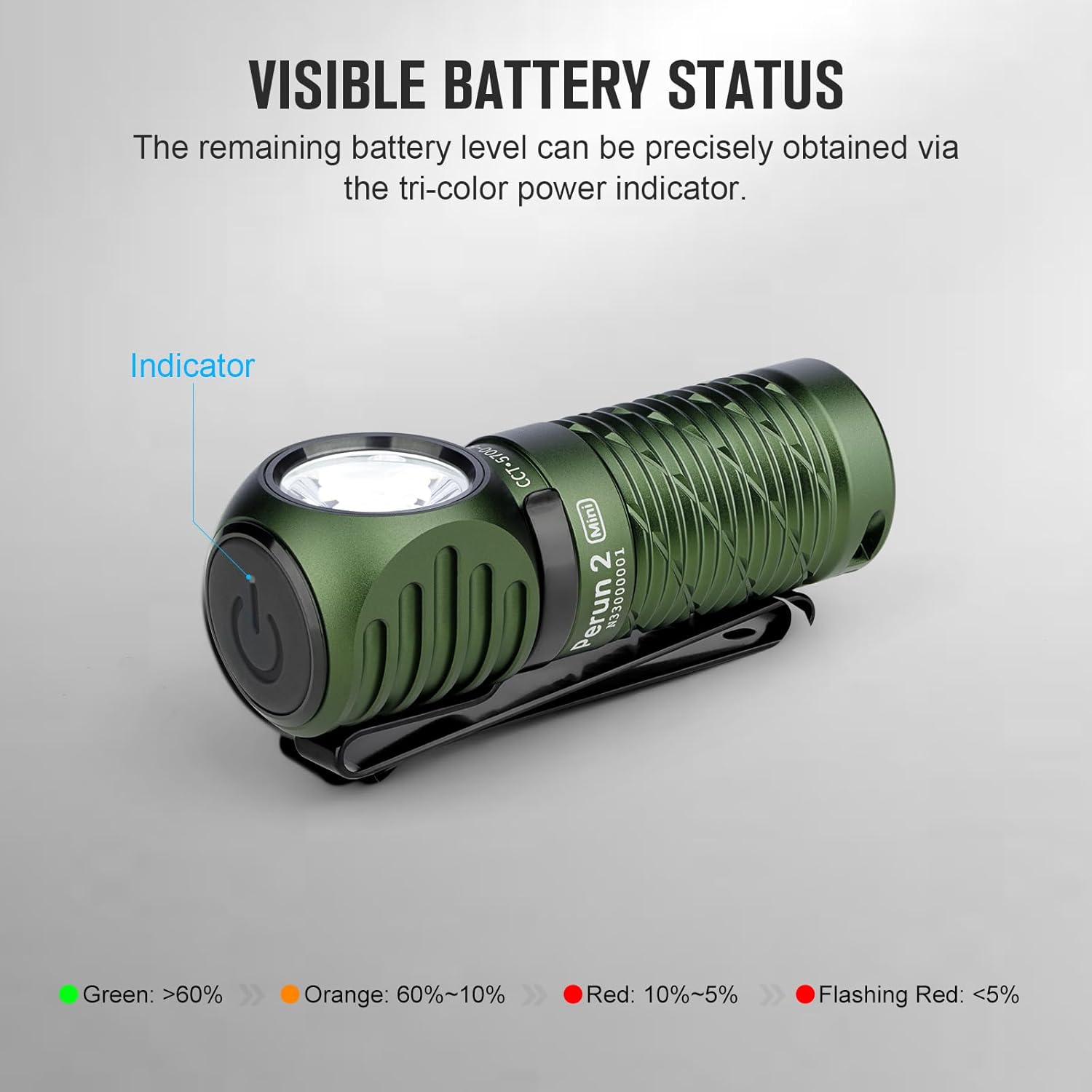
Image: A black Perun 2 Mini headlamp illustrating the tri-color battery status indicator on the side switch.

Image: A green Perun 2 Mini headlamp being charged with the MCC 1A Magnetic Charging Cable, demonstrating the simple magnetic attachment.
Карактеристике
- Моћне перформансе: The Perun 2 Mini offers a maximum output of 1,100 lumens and an extended endurance of up to 10 days on its lowest setting, thanks to an 18% larger battery capacity compared to its predecessor.
- Red Light Option: In addition to high-performance white LED lighting, the integrated red LED can be used to preserve night vision or as an effective emergency warning signal.
- Upgraded Headband: The redesigned headband is more comfortable and lighter, featuring a reduced skin-to-head contact area for improved wearability.
- Мултифункционална употреба: The Perun 2 Mini can be worn as a headlamp for hands-free illumination, used as a handheld flashlight, or attached to backpacks and belts via its pocket clip. Its magnetic tail cap also allows it to function as a work light by attaching to iron surfaces.

Image: The Perun 2 Mini showcasing its versatility: worn as a headlamp, carried with its two-way pocket clip, and magnetically attached for hands-free work.
Спецификације
| Феатуре | Детаљ |
|---|---|
| Бранд | ОЛИГХТ |
| Модел | Перун 2 Мини |
| Тип извора светлости | ЛЕД |
| White Brightness (Max) | 1100 лумена |
| Луминоус Флук | 1100 лумена |
| Максимални бацање | 150 метара |
| Извор напајања | Battery Powered (Customized Rechargeable Battery) |
| Посебна карактеристика | Night Vision (Red Light) |
| Ниво отпорности на воду | ИПКС8 (водоотпоран) |
| Оцена теста пада | 1.5 метара |
| Тежина | 54 г (1.9 оз) |
| Опције боја | Black, Cool White, Olive Drab Green |
Одржавање
- Чишћење: Обришите главуamp са меким, дamp тканина. Немојте користити абразивна средства за чишћење или раствараче.
- Одржавање батерије: Recharge the battery regularly, even if not in frequent use, to maintain optimal performance and extend battery life. Store the headlamp with a partially charged battery if storing for long periods.
- О-прстенови: Periodically check the O-rings for wear and tear. Replace them if damaged to maintain the headlamp's water resistance. Apply silicone grease to the O-rings to keep them supple.
- Складиштење: Чувајте главуamp на хладном и сувом месту далеко од директне сунчеве светлости и екстремних температура.
Решавање проблема
- Светло се не укључује:
- Ensure the battery is correctly inserted with the positive (+) end facing forward.
- Проверите да ли је задњи поклопац потпуно затегнут.
- Проверите да ли је батерија напуњена.
- If the light is locked out, press and hold the side switch for several seconds until the light briefly flashes to unlock it.
- Пригушено светло или кратко време рада:
- Напуните батерију у потпуности.
- Clean the contact points on the battery and inside the headlamp with a clean cotton swab.
- Magnetic Charging Not Working:
- Ensure the magnetic charging cable is properly connected to both the power source and the headlamp's tail cap.
- Check for any debris on the magnetic contact points.
Гаранција и подршка
OLIGHT products are manufactured with high-quality materials and workmanship. For detailed warranty information and customer support, please refer to the official OLIGHT webсајт или директно контактирајте њихову корисничку службу. Сачувајте рачун као доказ о куповини за потребе гаранције.
За даљу помоћ, посетите OLIGHT продавница на Амазону.


