1. Увод
This manual provides instructions for the Varmilo Koi 73 JIS Keyboard with Sakura Switches (Model: VMMA73A039SAKURA). This keyboard features a unique design inspired by traditional Chinese Koi fish and water elements, combined with a modern aesthetic. It is a compact 65% size keyboard with a Japanese Industrial Standard (JIS) layout, designed for both functionality and portability. The keyboard is equipped with Cherry-style stabilizers for a stable typing experience.
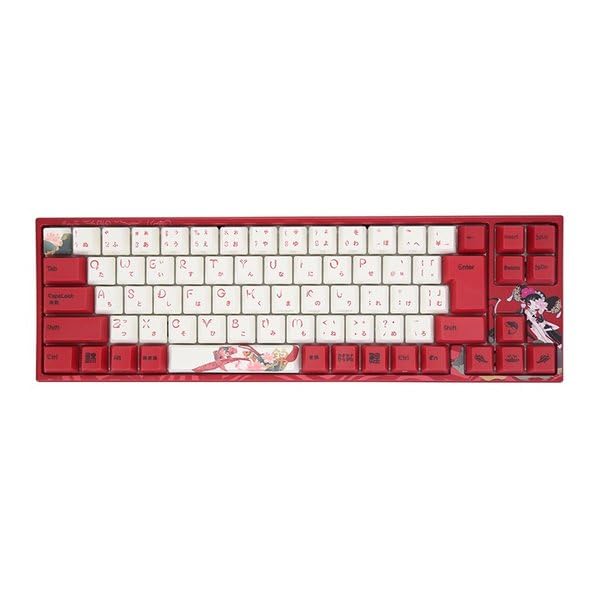
Image: Varmilo Koi 73 JIS Keyboard overview.
2. Кључне карактеристике
- Unique Koi Design: Features vibrant koi fish illustrations and a red aesthetic, developed in collaboration with illustrator Li Huan.
- JIS Layout: 73-key Japanese Industrial Standard layout for specific regional input needs.
- Compact 65% Size: Optimizes desk space while retaining essential function and arrow keys.
- Прилагодљиви прекидачи: Offers a choice of Varmilo mechanical electrostatic capacity switches to suit individual typing preferences.
- Cherry-Style Stabilizers: Ensures consistent and stable key presses, especially for larger keys.
- УСБ повезивање: Reliable wired connection for stable performance.
3. Водич за подешавање
3.1 Садржај пакета
Пре него што почнете, уверите се да су све ставке присутне у пакету:
- Varmilo Koi 73 JIS Keyboard
- УСБ кабл
- Кориснички приручник (овај документ)
3.2 Повезивање тастатуре
To connect your Varmilo Koi 73 keyboard to your computer, follow these steps:
- Locate the USB-C port on the back of the keyboard.
- Connect one end of the provided USB cable to the keyboard's USB-C port.
- Повежите други крај УСБ кабла са доступним УСБ портом на рачунару.
- Ваш оперативни систем би требало аутоматски да препозна тастатуру.
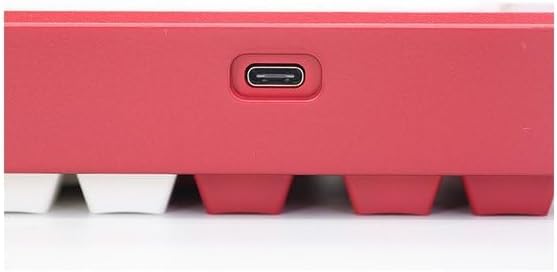
Image: USB-C port for keyboard connection.
3.3 Driver Installation (Optional)
For advanced customization and optimal performance, it is recommended to install the Varmilo driver software. This software allows you to remap keys, adjust performance settings, and customize lighting effects.
Video: This video demonstrates the driver installation process and software usage for Varmilo keyboards. While it features the Muse65 model, the steps for driver installation and basic software navigation are generally applicable to other Varmilo keyboards like the Koi 73.
Please visit the official Varmilo website for the latest driver downloads specific to your keyboard model. Follow the on-screen instructions during installation.
4. Упутство за употребу
4.1 Основне функције тастера
The Varmilo Koi 73 keyboard features a standard JIS layout. Most keys function as labeled. For special functions, refer to the combination keys below.
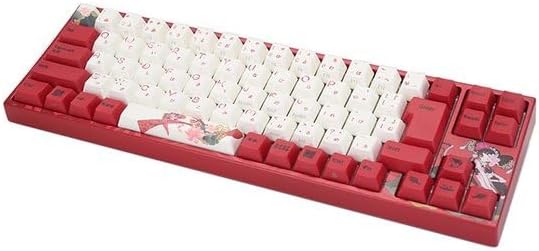
Слика: Прекоview of the Varmilo Koi 73 JIS Keyboard layout.
4.2 Комбинације функцијских тастера (Fn)
Since this is a 73-key layout, some functions are accessed via the Fn key. Hold down the Fn key and press the corresponding key to activate its secondary function. Common Fn combinations include:
- Fn + F1-F12: Multimedia controls (e.g., volume, play/pause).
- Fn + тастери са стрелицама: Page Up/Down, Home/End (specific to model, refer to keycap legends).
- Fn + Win тастер: Locks/unlocks the Windows key.

Image: Left side keys, often used with Fn for additional functions.
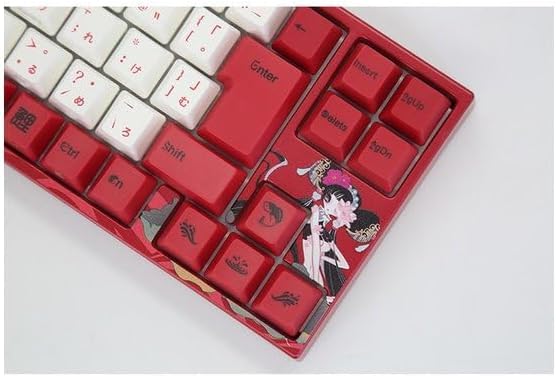
Image: Right side keys, including navigation and utility keys.
4.3 светлосних ефеката
The Varmilo Koi 73 keyboard supports various RGB lighting effects. You can cycle through different modes and adjust brightness using specific key combinations. Refer to your keyboard's specific keycap legends or the driver software for detailed lighting controls.
Video: This video showcases various RGB lighting effects on a Varmilo keyboard. While the model shown is Muse65, it provides a general idea of the dynamic lighting capabilities available on Varmilo keyboards, including the Koi 73.
5. Одржавање и њега
Proper maintenance ensures the longevity and optimal performance of your Varmilo Koi 73 keyboard.
- Чишћење тастера: Gently remove keycaps using a keycap puller. Clean the keycaps with a soft cloth dampОпрати благим сапуном и водом. Уверите се да су потпуно суви пре поновног причвршћивања.
- Чишћење тела тастатуре: Користите меку, суву крпу да обришете тело тастатуре. За тврдокорну прљавштину, благо дamp cloth with a small amount of isopropyl alcohol can be used. Avoid excessive moisture.
- Уклањање прашине: Користите компримовани ваздух да уклоните прашину и остатке између тастера.
- Избегавајте течности: Keep liquids away from the keyboard to prevent damage.
- Нега каблова: Немојте прекомерно савијати или криво увијати USB кабл.
КСНУМКС. Решавање проблема
If you encounter issues with your Varmilo Koi 73 keyboard, try the following solutions:
- Тастатура не реагује:
- Уверите се да је USB кабл безбедно повезан и са тастатуром и са рачунаром.
- Покушајте да повежете тастатуру са другим УСБ портом на рачунару.
- Поново покрените рачунар.
- Ако користите УСБ чвориште, покушајте да га директно повежете са рачунаром.
- Кључеви се не региструју:
- Check for any debris or foreign objects under the keycaps.
- If specific keys are not working, consider reinstalling the keyboard driver.
- Проблеми са осветљењем:
- Ensure the keyboard driver is installed and up to date.
- Use the Fn key combinations or driver software to adjust lighting modes and brightness.
- Закључан Windows тастер:
- Притисните Fn + Win Key да бисте пребацили закључавање тастера Windows.
If the problem persists, please contact Varmilo customer support for further assistance.
7. Спецификације
| Бранд | Вармило |
| Број модела | VMMA73A039SAKURA |
| Распоред тастатуре | 73-key JIS (Japanese Industrial Standard) |
| Повезивање | УСБ Виред |
| Тип прекидача | Mechanical (Linear) |
| Компатибилни уређаји | Лаптоп |
| Димензије производа | 34.2 цм (Д) к 34.2 цм (Ш) к 5.1 цм (В) |
| Укључене компоненте | УСБ кабл |
8. Гаранција и подршка
Varmilo products typically come with a manufacturer's warranty. Please refer to the warranty card included with your product or visit the official Varmilo webсајт за детаљне услове гаранције.
For technical support, driver downloads, or further inquiries, please visit the official Varmilo support page or contact their customer service.
Official Varmilo Webсајт: ввв.вармило.цом