Увод
The M-VAVE SMK-25 MINI is a compact and portable 25-key USB MIDI keyboard controller designed for music production on Mac and PC. It features velocity-sensitive keys, assignable controls, pitch and modulation functions, and versatile connectivity options including USB and Bluetooth. This manual provides detailed instructions for setting up, operating, maintaining, and troubleshooting your device.

Image: The M-VAVE SMK-25 MINI MIDI Keyboard Controller, showcasing its compact design and 25 velocity-sensitive keys.
Сетуп
1. Укључивање
The SMK-25 MINI features a built-in rechargeable battery. To power on the device, press and hold the power button located on the side or top panel until the indicator light illuminates.
2. УСБ веза
For a wired connection to your computer (Mac or PC), use the provided USB-C cable. Connect one end to the USB-C port on the SMK-25 MINI and the other end to an available USB port on your computer. The device is plug-and-play, requiring no additional drivers for basic functionality.

Image: Illustration of the plug-and-play USB connection process for the MIDI keyboard controller to a computer.
3. Блуетоотх веза
Да бисте се бежично повезали преко Блуетоотх-а:
- Ensure the SMK-25 MINI is powered on.
- Притисните тастер BT button on the controller to activate Bluetooth pairing mode. The Bluetooth indicator light will flash.
- On your computer or mobile device, navigate to Bluetooth settings and select "SMK-25 MINI" from the list of available devices.
- Када се повеже, индикаторска лампица Bluetooth-а ће почети да светли континуирано.
4. Software Setup (DAW Compatibility)
The SMK-25 MINI is compatible with various Digital Audio Workstations (DAWs) such as Ableton Live, GarageBand, Logic Pro, Studio One, Cubase, Pro Tools, and Reason Studios. After connecting the controller, open your preferred DAW and ensure the SMK-25 MINI is recognized as a MIDI input device in the software's preferences or settings.

Image: The M-VAVE SMK-25 MINI shown with various DAW logos, indicating broad software compatibility.
Упутство за употребу
1. Основне контроле
- Тастери осетљиви на брзину: The 25 keys respond to how hard you press them, allowing for dynamic expression in your playing.
- Pitch Bend Buttons: Користите ПОДИЋИ и ПИТЦХ ДОВН buttons to momentarily raise or lower the pitch of notes.
- Modulation Button: Тхе МОД button can be assigned to control various parameters within your DAW or instrument, such as vibrato or filter cutoff.
- Sustain Button: Притисните тастер СУС button to sustain notes, similar to a piano sustain pedal. An external sustain pedal can also be connected via the 3.5mm port.
- Оцтаве Схифт: Користите ОЦ+ и OC- buttons to shift the keyboard's octave range up or down.
- Customization Knob: The rotary knob typically controls volume or can be assigned to other MIDI CC parameters for real-time control.

Слика: Крупни план view of the M-VAVE SMK-25 MINI's control panel, highlighting the pitch, mod, sustain, arpeggiator, and octave shift buttons.
2. Напредне функције
- Арпеђатор: Притисните тастер АРП button to activate the arpeggiator. You can then use the keys and other controls to adjust arpeggio patterns, tempo, gate length, and octave range. Refer to your DAW's manual for specific arpeggiator synchronization settings.
- Smart Chord & Scale Modes: Тхе СЦ/ЦХ button enables Smart Chord and Smart Scale modes. These modes assist in playing harmonically correct notes and chords within a selected scale, simplifying music creation.
Одржавање
To ensure the longevity and optimal performance of your M-VAVE SMK-25 MINI, follow these maintenance guidelines:
- Чишћење: Use a soft, dry cloth to clean the surface of the controller. Avoid abrasive cleaners, solvents, or waxes.
- Складиштење: Чувајте уређај на хладном и сувом месту, даље од директне сунчеве светлости, екстремних температура и високе влажности.
- Руковање: Пажљиво рукујте контролером. Избегавајте да га испустите или изложите јаким ударцима.
- Одржавање батерије: За оптималан век трајања батерије, избегавајте често потпуно пражњење батерије. Редовно пуните уређај, посебно ако ће бити складиштен дуже време.
Решавање проблема
| Проблем | Могући узрок | Решење |
|---|---|---|
| Уређај се не укључује. | Проблем са слабом батеријом или напајањем. | Charge the device using the USB-C cable. Ensure the power button is pressed correctly. |
| No sound or MIDI input in DAW. | Incorrect connection or software settings. | Verify USB or Bluetooth connection. Check your DAW's MIDI input settings to ensure the SMK-25 MINI is selected and enabled. |
| Блуетоотх веза не успева. | Pairing mode not active or interference. | Осигурајте BT button is pressed and flashing. Move closer to the host device. Try restarting both devices. |
| Keys are unresponsive or inconsistent. | Software issue or physical obstruction. | Restart your DAW and the controller. Ensure no debris is lodged under the keys. |
Спецификације
| Феатуре | Детаљ |
|---|---|
| Модел | SMK-25 MINI |
| Број кључева | 25, Velocity-Sensitive |
| Повезивање | УСБ-Ц, Блуетоотх |
| МИДИ портови | 3.5mm MIDI Out (TRS Type A compatible) |
| Улаз за сустаин педалу | 3.5mm (shared with MIDI Out) |
| Контроле | Pitch Up/Down, Mod, Sustain, Arpeggiator, Smart Chord/Scale, Octave Up/Down, Customization Knob |
| Батерија | Built-in, 780 mAh Lithium |
| Време пуњења | Отприлике 5 сата |
| Радно време | Отприлике 30 сата |
| Време приправности | Отприлике 40 сата |
| Компатибилни уређаји | ПЦ, Мац, таблет, паметни телефон |
| Димензије | 15.12 к 5.63 к 2.64 инча (приближно) |
| Тежина | 1.2 фунте (приближно) |
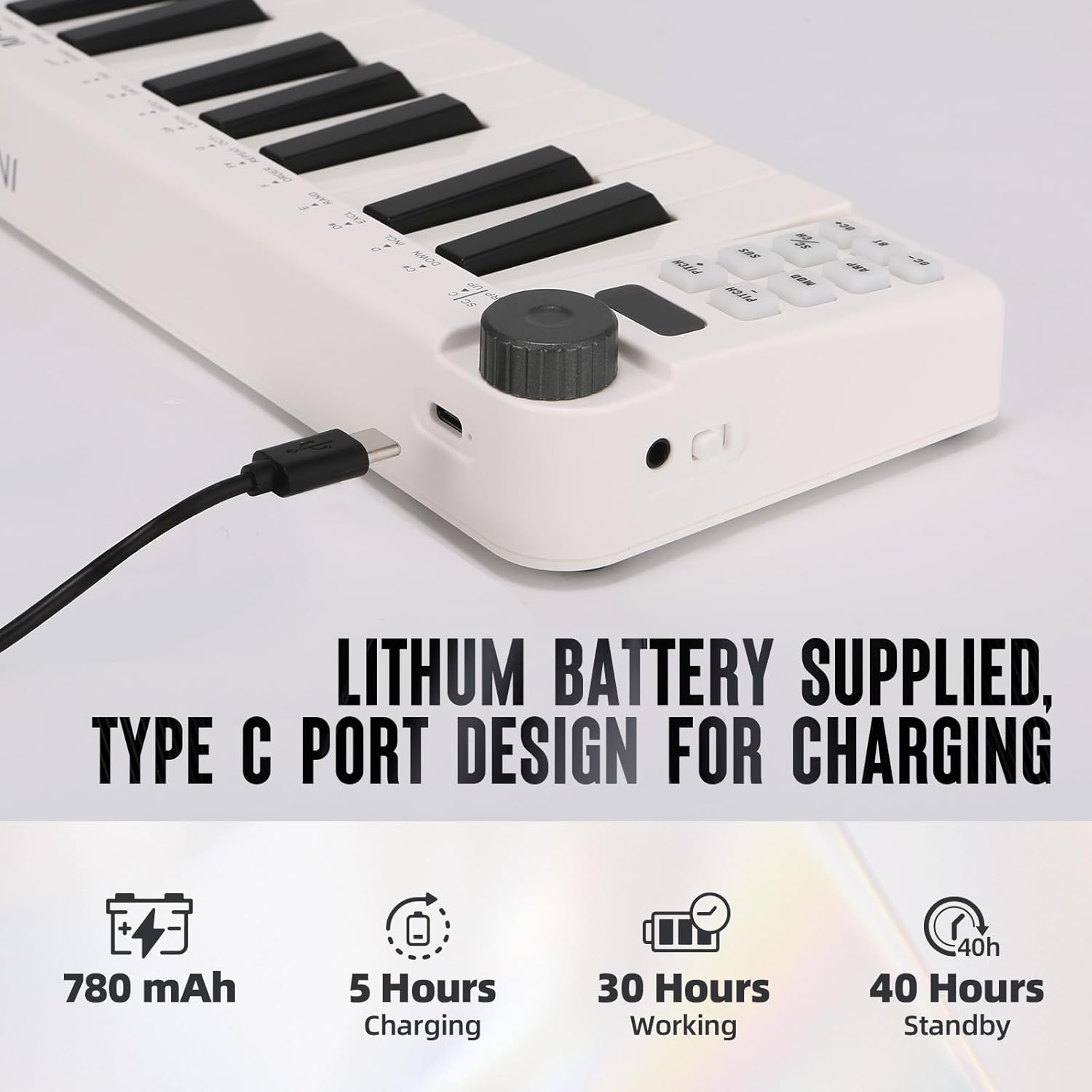
Image: Visual representation of the M-VAVE SMK-25 MINI's battery capacity, charging time, working time, and standby time.
Гаранција и подршка
M-VAVE products are designed for reliability and performance. For warranty information, technical support, or service inquiries, please refer to the official M-VAVE webсајт или директно контактирајте њихову корисничку подршку. Сачувајте рачун као доказ о куповини за потребе гаранције.
M-VAVE aims to provide high-quality audio equipment and instruments. For assistance, their professional sales support team can address questions within 24 hours.
Посетите M-VAVE Store on Amazon за више информација.


