1. Производ је готовview
The SPC Zeus 4G Pro is a smartphone designed for ease of use, particularly for seniors. It features a simplified interface with large icons, physical buttons for common actions, and an integrated SOS function for emergencies. The device runs on Android 11 and includes a charging base for convenient power management.

Image: The SPC Zeus 4G Pro smartphone positioned in its charging base. The screen shows a simplified interface with large, easy-to-read icons for essential applications like WhatsApp, Phone, Camera, and Contacts, designed for user accessibility.
2. Шта је у кутији
Upon unboxing your SPC Zeus 4G Pro, please ensure all the following items are present:
- SPC Zeus 4G Pro Smartphone
- База за пуњење
- УСБ кабл
- Сцреен Протецтор
- Кориснички приручник (овај документ)
3. Кључне карактеристике
3.1. Easy Mode with XXL Icons
The SPC Zeus 4G Pro features an intuitive 'Easy Mode' interface with extra-large icons for applications, making navigation straightforward. This mode also provides direct access to frequently used contacts and a shortcuts section for essential settings.

Image: The SPC Zeus 4G Pro displaying its Easy Mode interface, characterized by oversized icons for applications, enhancing visibility and ease of selection.
3.2. Physical Buttons and SOS Function
The device includes convenient physical buttons for answering and ending calls, returning to the home screen, and navigating back. On the rear, an SOS button allows users to quickly request help by initiating calls and sending SMS messages with geolocation to up to three pre-defined contacts.

Слика: Детаљна view highlighting the physical call answer/end buttons at the bottom front of the phone, and the prominent SOS button located on the rear, near the camera.
3.3. Convenient Charging Base
The SPC Zeus 4G Pro comes with a charging base, simplifying the charging process. Alternatively, the phone can be charged via its reversible USB-C port, allowing for easy connection in any orientation.

Image: The SPC Zeus 4G Pro smartphone securely placed in its charging base on a clean desk surface, alongside a notebook and reading glasses, illustrating its convenient charging solution.
3.4. Оперативни систем Андроид 11
Running on Android 11, the SPC Zeus 4G Pro provides access to the Google Play Store, enabling users to download a wide range of popular applications. Users can choose between the adapted Easy Mode interface or the native Android interface.
3.5. Video Calls and Expanded Memory
With its 5.5-inch IPS display and 4G connectivity, the smartphone is well-suited for video calls, including those made via WhatsApp. It features 4GB of RAM for smooth performance and 64GB of internal memory, expandable by an additional 512GB via a microSD card, for storing photos and videos from its 13MP camera. It also includes an FM radio.

Image: The SPC Zeus 4G Pro screen showing a contact list where each entry is accompanied by a photo, facilitating easy identification and selection for users.
3.6. Smart Help Remote Assistance
The Smart Help function allows authorized family members or caregivers to remotely configure phone settings via SMS, such as adding contacts, adjusting volume, or activating the SOS function. It can also send alerts for low battery or missed calls and automatically increase volume if calls are not answered.
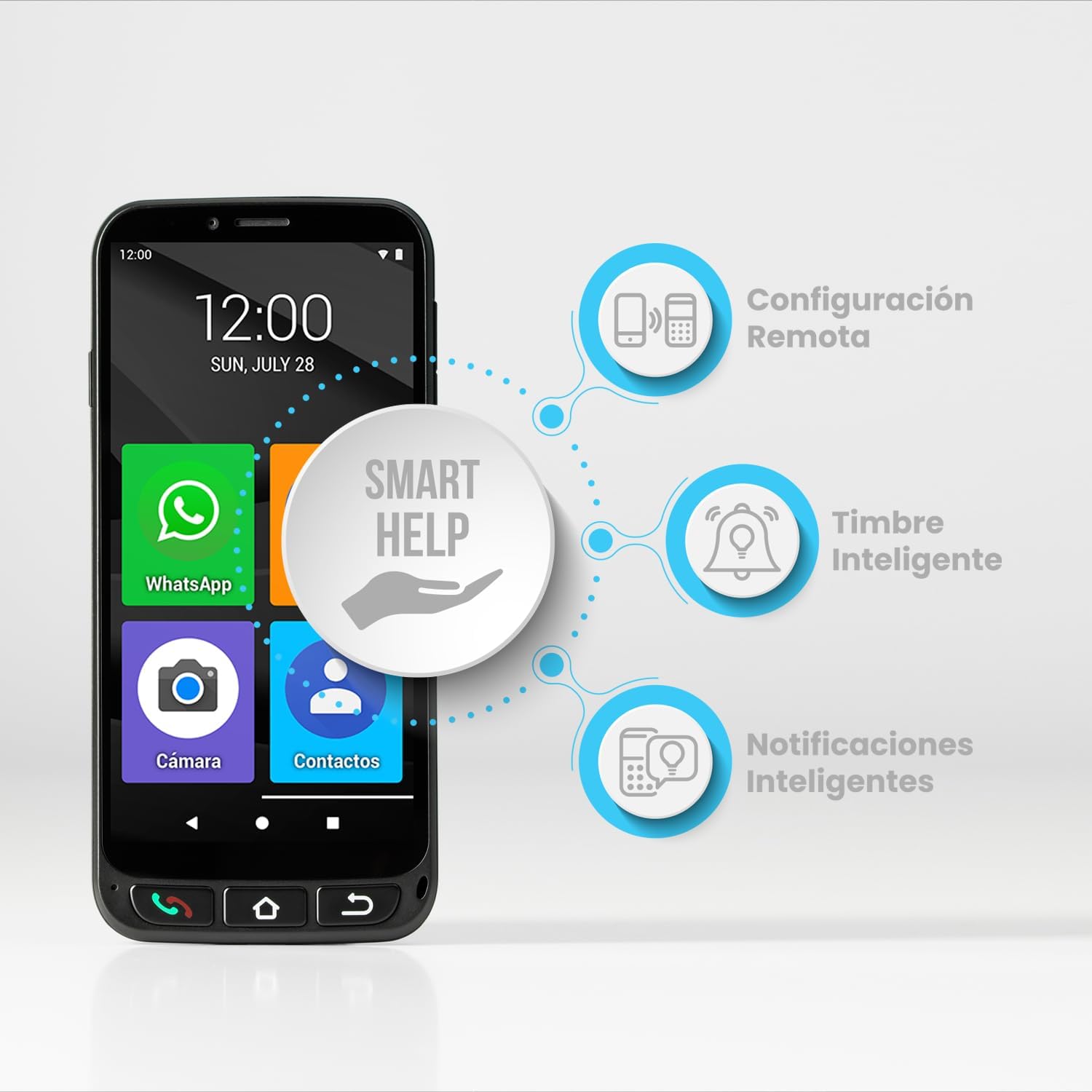
Image: A visual representation of the Smart Help system, showing its three main components: Remote Configuration, Smart Ringer (automatic volume adjustment), and Smart Notifications (alerts for low battery or missed calls).
4. Водич за подешавање
4.1. Уметање SIM картице и MicroSD картице
- Пронађите лежиште за SIM/MicroSD картицу са стране телефона.
- Користите приложени алат за избацивање СИМ картице да бисте отворили лежиште.
- Carefully place your NanoSIM and MicroSIM cards (if applicable) and MicroSD card into their respective slots.
- Пажљиво гурните лежиште назад у телефон док не кликне на своје место.
4.2. Почетно пуњење
Before first use, fully charge your SPC Zeus 4G Pro. You can use either the included charging base or the USB-C cable.
- Коришћење базе за пуњење: Place the phone vertically into the charging base, ensuring the charging contacts align. The phone will indicate charging.
- Коришћење УСБ-Ц кабла: Connect the USB-C cable to the phone's charging port and the other end to a compatible USB power adapter.
4.3. Укључивање и почетна конфигурација
- Press and hold the Power button (usually on the side) until the SPC logo appears.
- Пратите упутства на екрану да бисте изабрали језик, повезали се на Wi-Fi и подесили свој Google налог.
- Choose between 'Easy Mode' (recommended for simplified use) or the standard Android interface during setup.
- Configure your emergency contacts for the SOS function.
5. Упутство за употребу
5.1. Упућивање и примање позива
- Да бисте упутили позив: In Easy Mode, tap the large 'Phone' icon. You can dial a number directly or select a contact from your favorites or contact list. Press the green physical call button to initiate the call.
- Да бисте примили позив: When a call comes in, press the green physical call button or swipe the green icon on the screen to answer.
- Да бисте прекинули позив: Press the red physical call button or tap the red icon on the screen.
5.2. Using the SOS Button
In an emergency, press and hold the SOS button located on the back of the phone for approximately 3 seconds. The phone will automatically:
- Initiate calls to your pre-defined emergency contacts in sequence until one answers.
- Emit an audible alarm to attract attention.
- Send an SMS message with your current geolocation to all emergency contacts.
5.3. Navigating Easy Mode
- Почетни екран: Displays large icons for frequently used apps and favorite contacts.
- Пречице: Swipe left or right (or tap the 'Shortcuts' icon) to access quick settings like Wi-Fi, Bluetooth, and font size.
- Physical Navigation Buttons:
- Зелено дугме: Answer call / Initiate call.
- Home Button (middle): Вратите се на главни почетни екран.
- Back Button (right): Вратите се на претходни екран.
- Црвено дугме: Заврши позив.
6. Одржавање
6.1. Брига о батерији
- Да бисте продужили век трајања батерије, избегавајте екстремне температуре.
- Charge the phone regularly, ideally before the battery completely drains.
- Use only the provided charging base or USB-C cable and a compatible power adapter.
6.2. Чишћење уређаја
- Нежно обришите екран и кућиште меком крпом која не оставља влакна.
- Избегавајте употребу јаких хемикалија, абразивних средстава за чишћење или аеросолних спрејева.
- Ensure no liquid enters the ports or openings.
6.3. Ажурирања софтвера
Periodically check for software updates to ensure optimal performance and security. You can usually find this option in the phone's settings under "System" or "About phone."
КСНУМКС. Решавање проблема
| Проблем | Могући узрок | Решење |
|---|---|---|
| Телефон се не укључује. | Батерија је потпуно испражњена. | Connect to charger and allow to charge for at least 15 minutes before attempting to power on. |
| Не могу да упућујем или примам позиве. | No SIM card inserted, SIM card not properly seated, or no network signal. | Ensure SIM card is correctly inserted. Check network signal strength. Contact your service provider if issues persist. |
| Екран не реагује. | Привремени софтверски квар. | Restart the phone by pressing and holding the Power button until it reboots. |
| Charging base does not charge phone with case on. | Case interferes with charging contacts. | Remove the protective case before placing the phone in the charging base. Charge via USB-C cable if case is preferred. |
| SOS дугме не ради. | Emergency contacts not set up or incorrect. | Verify and configure emergency contacts in the phone's settings. Ensure sufficient balance/plan for calls/SMS. |
8. Спецификације
| Назив модела | Zeus 4G Pro |
| Број модела | 2352464Н |
| Оперативни систем | Андроид 11.0 |
| Величина екрана | 5.5 инча |
| Резолуција екрана | 1440 к 720 пиксела |
| РАМ | 4 ГБ |
| Интерна меморија | 64 GB (Expandable up to 512GB via MicroSD) |
| Камера | 13MP (Rear), Frontal |
| Капацитет батерије | 2400 мАх |
| Талк Тиме | 6 сата |
| Повезивање | Блутут, УСБ, Ви-Фи, 4Г |
| Посебне карактеристике | Dual SIM, Wi-Fi Hotspot, Integrated GPS, Expandable Memory, SOS Button, Easy Mode, Smart Help |
| Тежина производа | 620 г |
| Боја | Црно |
9. Гаранција и подршка
The SPC Zeus 4G Pro comes with a standard manufacturer's warranty. For detailed warranty terms and conditions, please refer to the warranty card included in your product packaging or visit the official SPC website. For technical support, troubleshooting assistance, or service inquiries, please contact SPC customer support through their official channels.
Више информација и ресурса за подршку можете пронаћи на SPC Brand Store on Amazon или званичник произвођача webсајту.


