Увод
This manual provides detailed instructions for the TECPHILE iPad Keyboard Case, Model T5509D. It covers setup, operation, maintenance, and troubleshooting to ensure optimal use of your device. Please read this manual thoroughly before using the product.
Компатибилност
The TECPHILE iPad Keyboard Case (Model T5509D) is specifically designed for the following iPad Pro 12.9-inch models:
- iPad Pro 12.9-inch (6th Generation, 2022): Models A2436, A2764, A2437, A2766
- iPad Pro 12.9-inch (5th Generation, 2021): Models A2378, A2379, A2461, A2462
- iPad Pro 12.9-inch (4th Generation, 2020): Models A2233, A2229, A2069, A2232
- iPad Pro 12.9-inch (3rd Generation, 2018): Models A1876, A2014, A1895, A1983
This case is not compatible with any other iPad models.

Image: Compatibility chart for TECPHILE iPad Keyboard Case. Please verify your iPad model number on the back of your device to ensure compatibility.
Садржај пакета
Приликом отварања пакета, молимо вас да се уверите да су сви састојци присутни:
- TECPHILE iPad Keyboard Case (with integrated kickstand and pencil holder)
- Detachable Wireless Backlit Keyboard
- УСБ-Ц кабл за пуњење
- Кориснички приручник (овај документ)
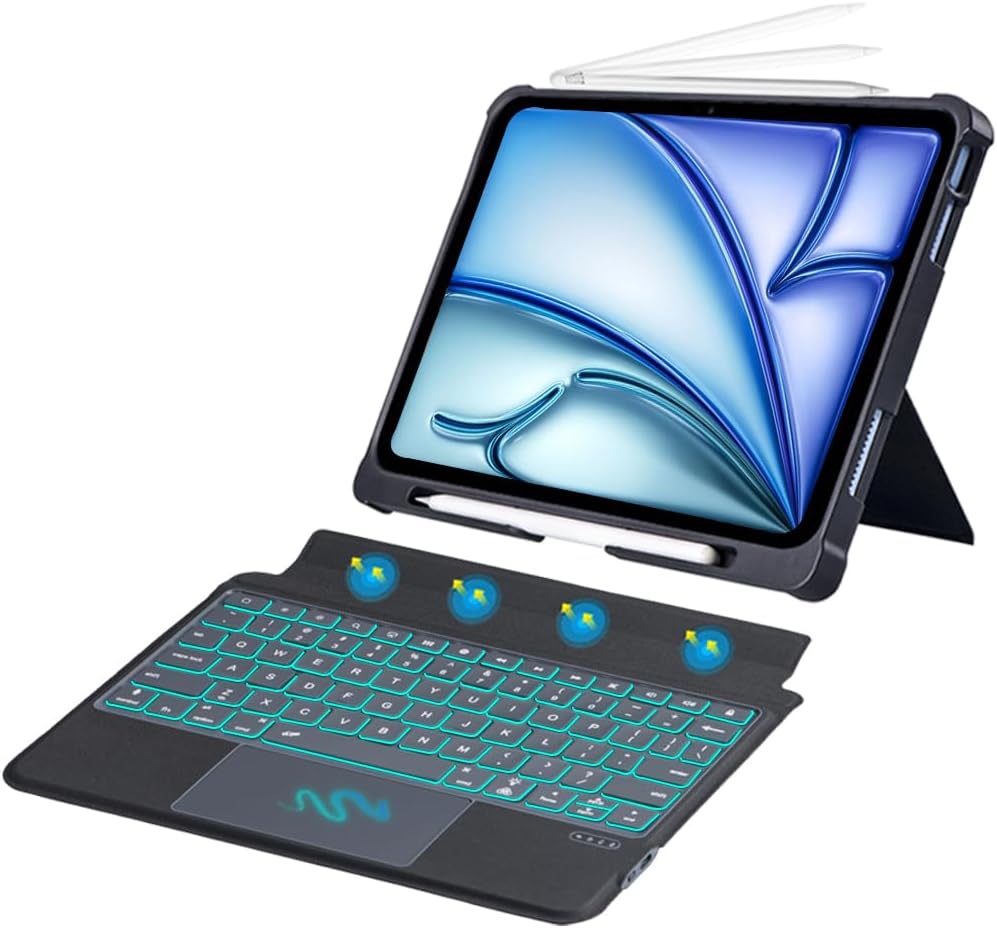
Слика: Прекоview of the TECPHILE iPad Keyboard Case components, including the case with an iPad and the detached wireless keyboard.
Водич за подешавање
1. Причвршћивање iPad-а на футролу
- Gently align your iPad Pro 12.9-inch with the case.
- Insert the iPad into the protective shell, ensuring all corners are securely fitted. The case provides full protection and features honeycomb heat release design.
- The case includes a dedicated pencil holder and supports wireless charging for your Apple Pencil.
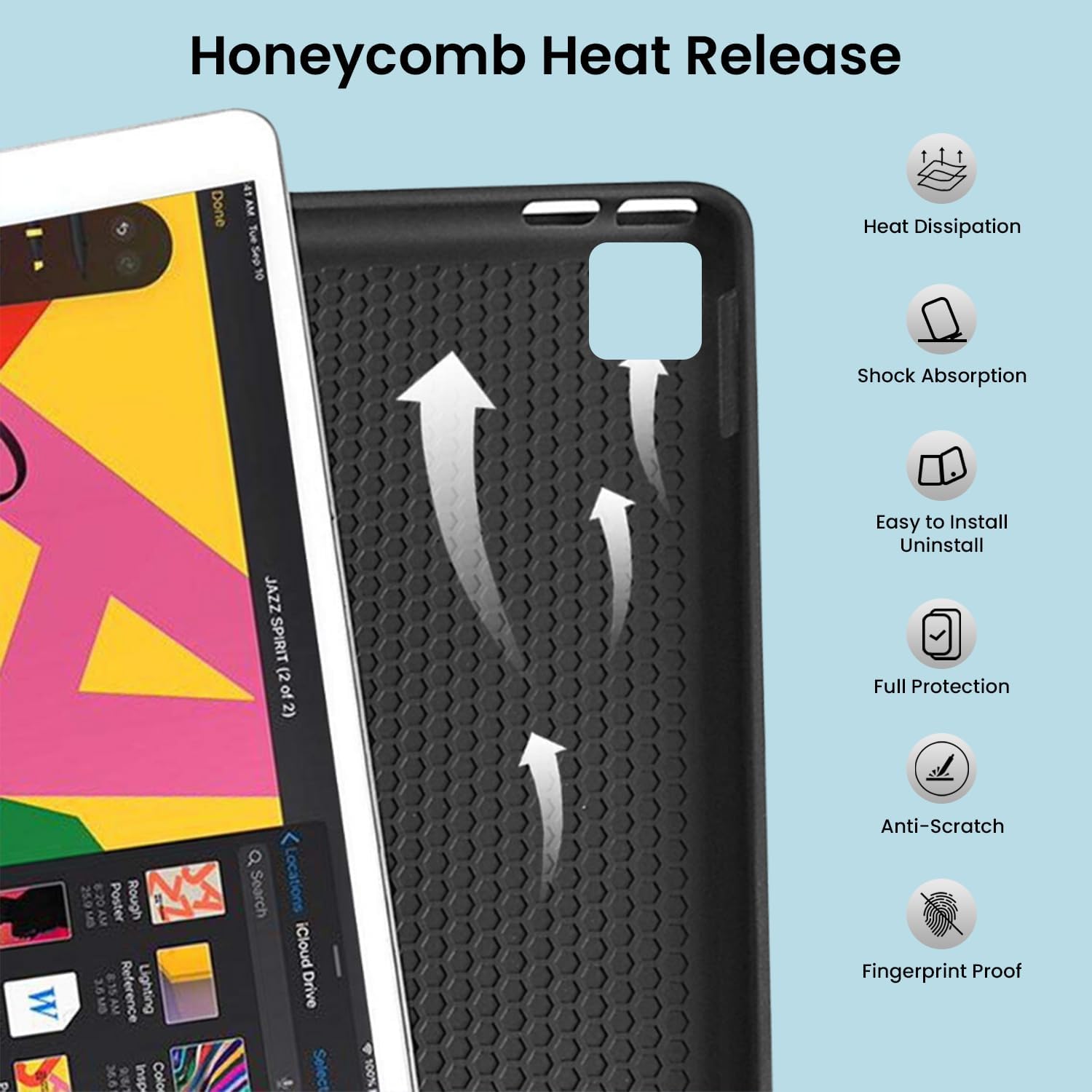
Image: Detail of the case's honeycomb structure for heat dissipation and protective features.

Image: Illustrates the wireless charging capability for the Apple Pencil and the integrated pencil holder.
2. Пуњење тастатуре
Before initial use, fully charge the keyboard. The keyboard has a 500mAh battery capacity.
- Пронађите USB-C порт за пуњење са стране тастатуре.
- Connect the provided USB-C cable to the keyboard and a power source (e.g., USB wall adapter, computer USB port).
- Индикаторска лампица пуњења ће се упалити. Када се потпуно напуни, светло се може променити или искључити.
A full charge provides approximately 80 hours of use without backlight or 5 hours with backlight enabled.

Image: Keyboard charging port and battery performance details.
3. Connecting the Keyboard via Bluetooth
The keyboard connects wirelessly to your iPad via Bluetooth.
- Уверите се да је тастатура напуњена и укључена.
- На тастатури притисните Фн + З keys simultaneously. The Bluetooth indicator light will start blinking, indicating it's in pairing mode.
- На вашем iPad-у идите на Подешавања > Блуетоотх.
- Укључите Bluetooth. Ваш iPad ће тражити доступне уређаје.
- Locate and tap "Bluetooth Keyboard" (or similar name) in the list of devices to connect.
- Once connected, the Bluetooth indicator light on the keyboard will stop blinking.

Image: Visual guide for Bluetooth pairing process.
Упутство за употребу
Функције тастатуре
The detachable keyboard features a QWERTY layout with additional function keys for iPad control.
- Контрола позадинског осветљења: Притисните Фн + 💡 (light bulb icon) to turn on/off the backlight and cycle through 7 different colors. Press Фн + ☀ (sun icon) to adjust the 3 levels of brightness.
- Full Shortcut Row: Access common iPad functions directly from the top row of keys.
- Intelligent Voice Input Function: Utilize the dedicated key for voice input.

Слика: Детаљна view of the keyboard's backlit keys and function controls.
Smart Multi-Gesture Trackpad
The integrated large trackpad supports multi-touch gestures for enhanced navigation.
- Основна навигација: Move the cursor by sliding your finger across the trackpad.
- Click Functions: Supports right and left click functions.
- Multi-Finger Gestures: Utilize native iPad multi-finger gestures for scrolling, swiping, and other actions. Refer to your iPad's settings for a full list of supported gestures.
- Turn On/Off Trackpad: Притисните Фн + 🖱️ (trackpad icon) to enable or disable the trackpad.
Adjustable Kickstand and Usage Modes
The case features an adjustable kickstand that allows for multiple viewуглове гледања и начине коришћења.
- Режим типа: Position the iPad upright with the keyboard attached for a laptop-like experience.
- View Режим: Adjust the kickstand to a comfortable angle for watching videos or presentations without the keyboard.
- Режим читања: Fold the keyboard behind the iPad for a tablet-like reading experience.
- Режим скицирања: Lower the angle for drawing or writing with the Apple Pencil.
The kickstand offers a seamless range of angles, smoothly reclining from 30° to 160° while maintaining stability.

Image: Various usage modes enabled by the adjustable kickstand and detachable keyboard.
Функција аутоматског буђења/спавања
The keyboard case includes an auto wake/sleep function to conserve battery life. Closing the case will put your iPad to sleep, and opening it will wake it up.
Одржавање
- Чишћење: Користите меку, дamp крпу за брисање спољашњости кућишта и тастатуре. Избегавајте јаке хемикалије или абразивне материјале.
- Складиштење: Када се не користи дуже време, чувајте футролу за тастатуру на хладном и сувом месту. Уверите се да је тастатура искључена да бисте продужили век трајања батерије.
- Одржавање батерије: To prolong battery life, avoid fully discharging the keyboard frequently. Charge it regularly.
Решавање проблема
Тастатура се не повезује
- Проверите снагу: Уверите се да је тастатура укључена и да има довољно напуњености батерије.
- Поново упарите Bluetooth:
- На вашем iPad-у идите на Подешавања > Блуетоотх.
- Forget or unpair the "Bluetooth Keyboard" if it appears in "My Devices".
- Поново покрените иПад.
- Put the keyboard into pairing mode (press Фн + З).
- Тражи and connect to the keyboard again on your iPad.
- сметње: Удаљите се од других бежичних уређаја који могу изазвати сметње.
Тастери не реагују
- Ниво батерије: Charge the keyboard fully.
- Блуетоотх веза: Уверите се да је тастатура правилно повезана путем Блутут-а.
- Поново покрени: Turn the keyboard off and on again.
Trackpad Not Working
- Enable Trackpad: Уверите се да је тракпед омогућен притиском на Фн + 🖱️ (trackpad icon).
- iPad Settings: Проверите подешавања приступачности на iPad-у за контролу показивача.
- Очистите тракпад: Уверите се да је површина додирне табле чиста и без прљавштине.
Спецификације
| Назив модела | Т5509Д |
| Компатибилност | iPad Pro 12.9" (6th, 5th, 4th, 3rd Gen) |
| Повезивање | Блуетоотх |
| Распоред тастатуре | КВЕРТИ |
| Позадинско осветљење | 7 боја, 3 нивоа осветљености |
| Трацкпад | Large Multi-Gesture Trackpad |
| Капацитет батерије | 500мАх (литијум-јонски) |
| Battery Life (Non-backlight) | До 80 сати |
| Battery Life (Backlight) | До 5 сати |
| Порт за пуњење | УСБ-Ц |
| Димензије производа | 29 к 24 к 2 цм |
| Тежина артикла | 735 г |
| Материјал | Leatherite and ABS Plastic |
| Посебне карактеристике | Adjustable Kickstand (30°-160°), Detachable Keyboard, Pencil Holder, Wireless Pencil Charging Support, Auto Wake/Sleep, Honeycomb Heat Release |
Гаранција и подршка
For warranty information or technical support, please refer to the documentation included with your purchase or contact TECPHILE customer service through the retailer where the product was purchased. Please have your model number (T5509D) and purchase details ready when contacting support.
