1. Увод
Овај приручник пружа основне информације за безбедно и ефикасно коришћење вашег ViewSonic VA2732-MH-W 27-inch Full HD IPS Monitor. Please read these instructions thoroughly before operating the device and retain them for future reference.
Тхе ViewSonic VA2732-MH-W is a 27-inch Full HD (1920x1080) IPS monitor designed for office and home use. It features a 100Hz refresh rate and 1ms (MPRT) response time for smooth visuals, EyeProtech+ technology for reduced eye strain, and multi-OS compatibility with Windows and macOS systems. The monitor includes built-in 2W x 2 stereo speakers and offers versatile connectivity options.

Слика 1.1: ViewSonic VA Series Monitors for Office and Home Environments.
2. Подешавање и инсталација
2.1 Садржај пакета
Проверите да ли су све ставке присутне у пакету:
- ViewSonic VA2732-MH-W Monitor x1
- 3-pin Power Plug x1
- HDMI Cable (v1.4) x1
- АЦ/ДЦ адаптер к1
- Кратки водич за почетак к1
2.2 Склапање монитора
Follow the instructions in the Quick Start Guide for attaching the stand to the monitor. Ensure all connections are secure.
2.3 ВЕСА монтажа
The monitor is VESA compatible (100 x 100 mm) for wall or arm mounting. Use appropriate VESA-compliant mounting hardware (sold separately) and follow the mounting kit's instructions.
2.4 Повезивање са рачунаром
Connect the monitor to your computer using the provided HDMI cable or a VGA cable (not included). Ensure the cables are securely plugged into both the monitor and your computer's video output port.

Слика 2.1: Позади view of the monitor displaying available connectivity ports (HDMI, VGA, and 3.5mm Audio Out).
2.5 Прикључак за напајање
Connect the AC/DC adapter to the monitor's power input, then plug the 3-pin power plug into a power outlet. Press the power button on the monitor to turn it on.
3. Операција
3.1 Контроле монитора
The monitor features physical control buttons and an On-Screen Display (OSD) menu for adjustments.
- Физичке контроле: Key 1 (Favorite), Key 2, Key 3, Key 4, Key 5 (Power).
- Контроле приказа на екрану (ОСД): Избор улаза, подешавање звука, ViewMode, Color Adjust, Manual Image Adjust, Setup Menu.
3.2 Visual Performance and Features
The monitor features a SuperClear IPS Panel with 109% sRGB color gamut for vibrant and accurate visuals. It offers a 100Hz refresh rate and 1ms (MPRT) response time for fluid motion.

Image 3.1: SuperClear IPS Panel for accurate and vivid colors.

Image 3.2: High 100Hz Refresh Rate and 1ms Response Time for smoother action.
3.3 ViewМоде Пресетс
Тхе ViewMode feature provides optimized settings for various applications:
- игра: Оптимизовано за визуелне ефекте у играма.
- филм: Enhanced for video playback.
- Web: Погодно за опште web прегледавање.
- Текст: Смањује напрезање очију приликом читања докумената.
- Моно: Black and white display mode.

Слика 3.3: ViewMode offers optimized presets for different tasks.
3.4 EyeProtech+ for Eye Comfort
EyeProtech+ combines Flicker-Free technology and a low blue light filter to minimize eye strain during extended viewинг периоде.

Image 3.4: EyeProtech+ reduces blue light emission and eliminates flicker.

Image 3.5: Visual representation of Flicker-Free and Blue Light Filter technologies.
3.5 Аудио функције
The monitor includes two 2W built-in stereo speakers. An additional 3.5mm Audio Out port is available for connecting external headphones or speakers.

Image 3.6: Location of built-in speakers on the monitor.
3.6 Multi-OS Compatibility
The VA2732-MH-W is certified for Windows 10/11 and tested for macOS, ensuring broad compatibility with various operating systems.
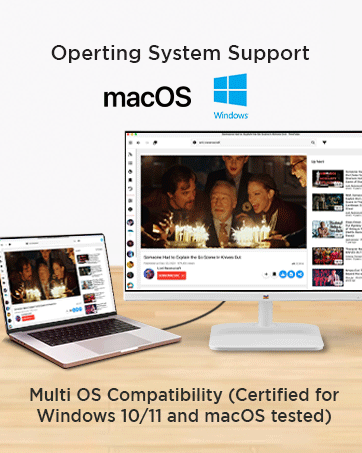
Image 3.7: Multi-OS compatibility with Windows and macOS.
4. Одржавање
4.1 Чишћење монитора
Да бисте очистили екран монитора, нежно га обришите меком крпом која не оставља влакна. За тврдокорне мрље, дampen the cloth with a mild, non-abrasive screen cleaner. Avoid using harsh chemicals or abrasive materials that could damage the anti-glare surface or 3H hard coating.
За монитор цasing, use a soft, dry cloth. Do not spray cleaners directly onto the monitor.
4.2 Eco Mode for Energy Efficiency
The monitor features an Eco Mode with 'Conserve', 'Optimize', and 'Standard' settings to manage power consumption. Adjusting these settings can reduce energy usage.

Image 4.1: Eco Mode helps reduce energy consumption.
КСНУМКС. Решавање проблема
If you encounter issues with your monitor, refer to the Quick Start Guide for basic troubleshooting steps. Common issues and potential solutions include:
- Без приказа: Ensure all cables (power and video) are securely connected. Check if the monitor is powered on. Verify the correct input source is selected via the OSD menu.
- Лош квалитет слике: Adjust resolution and refresh rate settings on your computer. Use the OSD menu to fine-tune brightness, contrast, and color settings.
- Нема звука: Check the audio cable connection (if using external speakers/headphones). Adjust the volume via the OSD menu and your computer's sound settings. Ensure the correct audio output device is selected on your computer.
For more complex issues, contact ViewСоник корисничка подршка.
6. Спецификације
Испод су техничке спецификације за ViewSonic VA2732-MH-W monitor:
| Феатуре | Спецификација |
|---|---|
| Бранд | ViewСониц |
| Број модела | VA2732-MH-W |
| Величина екрана | 27 инча (68.58 цм) |
| Панел Типе | IPS (SuperClear) |
| Резолуција | 1920 к 1080 (Фулл ХД) |
| Аспецт Ратио | 16:9 |
| Рефресх Рате | 100Хз |
| Време одговора | 1мс (МПРТ) |
| Осветљеност | 250 цд/м² |
| Статички однос контраста | 1,000: 1 (типично) |
| Динамички однос контраста | 50М:1 |
| Гамут боја | 109% сРГБ |
| Повезивање | 1x HDMI 1.4, 1x VGA, 1x 3.5mm Audio Out |
| Звучници | 2x 2W Stereo Speakers |
| ВЕСА компатибилност | 100 к 100 мм |
| Потрошња енергије (уобичајено) | 28В |
| Потрошња енергије (макс.) | 30В |
| Power Consumption (Eco Mode Conserve) | 20В |
| Потрошња енергије (приправност) | 0.3В |
| Димензије (физичке) | 615 к 459 к 225 мм |
| Нето тежина | 4.1 кг |
| Боја | Бела |
7. Гаранција и подршка
7.1 Гаранција произвођача
Тхе ViewSonic VA2732-MH-W monitor comes with a 3 године стандардне гаранције произвођача на лицу местаМолимо вас да сачувате доказ о куповини за потребе гаранције.
7.2 Manufacturer and Importer Information
Произвођач / Увозник: ViewСоник Технолоџиз ИНДИЈА Привате Лимитед
GST Number: 33AABCV7912Q1ZV
Адреса: No.25/14 B-8 GEMS Court., Khadher Nawaz Khan Road., Nungambakkam Chennai -600006
7.3 Корисничка подршка
For technical assistance, warranty service, or further inquiries, please contact ViewSonic customer support through their official channels. Refer to the Quick Start Guide or the ViewСониц webсајт за контакт детаље.


