1. Увод
Thank you for choosing the truefree O2 Open Ear Headphones. This manual provides detailed instructions for setting up, operating, and maintaining your new wireless earbuds. Please read this guide thoroughly to ensure optimal performance and a satisfying user experience.
2. Садржај пакета
Проверите да ли се у вашем пакету налазе све ставке наведене у наставку:
- truefree O2 Open Ear Earbuds (x2)
- Футрола за пуњење
- УСБ-Ц кабл за пуњење
- Упутство за употребу
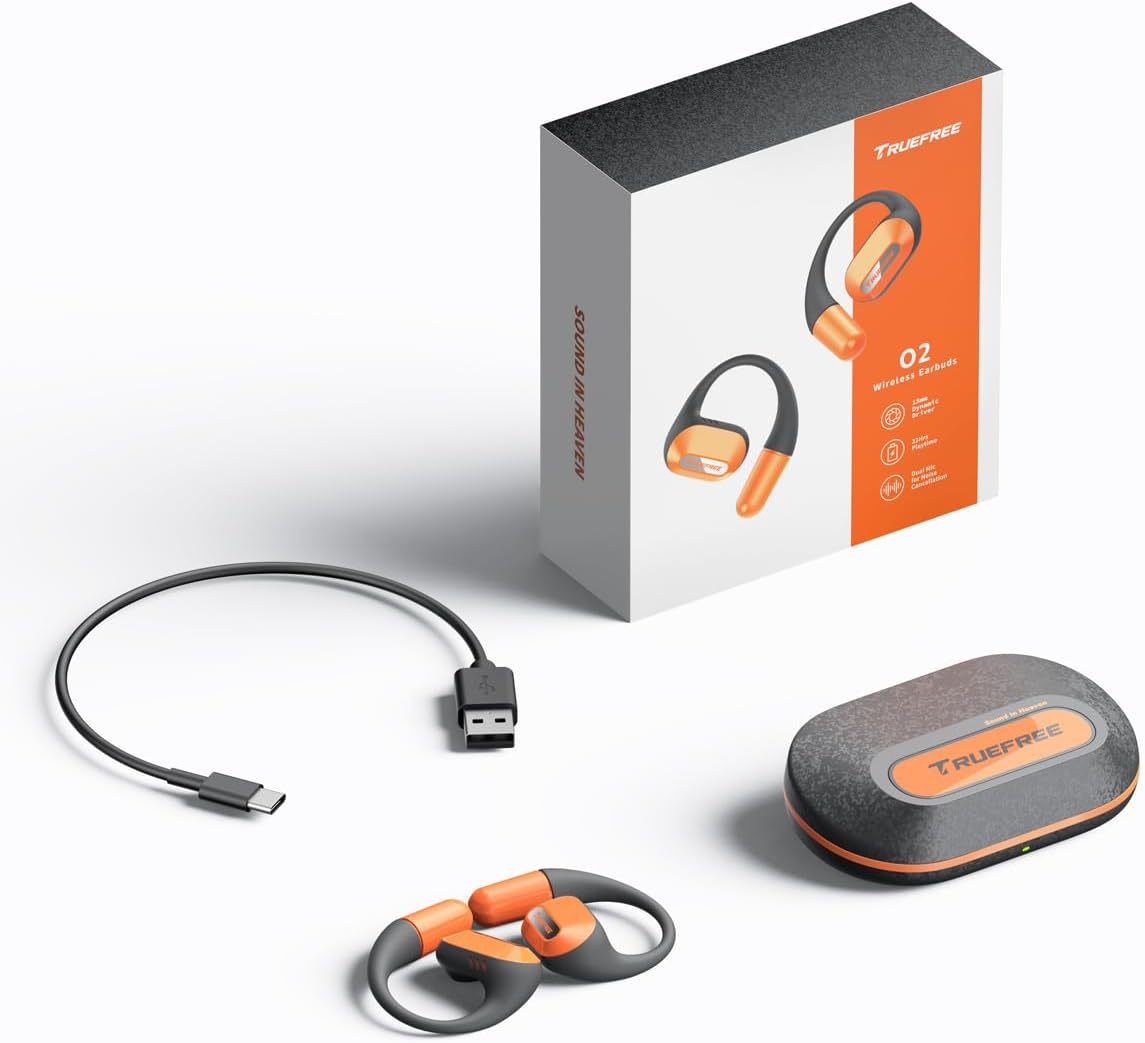
The complete package contents: two truefree O2 open ear earbuds, the charging case, a USB-C charging cable, and the user manual.
3. Производ је готовview
The truefree O2 headphones feature an open-ear design for comfort and situational awareness, equipped with 15mm dynamic drivers and directional acoustics. The earbuds are ultra-lightweight (8g each) and designed with soft silicone ear hooks for a secure fit during various activities.

The truefree O2 open ear headphones and their compact charging case.
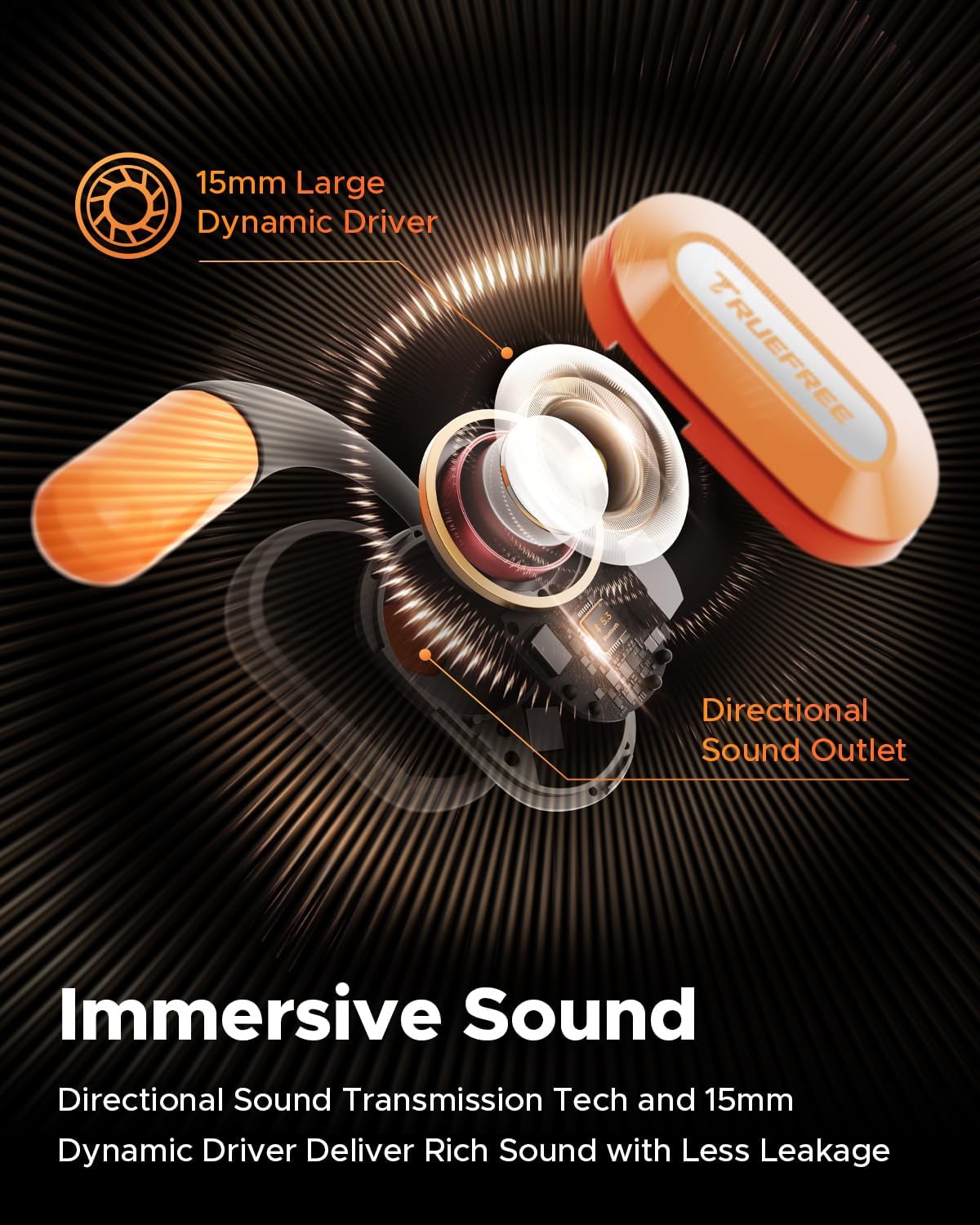
Експлодирао view diagram of the truefree O2 earbud, highlighting its 15mm large dynamic driver and directional sound outlet for immersive audio with minimal leakage.
4. Ношење слушалица
За оптималан квалитет звука и удобност, уверите се да су слушалице правилно ношене.
- Идентификујте леву (Л) и десну (Р) слушалице.
- Gently hook the earbud over your ear, positioning the speaker part towards your ear canal.
- Adjust the ear hook to fit snugly and securely around your ear. The flexible NiTi alloy memory steel wire ensures a stable fit for various ear shapes.
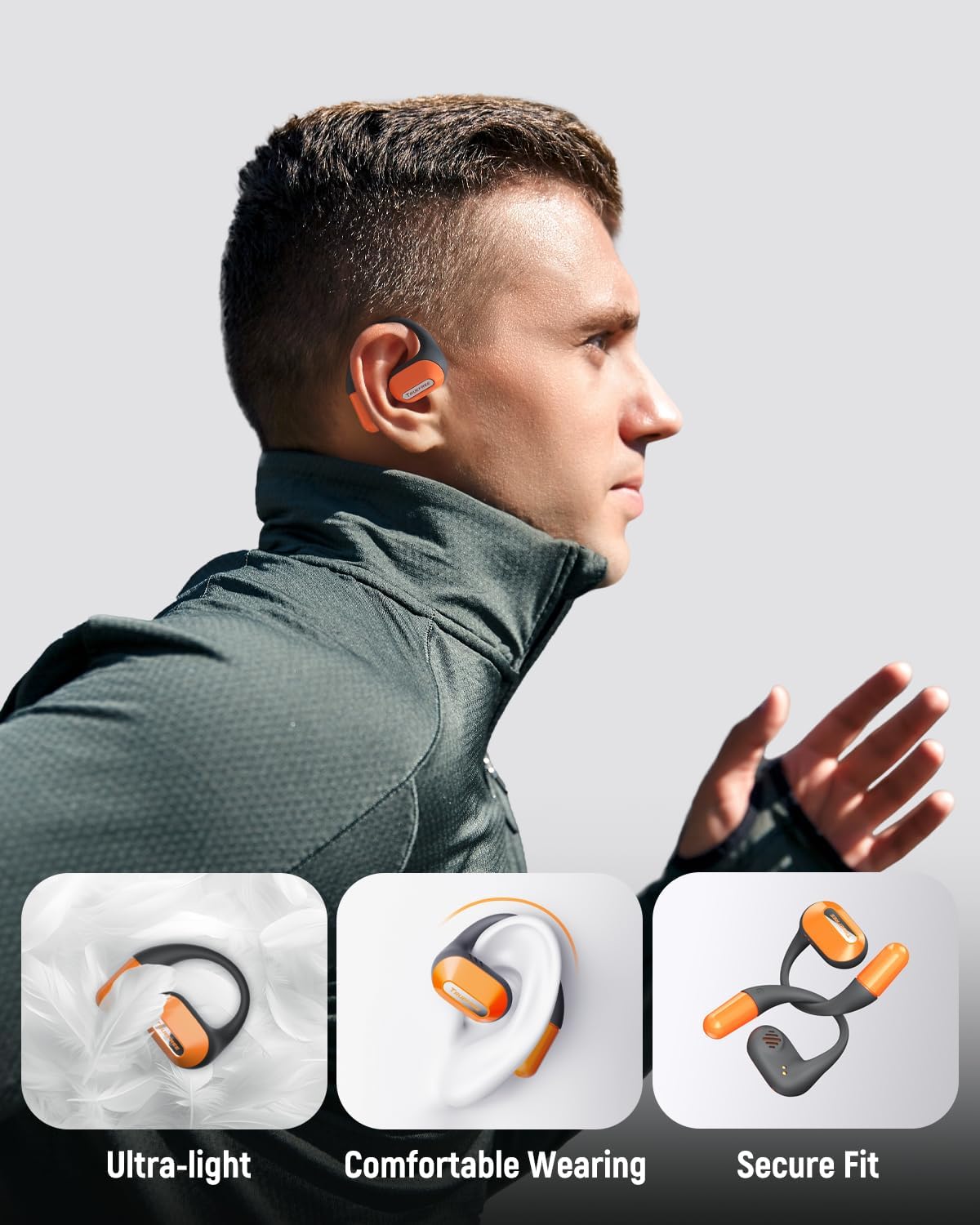
A user wearing the truefree O2 headphones, demonstrating their ultra-light design, comfortable fit, and secure ear hooks suitable for active use.
5. Пуњење
The truefree O2 headphones and charging case are designed for efficient power management.
5.1 Пуњење слушалица
- Ставите слушалице у кућиште за пуњење. Уверите се да су контакти за пуњење поравнати.
- The indicator lights on the earbuds will show their charging status.
- Потпуно пуњење обезбеђује приближно 6.5 сати репродукције.
5.2 Пуњење кућишта
- Повежите USB-C кабл за пуњење са портом за пуњење на кућишту и са извором напајања.
- The charging case can be fully charged in approximately 1 hour and 15 minutes.
- A fully charged case provides up to 22 hours of total playtime for the earbuds.

An illustration detailing the IPX5 waterproof rating, 6.5 hours of playtime on a single charge, 22 hours total with the charging case, and 1 hour 15 minutes fast charging via USB-C.
6. Подешавање
6.1 Почетно упаривање путем Bluetooth-а
- Отворите кућиште за пуњење. Слушалице ће аутоматски ући у режим упаривања.
- Омогућите Блутут на свом уређају (паметном телефону, таблету, лаптопу).
- Тражи "truefree O2" in the list of available Bluetooth devices.
- Select "truefree O2" to connect. A voice prompt will confirm successful pairing.
6.2 Контрола апликација
Enhance your experience by downloading the "Truefree" application from your device's app store.
- Прилагођавање: Adjust EQ settings, including 9 personalized presets and a customizable option.
- Ажурирања фирмвера: Редовно ажурирајте своје слушалице најновијим функцијама и побољшањима.
- Специјалне функције: Control features like game mode and other settings directly from the app.
- Дуал Девице Цоннецтион: Enable multipoint connection for seamless switching between two devices.
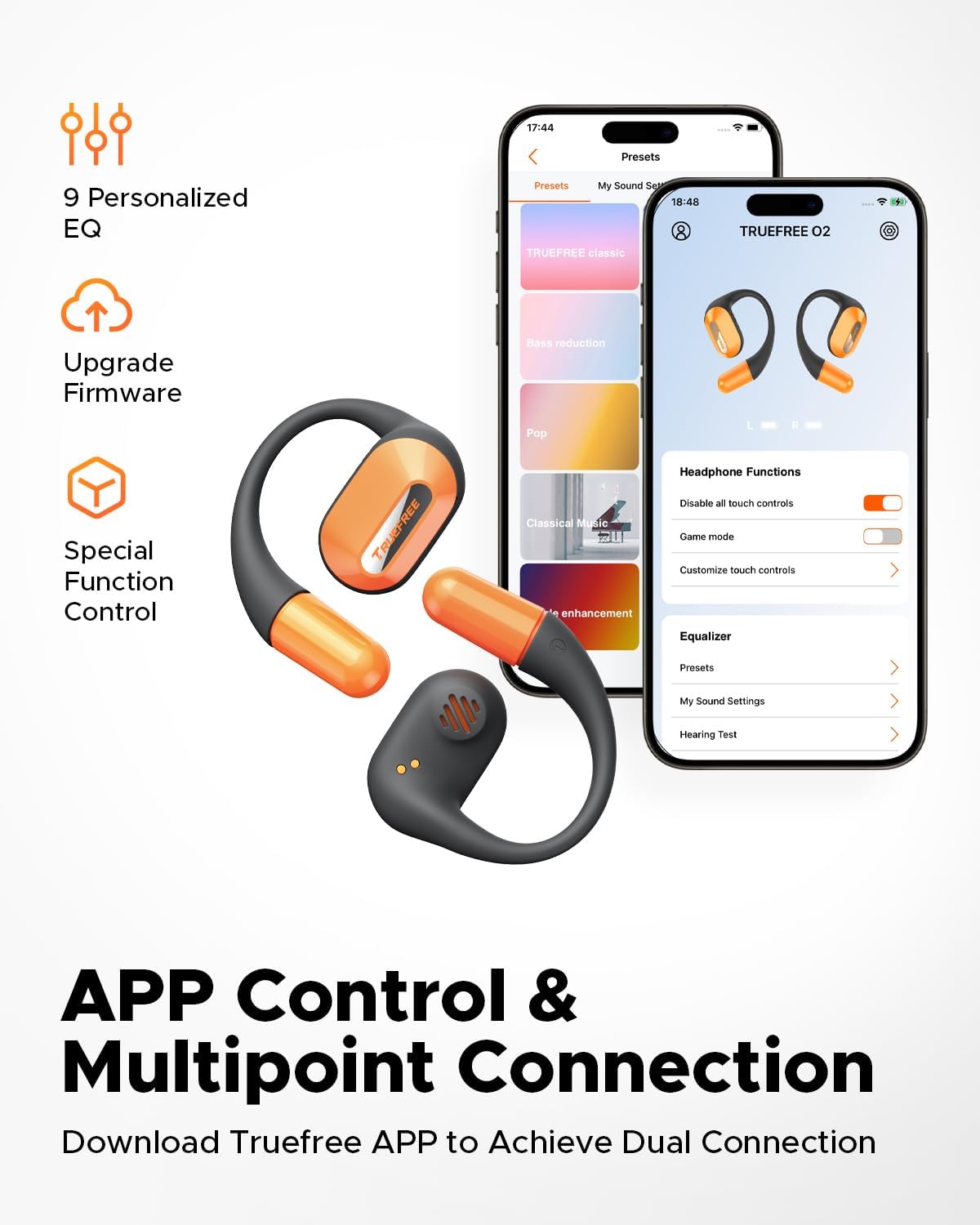
Screenshots of the Truefree mobile application, illustrating options for customizing EQ settings, game mode, and other control functions for the O2 headphones.
7. Оперативни
7.1 Контроле на додир
The truefree O2 earbuds feature intuitive touch controls on both the left (L) and right (R) earbuds.
| Акција | Функција |
|---|---|
| L & R Double tap | Пуштање/Пауза, Одговарање/Завршавање позива |
| L & R Long press for 1.5s | Previous Track (L), Next Track (R), Power On/Off (when not in case) |
| L Single tap | Утишавање звука |
| R Single tap | Волуме Уп |
| L Long press for 3s | Активирајте режим игре |
| R Long press for 3s | Активирајте гласовни помоћник |

A visual guide to the touch control functions on the truefree O2 earbuds.
7.2 Вишеструка веза
The truefree O2 supports connecting to two devices simultaneously, allowing for seamless switching between audio sources.
- Ensure the earbuds are connected to your first device.
- Put the earbuds back into the charging case, then take them out again to re-enter pairing mode.
- Connect the earbuds to your second device via Bluetooth.
- Once both devices are paired, the earbuds will intelligently switch audio based on activity (e.g., taking a call on your phone while listening to music on your laptop).

An image showing the truefree O2 headphones connected to both a laptop and a smartphone, illustrating the multipoint connection feature for seamless device switching.
7.3 Режим игре
Activate Game Mode for reduced audio latency, providing a more synchronized audio-visual experience during gaming.
- To activate: Long press the left earbud for 3 seconds.
- To deactivate: Repeat the action.
- Game Mode can also be toggled via the Truefree app.
8. Одржавање
8.1 IPX5 Waterproof Rating
The truefree O2 earbuds are IPX5 waterproof, meaning they are resistant to sweat and light splashes of water. This makes them suitable for workouts and outdoor activities.
- Не потапајте слушалице у воду.
- Уверите се да су слушалице суве пре него што их вратите у кућиште за пуњење како бисте спречили оштећења.

The truefree O2 earbud with water droplets, illustrating its IPX5 waterproof rating.
8.2 Чишћење
- Обришите слушалице и кућиште за пуњење меком, сувом крпом која не оставља влакна.
- Избегавајте употребу абразивних материјала или јаких хемикалија.
- Редовно чистите контакте за пуњење и на слушалицама и на кућишту како бисте осигурали правилно пуњење.
КСНУМКС. Решавање проблема
If you encounter issues with your truefree O2 headphones, refer to the following common solutions:
| Проблем | Решење |
|---|---|
| Слушалице се не упарују | Ensure earbuds are charged. Turn off and on Bluetooth on your device. Forget "truefree O2" from your device's Bluetooth list and re-pair. |
| Нема звука из једне слушалице | Place both earbuds back in the case, close it, then open it again. Check device's audio balance settings. |
| Проблем са пуњењем | Clean charging contacts on earbuds and case. Try a different USB-C cable and power adapter. Ensure earbuds are correctly seated in the case. |
| Мала јачина звука | Adjust volume on both the earbuds and your connected device. Check EQ settings in the Truefree app. |
| Веза често пада | Ensure no obstructions between earbuds and device. Reduce distance between earbuds and device. Avoid strong electromagnetic interference. |
If the issue persists, please contact truefree customer support for further assistance.
10. Спецификације
| Феатуре | Детаљ |
|---|---|
| Назив модела | truefree O2 |
| Повезивање | Блуетоотх 5.3 |
| Постављање уха | Отворено ухо |
| Облик слушалице | Хоок |
| Отпорност на воду | ИПКС5 |
| Трајање батерије слушалица | До 6.5 сати |
| Укупно време репродукције (са футролом) | До 22 сати |
| Време пуњења кућишта | Approx. 1 hour 15 minutes (USB-C) |
| Величина аудио драјвера | 15 мм |
| Тежина слушалице | 8 грама (сваки) |
| Тип контроле | Контрола додиром, контрола апликација |
| Посебне карактеристике | Multipoint Pairing, Game Mode, Dual-mic Noise Cancelling |
11. Гаранција и подршка
truefree is committed to providing excellent customer experience. If you have any problems or suggestions regarding your truefree O2 Open Ear Headphones, please do not hesitate to contact our customer support team. We are ready to offer you a satisfactory solution.
For support, please refer to the contact information provided on the truefree official webсајт или вашу платформу за куповину.


