1. Увод
This manual provides comprehensive instructions for the installation, operation, and maintenance of your Juno 2-Inch Flat Trim Canless Wafer LED Downlight. This innovative lighting solution is designed for quick and easy installation in various ceiling spaces, eliminating the need for traditional recessed housings. It features an all-in-one design with switchable white color temperature and adjustable lumen output, offering versatile lighting for accent, task, or general illumination.

Figure 1: Juno 2-Inch Flat Trim Canless Wafer LED Downlight with its remote driver box.
2. Безбедносне информације
Please read all instructions carefully before installation and retain this manual for future reference. Failure to follow these instructions may result in electric shock, fire, or other hazards.
- Always turn off power at the circuit breaker before beginning installation or performing any maintenance.
- All electrical connections must be in accordance with local and National Electrical Code (NEC) standards. If you are unfamiliar with proper electrical wiring connections, consult a qualified electrician.
- Не модификујте или мењајте производ на било који начин.
- Уверите се да је залиха волtage is compatible with the fixture (120 Volts).
- This product is suitable for wet locations and is IC Rated for direct contact with insulation.
- Do not install damaged products. Inspect the product upon receipt.
3. Садржај пакета
Пре него што наставите са инсталацијом, проверите да ли су све компоненте присутне и неоштећене:
- LED Lens (Integrated with Downlight Fixture)
- Mounting Hardware (Spring clips, remote driver box)
Note: The downlight fixture and remote driver box are typically pre-assembled or connected.
4. Карактеристике
The Juno 2-Inch Flat Trim Canless Wafer LED Downlight offers advanced features for optimal lighting performance and ease of use:
- Дизајн без кућишта: No housing required, allowing installation directly into ceiling drywall.
- Switchable White Color Temperature (SWW5): Easily select from five color temperature options:
- 2700К мека бела
- 3000К Топла бела
- 3500К неутрално бела
- 4000К Цоол Вхите
- 5000К Даилигхт
- Adjustable Lumen Output (ALO25): Choose from three brightness levels (Low, Medium, High) to suit your needs.
- Затамњење: Compatible with most standard TRIAC dimmers, dimming down to 10 percent.
- Енергетски ефикасан: Long-life LEDs and a high-efficiency driver ensure superior illumination and extended service life.
- ИЦ оцена: Approved for direct contact with insulation, simplifying installation in insulated ceilings.
- Wet Location Certified: Suitable for use in bathrooms, showers, and outdoor covered areas.

Figure 2: Switches on the remote driver box allow selection of color temperature and lumen output.

Figure 3: Visual guide to the different color temperatures available.
5. Подешавање и инсталација
The canless design simplifies installation. Follow these steps for a secure and proper setup:
- Искључите напајање: Before starting, ensure the power to the installation area is turned off at the circuit breaker.
- Припремите отварање: Cut a 2-inch diameter hole in the ceiling drywall at the desired location. Ensure there are no obstructions (joists, pipes, wires) within the ceiling space.
- Повежите ожичење:
- Open the remote driver box.
- Connect the building's supply wires (hot, neutral, ground) to the corresponding wires in the driver box using appropriate wire connectors.
- Уверите се да су сви прикључци сигурни и правилно изоловани.
- Close the driver box cover.
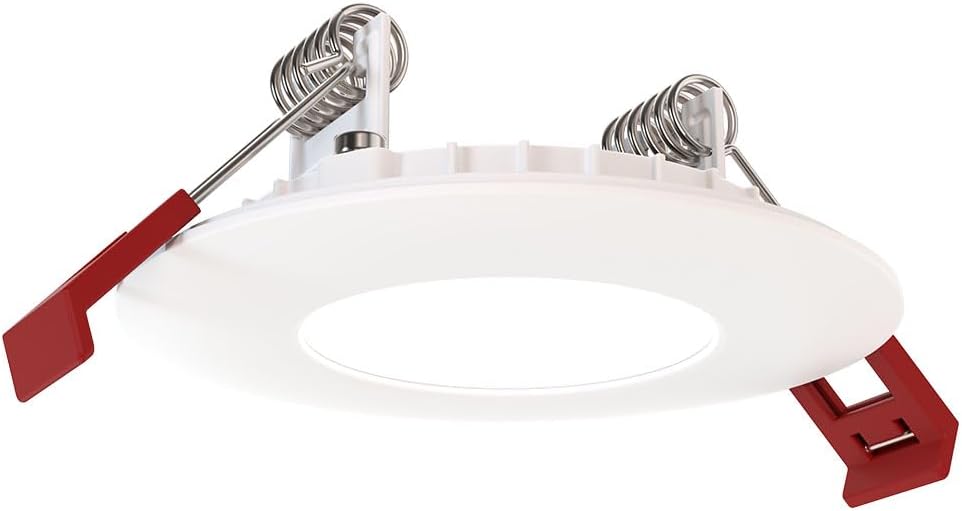
Figure 4: The remote driver box houses the electrical connections and adjustment switches.
- Select Settings (Pre-Installation): Before inserting the downlight into the ceiling, use the switches on the remote driver box to select your desired color temperature (2700K-5000K) and lumen output (Low, Medium, High). These settings can be adjusted later if needed, but it's easier before final installation.
- Insert Driver Box: Place the remote driver box into the ceiling opening. Its slim design allows it to fit into tight spaces.
- Инсталирајте уградну лампу:
- Gently push the spring-loaded clips on the sides of the downlight upwards.
- Insert the downlight into the ceiling opening.
- Once the downlight is fully inserted, release the clips. The clips will spring back down and firmly secure the fixture against the ceiling.

Figure 5: Dimensions of the downlight and driver box for installation planning.
- Врати снагу: Turn the power back on at the circuit breaker. Test the downlight's functionality.
6. Упутство за употребу
Your Juno LED Downlight is designed for simple operation once installed.
- Укључивање/искључивање: Control the light using a standard wall switch connected to the circuit.
- Затамњење: If connected to a compatible TRIAC dimmer switch, adjust the brightness by manipulating the dimmer control. The light can be dimmed down to 10% of its maximum output.
- Adjusting Color Temperature and Lumen Output:
The color temperature and lumen output are set via switches located on the remote driver box (refer to Figure 2). To change these settings after installation, you will need to access the driver box, which may require temporarily removing the fixture from the ceiling or accessing the box through an attic/access panel if it was placed there. It is recommended to set these preferences during installation.
- Прекидач температуре боје: Select from 2700K, 3000K, 3500K, 4000K, or 5000K.
- Lumen Output Switch: Choose Low, Medium, or High brightness.
7. Одржавање
The Juno LED Downlight requires minimal maintenance due to its durable design and long-life LEDs.
- Чишћење: Пре чишћења проверите да ли је напајање искључено. Обришите уређај меком, сувом или благо длаком.amp крпа. Не користите абразивна средства за чишћење или раствараче, јер могу оштетити завршну обраду или електричне компоненте.
- ЛЕД животни век: The integrated LEDs are designed for extended operation and do not require replacement under normal use.
КСНУМКС. Решавање проблема
Ако наиђете на проблеме са уградном расветом, погледајте следеће уобичајене проблеме и решења:
| Проблем | Могући узрок | Решење |
|---|---|---|
| Светлост се не пали. | Нема струје за уређај. Слаба веза ожичења. Неисправан прекидач или осигурач. | Проверите осигурач и зидни прекидач. Turn off power, check all wire connections in the driver box. Test switch or breaker; replace if necessary. |
| Светло трепери или се неправилно пригушује. | Некомпатибилни прекидач за пригушивање јачине светла. Лабаво ожичење. Преоптерећено коло. | Ensure dimmer is TRIAC compatible and designed for LED lighting. Искључите напајање, проверите све жице. Reduce load on the circuit or consult an electrician. |
| Нетачна температура боје или осветљеност. | Switches on driver box set incorrectly. | Access the remote driver box and adjust the color temperature and lumen output switches to desired settings. |
If the problem persists after trying these solutions, contact customer support.
9. Спецификације
| Атрибут | Детаљ |
|---|---|
| Бранд | Јуно |
| Назив модела | WF2 RD ALO25 SWW5 90CRI 120 MW M6 (Round LED) |
| Величина | 2-Inch Flat Trim |
| Боја | Мат бела |
| Материјал | Алуминијум, поликарбонат |
| Тип извора светлости | ЛЕД |
| Волtage | 120 Волтс |
| Ватtage | 9.2 вати |
| Посебне карактеристике | Adjustable Color Temperature (2700K-5000K), Dimmable (Triac), Energy Efficient, Waterproof |
| Врста инсталације | Flush Mount (Canless) |
| Унутрашња/спољна употреба | Indoor, Outdoor (Wet Location Certified) |
| Димензије производа | 3.2"L x 3.2"W x 1.3"H (Fixture) |
| Тежина артикла | 13.2 унци |
| Цертификати | CSA certified, Title 24, Energy Star, IC Rated |
10. Гаранција и подршка
гаранција: This product comes with a Limited Warranty. Please refer to the product packaging or the manufacturer's official website for specific terms and conditions of the warranty.
Корисничка подршка: For technical assistance, troubleshooting beyond this manual, or warranty claims, please contact Juno customer support. Contact information can typically be found on the product packaging or the official Juno webсајту.
Онлине ресурси: For additional information, product updates, or FAQs, visit the official Juno webсајт: www.acuitybrands.com/brands/juno


