1. Увод
This user manual provides detailed instructions for the Baseus 17-in-1 Docking Station (Model: B0D78WFLST). This versatile docking station is designed to expand the connectivity of your laptop or compatible device, offering multiple ports for display, data transfer, networking, and power delivery. Please read this manual thoroughly before using the product to ensure proper operation and to maximize its capabilities.
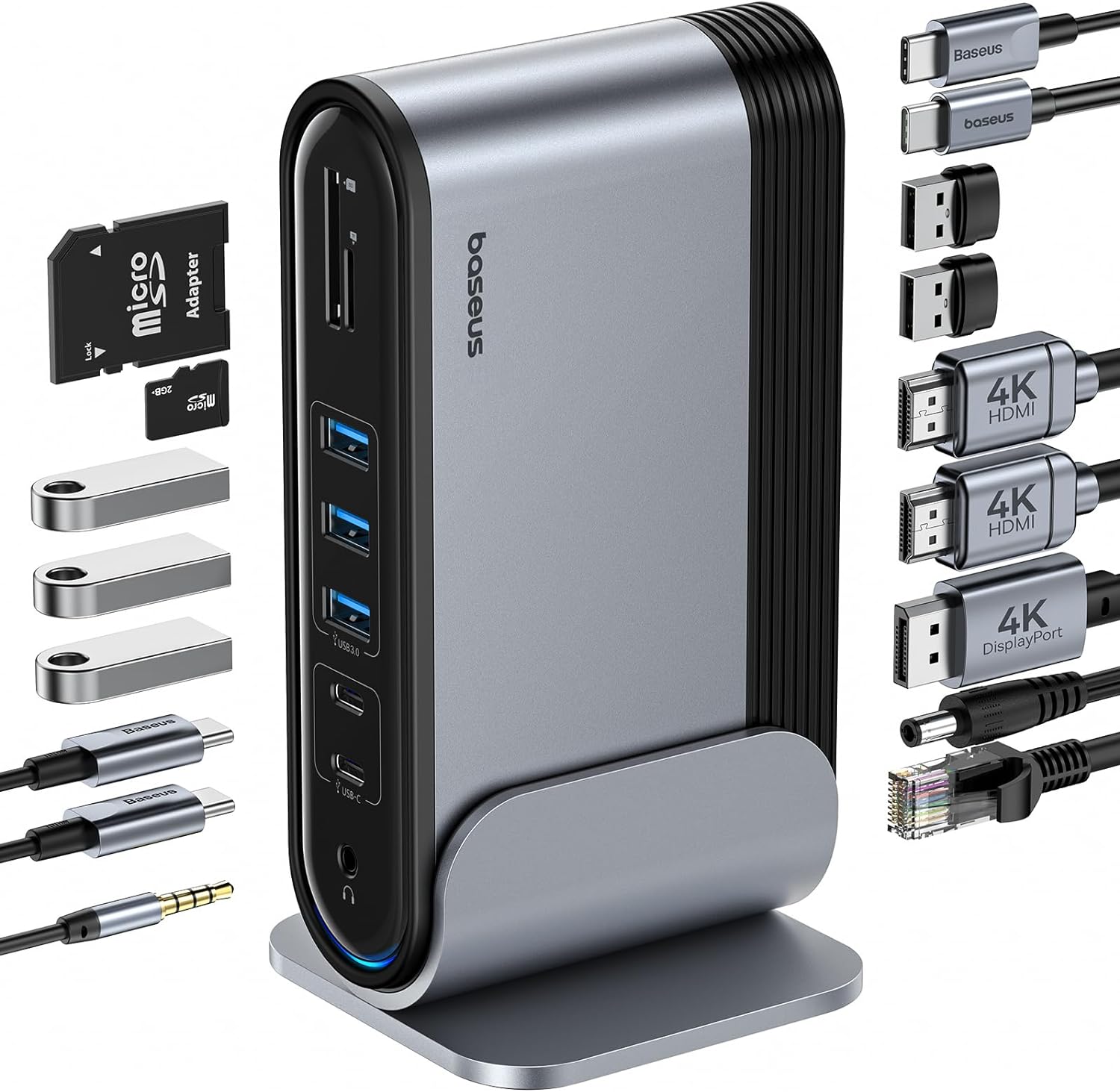
Figure 1: Baseus 17-in-1 Docking Station and included accessories.
2. Кључне карактеристике
The Baseus 17-in-1 Docking Station offers comprehensive connectivity solutions:
- 17-in-1 Port Expansion: Integrates a wide array of ports for diverse connectivity needs.
- Подршка за три монитора: Connect up to three external monitors for enhanced productivity.
- Екран високе резолуције: Supports 4K@60Hz resolution for single and dual displays, and 1080P@60Hz for triple displays on Windows systems.
- Брзи пренос података: Features USB 3.0 ports with 5Gbps transfer speeds and USB 2.0 ports for peripherals.
- Испорука снаге 100В: Provides up to 85W power output to charge your laptop (100W input required).
- Гигабит Етхернет: Ensures stable and high-speed wired network connection up to 1Gbps.
- Читач СД/ТФ картица: Convenient access to memory cards with speeds up to 104 MB/s.
- Аудио повезивање: Integrated 3.5mm audio jack for headphones or speakers.
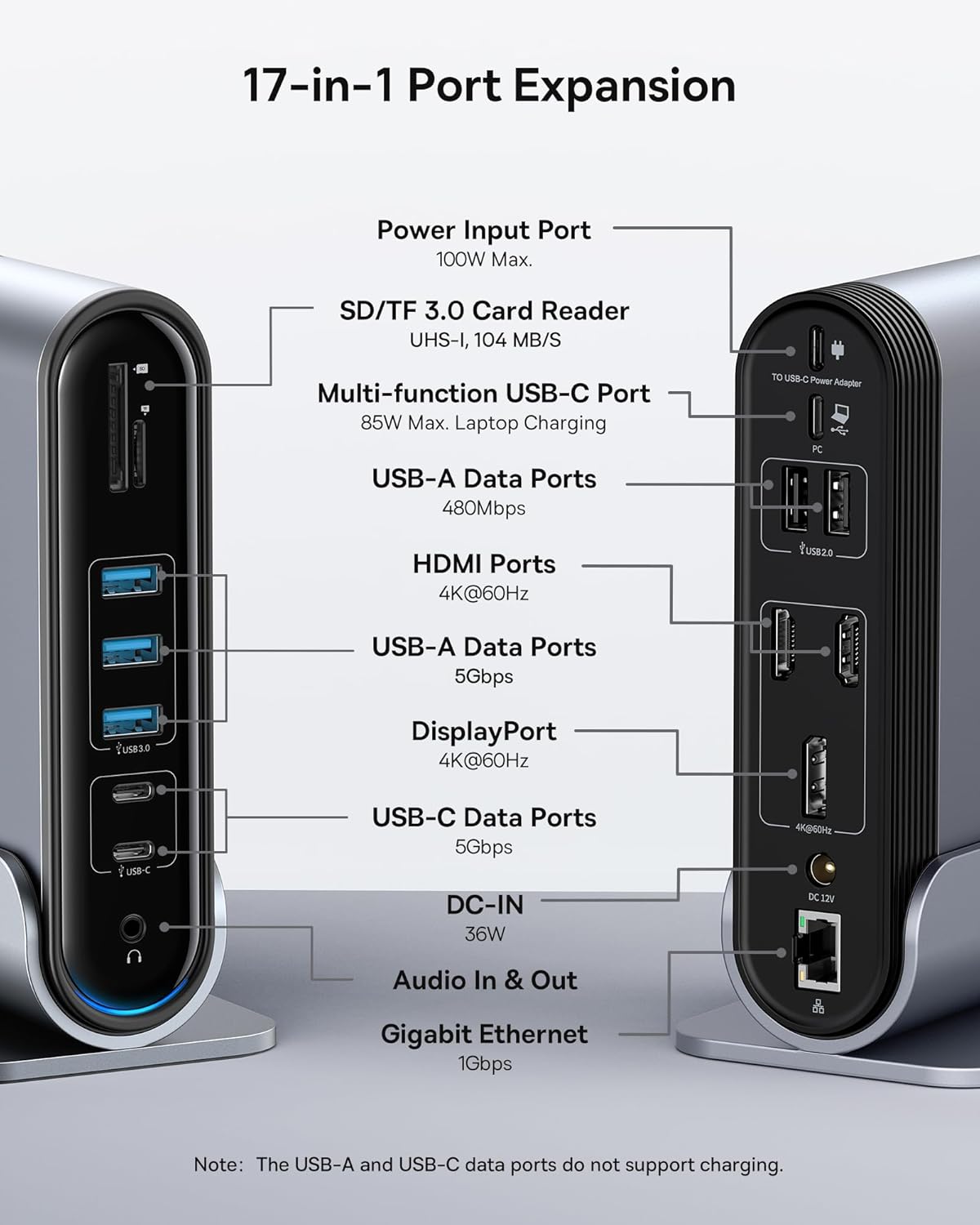
Figure 2: Detailed port layout and specifications of the docking station.
3. Садржај пакета
Молимо вас да проверите да ли су све ставке присутне у пакету:
- Басеус УнионЈои прикључна станица са 17 портова са три дисплеја
- Доцк Станд
- Повер Адаптер
- УСБ-Ц на УСБ-Ц кабл
- US Adapter Plug
- ЕУ адаптер за утикач
- UK Adapter Plug
- Упутство за употребу

Figure 3: What's included in the box.
4. Упутства за подешавање
Follow these steps to set up your Baseus 17-in-1 Docking Station:
- Прикључите напајање:
Connect the provided power adapter to the DC-IN port (36W) on the docking station. Use the appropriate regional adapter plug (US, EU, or UK) for your power outlet. For laptop charging, ensure a 100W PD charger (not included) is connected to the Power Input Port (100W Max.) on the docking station.

Figure 4: Power connection for the docking station and laptop charging.
- Повежите се са хост уређајем:
Use the included USB-C to USB-C cable to connect the docking station's Multi-function USB-C Port (85W Max. Laptop Charging) to your laptop or compatible host device.
- Повежите мониторе:
Connect your external monitors to the HDMI Ports (4K@60Hz) and/or DisplayPort (4K@60Hz) on the docking station using appropriate cables. Refer to the "Operating Instructions" section for display mode configurations.
- Повежите периферне уређаје:
Connect your USB devices (keyboard, mouse, external drives, etc.) to the available USB-A Data Ports (5Gbps or 480Mbps) and USB-C Data Ports (5Gbps). Insert SD or TF cards into the respective card reader slots.
- Повежи мрежу (опционо):
For a wired network connection, connect an Ethernet cable from your router/modem to the Gigabit Ethernet port (1Gbps) on the docking station.
- Повежите аудио (опционо):
Connect headphones or speakers to the 3.5mm Audio In & Out jack.
5. Упутство за употребу
5.1 Режими приказа
The docking station supports various display configurations depending on your operating system and the number of connected monitors.
За Windows системе:
- Mirror Mode (A+A+A): Displays the same content on all connected monitors and the laptop screen. Supports 1080P@60Hz.
- Extend Mode (A+B+C): Extends your desktop across multiple monitors, allowing different content on each screen. Supports 1080P@60Hz for triple display.
За macOS системе:
- Mirror Mode (A+A+A): Displays the same content on all connected monitors and the laptop screen. Supports 4K@60Hz.
- Extend Mode (A+B+B): Extends your desktop across external monitors, but macOS typically mirrors content across multiple external displays when using a single MST hub. Supports 4K@60Hz.
- Note: macOS does not support triple extended display (A+B+C) through a single MST hub.

Figure 5: Display mode configurations for Windows and macOS.

Figure 6: Detailed resolution capabilities for various display configurations and DP versions.
5.2 Пренос података
Докинг станица пружа могућности преноса података великом брзином:
- USB 3.0 (5Gbps): Ideal for external hard drives, SSDs, and other high-bandwidth devices.
- USB 2.0 (480Mbps): Suitable for keyboards, mice, printers, and other standard peripherals.
- Читач СД/ТФ картица: Quickly transfer photos and videos from memory cards.

Figure 7: Illustrating super-fast data transfer via the docking station.
5.3 Испорука напајања
The docking station supports Power Delivery (PD) to charge your laptop:
- Connect a 100W PD charger (not included) to the dedicated Power Input Port on the docking station.
- The docking station will then provide up to 85W of power to your connected laptop via the USB-C host connection.
Note: The USB-A and USB-C data ports on the front of the docking station do not support charging.
6. Одржавање и њега
To ensure the longevity and optimal performance of your docking station, follow these guidelines:
- Одржавајте уређај чистим брисањем меком, сувом крпом. Избегавајте употребу абразивних средстава за чишћење или растварача.
- Do not expose the docking station to water, moisture, or extreme temperatures.
- Избегавајте испуштање или излагање уређаја јаким ударима.
- Обезбедите одговарајућу вентилацију око прикључне станице како бисте спречили прегревање.
- Disconnect all cables when the device is not in use for extended periods.
КСНУМКС. Решавање проблема
If you encounter issues with your Baseus 17-in-1 Docking Station, refer to the following common problems and solutions:
7.1 No Display Output / Flickering Screen
- Проверите кабловске везе: Ensure all HDMI/DisplayPort cables are securely connected to both the docking station and the monitors.
- Verify Host Connection: Confirm the USB-C cable connecting the docking station to your laptop is firmly plugged in.
- Напајање: Make sure the docking station is receiving adequate power from its power adapter.
- Подешавања екрана: Check your computer's display settings (e.g., Windows Display Settings, macOS System Preferences > Displays) to ensure the external monitors are detected and configured correctly (Extend, Mirror).
- Ажурирања драјвера: Ensure your laptop's graphics drivers and USB-C drivers are up to date.
- Resolution Compatibility: Verify that the selected resolution and refresh rate are supported by your monitors and the docking station. Refer to the "Multiple Display Modes" table in Section 5.1.
- macOS Triple Display: Remember that macOS does not support triple extended display (A+B+C) through a single MST hub.
7.2 USB Devices Not Working
- Reconnect Device: Unplug and re-plug the USB device from the docking station.
- Пробајте други порт: Test the USB device in another USB port on the docking station or directly on your laptop to isolate the issue.
- Напајање: Ensure the docking station has sufficient power, especially for power-hungry USB devices.
- Проблеми са возачем: Check if the USB device requires specific drivers and ensure they are installed on your computer.
7.3 Лаптоп се не пуни
- 100W PD Charger: Confirm you are using a 100W Power Delivery charger connected to the dedicated Power Input Port on the docking station. The docking station itself does not generate power for your laptop.
- УСБ-Ц кабл: Ensure the USB-C cable connecting the docking station to your laptop supports power delivery.
- Компатибилност са лаптопом: Verify your laptop supports charging via its USB-C port.
7.4 Ethernet Connection Issues
- Провера кабла: Уверите се да је Етернет кабл безбедно повезан и са базном станицом и са рутером/модемом.
- Подешавања мреже: Проверите мрежна подешавања рачунара да бисте се уверили да је Етернет адаптер омогућен и правилно конфигурисан.
- Рутер/Модем: Verify your router/modem is functioning properly.
8. Спецификације
| Феатуре | Спецификација |
|---|---|
| Модел | B0D78WFLST |
| Бранд | Басеус |
| Укупан број портова | 17 |
| ХДМИ портови | 2 (4K@60Hz) |
| ДисплаиПорт | 1 (4K@60Hz) |
| УСБ-А портови за податке | 7 (3x 5Gbps, 4x 480Mbps) |
| УСБ-Ц портови података | 2 (5Gbps) |
| Power Delivery (Input) | 100W Max (via dedicated PD port) |
| Power Output (to Laptop) | 85W Max (via Multi-function USB-C Port) |
| Етхернет порт | 1 (1Gbps Gigabit Ethernet) |
| Читач картица | SD/TF (UHS-I, 104 MB/s) |
| Аудио Јацк | 3.5mm Audio In & Out |
| Компатибилни уређаји | Dell, HP, Mac, Lenovo, Steam Deck, etc. |
| Димензије | 9.29 к 8.27 к 2.28 инча |
| Тежина артикла | 1.9 фунти |
9. Гаранција и подршка
За информације о гаранцији и техничку подршку, обратите се званичном Baseus-у. website or contact Baseus customer service directly. Keep your purchase receipt as proof of purchase for warranty claims.
Baseus Official Webсајт: ввв.басеус.цом
For further assistance, you may also contact the seller through the platform where you purchased the product.


