1. Увод
This manual provides essential information for the safe and efficient use of your SPC Discovery 2 ME smartphone. Please read this guide thoroughly before operating the device to ensure proper functionality and to prevent damage.
2. Безбедносне информације
- Безбедност батерије: Do not disassemble, puncture, or modify the battery. Use only approved chargers and cables. Avoid extreme temperatures.
- Отпорност на воду: Овај уређај није водоотпоран. Избегавајте излагање течностима.
- Заштита слуха: Избегавајте дуже слушање на високим нивоима јачине звука како бисте спречили оштећење слуха.
- Безбедност вожње: Do not use your phone while driving. Follow local laws and regulations regarding mobile device use.
- Медицински уређаји: Maintain a safe distance between the phone and medical implants like pacemakers. Consult your physician and medical device manufacturer for specific guidelines.
- одлагање: Dispose of the device and battery responsibly according to local regulations. Do not dispose of with household waste.
3. Садржај пакета
Проверите да ли су све ставке присутне у паковању вашег производа:
- SPC Discovery 2 ME Smartphone
- УСБ-Ц на УСБ-Ц кабл
- Алат за избацивање СИМ картице
- Водич за брзи почетак (ако је применљиво)
Note: A power adapter is not included and must be purchased separately. For optimal charging, use an 18W USB Power Delivery (PD) compatible charger.
4. Изглед уређаја
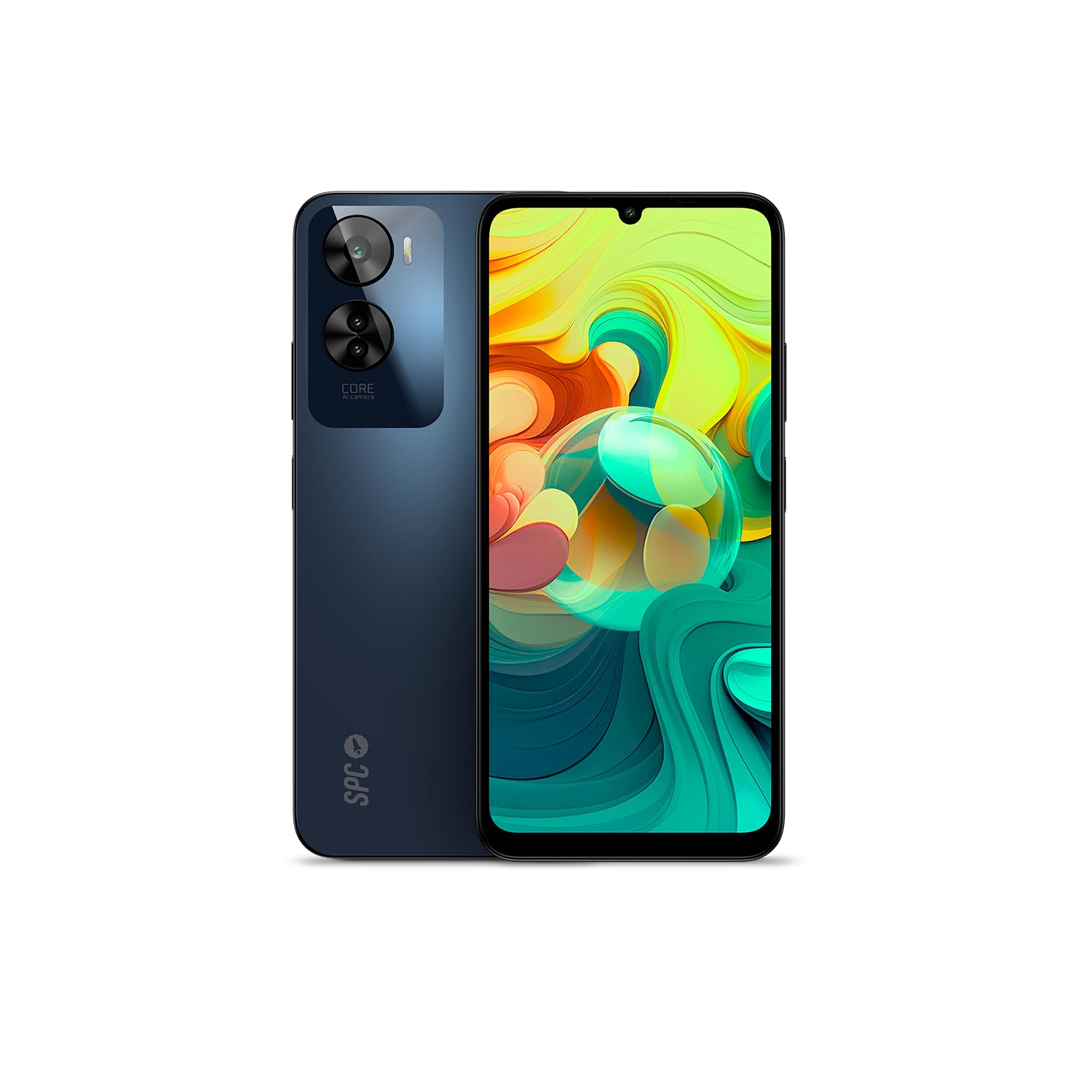
Слика 4.1: Фронт view of the SPC Discovery 2 ME, showing the display and front camera.

Слика 4.2: Назад view of the SPC Discovery 2 ME, highlighting the triple camera module and fingerprint sensor.

Слика 4.3: Англед view of the SPC Discovery 2 ME, showing both front and back, and side buttons.
- Предња камера: Налази се у горњем средишњем делу екрана.
- Приказ: 6.75-inch HD+ IPS InCell screen.
- Дугмад за јачину звука: На десној страни уређаја.
- Дугме за напајање/сензор отиска прста: На десној страни, испод дугмади за јачину звука.
- УСБ-Ц порт: На дну за пуњење и пренос података.
- 3.5 мм аудио прикључак: За слушалице.
- Лежиште за SIM/MicroSD картицу: На левој страни уређаја.
- Трострука задња камера: Налази се у горњем левом углу задњег панела.
5. Подешавање
5.1. Уметање SIM и MicroSD картица
- Locate the SIM/MicroSD card tray on the left side of the phone.
- Уметните алат за избацивање СИМ картице у мали отвор на лежишту и чврсто притисните док лежиште не искочи.
- Place your Nano-SIM card(s) and/or MicroSD card into the designated slots on the tray. Ensure the gold contacts face downwards. The device supports dual SIM and MicroSD expansion up to 512GB.
- Пажљиво вратите лежиште у телефон док не кликне на своје место.
5.2. Прво укључивање и основно подешавање
- Press and hold the Power button on the right side of the device until the SPC logo appears.
- Пратите упутства на екрану да бисте завршили почетно подешавање:
- Изаберите свој језик.
- Повежите се на Ви-Фи мрежу.
- Review и прихватите услове и одредбе.
- Пријавите се помоћу свог Google налога или креирајте нови.
- Set up screen lock (PIN, pattern, password) and biometric security (fingerprint, facial recognition).
6. Упутство за употребу
6.1. Основна навигација
- Покрети додиром: Додирните да бисте изабрали, превуците прстом да бисте се померали, уштипните да бисте зумирали.
- Почетни екран: Приступите апликацијама, виџетима и обавештењима.
- Табла са обавештењима: Превуците надоле од врха екрана до view обавештења и брза подешавања.
- Фиока апликација: Превуците прстом нагоре од дна екрана да бисте приступили свим инсталираним апликацијама.
6.2. Обављање позива и слање порука
- Позиви: Отворите апликацију „Телефон“, унесите број и додирните икону за позив.
- Поруке: Отворите апликацију „Поруке“, додирните икону нове поруке, унесите примаоца и своју поруку.
- Дуал сим: If using two SIM cards, you can select which SIM to use for calls or messages from the respective app settings.
6.3. Употреба камере
The SPC Discovery 2 ME features a triple AI camera system, including a 50MP main sensor.
- Отворите апликацију „Камера“.
- Изаберите жељени режим (Фотографија, Видео, Портрет, Макро, итд.).
- Додирните дугме затварача да бисте снимили слику или покренули/зауставили снимање видеа.
- Use the AI scene detection for optimized settings.
- For close-up shots, switch to Macro mode.
6.4. NFC for Contactless Payments
Your device supports NFC (Near Field Communication) for secure contactless payments.
- Ensure NFC is enabled in your phone's settings (Settings > Connected devices > Connection preferences > NFC).
- Set up your preferred payment app (e.g., Google Pay) and add your credit/debit cards.
- To make a payment, unlock your phone and hold the back of the device near the contactless payment terminal.
6.5. Biometric Unlock
The device offers both fingerprint and facial recognition for secure unlocking.
- Сензор отиска прста: Located on the side power button. Register your fingerprints via Settings > Security & privacy > Device unlock > Fingerprint unlock.
- Препознавање лица: Register your face via Settings > Security & privacy > Device unlock > Face unlock. Ensure good lighting when setting up and using this feature.
6.6. Управљање батеријом
The 5000 mAh battery provides extended usage. For optimal battery life:
- Charge your device using the provided USB-C cable and an 18W PD compatible charger.
- Избегавајте често потпуно пражњење батерије.
- Омогућите режим уштеде батерије када је батерија празна.
- Затворите некоришћене апликације које раде у позадини.
7. Одржавање
- Чишћење: Користите меку крпу која не оставља влакна за чишћење екрана и кућишта. Избегавајте абразивне материјале или јаке хемикалије.
- Ажурирања софтвера: Regularly check for and install system updates (Settings > System > System update) to ensure optimal performance and security. The device runs on Android 14.
- Складиштење: Manage your 256GB internal storage by regularly deleting unnecessary files or moving them to the expandable MicroSD card (up to 512GB).
КСНУМКС. Решавање проблема
| Иссуе | Могуће решење |
|---|---|
| Уређај се не укључује. | Уверите се да је батерија напуњена. Повежите је са пуњачем најмање 15 минута, а затим покушајте поново да је укључите. |
| Батерија се брзо празни. | Reduce screen brightness, close background apps, disable unused features like GPS or Bluetooth, or enable battery saver mode. |
| Апликације се руше или замрзавају. | Clear the app's cache (Settings > Apps > [App Name] > Storage & cache > Clear cache). If the issue persists, restart the device. |
| Повезивање на Ви-Фи није могуће. | Restart your router and phone. Forget the network and reconnect. Ensure Wi-Fi is enabled on your device. |
| Сензор отиска прста не ради. | Уверите се да вам је прст чист и сув. Поново региструјте отиске прстију у подешавањима. |
9. Спецификације
| Феатуре | Детаљ |
|---|---|
| Назив модела | Discovery 2 ME |
| Број модела | 25246256Д |
| Оперативни систем | Андроид 14 |
| Величина екрана | 6.75 инча |
| Резолуција екрана | 1600 x 720 (HD+) |
| Рефресх Рате | 90 Хз |
| Брзина процесора | 1.6 GHz (Octa-core) |
| РАМ | 6 GB (expandable up to 14 GB virtual RAM) |
| Интерна меморија | 256 ГБ |
| Екпандабле Стораге | МицроСД до 512 ГБ |
| Реар Цамера Ресолутион | 50 Megapixels (Main) |
| Капацитет батерије | 5000 mAh (литијум-јонска) |
| Пуњење | 18W Fast Charge (USB PD) |
| Повезивање | 4G, Bluetooth, Wi-Fi, NFC |
| Портс | УСБ Типе-Ц, 3.5 мм прикључак |
| Посебне карактеристике | Dual SIM, Integrated GPS, Expandable Memory, USB OTG Support, Biometric Unlock (Fingerprint, Facial Recognition) |
10. Гаранција и подршка
Your SPC Discovery 2 ME smartphone is covered by a standard manufacturer's warranty. For detailed warranty terms and conditions, please refer to the warranty card included in your package or visit the official SPC webсајту.
For technical support, troubleshooting assistance, or service requests, please contact SPC customer support through their official channels. Contact information can typically be found on the SPC webсајту или у водичу за брзи почетак.


