1. Увод
The xTool Safety Set (Model MFS-K001-02A) is designed to enhance the safety of your laser engraving and cutting operations. This system provides automatic flame detection and extinguishing capabilities, offering peace of mind during machine operation. It is compatible with various xTool laser machines, including the P2, P2S, M1, and D1 Pro, when used within an appropriate enclosure.
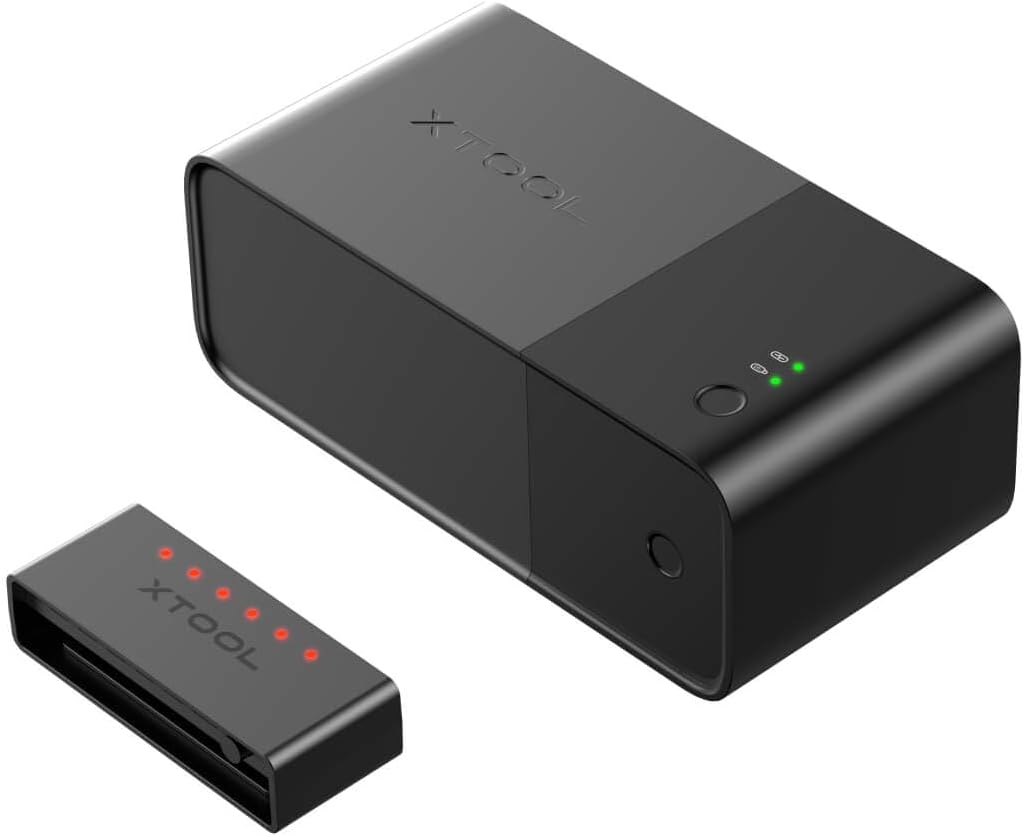
Image 1.1: The xTool Safety Set, featuring the main control unit and the flame detection sensor.
2. Мере предострожности
- Употреба кућишта: This safety set is designed for use with laser machines operating within an enclosed space (up to 0.13m³). Open-frame machines require an enclosure for effective flame extinguishing.
- CO2 Gas: The system uses CO2 gas for extinguishing, which is pollution-free and non-toxic. However, ensure proper ventilation after an extinguishing event.
- Gas Bottle Replacement: The CO2 gas bottles are consumable. Replace them after they have been discharged. Always use genuine xTool replacement bottles.
- Flame Detection: The system is designed to detect flames that may cause significant damage. Small, momentary flames that do not pose a risk may not trigger the extinguishing mechanism.
- Редовне провере: Periodically check the system's status indicators to ensure it is functioning correctly.
3. Садржај пакета
Verify that all components are present in your xTool Safety Set package:
- xTool Safety Set Main Control Unit
- Сензор за детекцију пламена
- CO2 Gas Bottles (typically 4 included)
- Цоннецтион Цаблес
- Прибор за монтажу
- Кориснички приручник (овај документ)
4. Подешавање
Follow these steps to install your xTool Safety Set:
- Position the Main Unit: Place the main control unit in a stable location near your laser machine, ensuring it is easily accessible and its indicators are visible.
- Connect to Laser Machine: Connect the safety set to the designated port on your xTool laser machine using the provided cable. Refer to your laser machine's manual for specific port locations.
- Install Flame Sensor: Mount the flame detection sensor inside the laser machine's enclosure, ensuring it has a clear view of the working area. Secure it using the provided mounting accessories.
- Insert CO2 Gas Bottles: Open the compartment on the main unit and carefully insert the CO2 gas bottles. Ensure they are securely twisted into place. The system typically comes with 4 gas bottles.

Image 4.1: The xTool Safety Set connected to a compatible laser machine, demonstrating its compact placement.

Image 4.2: Illustrates the process of inserting replaceable CO2 gas bottles into the safety set's main unit.
5. Упутство за употребу
The xTool Safety Set operates primarily in an automatic mode, but also offers manual control:
5.1 Automatic Flame Extinguishing Mode
When a flame is detected within the laser machine's enclosure, the system initiates a four-step safety protocol:
- Auto Flame Detection: The sensor detects the presence of a flame.
- Auto Alarm Triggering: An audible alarm is activated to alert the user.
- Auto Power Cut: The laser machine's power supply is automatically cut off to prevent further operation.
- Auto Flame Extinguishing: CO2 gas is released into the enclosure to suppress the flame.

Image 5.1: Visual representation of the four-step automatic flame extinguishing process.
5.2 Manual Flame Extinguishing Mode
In addition to automatic detection, you can manually activate the extinguishing function by pressing the dedicated flame extinguishing button on the main control unit. This allows for immediate response if you observe a flame before the automatic system triggers.
6. Одржавање
To ensure optimal performance and safety, regular maintenance is required:
- Gas Bottle Replacement: After the system has discharged CO2 gas, the used bottles must be replaced. Ensure the system is powered off before replacing bottles.
- Чишћење сензора: Periodically inspect and gently clean the flame detection sensor to ensure it remains free of dust or debris that could obstruct its view.
- Провера система: Regularly check the indicator lights on the main unit to confirm proper functioning. Consult the troubleshooting section if any error indicators are present.
КСНУМКС. Решавање проблема
| Иссуе | Могући узрок | Решење |
|---|---|---|
| System does not extinguish a small flame. | The system is designed to respond to flames that pose a significant risk. Minor, momentary flames may not trigger the extinguishing mechanism. | This is normal operation. For any persistent or growing flame, use the manual extinguishing button. |
| Alarm sounds but no flame is visible. | Блокада или квар сензора. | Check the sensor for any debris or blockages. Ensure it is securely connected. If the issue persists, contact customer support. |
| CO2 gas does not discharge when triggered. | Empty gas bottles or improper installation. | Verify that the gas bottles are correctly installed and not empty. Replace if necessary. |
8. Спецификације
- Број модела: MFS-K001-02A
- Димензије производа: 16.14 к 12.99 к 4.33 инча
- Тежина артикла: 6.27 фунти
- Произвођач: xАлат
- Компатибилност: All 455nm blue diode laser or CO2 laser machines (within a 0.13m³ enclosed space). Specifically compatible with xTool P2, P2S, M1, D1 Pro.
- Extinguishing Agent: CO2 Gas (pollution-free & non-toxic)

Image 8.1: Illustrates the compatibility of the xTool Safety Set with various xTool laser machine models.
9. Гаранција и подршка
xTool is committed to providing excellent customer service and support for your Safety Set. For any inquiries or assistance, please utilize the following channels:
9.1 Multi-Channel Service
- Подршка путем е-поште: For detailed inquiries and technical assistance.
- Ћаскање уживо: For immediate questions and quick support.
- Телефонска подршка: For direct communication with a support representative.
- Фацебоок група: Join the xTool community for peer support and official announcements.
9.2 Technical Service Team
Our dedicated technical service team aims to provide prompt responses, typically within 24 hours, to ensure your issues are resolved efficiently.


