1. Увод
The IDUINO PC1080 is a high-performance dual-channel 6S LiPo charger specifically designed for industrial application drones. It offers reliable, safe, and user-friendly operation with a comprehensive set of functionalities. These include a battery voltage meter, internal resistance meter, LiHV charging mode, and a time-saving synchronization mode. Its robust design ensures stable performance in various environments.
2. Садржај пакета
Молимо вас да проверите да ли се у вашем пакету налазе све доле наведене ставке:
- 1 x PC1080 Dual Channel LiPo Charger
- 1 к АЦ кабл за напајање
- 1 x Synchronous data connectors
- 1 x Упутство на енглеском језику (овај документ)
3. Кључне карактеристике
The IDUINO PC1080 charger incorporates several advanced features for efficient and safe battery management:
- High-Frequency Capacitor: Utilizes high-specification large capacitors to ensure prolonged and stable operation.
- Active PFC: Features Active Power Factor Correction circuitry for optimal power draw, achieving high efficiency (93%) and reducing interference to the power grid.
- Switched-mode Power Supply: Designed to accept power from mains supplies globally.
- Конформни премаз: Electronic components are protected with a conformal coating, enhancing resistance to moisture, dust, chemicals, corrosion, and temperature extremes, ensuring stable field performance.
- Automatic Sequential Charging: When paired with G630 charging hubs, the PC1080 can automatically charge up to 12 LiPo battery packs in sequence, prioritizing batteries with the highest remaining capacity.
- One-Key Start: Simplifies the charging process with a single button press (default 20A current).
- Unique Synchronization Function: Allows one charger to control multiple other chargers for streamlined operation.
- Праћење статуса батерије: Provides real-time battery voltage and internal resistance detection.
- Свеобухватна заштита: Includes short circuit maintenance, reverse polarity protection, over-temperature protection, and a built-in anti-fire protection circuit to prevent sparking during battery connection.
4. Спецификације
| Параметар | Валуе |
|---|---|
| Бранд | IDUINO |
| Произвођач | СКИРЦ |
| Модел | SKYRC PC1080 |
| Улазни волtage | КСНУМКС-КСНУМКС В АЦ |
| Излазна снага | 1080 В (540 В к 2) |
| Дисцхарге Повер | 100 В (50 В к 2) |
| Цхарге Цуррент | 1.0-20.0 A x 2 |
| Билансна струја | 1.2 А |
| Тип батерије | ЛиПо/ЛиХВ |
| Број ћелија батерије | 6S x 2 |
| Режими пуњења | Balance Charge Mode / Storage Mode / Charge Mode |
| Димензије производа | 5 к 3 к 4 цм |
| Тежина артикла | 1 кг |
| Земља порекла | Кина |
5. Производ је готовview
5.1 Фронт View
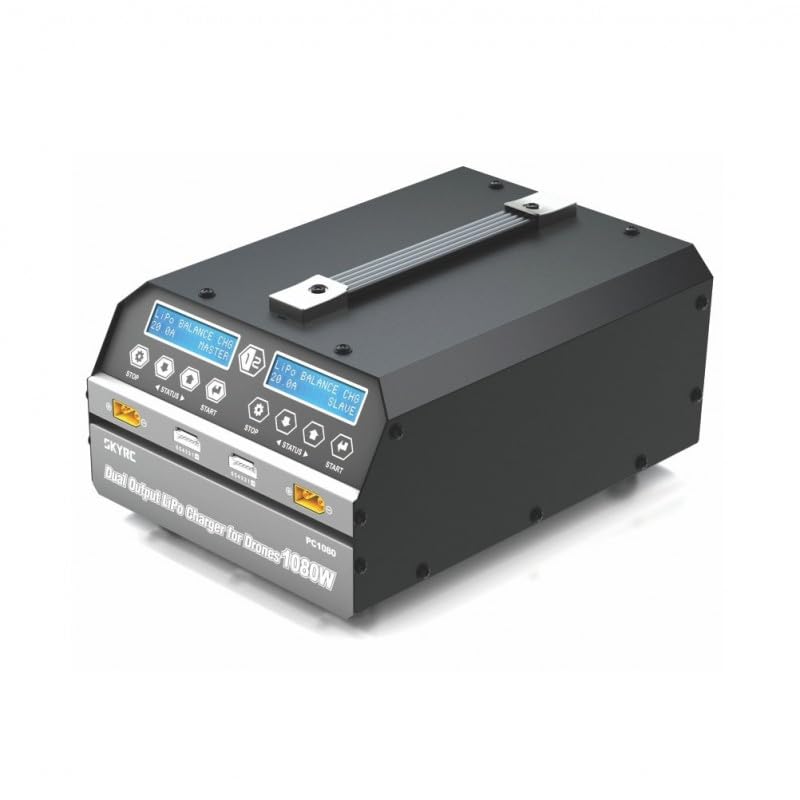
This image displays the front of the IDUINO PC1080 charger, highlighting its dual charging channels, each with its own display screen, control buttons (STOP, STATUS, START), and battery connection ports. The robust handle for portability is also visible.
5.2 Реар View
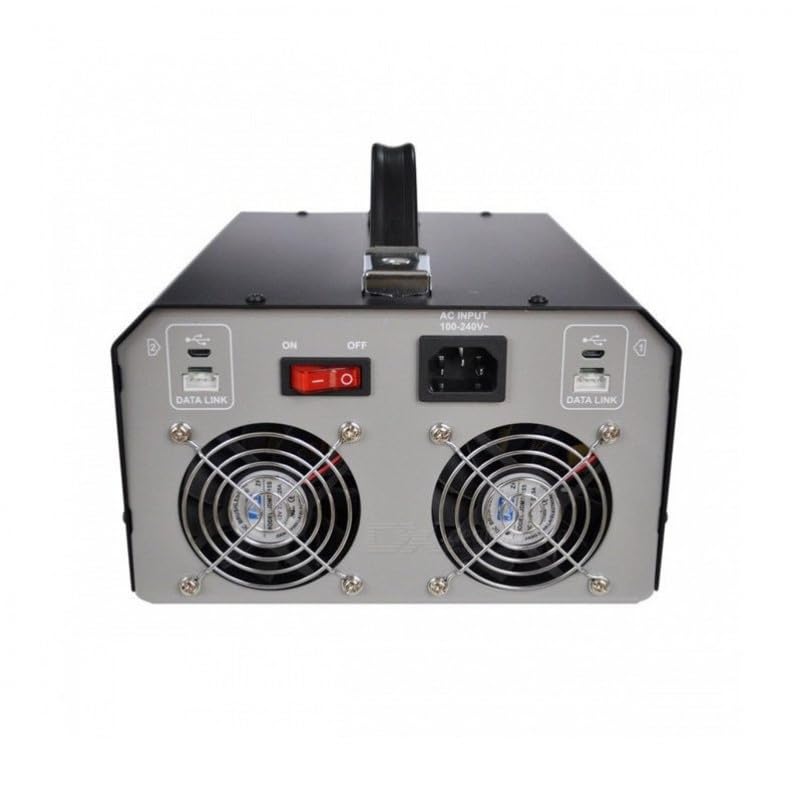
The rear panel of the charger features the AC input port (100-240V), the main ON/OFF power switch, and two cooling fans to dissipate heat during operation. Data Link ports are also present for synchronization with other units.
5.3 Charger in Operation
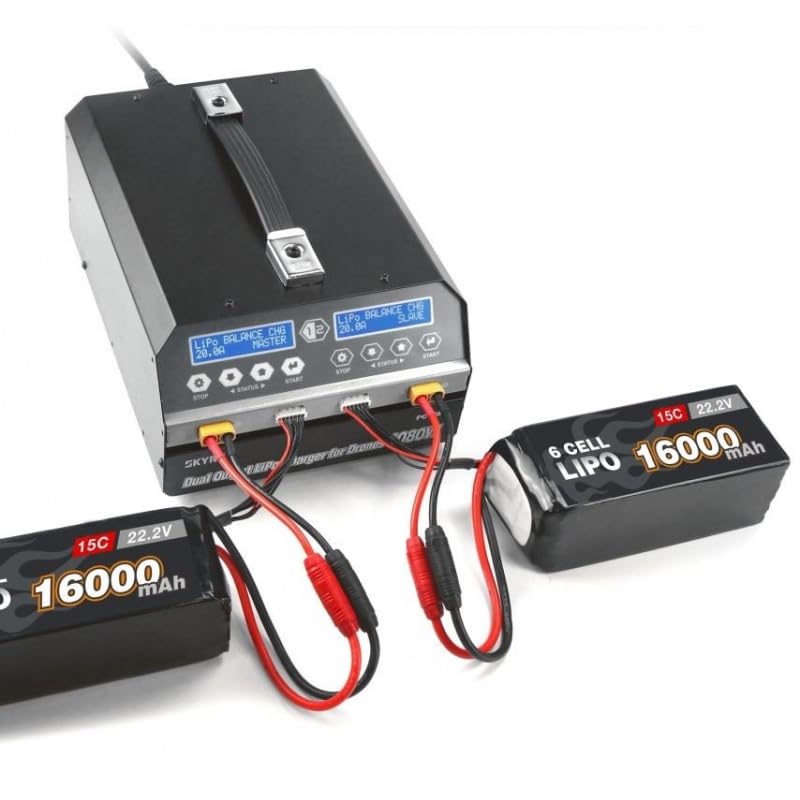
This image shows the IDUINO PC1080 charger actively charging two 6S 16000mAh LiPo batteries. The display screens indicate the charging status, demonstrating the dual-channel capability of the device.
6. Подешавање
Follow these steps for initial setup of your PC1080 charger:
- Распакујте пуњач: Пажљиво извадите пуњач и сву додатну опрему из паковања.
- Повежите наизменичну струју: Plug the supplied AC power cord into the AC input port on the rear of the charger. Connect the other end to a suitable 100-240V AC power outlet.
- Укључено: Flip the main ON/OFF switch on the rear panel to the 'ON' position. The display screens on the front will illuminate.
- Припремите батерије: Ensure your LiPo/LiHV batteries are in good condition and within their safe operating temperature range.
- Повежите батерије: Connect your battery's main discharge lead to the corresponding output port on one of the charger channels. Then, connect the battery's balance lead to the balance port. Ensure correct polarity for all connections.
7. Упутство за употребу
7.1 Основно пуњење
To initiate a basic charge cycle:
- Изаберите канал: Identify the channel (Master or Slave) you wish to use.
- Повежите батерију: As described in the Setup section, connect your battery to the chosen channel.
- One-Key Start: Press the 'START' button on the desired channel. The charger will automatically begin charging with a default current of 20A.
- Пратите напредак: The display screen will show real-time charging parameters such as voltage, current, and charged capacity.
- Заустави пуњење: To stop charging at any time, press the 'STOP' button on the active channel.
7.2 Advanced Charging Modes
The PC1080 supports various charging modes:
- Balance Charge Mode: Recommended for LiPo/LiHV batteries to ensure all cells are charged to the same voltage, prolonging battery life.
- Режим складиштења: Charges or discharges the battery to a specific voltage level suitable for long-term storage, preventing degradation.
- Режим пуњења: Standard charging without balancing. Use with caution and only when balancing is not required.
To select a specific mode, navigate through the menu using the 'STATUS' button before pressing 'START'.
7.3 Функција синхронизације
The unique synchronization function allows you to control multiple PC1080 chargers from a single master unit. Connect the synchronous data connectors between the chargers as per the diagram in the full manual (not provided here). Once connected, operations initiated on the master charger will be replicated on the slave chargers.
7.4 Battery Status Monitoring
During charging or when a battery is connected, you can press the 'STATUS' button to cycle through various battery parameters displayed on the screen, including:
- Укупна запремина батеријеtage
- Индивидуална ћелија волtages
- Internal resistance of each cell
- Charging current and capacity
8. Одржавање
Правилно одржавање осигурава дуготрајност и безбедан рад вашег пуњача:
- Чишћење: Regularly wipe the charger's exterior with a soft, dry cloth. Do not use solvents or abrasive cleaners. Ensure ventilation openings are free from dust and debris.
- Складиштење: Чувајте пуњач на хладном и сувом месту, даље од директне сунчеве светлости, влаге и екстремних температура.
- Инспекција каблова: Periodically inspect all cables and connectors for signs of wear, damage, or corrosion. Replace damaged cables immediately.
- вентилација: Ensure adequate airflow around the charger during operation. Do not block the cooling fans.
КСНУМКС. Решавање проблема
If you encounter issues with your PC1080 charger, refer to the table below for common problems and their solutions:
| Проблем | Могући узрок | Решење |
|---|---|---|
| Пуњач се не укључује | No AC power; Power switch off; Faulty power cord | Check AC outlet; Ensure power switch is ON; Try a different power cord |
| Пуњење не почиње | Battery not connected properly; Incorrect battery type selected; Safety error triggered | Reconnect battery (main and balance leads); Verify battery type and cell count; Check display for error messages (e.g., 'Connection Break', 'Cell Error') |
| Charger displays 'Over Temperature' | Poor ventilation; Ambient temperature too high; Internal fault | Ensure clear ventilation around charger; Move to a cooler environment; If problem persists, contact support |
| Battery not balancing correctly | Balance lead not connected; Damaged balance lead; Faulty battery cell | Ensure balance lead is fully inserted; Inspect balance lead for damage; Test battery with another device if possible |
| Synchronization not working | Data link cables not connected; Incorrect master/slave setup | Verify data link cable connections; Ensure one unit is set as master and others as slaves |
Ако проблем и даље постоји након покушаја ових решења, обратите се корисничкој подршци.
10. Безбедносне информације
Always observe the following safety precautions when operating the IDUINO PC1080 charger:
- Never leave the charger unattended while in operation, especially when charging LiPo/LiHV batteries.
- Увек пуните батерије на незапаљивој површини, даље од запаљивих материјала.
- Обезбедите одговарајућу вентилацију како бисте спречили прегревање.
- Do not attempt to charge damaged, swollen, or leaking batteries.
- Always connect the battery to the charger before connecting the charger to AC power. Disconnect AC power before disconnecting the battery.
- Keep the charger away from water, moisture, and high humidity.
- Не растављајте нити модификујте пуњач. Сво сервисирање препустите квалификованом особљу.
- Чувати ван домашаја деце.
11. Гаранција и подршка
The IDUINO PC1080 Dual Channel LiPo Battery Charger comes with a standard manufacturer's warranty. For specific warranty terms and conditions, please refer to the warranty card included with your product or visit the official IDUINO website. For technical support, troubleshooting assistance, or warranty claims, please contact IDUINO customer service through the contact information provided on their official webсајт или ваш рачун о куповини.


