Увод
This manual provides instructions for the safe and effective use of your Ashfly Portable Handheld Kids Microscope. Please read this manual thoroughly before operating the device and retain it for future reference.
The Ashfly Portable Handheld Kids Microscope is designed to introduce young scientists to the microscopic world. Featuring a 2-inch LCD screen and 200x magnification, it allows for real-time observation of small objects.
Садржај пакета
Проверите да ли се у вашем пакету налазе све ставке наведене у наставку:
- Ashfly Portable Handheld Kids Microscope
- УСБ кабл за пуњење
- Lanyard/Wrist Strap
- Кориснички приручник (овај документ)

Image: Contents of the Ashfly Portable Handheld Kids Microscope package, including the microscope, USB cable, and wrist strap.
Сетуп
1. Пуњење уређаја
- Locate the USB charging port on the microscope.
- Connect the provided USB charging cable to the microscope and a compatible USB power source (e.g., computer, wall adapter).
- Индикаторска лампица пуњења ће се упалити. Сачекајте отприлике 2-3 сати да се потпуно напуни.
- Када се потпуно напуни, искључите кабл за пуњење.
2. Attaching the Lanyard/Wrist Strap
Thread the lanyard or wrist strap through the designated loop on the microscope to prevent accidental drops during use.
Упутство за употребу
1. Укључивање/искључивање
- To power on, press and hold the power button (usually marked with a power symbol) for a few seconds until the screen illuminates.
- Да бисте искључили напајање, поново притисните и држите дугме за напајање док се екран не искључи.
2. Observing Objects
- Place the object you wish to observe on a flat surface.
- Position the microscope's lens directly over the object.
- Adjust the focus wheel (if present) or move the microscope closer/further from the object until a clear image appears on the 2-inch LCD screen.
- Use the zoom adjustment button (4x zoom) to further magnify the image up to 200x.

Image: A child holding the Ashfly microscope, observing a small object on a surface, demonstrating its handheld operation.
3. Снимање фотографија и видео записа
The microscope supports photo and video functions. It comes with built-in memory for storing observations.
- To take a photo: Press the designated photo capture button (refer to device markings).
- To record a video: Press the designated video record button to start recording, and press it again to stop.

Image: The Ashfly microscope's screen displaying a magnified image of an insect, illustrating its digital imaging capability.
4. Dual-Lens Design
This microscope features a dual-lens design. One side is the digital microscope for recording observations, and the other side is a physical magnifier for quick viewинг објеката.
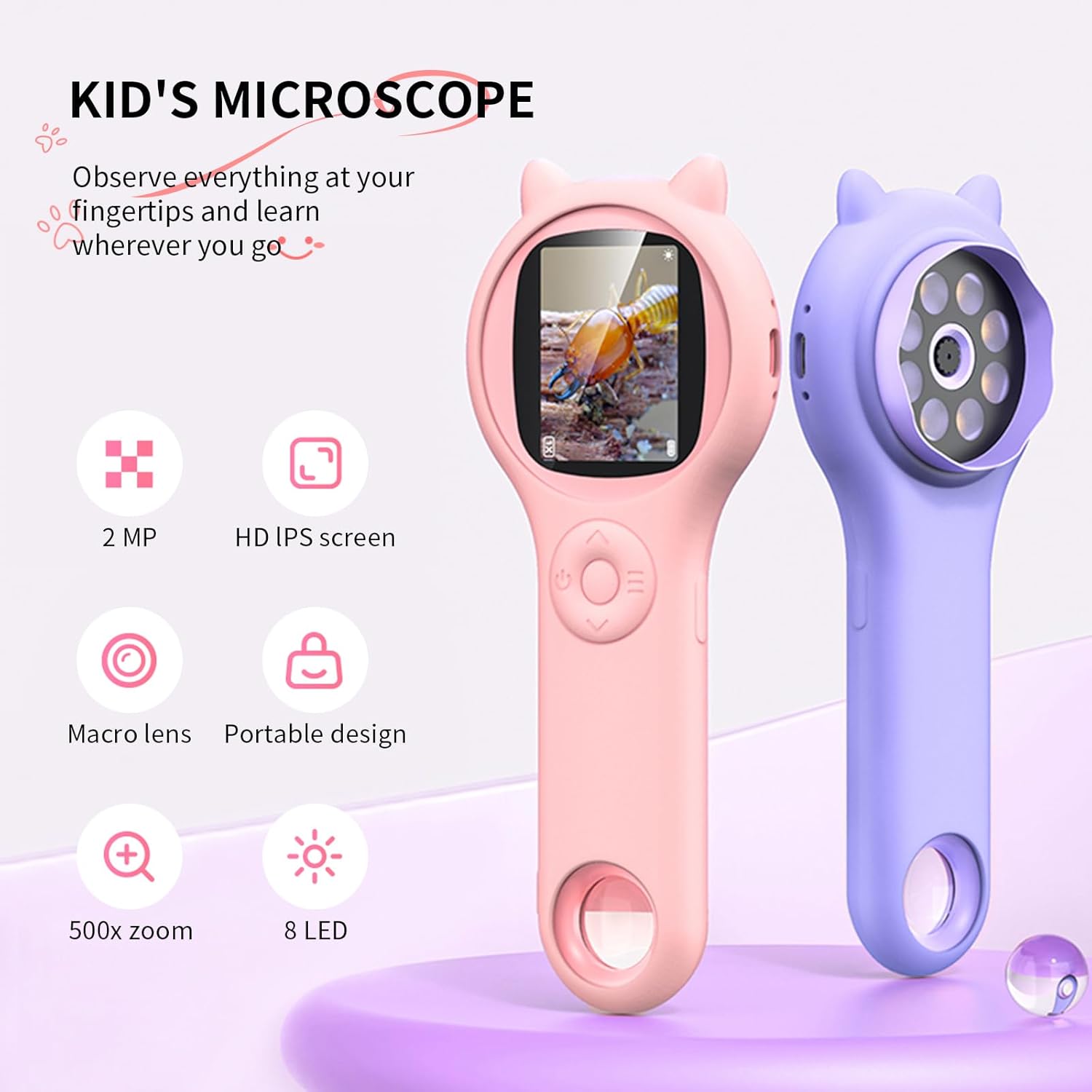
Image: Two Ashfly Kids Microscopes, one pink and one purple, illustrating the compact design and the different lenses/screens on each side.
Одржавање
- Чишћење: Use a soft, dry cloth to clean the exterior of the microscope. For the lens and screen, use a specialized lens cleaning cloth. Do not use abrasive cleaners or solvents.
- Складиштење: Store the microscope in a cool, dry place away from direct sunlight and extreme temperatures.
- Одржавање батерије: Да бисте продужили век трајања батерије, избегавајте често потпуно пражњење батерије. Редовно пуните уређај, чак и ако га не користите дуже време.
Решавање проблема
| Проблем | Могући узрок | Решење |
|---|---|---|
| Уређај се не укључује. | Батерија је испражњена. | Напуните уређај помоћу приложеног УСБ кабла. |
| Image on screen is blurry. | Incorrect focus or distance from object. | Adjust the microscope's distance from the object or use the focus wheel (if applicable) until the image is clear. |
| Cannot capture photos/videos. | Интерна меморија је пуна. | Transfer existing photos/videos to a computer to free up space. |
Спецификације
| Феатуре | Детаљ |
|---|---|
| Модел | ASIN B0DBVB3RGT |
| Бранд | Асхфли |
| Увећање | Up to 200x (with 4x zoom adjustment) |
| Екран | 2-inch LCD, 1080P HD digital imaging |
| Извор светлости | ЛЕД |
| Материјал | Пластика |
| Боја | Љубичаста |
| Извор напајања | Баттери Поверед |
| Објецтиве Ленс | Ахроматски |
Информације о гаранцији
Ashfly products are designed for quality and durability. For specific warranty details, please refer to the warranty card included with your product or visit the official Ashfly webсајт. Сачувајте рачун као доказ о куповини за потребе гаранције.
Корисничка подршка
If you encounter any issues or have questions regarding your Ashfly Portable Handheld Kids Microscope, please contact our customer support team:
- Подршка на мрежи: Посетите Ashfly Store on Amazon за често постављана питања и опције контакта.
- Емаил: Погледајте паковање производа или званичне website for direct email support.


