Увод
The Stinger HORIZON10 is a state-of-the-art 10.1-inch universal car stereo designed to enhance your in-vehicle entertainment and connectivity. Featuring a 1280x800 HD weather-resistant touchscreen, wireless Apple CarPlay and Android Auto, advanced audio controls, and multiple camera inputs, the HORIZON10 provides a comprehensive and intuitive user experience. This manual provides detailed instructions for setting up, operating, maintaining, and troubleshooting your new car stereo.

Image: The Stinger HORIZON10 Infotainment System, showcasinг његов елегантан дизајн и кориснички интерфејс.
Шта је у кутији
Upon unboxing your Stinger HORIZON10, please verify that all the following components are included:
- 10.1" Multimedia Touchscreen Display
- Радио модул
- Дисплеј Брацкет
- Nose Bracket - Radio Bracket
- Задњи поклопац ЛВДС конектора
- Сцревс
- Водоотпорни утикач
- 16 Пин АВ свежањ
- 12 Пин Пре-оут Харнесс
- 14 Пин Дата Харнесс
- 26 Pin Power Harness LVDS Display Cable
- Ектернал Мицропхоне
- ГПС антена
- GPS Mounting Plate
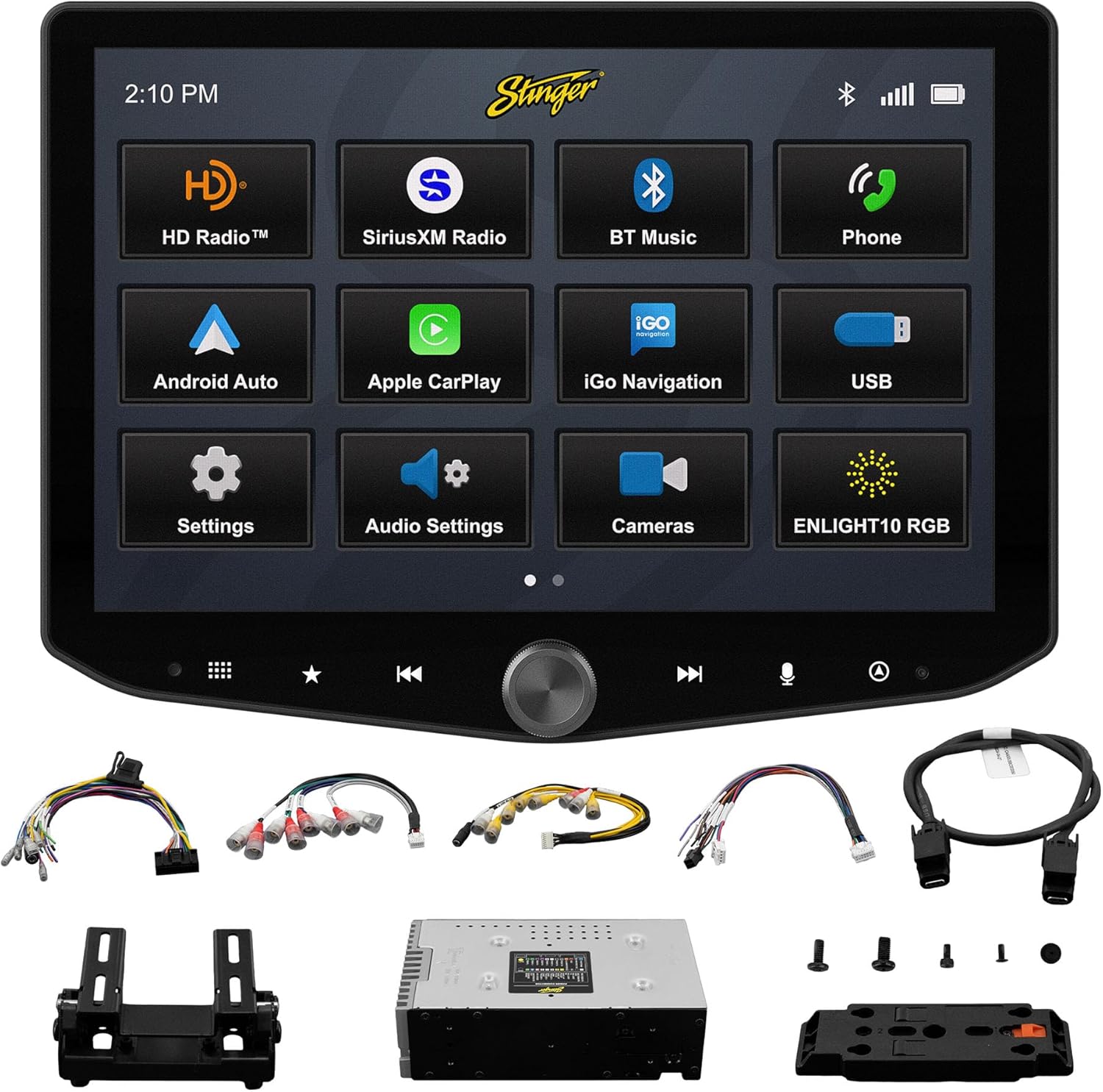
Image: All components included with the Stinger HORIZON10 car stereo system.
Подешавање и инсталација
Professional installation is highly recommended for the Stinger HORIZON10 to ensure proper functionality and integration with your vehicle's electrical system. This unit is designed for universal compatibility, but specific vehicle dash kits, wiring harness interfaces, or antenna adapters may be required and are sold separately.
Почетни кораци подешавања:
- Монтажа: Securely mount the display and radio module using the provided brackets and screws. Ensure proper ventilation around the unit.
- Ожичење: Connect the 16-pin AV harness, 12-pin pre-out harness, 14-pin data harness, and 26-pin power harness LVDS display cable to the corresponding ports on the radio module and your vehicle's wiring system. Refer to your vehicle's specific wiring diagram if necessary.
- Спољашње везе: Connect the external microphone for hands-free calling and the GPS antenna for navigation functionality.
- Укључено: Once all connections are secure, power on your vehicle to initiate the stereo. The unit should boot up and display the Stinger logo.
- Почетна конфигурација: Пратите сва упутства на екрану за почетно подешавање, као што су избор језика и временске зоне.
Упутство за употребу
Interfejs ekrana osetljivog na dodir
The HORIZON10 features a large 10.1" 1280x800 HD floating touchscreen with anti-glare and anti-fingerprint film protection. Navigate through menus and applications by tapping, swiping, and pinching on the screen. The capacitive touch panel buttons and machined aluminum anodized knob provide additional tactile control.

Слика: Детаљна view of the Stinger HORIZON10 touchscreen, highlighting its capacitive touch buttons and anodized knob.
Бежични Аппле ЦарПлаи и Андроид Ауто
Connect your iPhone or Android phone wirelessly to access navigation, calls, messages, music, and more directly on the HORIZON10 display. Wired connections are also supported via the USB-C input, which also provides fast 3A phone charging.

Image: The Stinger HORIZON10 displaying the Apple CarPlay interface wirelessly connected to an iPhone.

Image: The Stinger HORIZON10 displaying the Android Auto interface wirelessly connected to an Android phone.
Bluetooth 5.1 & Wi-Fi Connectivity
The unit supports dual phone connections for fast hands-free calling and music streaming via Bluetooth 5.1 A2DP. Wi-Fi connectivity enables additional features and updates.
Напредне аудио функције
Customize your sound experience with the 15-band adjustable EQ, 6 user EQ presets, and built-in crossover with HPF & LPF. The system offers 4.5 Vrms & 8ch RCA outputs with subwoofer control, and a Toslink (optical) audio output (48 kHz variable) for high-fidelity sound.

Image: Screenshot of the Stinger HORIZON10's advanced audio settings, showing the 15-band equalizer.
Улази за камеру
Integrate up to four cameras (front/rear dashcam, blind spot cameras, backup camera) for enhanced safety and visibility. The system supports both AHD 720p and CVBS 480p camera inputs.

Image: The Stinger HORIZON10 displaying multiple camera views, illustrating its 4 camera input capability.
Радио тјунер
Enjoy a wide variety of audio content with the built-in HD AM/FM radio tuner. The unit is also SiriusXM-Ready (SiriusXM Tuner Sold Separately).

Image: The Stinger HORIZON10 displaying the HD Radio interface, showing available stations.
USB & HDMI Inputs
The unit includes two USB-A inputs, one USB-C input (with 3A charging), and one HDMI input for media playback or mirroring.
Прилагођавање
Personalize your experience by changing the background image and rearranging Home screen icons for easier access to your most used features.
onX Offroad App
The HORIZON10 includes a free 3-month trial of the onX GPS navigation off-roading map app. Register on the Stinger website to activate your trial.
Видео производа прекоview
Видео: Званичник прекоview of the Stinger HORIZON10's key features and capabilities.
Одржавање
To ensure the longevity and optimal performance of your Stinger HORIZON10, follow these maintenance guidelines:
- Чишћење екрана: Користите меку крпу која не оставља влакна да нежно обришете екран осетљив на додир. За тврдокорне мрље, благо обришитеampОбришите крпу водом или средством за чишћење екрана. Избегавајте абразивне материјале или јаке хемикалије.
- Отпорност на временске услове: While the display is IP65 weather-resistant, the radio chassis is not. Avoid direct exposure of the main unit to water or excessive moisture.
- Општа нега: Keep the unit free from dust and debris. Ensure all connections remain secure.

Image: The Stinger HORIZON10 display with water droplets, demonstrating its IP65 weather-resistant feature.
Решавање проблема
If you encounter issues with your Stinger HORIZON10, refer to the following common problems and solutions:
| Проблем | Могући узрок | Решење |
|---|---|---|
| Но Повер | Лабав прикључак за напајање, прегорели осигурач, проблем са акумулатором возила. | Check all power connections. Inspect vehicle fuses. Ensure vehicle battery is charged. |
| Нема аудио излаза | Incorrect audio settings, loose speaker wires, ampпитање лифиера. | Verify audio settings (volume, mute, source). Check speaker wire connections. Consult an audio specialist if using an external ampлифиер. |
| CarPlay/Android Auto се не повезује | Bluetooth/Wi-Fi off on phone, incorrect pairing, phone software issue. | Ensure Bluetooth and Wi-Fi are enabled on your phone. Re-pair the device. Restart both the phone and the HORIZON10 unit. Update phone OS. |
| Екран осетљив на додир не реагује | Temporary software glitch, excessive dirt/moisture on screen. | Perform a soft reset (refer to device settings for reset option). Clean the screen thoroughly. If persistent, contact support. |
| Слаб радио пријем | Антена није повезана, оштећена антена, подручје слабог сигнала. | Check antenna connection. Consider a signal booster if in a weak reception area. |
If the problem persists after attempting these solutions, please contact Stinger customer support.
Спецификације
| Феатуре | Детаљ |
|---|---|
| Број модела | 10.1" - IX210 |
| Димензије производа | 12.75 к 7.5 к 9.75 инча |
| Тежина артикла | 6.98 фунти |
| Величина екрана | 10.1 инча |
| Резолуција екрана | 1280к800 ХД |
| Отпорност на временске услове | IP65 (Display only) |
| Технологија повезивања | Bluetooth 5.1 A2DP, Wi-Fi |
| Тип контролера | Smartphone, Touchscreen |
| УСБ улази | 2x USB-A, 1x USB-C (3A charging) |
| ХДМИ портови | 1 |
| Улази за камеру | 4 (AHD 720p / CVBS 480p compatible) |
| Режим аудио излаза | Стерео |
| Конфигурација канала сурроунд звука | 7.1 |
| Број канала | 8 |
| EQ | 15-band adjustable EQ, 6 user presets |
| РЦА излази | 4.5 Vrms & 8ch with subwoofer control |
| Оптички аудио излаз | Toslink (48 kHz variable) |
Информације о гаранцији
For detailed warranty information regarding your Stinger HORIZON10, please refer to the warranty card included with your product or visit the official STINGER website. Warranty terms and conditions may vary and are subject to the manufacturer's policy.
Корисничка подршка
Should you require further assistance, technical support, or have questions not covered in this manual, please contact STINGER customer service through their official webсајт или контакт информације које сте добили уз документацију о производу.
STINGER Official Webсајт: www.stinger.com


