Увод
This manual provides detailed instructions for the operation and maintenance of your Casio G-Shock GM2110D-4A Octagonal Orange Stainless Steel Watch. Please read this manual carefully to ensure proper use and to fully utilize all features of your watch. Keep this manual for future reference.
Производ је завршенview
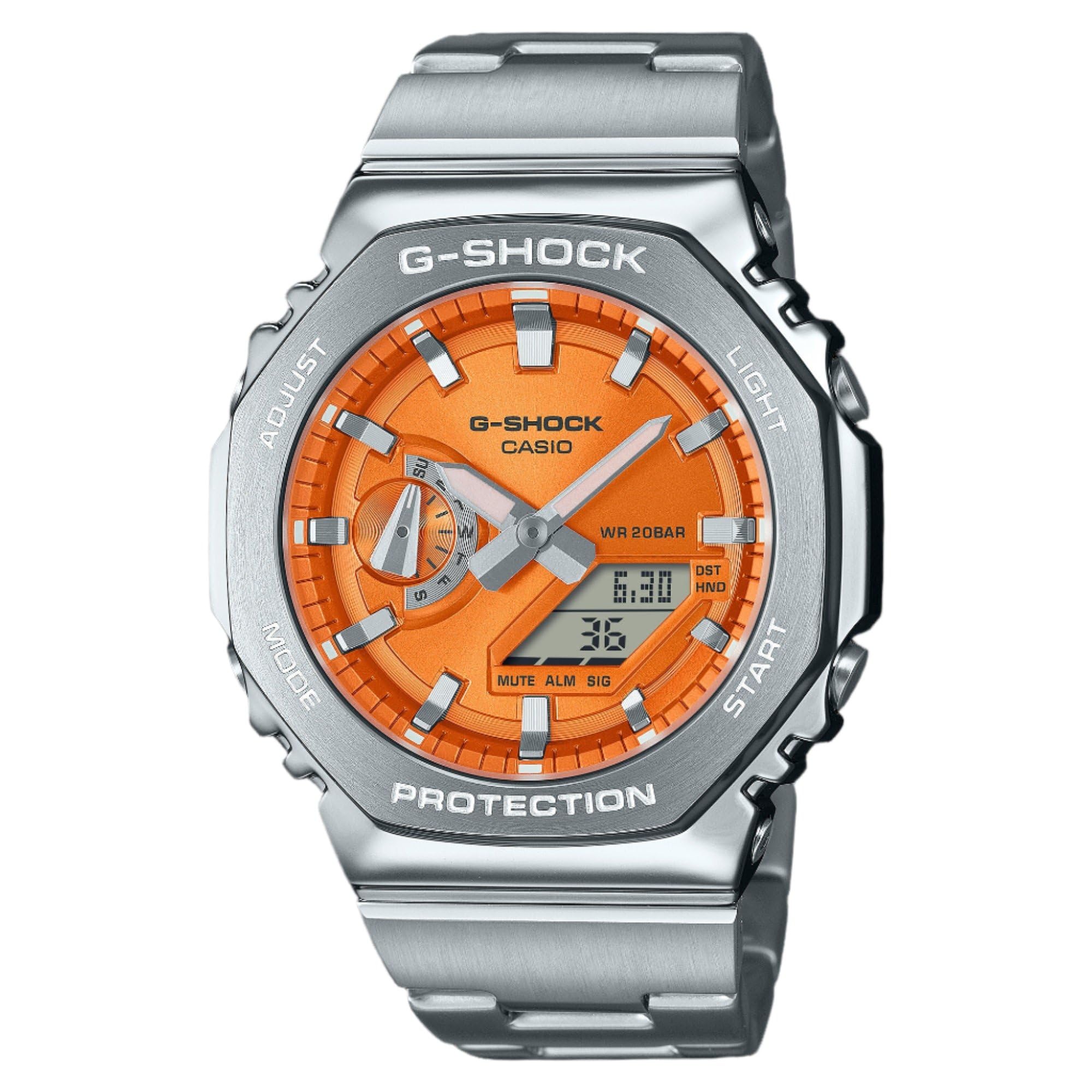
Слика 1: Casio G-Shock GM2110D-4A Octagonal Orange Stainless Steel Watch. This image shows the watch with its octagonal silver-tone stainless steel case and band, featuring an orange analog-digital dial. The dial displays the time 6:30 and the date 36, with 'G-SHOCK CASIO' and 'WR 20BAR PROTECTION' clearly visible. The watch's functional buttons, labeled 'ADJUST', 'MODE', 'LIGHT', and 'START', are positioned around the case.
The Casio G-Shock GM2110D-4A is a robust analog-digital watch designed for durability and functionality. It features an orange dial with silver-tone hands, housed within a silver-tone stainless steel case and band. Key features include quartz movement, 200-meter water resistance, and a scratch-resistant mineral crystal. The watch also includes various functions such as alarm, light, shock resistance, and a timer.
Сетуп
1. Почетно подешавање времена
- У режиму мерења времена, притисните и држите АДЈУСТ button (top left) until the city code starts to flash in the digital display. This indicates the setting mode.
- Користите МОДЕ button (bottom left) to cycle through the settings: City Code → DST → 12/24-hour format → Seconds → Hour → Minute → Year → Month → Day.
- Користите СТАРТ button (bottom right) or ЛИГХТ button (top right) to change the flashing value.
- Након што подесите сва подешавања, притисните дугме АДЈУСТ button to exit the setting mode. The analog hands will automatically adjust to the digital time.
2. Home City Selection
Selecting your Home City is crucial for correct timekeeping and World Time functions. Follow the initial time setting steps to select your desired city code.
Упутство за употребу
1. Навигација режима
Притисните тастер МОДЕ button (bottom left) to cycle through the watch's various modes:
- Режим мерења времена (тренутно време и датум)
- World Time Mode (times in different cities)
- Режим штоперице
- Тимер Моде
- Аларм Моде
2. Режим мерења времена
This mode displays the current time and date. Use the АДЈУСТ button to enter setting mode for time and date adjustments as described in the "Setup" section.
3. Режим светског времена
У режиму светског времена, користите СТАРТ button (bottom right) to scroll through different city codes and view their current times.
4. Режим штоперице
- Притисните СТАРТ за почетак мерења времена.
- Притисните СТАРТ поново да бисте паузирали/наставили.
- Притисните АДЈУСТ to reset the stopwatch to zero while it is paused.
5. Режим тајмера
- In Timer Mode, press and hold АДЈУСТ да уђете у режим подешавања.
- Користите МОДЕ to select hours, minutes, or seconds.
- Користите СТАРТ or ЛИГХТ да промените вредности.
- Притисните АДЈУСТ да бисте изашли из режима подешавања.
- Притисните СТАРТ за почетак одбројавања.
6. Аларм мод
- In Alarm Mode, press and hold АДЈУСТ да уђете у режим подешавања.
- Користите МОДЕ to select hour or minute.
- Користите СТАРТ or ЛИГХТ да промените вредности.
- Притисните АДЈУСТ да бисте изашли из режима подешавања.
- Притисните СТАРТ да бисте укључили/искључили аларм. Индикатор ће се приказивати када је аларм активан.
7. Illumination (Light)
Притисните тастер ЛИГХТ дугме (горе десно) за осветљавање лица сата ради лакшег viewинг у условима слабог осветљења.
Одржавање
1. Чишћење
Wipe the watch regularly with a soft, dry cloth to remove dirt and moisture. For stainless steel parts, a slightly damp cloth can be used, followed by a dry cloth. Avoid using chemical cleaners or solvents.
2. Отпорност на воду
This watch is water resistant to 200 meters (20 BAR). This means it is suitable for recreational scuba diving. Do not operate buttons while the watch is submerged in water. After exposure to saltwater, rinse the watch with fresh water and wipe it dry.
3. Замена батерије
The watch is powered by a battery. When the display becomes dim or functions become erratic, it may be time for a battery replacement. It is recommended to have the battery replaced by an authorized Casio service center to ensure proper sealing and water resistance.
Решавање проблема
- Дигитални дисплеј је празан или затамњен: The battery may be low. Consider battery replacement.
- Време је погрешно: Ensure your Home City setting is correct and adjust the time as described in the "Setup" section. Check for DST (Daylight Saving Time) settings.
- Аналогне казаљке се не поклапају са дигиталним временом: Perform a hand alignment correction. Refer to the full Casio module manual for detailed steps, typically involving holding specific buttons in Timekeeping Mode to enter hand adjustment.
- Watch stops working after exposure to water: Immediately take the watch to an authorized service center. Do not attempt to open the watch yourself.
Спецификације
| Феатуре | Детаљ |
|---|---|
| Број модела | GM2110D-4A |
| Покрет | Кварц (аналогно-дигитални) |
| Материјал кућишта | нерђајући челик |
| Банд Материал | нерђајући челик |
| Цристал | Минерал отпоран на гребање |
| Отпорност на воду | 200 метара (20 бара) |
| Пречник кућишта | 44 мм |
| Цасе Тхицкнесс | 11.8 мм |
| Банд Видтх | 25 мм |
| Боја бирања | Оранге |
| Додатне карактеристике | Alarm, Light, Shock Resistant, Timer, World Time |
Гаранција и подршка
This Casio G-Shock watch comes with a limited warranty. For specific warranty terms, conditions, and duration, please refer to the warranty card included with your purchase or visit the official Casio website. For technical support, service, or inquiries, please contact Casio customer service directly.
Више информација и ресурса за подршку можете пронаћи на званичном Casio сајту. webсајт: ввв.цасио.цом