1. Увод
This manual provides comprehensive instructions for the safe and efficient operation of your TIDRADIO TD-M11 FRS Two-Way Radio. Please read this manual thoroughly before using the device to ensure proper functionality and to prevent damage. The TD-M11 is a robust, waterproof FRS radio designed for reliable communication in various environments.
2. Садржај пакета
Проверите да ли су све ставке присутне у вашем пакету:
- 2 x TIDRADIO TD-M11 Walkie Talkies
- 2 к 1000мАх Ли-ион батерије
- 2 x USB Charging Cables & Adapters
- 2 к копче за појас
- 1 к Упутство за употребу
3. Производ је готовview
The TIDRADIO TD-M11 is a compact and durable FRS two-way radio. It features an integrated LED display, a rotary knob for power and volume, and side buttons for channel selection and Push-to-Talk (PTT).
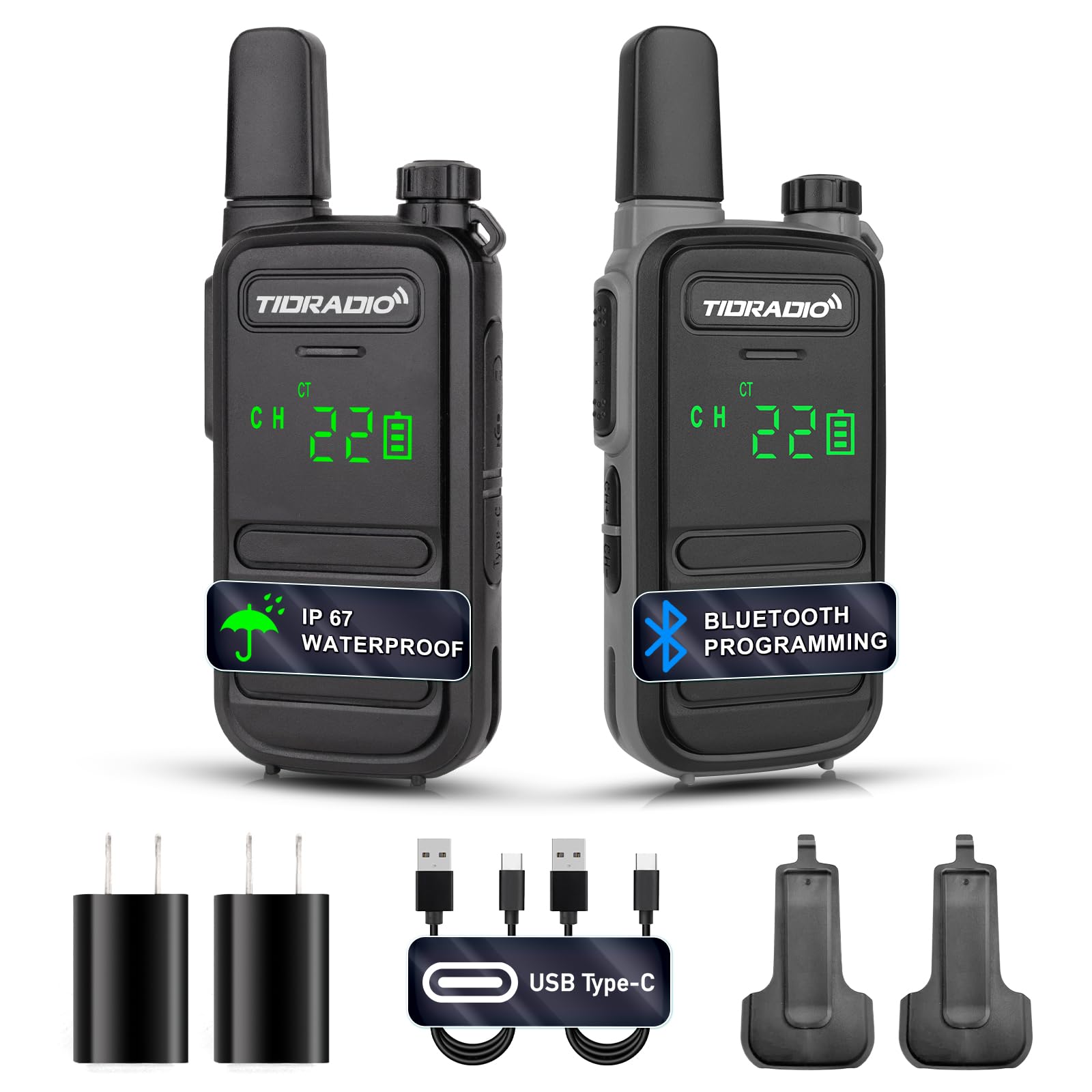
Слика 3.1: Предња страна view of the TIDRADIO TD-M11 Walkie Talkie.

Figure 3.2: Dimensions and weight of the TD-M11 radio. The radio weighs approximately 0.2 lbs, with a thickness of 0.7 inches and a height of 5.3 inches.
4. Подешавање
4.1 Инсталација батерије
- Уверите се да је радио искључен.
- Пронађите поклопац одељка за батерију на задњој страни радија.
- Slide the cover downwards or unlatch it to remove.
- Insert the 1000mAh Li-ion battery, ensuring the contacts align correctly.
- Вратите поклопац одељка за батерије и причврстите га.
4.2 Пуњење батерије
The TD-M11 features a Type-C charging port for convenience. Use the provided USB charging cable and adapter.
- Connect the Type-C end of the charging cable to the radio's charging port.
- Connect the USB-A end to the provided power adapter or a compatible USB power source (e.g., power bank, PC, vehicle charger).
- The LED indicator on the radio will show charging status.
- Charging efficiently and quickly extends the battery life.

Figure 4.1: The TD-M11 supports Type-C charging via adapter, power bank, PC, or vehicle charger.
5. Упутство за употребу
5.1 Укључивање/искључивање и подешавање јачине звука
To power on the radio, rotate the top knob clockwise. Continue rotating to increase the volume. Rotate counter-clockwise to decrease volume and power off.
5.2 Избор канала
Use the CH+ and CH- buttons located on the side of the radio to cycle through the available 22 FRS channels.
5.3 Пренос и пријем
To transmit, press and hold the Push-to-Talk (PTT) button on the side of the radio and speak clearly into the microphone. Release the PTT button to receive.
5.4 VOX функција (гласовно управљана централа)
The built-in VOX function allows for hands-free operation. When activated, the radio will transmit automatically when it detects your voice. This feature can be configured via the Odmaster APP.

Figure 5.1: Illustration of the VOX function, enabling voice-activated transmission.
5.5 Bluetooth Programming with Odmaster APP
The TD-M11 can be programmed wirelessly using the Odmaster APP on your mobile phone. This allows for reading and writing frequencies, and searching for nearby repeaters.
- Укључите радио.
- Long press the CH+ button to activate Bluetooth. The LED indicator will show a red light.
- Download the Odmaster APP from Google Play Store or Apple App Store.
- Open the APP and connect to the radio via Bluetooth.
- Select the TD-M11 model within the APP.
- Read the current radio settings.
- Modify parameters as needed (e.g., RX/TX frequencies, power levels, VOX settings).
- Write the new settings to the radio.
Video 5.1: This video demonstrates the process of connecting your mobile phone to the TIDRADIO TD-M11 and programming it using the Odmaster application. It shows how to activate Bluetooth on the radio, pair it with the app, select the radio model, read current settings, and write new configurations.

Figure 5.2: Step-by-step guide for connecting the TD-M11 to the Odmaster APP via Bluetooth for programming. Note: Bluetooth is for programming only and cannot be connected to other accessories.
5.6 NOAA Weather Forecast
The LED display can clearly show NOAA weather forecasts, providing essential weather information.
5.7 Busy Channel Lockout (BCLO)
BCLO automatically or manually prevents transmission on busy communication channels to avoid interference and maintain clear communication.
6. Карактеристике
- 2W Output Power & 22 FRS Channels: Provides reliable long-range communication.
- IP67 Waterproof Performance: Designed to withstand various weather conditions, suitable for outdoor activities like hiking and hunting.
- Bluetooth Connection for Programming: Connects to the Odmaster APP for mobile programming of frequencies and settings.
- Built-in VOX: Омогућава комуникацију без употребе руку.
- ЛЕД дисплеј: Hidden LED lighting clearly displays working status and NOAA weather forecasts, offering better dustproof effect.
- Пуњач типа Ц: Convenient USB charging for the 1000 mAh Li-ion battery.
- Лаган и преносив: Compact design for easy carrying and one-handed control.
- Блокада заузетог канала (BCLO): Prevents transmission on occupied channels.
- Отпоран на ударце и прашину: Enhanced durability for challenging environments.

Figure 6.1: The TD-M11 is designed to be shockproof and drop-proof for increased durability.

Figure 6.2: The TD-M11 features IP67 waterproofing. Note: The TD-M11 cannot be used underwater. If it falls into water, shake or wipe the water off the walkie-talkie first before using it again.

Figure 6.3: The TD-M11's LED display shows channel, volume, and battery status, designed for clarity in various conditions.
7. Спецификације
| Феатуре | Спецификација |
|---|---|
| Број модела | ТД-М11 |
| Тежина артикла | 3.2 унци |
| Димензије производа | 0.7 к 2.1 к 5.3 инча |
| Батерије | Потребна је 2 литијум-полимерска батерија (укључена) |
| Број канала | 22 |
| Посебна карактеристика | ИП67 водоотпоран |
| Фреквенцијски опсег | УХФ КСНУМКС-КСНУМКСМХз |
| Максимални домет говора | 5 километара |
| Волtage | 3.7 Волтс |
| Ниво отпорности на воду | Водоотпоран |
8. Одржавање
8.1 Чишћење
Обришите радио меком, дamp cloth. Do not use harsh chemicals or abrasive cleaners. Ensure the Type-C port cover is securely closed to maintain water resistance.
8.2 Одржавање батерије
To prolong battery life, avoid fully discharging the battery frequently. Store the radio and batteries in a cool, dry place when not in use for extended periods. If the radio will not be used for a long time, charge the battery to about 50% before storage.
8.3 Отпорност на воду
While the TD-M11 is IP67 waterproof, it is not designed for submersion. If the radio gets wet, wipe it dry immediately. Ensure all port covers are sealed to maintain water resistance.
КСНУМКС. Решавање проблема
9.1 Radio Does Not Power On
- Проверите да ли је батерија правилно постављена и напуњена.
- Ensure the power/volume knob is rotated sufficiently clockwise.
9.2 Cannot Transmit or Receive
- Verify that the radio is on the same channel as the other party.
- Проверите да ли је ниво батерије довољан.
- Ensure you are within range. Obstacles like buildings and terrain can reduce range.
- If Busy Channel Lockout (BCLO) is active, you may not be able to transmit on an occupied channel.
9.3 Лош квалитет звука
- Подесите ниво јачине звука.
- Ensure the microphone and speaker are not obstructed.
- Move closer to the other radio or to an area with fewer obstructions.
9.4 Bluetooth Programming Issues
- Ensure Bluetooth is activated on the radio (long press CH+).
- Make sure the Odmaster APP is updated to the latest version.
- Restart both the radio and your mobile device.
10. Гаранција и подршка
10.1 Информације о гаранцији
The TIDRADIO TD-M11 comes with a 60-day hassle-free replacement warranty. Please retain your proof of purchase for warranty claims.
10.2 Корисничка подршка
For further assistance, technical support, or warranty inquiries, please contact TIDRADIO customer service through the retailer's platform or the official TIDRADIO webсајту.


