1. Увод
This manual provides detailed instructions for setting up, operating, and maintaining your Mercusys MR27BE BE3600 Dual-Band Wi-Fi 7 Router. The MR27BE is designed to deliver high-speed wireless connectivity with Wi-Fi 7 technology, featuring dual-band operation and multiple high-speed Ethernet ports for a robust home or small office network.
2. Садржај пакета
Проверите да ли ваш пакет садржи следеће ставке:
- Mercusys MR27BE Wi-Fi 7 Router
- Повер Адаптер
- Етхернет Цабле
- Водич за брзу инсталацију

This image displays the retail packaging for the Mercusys MR27BE BE3600 Dual Band Wi-Fi 7 Router, highlighting key features and branding.
3. Физички претекview
3.1 Задња плоча
The rear panel of the MR27BE router features various ports and buttons for connectivity and control.
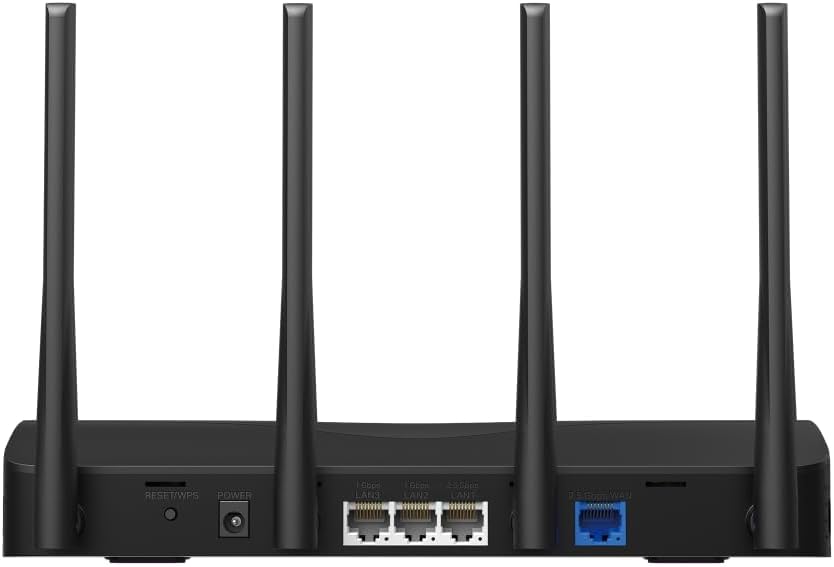
This image displays the rear panel of the MR27BE router, highlighting the 2.5 Gbps WAN port (blue), 2.5 Gbps LAN port, two 1 Gbps LAN ports, the Reset/WPS button, and the power input.
- Напајање: Овде прикључите приложени адаптер за напајање.
- Дугме за ресетовање/ВПС: Press and hold for 1 second to activate WPS. Press and hold for more than 5 seconds to factory reset the router.
- LAN Ports (1 Gbps): Two Gigabit Ethernet ports for connecting wired devices.
- LAN Port (2.5 Gbps): One 2.5 Gigabit Ethernet port for high-speed wired connections.
- WAN Port (2.5 Gbps): One 2.5 Gigabit Ethernet port for connecting to your modem or internet service provider's (ISP) network.
3.2 Кључне карактеристике
The MR27BE router incorporates advanced features for enhanced network performance.

This graphic illustrates key features of the MR27BE, including its Wi-Fi 7 capabilities, the presence of 2x 2.5 Gbps ports and 2x Gigabit ports, four omni-directional high-gain antennas, EasyMesh compatibility, and easy app control.

This image demonstrates the speed performance of the MR27BE router, indicating up to 2880 Mbps on the 5 GHz band and 688 Mbps on the 2.4 GHz band, showcasing its Wi-Fi 7 capabilities.
4. Подешавање
4.1 Повезивање хардвера
- Искључивање: Disconnect the power from your modem (if applicable).
- Повежите ВАН порт: Connect one end of the Ethernet cable to your modem's Ethernet port and the other end to the blue 2.5 Gbps WAN port on your MR27BE router.
- Прикључите напајање: Connect the power adapter to the router's Power port and plug it into an electrical outlet.
- Укључено: Wait for the router to power on completely. The LED indicator should turn solid green.
- Повежите уређаје (опционо): For wired devices, connect an Ethernet cable from your computer or other device to one of the yellow LAN ports on the router.

This image shows the 2.5 Gbps ports of the MR27BE router in use, illustrating connections for 2.5 Gbps wired devices and multi-gig internet access, emphasizing high-performance networking.
4.2 Почетна конфигурација
You can configure your router using the MERCUSYS app or a web претраживач.
Коришћење апликације MERCUSYS:
- Преузмите апликацију MERCUSYS са App Store-а или Google Play-а.
- Connect your smartphone to the router's default Wi-Fi network (SSID and password are on the label at the bottom of the router).
- Отворите апликацију MERCUSYS и пратите упутства на екрану да бисте завршили подешавање.
Коришћењем а Web Прегледач:
- Connect your computer to the router via an Ethernet cable or the default Wi-Fi network.
- Отвори а web претраживач и тип
mwlogin.netor192.168.1.1у траку за адресу. - Креирајте лозинку за пријаву када се то од вас затражи.
- Follow the Quick Setup wizard to configure your internet connection and Wi-Fi settings.
5. Управљање рутером
5.1 Повезивање уређаја
- Бежични уређаји: Тражи your Wi-Fi network name (SSID) on your device and enter the Wi-Fi password you set during setup.
- Жични уређаји: Connect an Ethernet cable from your device to any available LAN port on the router.
5.2 Компатибилност са EasyMesh-ом
The MR27BE router supports EasyMesh, allowing you to create a seamless whole-home Wi-Fi network by adding compatible EasyMesh range extenders or other routers.

This diagram visually explains how the EasyMesh system, compatible with the MR27BE router, can expand Wi-Fi coverage throughout an entire home, ensuring seamless connections.
To set up an EasyMesh network, refer to the instructions provided with your EasyMesh compatible devices or the MERCUSYS app.
5.3 Advanced Settings (via Web Интерфејс)
Приступите web интерфејс (mwlogin.net) to configure advanced settings such as:
- Мрежа гостију: Направите засебну Wi-Fi мрежу за госте.
- Родитељски надзор: Управљајте приступом интернету за одређене уређаје.
- Безбедност мреже: Configure firewall rules and access control.
- Режим рада: Switch between Router, Access Point, or Range Extender modes.
6. Одржавање
6.1 Ажурирање фирмвера
Regularly updating the router's firmware ensures optimal performance and security. You can check for updates via the MERCUSYS app or the web interface under System Tools > Firmware Upgrade.
6.2 Поновно покретање рутера
If you experience network issues, a simple restart can often resolve them. You can restart the router via the MERCUSYS app, the web interface, or by unplugging and replugging the power adapter.
6.3 Ресетовање на фабричка подешавања
A factory reset will restore the router to its default settings. This can be done by pressing and holding the Reset/WPS button on the rear panel for more than 5 seconds until the LED blinks rapidly, or via the web interface under System Tools > Factory Defaults.
КСНУМКС. Решавање проблема
7.1 Нема приступа интернету
- Check all cable connections, especially the WAN port connection to your modem.
- Ensure your modem is working correctly.
- Рестартујте и модем и рутер.
- Проверите подешавања интернета у рутеру web интерфејс.
7.2 Проблеми са Wi-Fi сигналом
- Уверите се да је рутер постављен на централној локацији, даље од препрека и извора сметњи (нпр. микроталасне пећнице, бежични телефони).
- Подесите антене рутера за оптималну покривеност.
- Consider using EasyMesh compatible devices to extend coverage in larger homes.
7.3 Заборављена лозинка за Wi-Fi или лозинка за пријаву
- Подразумевана лозинка за Wi-Fi се налази на налепници на дну рутера.
- If you changed it and forgot, you will need to perform a factory reset to restore default settings, then reconfigure the router.
8. Спецификације
| Назив модела | МР27БЕ |
| вирелесс стандард | 802.11be (Wi-Fi 7) |
| Класа фреквенцијског опсега | Дуал-Банд |
| ВАН Порт | 1x 2.5 Gbps WAN Port |
| ЛАН портови | 1x 2.5 Gbps LAN Port, 2x 1 Gbps LAN Ports |
| Посебна карактеристика | ЕасиМесх Цомпатибле |
| Димензије производа | 7.87 к 5.91 к 3.94 инча |
| Тежина артикла | 2.23 фунти |
| Укључене компоненте | MR27BE, Power Adapter, instruction manual |
9. Подршка
For technical support, warranty information, or further assistance, please visit the official Mercusys website or contact Mercusys customer support.
- Mercusys Official Webсајт: ввв.мерцусис.цом
- Refer to the Quick Installation Guide for initial setup and contact details.