1. Увод
Thank you for choosing the Groove Electronics Wireless Bluetooth Earbuds, Model X31. These earbuds are designed to provide a high-fidelity audio experience with the convenience of wireless connectivity, perfect for an active lifestyle. Featuring IPX7 waterproof protection, a secure comfort fit, and extended battery life, they are built to accompany you through workouts, daily commutes, and leisure activities. This manual provides essential information on how to set up, operate, maintain, and troubleshoot your new earbuds to ensure optimal performance and longevity.
2. Шта је у кутији
Молимо вас да проверите да ли су све ставке наведене у наставку укључене у ваш пакет:
- Groove Electronics Wireless Bluetooth Earbuds (Left & Right)
- Преносива торбица за пуњење
- УСБ-Ц кабл за пуњење
- Multiple Sizes of Eartips (Small, Medium, Large)

Contents of the product packaging, including the wireless earbuds, charging case, eartips, and USB-C charging cable.
3. Производ је готовview
The Groove Electronics X31 earbuds are designed for comfort, durability, and superior sound quality. They feature an ergonomic ear hook design for a secure fit during any activity and are equipped with advanced Bluetooth 5.3 technology for stable and fast connections.
3.1 Кључне карактеристике
- IPX7 Водоотпорна заштита: Resistant to sweat, rain, and accidental immersion.
- Secure Comfort Fit: Ergonomic ear hooks ensure stability during intense activities.
- Продужено време репродукције: Up to 14 hours on a single charge, and 80 hours with the charging case.
- Звук високе верности: Dynamic drivers deliver crisp highs, rich mids, and powerful bass.
- Intuitive Button Controls: Једноставно управљање музиком, позивима и гласовним асистентом.
- Fast Bluetooth 5.3 Pairing: Quick and stable connection to your devices.
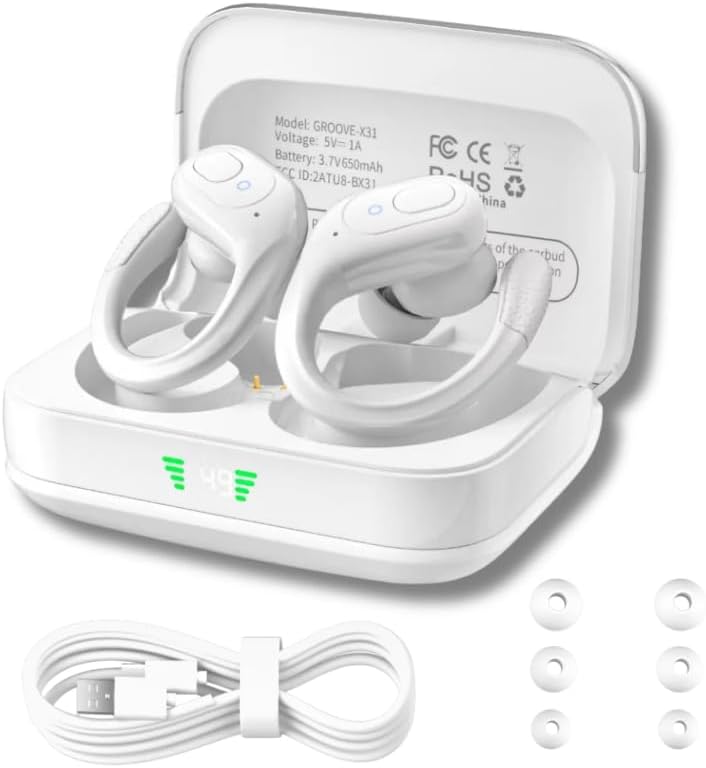
Groove Electronics Wireless Bluetooth Earbuds (Model X31) in their charging case, accompanied by a USB-C charging cable and various sizes of eartips.

Close-up of the earbuds with water droplets, highlighting their IPX7 waterproof and sweat-resistant design for active use.

Diagram illustrating the immersive high-definition stereo sound experience provided by the earbuds, with musical notes and a speaker icon.
4. Подешавање
4.1 Пуњење слушалица и футроле
Before first use, fully charge the earbuds and the charging case. The charging case features an LED display indicating the battery percentage.
- Ставите слушалице у кутијицу за пуњење, водећи рачуна да су правилно постављене.
- Connect the USB-C charging cable to the charging port on the case and plug the other end into a USB power source (e.g., wall adapter, computer USB port).
- The LED display on the case will show the charging status. Once fully charged, the display will indicate 100%.
- A full charge provides up to 14 hours of playtime for the earbuds, and the charging case holds multiple charges for a total of up to 80 hours of listening time.

Illustration demonstrating the extended battery life of the earbuds, showing 14 hours on a single charge and up to 80 hours with the charging case, along with the convenient LED power display.
4.2 Упаривање са вашим уређајем
Слушалице ће аутоматски ући у режим упаривања када се изваде из кућишта за пуњење.
- Отворите кућиште за пуњење и извадите обе слушалице. Аутоматски ће се укључити и ући у режим упаривања.
- On your device (smartphone, tablet, laptop, etc.), enable Bluetooth.
- Тражи new Bluetooth devices. Select "GROOVE-X31" from the list of available devices.
- Када се повежете, чућете звук потврде и слушалице ће бити спремне за употребу.
- Слушалице ће се аутоматски поново повезати са последњим упареним уређајем када се изваде из футроле, ако је Блутут омогућен на уређају.

Image depicting the fast Bluetooth pairing process, showing the earbuds connecting to a smartphone with Bluetooth 5.3 technology for seamless connectivity.
5. Операција
5.1 Контроле дугмета
The earbuds feature intuitive push-button controls on each earbud. The functions can be performed on either the left (L) or right (R) earbud unless specified.
| Акција | Контрола | Функција |
|---|---|---|
| Single Press (x1) | Л/Р | Пуштање/паузирање музике, одговарање/прекидање позива |
| Double Press (x2) | Л/Р | Switch Song (Next Track) |
| Triple Press (x3) | Л/Р | Активирајте гласовни помоћник (Сири, Гоогле помоћник) |
| Press & Hold (2S) | Л/Р | Adjust Volume (L: Volume Down, R: Volume Up) |
| Press & Hold (2S) | Л/Р | Одбаци позив |
| Press & Hold (5S) | Л/Р | Укључивање/искључивање |
| Five Presses (x5) | Л/Р | Ресетујте слушалице |

Detailed diagram of the intuitive push-button controls on the earbuds, outlining functions such as play/pause, track switching, volume adjustment, call management, voice assistant activation, and power on/off.
6. Одржавање
Proper care and maintenance will ensure the longevity and optimal performance of your earbuds.
- Чишћење: Regularly clean the earbuds and charging case with a soft, dry, lint-free cloth. For the eartips, remove them and clean with a mild soap solution if necessary, then rinse and dry thoroughly before reattaching. Ensure charging contacts are free of debris.
- Изложеност води: While IPX7 waterproof, avoid prolonged submersion. After exposure to sweat or water, wipe the earbuds dry before placing them back in the charging case to prevent corrosion of charging contacts.
- Складиштење: Store the earbuds in their charging case when not in use to protect them from dust and damage. Store in a cool, dry place away from extreme temperatures.
- Одржавање батерије: Да бисте сачували век трајања батерије, избегавајте често потпуно пражњење слушалица и кућишта за пуњење. Редовно их пуните, чак и ако се не користе дуже време.
КСНУМКС. Решавање проблема
Ако наиђете на било какве проблеме са слушалицама, погледајте следећа уобичајена решења:
| Проблем | Могући узрок | Решење |
|---|---|---|
| Слушалице се не укључују | Ниска батерија | Ставите слушалице у кутијицу за пуњење и уверите се да је кутијица напуњена. |
| Упаривање са уређајем није могуће | Bluetooth off, out of range, or previously paired | Ensure Bluetooth is on. Move closer to device. Forget "GROOVE-X31" on your device's Bluetooth list and re-pair. |
| Само једна слушалица ради | Connection issue between earbuds or with device | Place both earbuds back in the case, close it, then open and remove them again. If issue persists, perform a factory reset (see below). |
| Нема звука или је тиха | Volume too low, incorrect audio output, or earbud blockage | Adjust volume on both earbuds and your device. Check device's audio output settings. Clean eartips and earbud mesh. |
| Кућиште за пуњење се не пуни | Faulty cable/adapter or dirty port | Пробајте други USB-C кабл и адаптер за напајање. Уверите се да је порт за пуњење чист и без прљавштине. |
7.1 Ресетовање на фабричка подешавања
If you experience persistent connectivity issues or other malfunctions, a factory reset may resolve the problem:
- Ensure both earbuds are in the charging case.
- On each earbud, quickly press the control button five times (x5).
- The earbuds will reset. Remove them from the case and attempt to re-pair with your device.
8. Спецификације
| Феатуре | Детаљ |
|---|---|
| Назив модела | Groove Electronics Wireless Bluetooth Earbuds with Charging Case |
| Број модела | Кс31 |
| Технологија повезивања | Бежични |
| Бежична комуникациона технологија | Блуетоотх |
| Блуетоотх верзија | 5.3 |
| Блуетоотх домет | 50 стопа |
| Ниво отпорности на воду | Водоотпоран (ИПКС7) |
| Трајање батерије (слушалице) | До 14 сати (једно пуњење) |
| Укупно време репродукције (са футролом) | До 80 сати |
| Контролни метод | Remote (Button Control) |
| Постављање уха | У уху (са кукицом за уши) |
| Тип аудио драјвера | Динамички возач |
| Контрола буке | Активно поништавање буке (ENC за позиве) |
| Компатибилни уређаји | Smartphones, Tablets, Laptops, Smart Speakers, Gaming Consoles, Television, Cars, Motorcycles |
| Тежина артикла | 5.3 унци |
| Боја | Бела |
9. Гаранција и подршка
Groove Electronics stands behind the quality of its products. Your Groove Electronics Wireless Bluetooth Earbuds (Model X31) are covered by a standard manufacturer's warranty against defects in materials and workmanship.
For specific warranty terms, registration, or technical support, please refer to the warranty card included in your product packaging or visit the official Groove Electronics website. You may also contact our customer support team through the details provided on our webсајт или вашу платформу за куповину.
Подршка на мрежи: For FAQs, troubleshooting guides, and contact information, please visit the Groove Electronics Store on Amazon.