Увод
Welcome to the GOBOULT Mirage Smart Watch user manual. This guide provides detailed instructions on how to set up, operate, and maintain your new smartwatch. Please read this manual thoroughly to ensure optimal performance and longevity of your device.
Производ је завршенview
The GOBOULT Mirage Smart Watch is a feature-rich device designed to enhance your daily life with advanced health monitoring, communication, and fitness tracking capabilities. It features a vibrant 1.39-inch HD display, Bluetooth calling, and a durable zinc alloy frame.
Кључне карактеристике:
- 1.39-инчни ХД екран: Bright and clear screen with 500 nits brightness and 360x360 pixel resolution.
- Блуетоотх позивање: Make and receive calls directly from your wrist with a built-in speaker and microphone.
- Свеобухватно праћење здравља: Includes SpO2, heart rate, blood pressure, sleep tracking, breath training, and menstrual cycle tracking.
- 120+ спортских режима: Track a wide range of physical activities with detailed metrics.
- АИ гласовни асистент: Hands-free control and access to features.
- IP67 водоотпорност: Дизајниран да издржи прскање и прашину.
- Прилагодљиви сатови: Over 300 cloud-based watch faces to personalize your device.
- Паметна обавештења: Receive alerts for calls, messages, and app notifications.
- Дуг век трајања батерије: До 7 дана уобичајене употребе.
Шта је у кутији:
- GOBOULT Mirage Smart Watch (Coal Black)
- Кабл за пуњење
- Упутство за употребу
- Гарантни лист

Слика: Прекоview of the GOBOULT Mirage Smart Watch highlighting its main features.
Водич за подешавање
1. Пуњење паметног сата
- Connect the magnetic charging cable to the charging pins on the back of your smartwatch.
- Прикључите УСБ крај кабла у стандардни УСБ адаптер за напајање (препоручује се 5V/1A) или УСБ порт рачунара.
- The watch display will show a charging indicator. A full charge takes approximately 120 minutes.
- Уверите се да су пинови за пуњење чисти и суви пре пуњења како бисте спречили корозију.
2. Укључивање/искључивање
- Укључено: Press and hold the side button (digital crown) for a few seconds until the GOBOULT logo appears.
- Искључивање: From the watch face, swipe down to access quick settings, or navigate to the settings menu. Select "Power Off" and confirm. Alternatively, press and hold the side button until the power off option appears.
3. Упаривање са вашим паметним телефоном
- Download the official GOBOULT companion app from your smartphone's app store (available for iOS and Android).
- Уверите се да је Блуетоотх омогућен на вашем паметном телефону.
- Open the GOBOULT app and follow the on-screen instructions to create an account or log in.
- In the app, select "Add Device" or a similar option to search for your smartwatch.
- Select "GOBOULT Mirage" from the list of available devices.
- Потврдите захтев за упаривање и на паметном телефону и на паметном сату.
- Након упаривања, сат ће синхронизовати податке са вашим телефоном, а подешавања можете прилагодити путем апликације.
Упутство за употребу
Основна навигација:
- екран осетљив на додир: Превуците прстом лево/десно, горе/доле да бисте се кретали кроз меније и обавештења. Додирните да бисте изабрали ставке.
- Digital Crown (Side Button):
- Притисните једном: Return to the watch face from any screen, or wake the screen.
- Притисните и држите: Power on/off, or access the AI Voice Assistant (configurable).
- ротирати: Листајте кроз меније, листе или прилагођавајте подешавања.
- Дугме за пречицу: The second physical button on the side can be customized for quick access to specific functions, such as launching sports modes.

Image: Digital crown and button functionalities for navigation and quick access.
Мониторинг здравља
The GOBOULT Mirage Smart Watch offers a comprehensive suite of health tracking features. For accurate readings, ensure the watch is worn snugly on your wrist, about one finger's width from your wrist bone.
- Мониторинг срчане фреквенције: The watch continuously tracks your heart rate. View подаци у реалном времену на сату или детаљни трендови у апликацији.
- Праћење SpO2 (кисеоника у крви): Measure your blood oxygen levels on demand. Navigate to the SpO2 function on your watch and remain still for accurate results.
- Праћење крвног притиска: Access the blood pressure feature on your watch for readings.
- Праћење сна: Wear your watch to bed to track your sleep patterns, including deep sleep, light sleep, and awake times. Data is available in the app.
- Breath Training Mode: Follow guided breathing exercises to help reduce stress and improve relaxation.
- Праћење активности: Прати кораке, пређену удаљеност и потрошњу калорија током дана.
- Подсетник за пиће воде: Set reminders in the app to ensure you stay hydrated.
- Седентарни подсетник: Примајте обавештења када сте предуго неактивни, подстичући вас да се крећете.
- Праћење менструалног циклуса: For female users, track and predict menstrual cycles through the companion app.

Image: The watch's health sensors and a summary of its health monitoring capabilities.
Спортски режими
The GOBOULT Mirage Smart Watch supports over 120 sports modes to accurately track your workouts. From running to yoga, you can monitor your performance and progress.
Using Sports Modes:
- Access the sports mode menu from the watch's main interface or by using the dedicated shortcut button.
- Scroll through the list and select your desired activity (e.g., Running, Cycling, Yoga, Cricket, Badminton, Basketball).
- Tap to start the activity. The watch will begin recording data such as duration, heart rate, calories burned, and distance (where applicable).
- To pause or end an activity, swipe right or press the side button and follow the on-screen prompts.
- Review your workout summaries on the watch or in detail within the companion app.

Image: The watch interface showing various sports modes and quick access options.
Блутут позиви и паметна обавештења
With Bluetooth 5.3 connectivity, your GOBOULT Mirage Smart Watch allows you to manage calls and receive notifications directly on your wrist.
Блуетоотх позивање:
- Ensure your watch is paired with your phone via Bluetooth.
- Упућивање позива: Приступите тастатури за бројчаник или листи контаката на сату да бисте започели позив.
- Примање позива: When a call comes in, the watch will display the caller ID. You can answer or reject the call directly from your wrist using the built-in speaker and microphone.
- Синхронизација контаката: Synchronize your phone contacts with the watch through the companion app for easy access.
Паметна обавештења:
- Enable app notifications in the GOBOULT companion app on your smartphone.
- Your watch will display incoming messages, social media alerts, and other app notifications.
- Swipe up or down on the watch face to view ваша историја обавештења.

Image: Bluetooth calling features and interface on the smartwatch.

Image: Smart notifications and other quick access features like calculator and voice assistant.
Прилагођавање
Лица за гледање:
Personalize your GOBOULT Mirage Smart Watch with over 300 cloud-based watch faces. You can change the watch face directly from the device or through the companion app.
- На стражи: From the watch face, press and hold the screen. Swipe left or right to browse available watch faces and tap to select.
- Преко апликације: Open the GOBOULT app, navigate to the watch face section, and explore a wider selection of designs. Download and apply your preferred watch face.

Слика: прamples of customizable watch faces available for the smartwatch.
Додатне карактеристике
АИ гласовни асистент:
Activate the AI Voice Assistant (compatible with Hey Siri and Ok Google) by long-pressing the digital crown or through a dedicated menu option. Use voice commands to perform various tasks hands-free.
Пронађи мој телефон:
If your paired smartphone is misplaced, use the "Find My Phone" feature on your watch to make it ring or vibrate, helping you locate it quickly.
- Go to the watch menu.
- Select the "Find Phone" option.
- The connected phone will ring or vibrate.
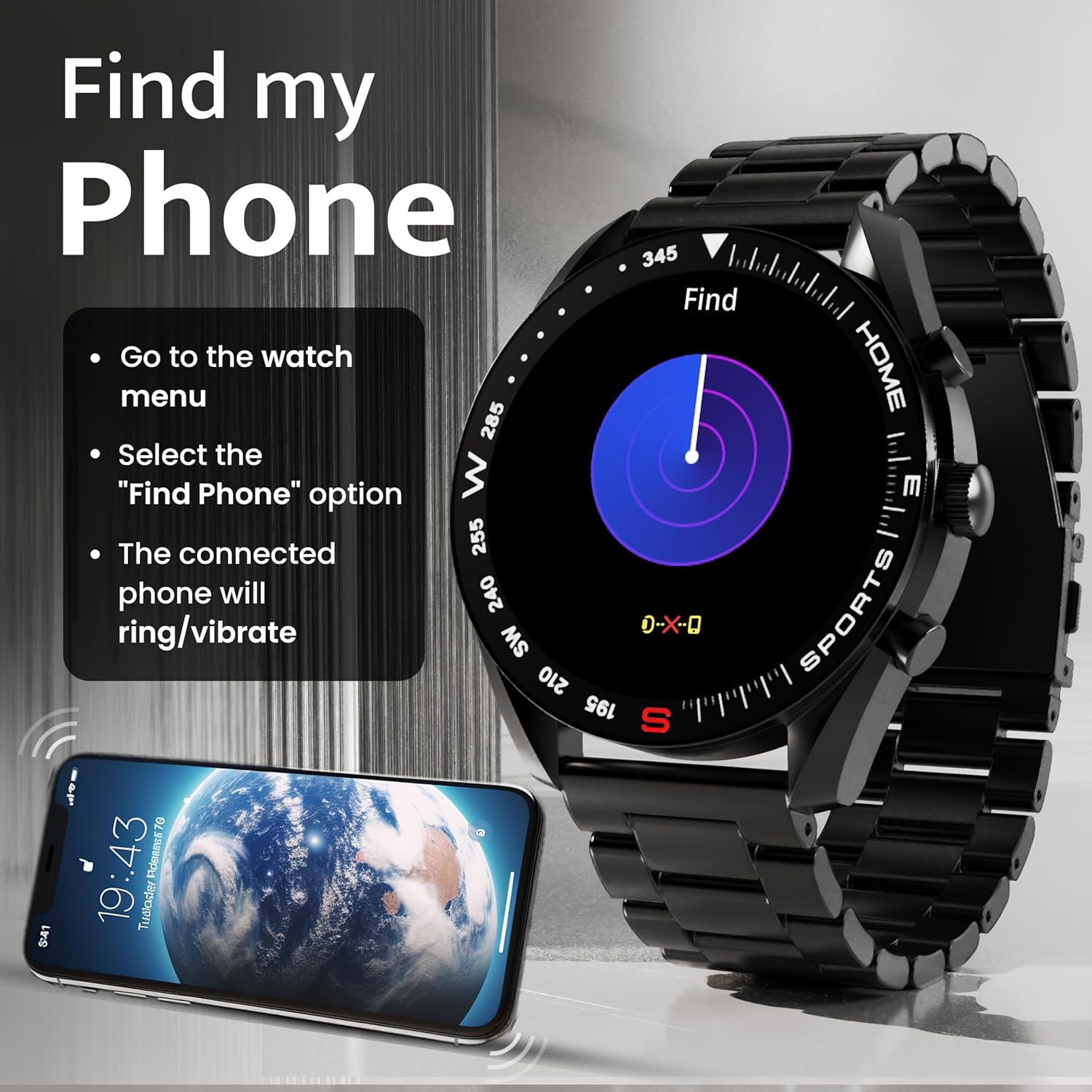
Image: How to use the 'Find My Phone' feature on the smartwatch.
Мини игре:
The watch includes several mini-games for entertainment, such as 2048, Battleship, Hamster, and Young Bird.

Слика: прamples of mini-games available on the smartwatch.
Одржавање
Cleaning Your Smart Watch:
- Обришите екран и кућиште сата меком крпом која не оставља влакна.
- За тврдокорну прљавштину, благо дampИсперите крпу водом. Избегавајте употребу јаких хемикалија или абразивних материјала.
- Clean the charging pins regularly with a dry cloth or cotton swab to ensure proper charging.
Отпорност на воду (IP67):
The GOBOULT Mirage Smart Watch is IP67 water-resistant, meaning it is protected against dust ingress and can withstand immersion in water up to 1 meter for up to 30 minutes. However, it is not suitable for swimming, showering with hot water, or diving. Avoid exposure to high-pressure water or corrosive liquids.

Image: Information regarding the IP67 water and dust resistance of the smartwatch.
Подешавање траке:
The watch comes with a metallic strap adjustment tool. Refer to the included instructions or a professional for adjusting the strap length to ensure a comfortable and secure fit.

Image: The watch's zinc alloy frame and the metallic strap adjustment tool.
Решавање проблема
- Сат се не укључује: Ensure the watch is fully charged. Connect it to the charging cable and allow it to charge for at least 30 minutes before attempting to power it on again.
- Упаривање са телефоном није могуће:
- Уверите се да је Bluetooth омогућен на вашем телефону и сату.
- Ensure the watch is within the Bluetooth range (up to 10 meters).
- Рестартујте и телефон и паметни сат.
- Clear the Bluetooth cache on your phone or forget the device and try pairing again.
- Ensure the GOBOULT companion app is updated to the latest version.
- Нетачни здравствени подаци: Ensure the watch is worn snugly on your wrist, not too tight or too loose. Clean the sensors on the back of the watch. Avoid excessive movement during measurements.
- Обавештења се не приказују:
- Check if notifications are enabled for the specific apps in the GOBOULT companion app.
- Ensure your phone's notification settings allow the GOBOULT app to display alerts.
- Verify that the watch is properly connected to your phone via Bluetooth.
- Kratko trajanje baterije: Reduce screen brightness, disable unnecessary features like continuous heart rate monitoring if not needed, and limit the number of active notifications. Ensure the watch is fully charged.
- Екран осетљив на додир не реагује: Поново покрените сат. Ако проблем и даље постоји, уверите се да је екран чист и сув.
Спецификације
| Феатуре | Детаљ |
|---|---|
| Назив модела | Мираге |
| Величина екрана | 1.39 инча ХД |
| Резолуција екрана | 360 к 360 пиксела |
| Осветљеност | 500 Nits Peak Brightness |
| Повезивање | Блуетоотх 5.3 |
| Отпорност на воду | ИП67 |
| Материјал оквира | Легура цинка |
| Тип батерије | Литхиум Полимер |
| Просечно трајање батерије | До 7 дана |
| Време пуњења | Отприлике 120 минута |
| Компатибилност оперативног система | иОС, Андроид |
| Тежина артикла | 106 г |
| Укључене компоненте | Smart Watch, Charging Cable, User Manual, Warranty Card |
Гаранција и подршка
Информације о гаранцији:
Your GOBOULT Mirage Smart Watch comes with a manufacturer's warranty. Please refer to the included Warranty Card for specific terms, conditions, and duration of the warranty. Keep your purchase receipt as proof of purchase.
Корисничка подршка:
If you encounter any issues or have questions not covered in this manual, please contact GOBOULT customer support. Contact details can typically be found on the Warranty Card or the official GOBOULT webсајту.


