
1. Увод
This manual provides comprehensive instructions for the assembly, operation, and maintenance of your FLEXISPOT 42 inch Desk Converter. This height-adjustable riser is designed to transform your traditional desk into an active sit-stand workstation, promoting varied postures for enhanced comfort and productivity.
The unique U-shaped design expands the keyboard workspace, accommodating dual monitors and a laptop, along with a wide keyboard tray.

Image 1.1: FLEXISPOT 42 inch Desk Converter in a typical office setup.
2. Безбедносне информације
- Always ensure the desk riser is placed on a stable, flat surface.
- Не прекорачујте максималну дозвољену тежину: 33 lbs (15 kg) for the desktop и 6.6 lbs (3 kg) for the keyboard tray. Exceeding these limits can compromise stability and lead to damage or injury.
- Keep hands and fingers clear of moving parts during height adjustment to prevent pinching.
- Distribute weight evenly across the desktop to maintain balance.
- Ensure all screws and fasteners are securely tightened before use and periodically check for looseness.
3. Садржај пакета
Пре склапања, проверите да ли су све компоненте присутне и да ли су неоштећене. Ако неки делови недостају или су оштећени, обратите се корисничкој подршци.
- Main Desk Converter Unit
- Ладица за тастатуру
- Assembly Hardware (screws, brackets)
- Упутство за употребу (овај документ)
4. Подешавање и монтажа
The FLEXISPOT Desk Converter is designed for quick assembly. Only the keyboard tray requires attachment.
Потребни алати:
- Шрафцигер (није укључен)
Кораци склапања:
- Carefully remove all components from the packaging. Place the main desk converter unit on a stable, flat surface.
- Identify the keyboard tray and its corresponding mounting brackets.
- Align the keyboard tray brackets with the pre-drilled holes on the underside of the main desktop unit.
- Secure the brackets to the desktop using the provided screws. Ensure they are tightened firmly but do not overtighten.
- Attach the keyboard tray to the brackets using the remaining screws. Verify that the keyboard tray is level and stable.

Image 4.1: Illustration of keyboard tray attachment.
5. Упутство за употребу
The desk converter features a gas-spring lifting mechanism for smooth and effortless height adjustment.
Подешавање висине:
- Clear any obstructions from around the desk converter.
- Locate the adjustment lever, typically on the side of the desktop.
- To raise the desk, gently squeeze the lever and lift the desktop to your desired height. The gas spring will assist the movement.
- To lower the desk, gently squeeze the lever and apply downward pressure to the desktop. Guide it smoothly to your preferred sitting height.
- Release the lever to lock the desk converter in position.

Image 5.1: Height adjustment range from 4.7 inches to 19.6 inches.
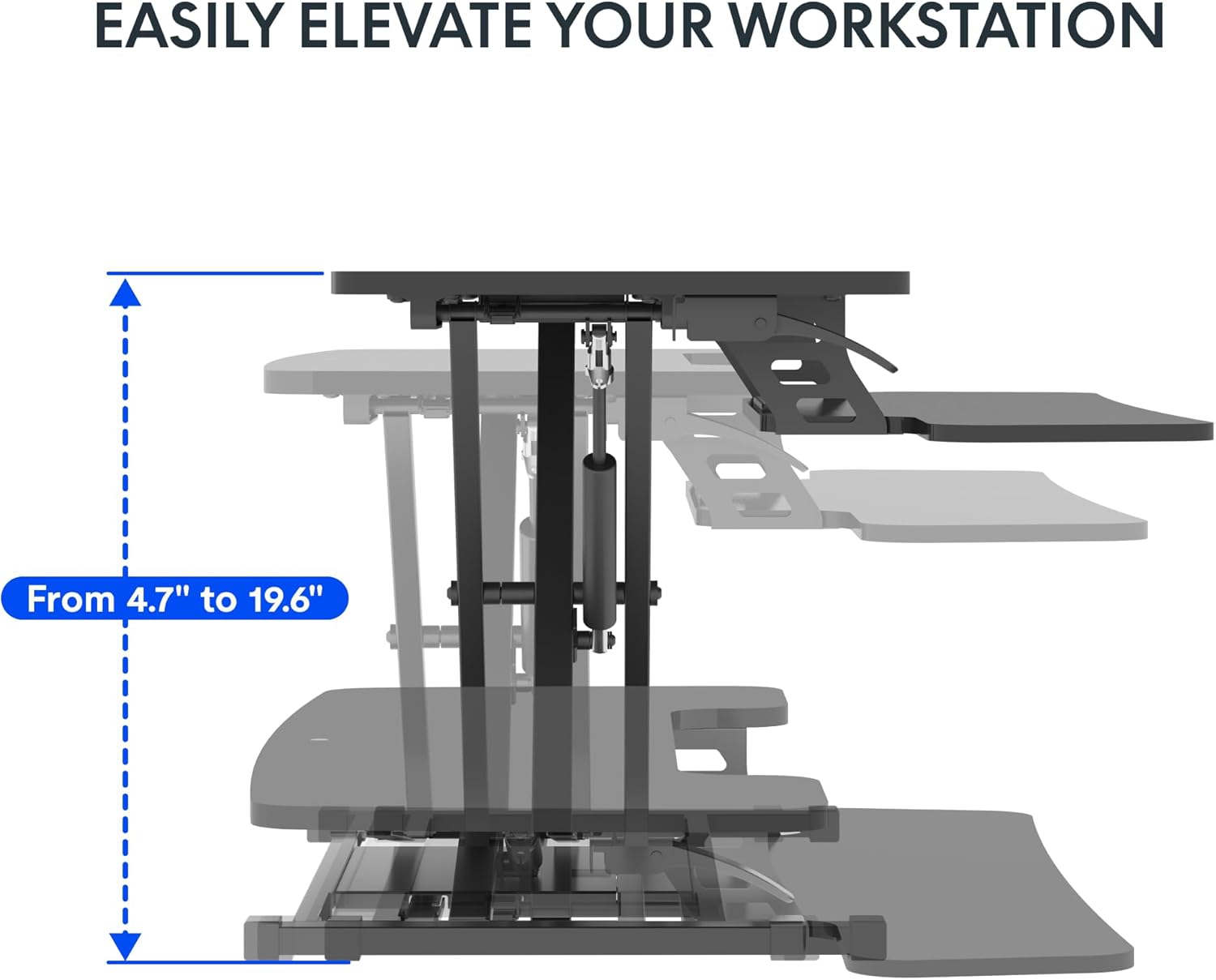
Image 5.2: Spacious two-tier design for monitors and keyboard.
6. Одржавање
Regular maintenance ensures the longevity and optimal performance of your desk converter.
- Чишћење: Обришите површине меком, дamp крпом. Избегавајте абразивна средства за чишћење или јаке хемикалије које би могле оштетити завршну обраду.
- Провере причвршћивача: Periodically inspect all screws and bolts, especially those securing the keyboard tray and the main frame. Tighten any loose fasteners to maintain stability.
- Провера механизма: Ensure the lifting mechanism operates smoothly. If you notice any stiffness or unusual noises, contact support. Do not attempt to lubricate or disassemble the gas spring mechanism yourself.
КСНУМКС. Решавање проблема
If you encounter issues with your desk converter, refer to the following common problems and solutions:
- Desk Converter is Unstable or Wobbles:
- Ensure the desk converter is placed on a completely flat and stable surface.
- Verify that all assembly screws, particularly those for the keyboard tray and the base, are securely tightened.
- Check that the weight on the desktop and keyboard tray does not exceed the specified capacity (33 lbs desktop, 6.6 lbs keyboard tray) and is evenly distributed.
- A slight wobble may be noticeable at maximum height; this is normal for some adjustable risers.
- Тешкоће са подешавањем висине:
- Ensure the adjustment lever is fully engaged when attempting to raise or lower the desk.
- Check for any obstructions preventing the mechanism from moving freely.
- Verify that the weight on the desktop is within the specified limits. Excessive weight can make adjustment difficult.
- Keyboard Tray Screws Do Not Fit or Come Loose:
- Ensure you are using the correct screws for the keyboard tray attachment. Refer to the assembly instructions.
- If screws consistently come loose, consider using slightly larger or coarser threaded screws of appropriate length, or apply a thread-locking compound (e.g., Loctite) if suitable for the material.
- Desktop Appears Slanted:
- Check the underlying desk surface for levelness.
- Inspect the desk converter's frame for any visible damage or bending. If damage is present, discontinue use and contact support.
8. Спецификације
Detailed product specifications for the FLEXISPOT 42 inch Desk Converter.

Image 8.1: Product dimensions and load capacities.
| Феатуре | Детаљ |
|---|---|
| Бранд | ФЛЕКСИСПОТ |
| Број модела | XLCB |
| Назив модела | МТ137 |
| Димензије производа (Д x Ш x В) | 24.9"Д к 42"Ш к 19.6"В |
| Димензије радне површине | 41.7 cm x 16.3 cm |
| Димензије лежишта за тастатуру | 34.6 cm x 12.2 cm |
| Басе Дименсионс | 27.4 cm x 15.5 cm |
| Опсег подешавања висине | 4.7" - 19.6" |
| Носивост радне површине | 33 фунти (15 кг) |
| Носивост послужавника за тастатуру | 6.6 фунти (3 кг) |
| Тежина артикла | 27.2 фунти (12.3 кг) |
| Боја | Цлассиц Блацк |
| Врх Врста материјала | Дрво |
| Основни материјал | Метал |
| Механизам за подизање | Manual (Gas Spring) |
| Рекуиред Ассембли | Да |
| Препоручене особе за монтажу | 1 |
9. Гаранција и подршка
The FLEXISPOT 42 inch Desk Converter comes with a Ограничена гаранција. For specific details regarding warranty coverage, duration, and terms, please refer to the warranty card included with your product or visit the official FLEXISPOT webсајту.
For technical assistance, troubleshooting not covered in this manual, or to inquire about replacement parts, please contact FLEXISPOT customer support directly. You can often find support contact information on the manufacturer's webсајту или путем ваше платформе за куповину.
Visit the official FLEXISPOT Store for more information: FLEXISPOT Store on Amazon