
Увод
Thank you for choosing the FLEXISPOT EC5 Plus Electric Sit-Stand Desk Frame. This manual provides essential information for the safe and efficient assembly, operation, and maintenance of your new desk frame. Designed with ergonomics in mind, this dual-motor frame offers smooth and quiet height adjustment, allowing you to effortlessly switch between sitting and standing positions for a healthier work environment.
Важна безбедносна упутства
Молимо вас да пажљиво прочитате сва упутства пре склапања и употребе. Непоштовање ових упутстава може довести до повреда или оштећења производа.
- Ensure all components are present and undamaged before assembly. Do not use if any parts are missing or damaged.
- Keep children and pets away from the desk during operation to prevent injury from moving parts.
- Do not place hands or other body parts near the lifting columns or crossbar during height adjustment to avoid pinching.
- Ensure the desk is placed on a level surface to prevent tipping.
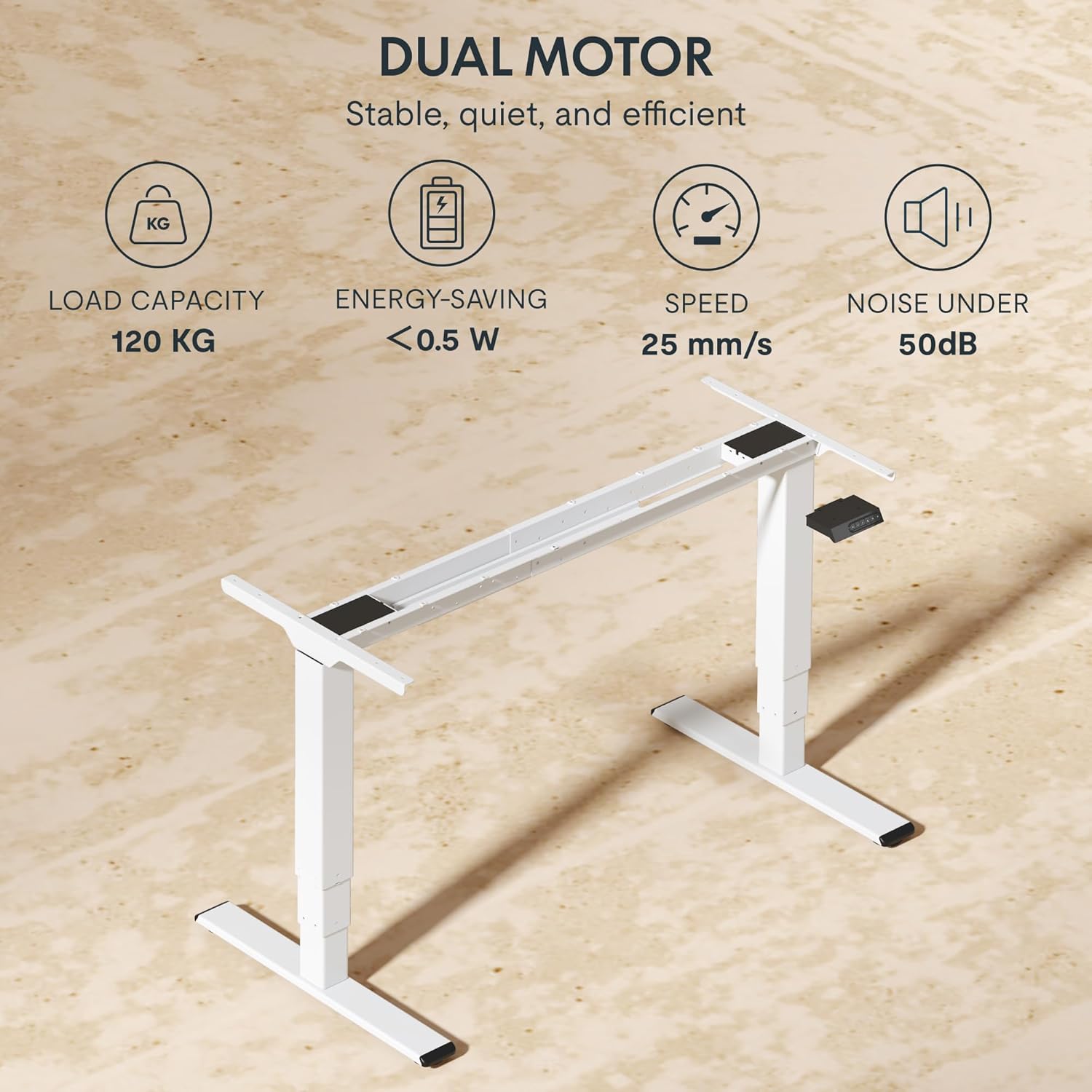
- Do not overload the desk. The maximum load capacity is 120 kg (265 lbs).
- Користите само приложени адаптер за напајање и каблове.
- Искључите напајање пре чишћења или одржавања.
- The anti-collision system is designed to prevent damage, but always exercise caution during operation.
Садржај пакета
Проверите да ли су све следеће компоненте укључене у ваш пакет:
- Ноге за сто (2)
- Пречка (1)
- Бочни носачи (2)
- Контролна кутија (1)
- Handset/Control Panel (1)
- адаптер за напајање (1)
- Кабл за напајање (1)
- Носач каблова (1)
- Hardware Kit (screws, tools, etc.)
- Кориснички приручник (овај документ)

Водич за подешавање
Упутство за монтажу
Assembly typically requires two people. Follow the steps below for a successful setup. Refer to the detailed diagrams in the included printed manual for visual guidance.
- Распакујте компоненте: Пажљиво извадите све делове из паковања и положите их на чисту, меку површину како бисте спречили огреботине.
- Attach Side Brackets to Legs: Secure the side brackets to the top of each lifting column (leg) using the provided screws.
- Саставите пречку: Connect the two halves of the crossbar, ensuring the motor cables are properly routed.
- Connect Legs to Crossbar: Attach the assembled legs to the crossbar. Ensure all connections are secure.
- Инсталирајте контролну кутију: Mount the control box to the designated area on the crossbar using the provided screws.
- Connect Motors and Handset: Plug the motor cables from each leg into the control box. Connect the handset/control panel cable to the control box.
- Прикључите адаптер за напајање: Connect the power adapter to the control box and then to the power cable.
- Mount Tabletop: Carefully place your chosen tabletop (not included) onto the assembled frame. Ensure it is centered and aligned. Secure the tabletop to the frame using appropriate screws (ensure screw length is suitable for your tabletop thickness to avoid piercing through). The frame is compatible with tabletops from 120 to 180 cm in length and 60 to 80 cm in width.
- Управљање кабловима: Use the included cable management tray and ties to organize all cables neatly.
- Прво појачање: Plug the power cable into a wall outlet. The desk should be ready for initial calibration or operation.

Упутство за употребу
Контролна табла је завршенаview
The EC5 Plus features an intuitive control panel with an LED display and memory functions.
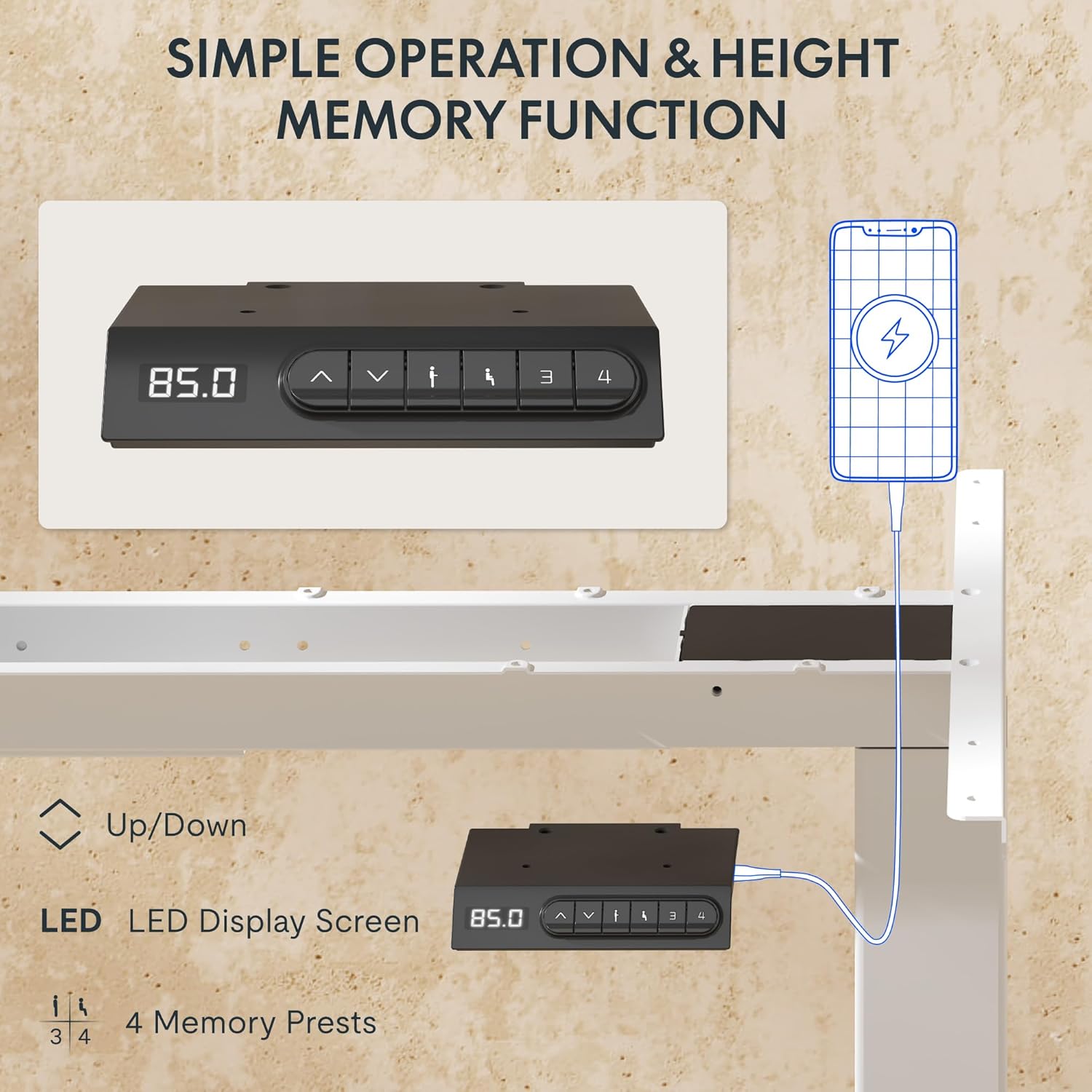
- ЛЕД дисплеј: Shows the current height of the desk in centimeters.
- Стрелице горе/доле (▲ / ▼): Press and hold to manually adjust the desk height.
- Пресет меморије (1, 2, 3, 4): Store and recall preferred height settings.
- USB-A и USB-C портови: Integrated charging ports for your devices.
Подешавање висине
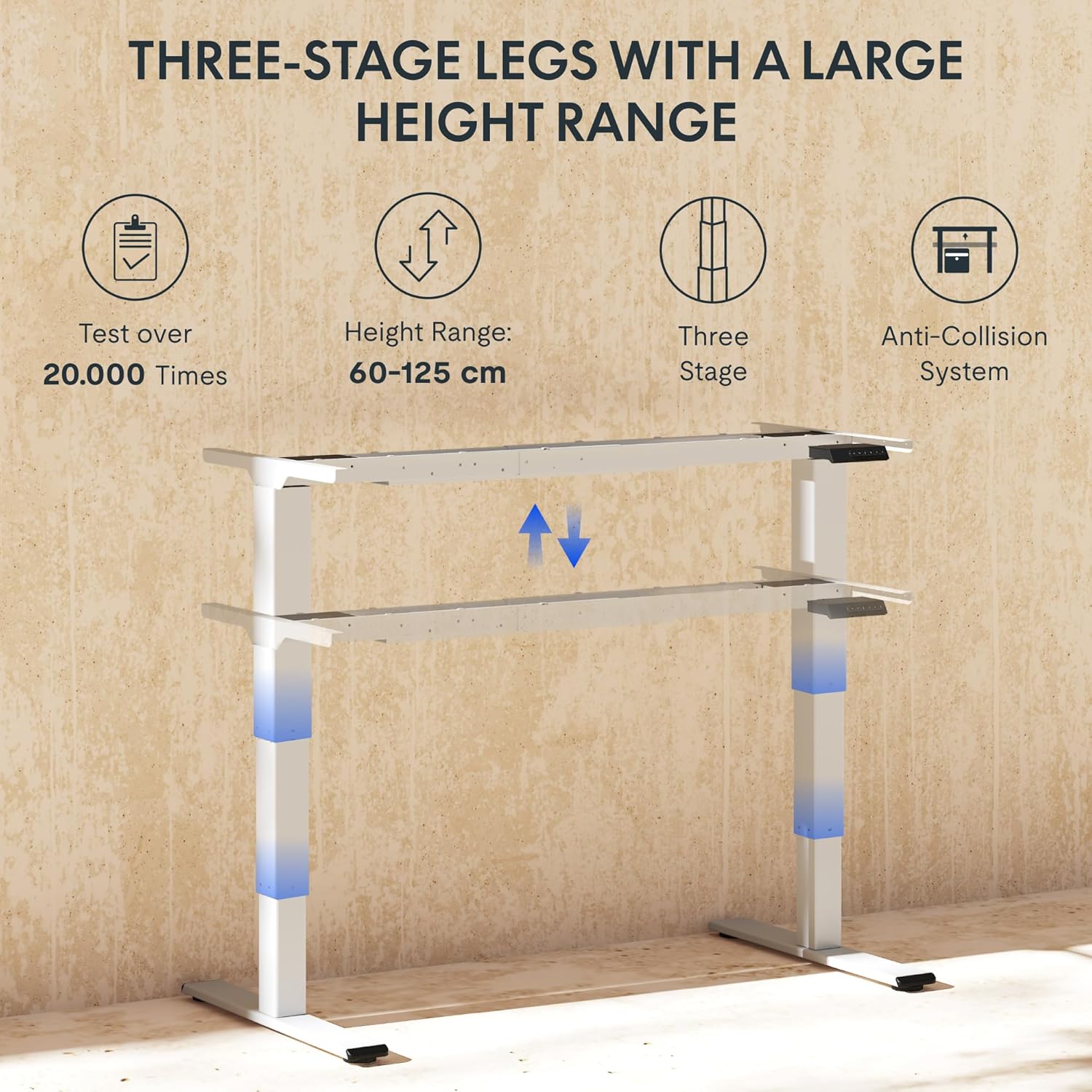
To adjust the desk height, press and hold the ▲ (Горе) или ▼ (Down) arrow button until the desk reaches your desired height. The LED display will show the current height in real-time. The desk frame supports a height range of 60 cm to 125 cm.
Мемори Пресетс
The desk allows you to save up to four preferred height settings for quick recall:
- Подесите сто на жељену висину помоћу стрелица горе/доле.
- Press the "M" or "SET" button (if available, otherwise proceed to step 3).
- Press one of the numbered memory preset buttons (1, 2, 3, or 4) within 3 seconds. The LED display will show "S-" followed by the number, indicating the height has been saved.
- To recall a saved height, simply press the corresponding numbered memory preset button. The desk will automatically move to the saved position.
Anti-Collision System
The EC5 Plus is equipped with an intelligent anti-collision system. If the desk encounters an obstacle during height adjustment, it will automatically stop and reverse slightly to prevent damage or injury. This system has adjustable sensitivity levels. Refer to the detailed manual for instructions on adjusting sensitivity.
УСБ портови за пуњење
The control panel includes integrated USB-A and USB-C charging ports. Simply connect your smartphone, tablet, or other compatible devices to these ports for convenient charging directly from your desk.
Одржавање
Regular maintenance ensures the longevity and optimal performance of your FLEXISPOT EC5 Plus desk frame.
- Чишћење: Wipe the desk frame with a soft, damp cloth. Avoid using abrasive cleaners or solvents that may damage the finish. Ensure the desk is unplugged before cleaning.
- инспекција: Периодично проверавајте све завртње и спојеве да бисте били сигурни да су чврсто затегнути. По потреби поново затегните.
- Управљање кабловима: Уверите се да каблови нису запетљани или уплетени, што би могло утицати на рад стола или проузроковати оштећење.
- подмазивање: The lifting columns are designed to be maintenance-free and do not require lubrication.
Решавање проблема
If you encounter any issues with your desk frame, refer to the table below for common problems and solutions.
| Проблем | Могући узрок | Решење |
|---|---|---|
| Радни сто се не помера. | Power cable disconnected; control box not connected; motor cables loose. | Check all power and motor connections. Ensure the power outlet is functional. |
| Сто се помера неравномерно или производи необичну буку. | Overload; loose connections; obstruction. | Reduce weight on the desk. Check all screws and connections. Ensure no obstructions are present. Perform a reset (refer to manual for specific reset procedure). |
| Anti-collision system triggers too often or not at all. | Sensitivity setting incorrect. | Adjust the anti-collision sensitivity via the control panel (refer to manual for specific steps). |
| ЛЕД дисплеј приказује код грешке. | Специфични квар. | Refer to the full user manual for a list of error codes and their corresponding solutions. If the issue persists, contact customer support. |
Спецификације
Detailed technical specifications for the FLEXISPOT EC5 Plus Desk Frame:
| Феатуре | Детаљ |
|---|---|
| Бранд | ФЛЕКСИСПОТ |
| Број модела | EC5W-PL-IE |
| Боја | Бела |
| Димензије производа (Д к Ш к В) | 80 x 180 x 125 cm (frame dimensions, adaptable to tabletop) |
| Тежина артикла | 22.6 килограма |
| Капацитет оптерећења | 120 кг (265 лбс) |
| Тип мотора | Двомоторни систем |
| Опсег подешавања висине | 60 cm - 125 cm (23.6 inches - 49.2 inches) |
| Брзина подизања | 25 мм/с |
| Ниво буке | Испод 50 dB |
| Нога Сtages | Три-сtage telescopic legs |
| Цонтрол Панел | LED display, 4 memory presets, Up/Down buttons |
| Портови за пуњење | Integrated USB-A and USB-C ports |
| Посебне карактеристике | Ergonomic design, Anti-Collision System, Energy-saving (<0.5W standby) |
| Compatible Tabletop Sizes | Length: 120-180 cm; Width: 60-80 cm |
| Основни материјал | Метал |
Гаранција и подршка
FLEXISPOT stands behind the quality of its products. Your EC5 Plus Desk Frame comes with the following warranty:
- Гаранција на оквир: 5 године
- Гаранција на мотор: 3 године
This warranty covers defects in materials and workmanship under normal use. For warranty claims or technical assistance, please contact FLEXISPOT customer support. Lifetime free technical support is provided.
For the most up-to-date contact information, please visit the official FLEXISPOT webсајт или погледајте документацију о куповини.
Webсајт: ввв.флекиспот.цом