Увод
This manual provides detailed instructions for the proper use and maintenance of your Ulefone Note 18 Pro smartphone. Please read this manual carefully before using your device to ensure optimal performance and longevity. Keep this manual for future reference.
Садржај пакета
Upon unboxing your Ulefone Note 18 Pro, please verify that all the following items are included:
- Ulefone Note 18 Pro Smartphone
- Повер Адаптер
- УСБ Типе-Ц кабл
- Алат за избацивање СИМ картице
- Pre-applied Screen Protector
- ТПУ заштитна футрола
- Водич за брзи почетак (ово упутство)

Image: Contents of the Ulefone Note 18 Pro retail package.
Сетуп
1. Инсталација SIM картице и TF картице
The Ulefone Note 18 Pro supports dual SIM cards or one SIM card and one TF (microSD) card for expanded storage. Use the provided SIM ejector tool to open the SIM tray.
- Пронађите лежиште за СИМ картицу са стране телефона.
- Уметните алат за избацивање СИМ картице у мали отвор поред лежишта и лагано притисните док лежиште не искочи.
- Place your Nano-SIM card(s) and/or TF card into the designated slots on the tray, ensuring the gold contacts face downwards.
- Пажљиво гурните лежиште назад у телефон док се не уклопи у тело уређаја.

Image: Illustration of the dual SIM/TF card slot.
2. Прво укључивање
Press and hold the Power button located on the side of the device until the Ulefone logo appears on the screen. Follow the on-screen prompts to complete the initial setup, including language selection, Wi-Fi connection, and Google account setup.
3. Пуњење уређаја
Before first use, it is recommended to fully charge your Ulefone Note 18 Pro. Connect the USB Type-C cable to the phone's charging port and the other end to the provided power adapter. Plug the adapter into a wall outlet.
The device features an 18W fast charging capability for its 5450mAh battery. A full charge typically takes approximately 3.2 hours.

Image: Battery specifications and charging details.
Управљање вашим уређајем
1. Основна навигација
The Ulefone Note 18 Pro operates on Android 14 and utilizes a 6.78-inch HD+ LCD touchscreen for navigation. Use gestures such as tapping, swiping, pinching, and spreading to interact with the interface.
The device also features an Innovative Custom Key, which can be configured for various functions:
- Један клик: Start Sound Recording, Open Flashlight, etc.
- Дупли клик: Take Screenshots, Open Zello, etc.
- Дуго притисните: Open SOS, Open Game Mode, etc.
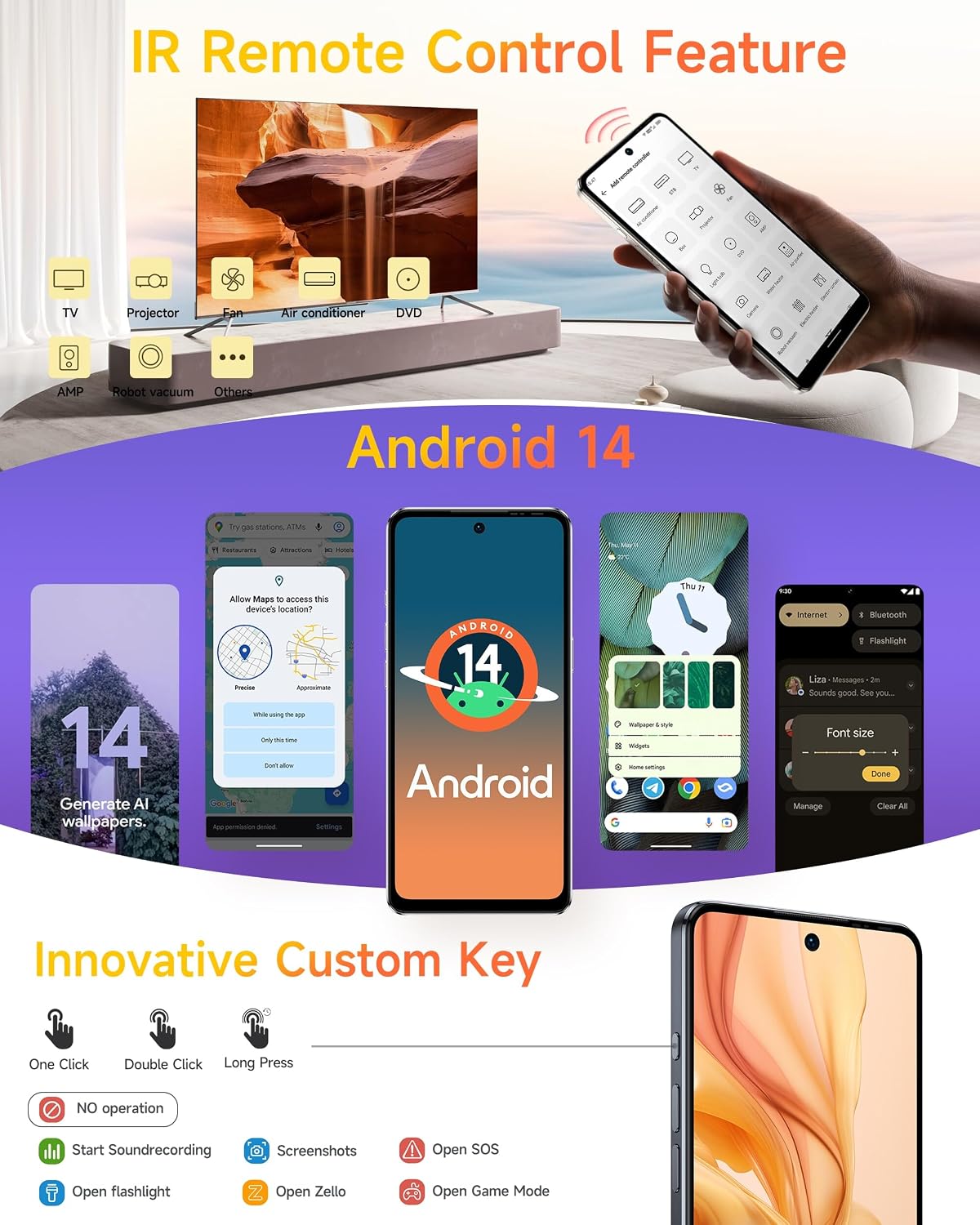
Image: Android 14 interface and Custom Key functionalities.
2. Употреба камере
The Ulefone Note 18 Pro is equipped with a versatile camera system:
- Главна камера од 64 МП: Sony IMX682 sensor with f/1.8 aperture.
- Ултраширока камера од 50 МП: 1/2.8" sensor with 117.3° FOV and f/2.2 aperture.
- Предња камера од 32 МП: За селфије високе резолуције и видео позиве.
To access the camera, tap the Camera icon on your home screen or app drawer. Select your desired mode (Photo, Video, Portrait, etc.) and tap the shutter button to capture images or start/stop recording.

Image: Camera specifications and sample photography.
3. Повезивање
Уређај подржава разне опције повезивања:
- 4Г ЛТЕ: За мобилне податке велике брзине.
- Ви-Фи: Повежите се на бежичне мреже за приступ интернету.
- Блуетоотх: For connecting to wireless accessories like headphones or speakers.
- НФЦ: For contactless payments (G Pay supported) and quick pairing with other NFC-enabled devices.
- Глобална навигација: Built-in GPS, GLONASS, BeiDou, and Galileo for accurate location services.
- Headset-free FM Radio: Enjoy FM radio without needing to plug in headphones as an antenna.

Image: Connectivity features including NFC, GPS, and FM Radio.
4. IR Remote Control Feature
The Ulefone Note 18 Pro includes an IR Blaster, allowing it to function as a universal remote control for various home appliances such as TVs, air conditioners, projectors, and more. Use the pre-installed IR remote app or download a compatible app to configure and control your devices.
Image: IR Remote Control functionality.
5. Сигурносне карактеристике
For enhanced security, the Ulefone Note 18 Pro offers:
- Откључавање лицем: Register your face to unlock the device quickly and conveniently.
- ИД отиска прста: The device features a side-mounted fingerprint sensor for secure and fast unlocking. Register your fingerprints in the Security settings.
Image: Face Unlock and Fingerprint ID security options.
Одржавање
1. Брига о батерији
- Avoid exposing the device to extreme temperatures (below 0°C or above 45°C) as this can degrade battery performance.
- Use only the original charger and cable provided with your device to prevent damage and ensure optimal charging.
- Do not leave the device charging for extended periods after it has reached 100% to prolong battery lifespan.
2. Чишћење уређаја
- Gently wipe the screen and back of the phone with a soft, lint-free cloth.
- За тврдокорне мрље, благо дampОбришите крпу водом или раствором за чишћење екрана. Избегавајте јаке хемикалије.
- The device is splash-proof; however, avoid submerging it in water.
Image: Splash-proof design of the device.
3. Ажурирања софтвера
Regularly check for and install system updates to ensure your device has the latest features, security patches, and performance improvements. You can usually find this option in Settings > System > System update.
Решавање проблема
If you encounter issues with your Ulefone Note 18 Pro, refer to the following common solutions:
| Проблем | Могуће решење |
|---|---|
| Уређај се неће укључити | Уверите се да је батерија напуњена. Повежите је са пуњачем најмање 10 минута, а затим покушајте поново да је укључите. |
| Апликације се руше или замрзавају | Clear the app's cache (Settings > Apps > [App Name] > Storage > Clear cache). If the problem persists, try reinstalling the app or performing a factory reset (backup data first). |
| Лош век трајања батерије | Смањите осветљеност екрана, онемогућите некоришћене функције (Wi-Fi, Bluetooth, GPS), затворите апликације у позадини и проверите да ли постоје апликације које троше много енергије у подешавањима потрошње батерије. |
| Повезивање на Ви-Фи није могуће | Restart your router and the phone. Forget the network in phone settings and reconnect. Ensure Wi-Fi is enabled on the phone. |
| Сензор отиска прста не ради | Ensure your finger is clean and dry. Re-register your fingerprint in Settings > Security > Fingerprint. |
Спецификације
The Ulefone Note 18 Pro boasts impressive specifications for a smooth user experience:

Image: Processor and Memory details.
| Феатуре | Детаљ |
|---|---|
| Назив модела | Ulefone Note 18 Pro Phone Android 14 Cell Phones Unlocked |
| Оперативни систем | Андроид 14 |
| Процесор | MediaTek Helio G91 Octa Core, 2 GHz |
| РАМ | 12 GB (6 GB физичке + 6 GB виртуелне) |
| Интерна меморија | 256 ГБ |
| Екпандабле Стораге | Yes, up to 2TB via TF card |
| Дисплаи | 6.78-inch HD+ LCD, 1512 x 720 resolution, Corning Gorilla Glass, 90Hz Refresh Rate |
| Задња камера | 64 MP Main (Sony IMX682) + 50 MP Ultra-Wide |
| Предња камера | 32 МП |
| Резолуција снимања видео записа | 4K |
| Капацитет батерије | 5450 mAh (литијум-полимер) |
| Пуњење | 18W Fast Charging, USB Type-C |
| СИМ картица | Дуал СИМ (Нано-СИМ) |
| Повезивање | 4G LTE, Wi-Fi, Bluetooth, NFC, GPS, GLONASS, BeiDou, Galileo |
| Остале карактеристике | IR Remote Control, Fingerprint ID, Face Unlock, Custom Key, Splash Proof, Headset-free FM Radio |
| Димензије | 16.88 к 7.68 к 0.88 цм |
| Тежина | 211 г |
Гаранција и подршка
Your Ulefone Note 18 Pro comes with a standard manufacturer's warranty. For detailed warranty terms and conditions, please refer to the warranty card included in your package or visit the official Ulefone website. For technical support, troubleshooting assistance, or service inquiries, please contact Ulefone customer service through their official channels.
Више информација и ресурса за подршку можете пронаћи на Ulefone Store on Amazon.


