Увод
Thank you for choosing the Blaupunkt Infinite 20W Party Speaker with Wired Mic. This manual provides essential information for the safe and efficient operation of your speaker. Please read it thoroughly before use and retain it for future reference.
Важне информације о безбедности
- Не излажите звучник води или прекомерној влази.
- Избегавајте постављање звучника у близини извора топлоте или на директној сунчевој светлости.
- Не покушавајте сами да растављате или поправљате уређај. Све сервисне радове препустите квалификованом особљу.
- Користите само назначени кабл за пуњење.
- Чувати ван домашаја деце.
Производ је завршенview
The Blaupunkt Infinite 20W Party Speaker (Model BSP101) is a portable audio system designed for powerful sound and entertainment. It features Bluetooth connectivity, USB/TF card playback, FM radio, karaoke function with a wired microphone, and dynamic flash lights.
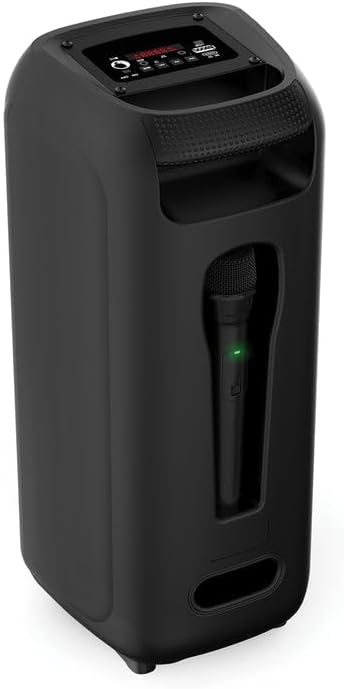
Слика 1: Предња страна View говорника

Слика 2: Позади View говорника
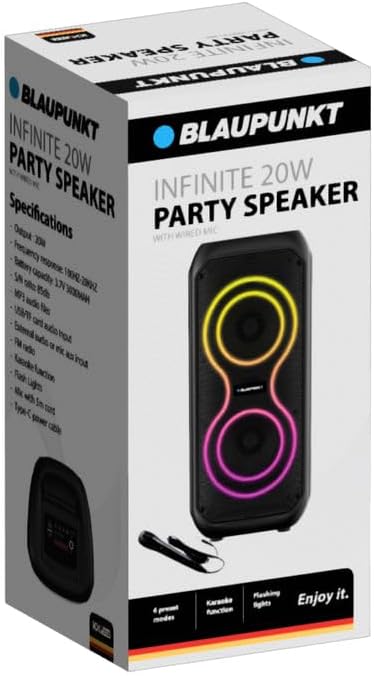
Figure 3: Wired Microphone
Водич за подешавање
1. Распакивање и први преглед
Пажљиво извадите све компоненте из паковања. Уверите се да су присутне следеће ставке:
- Blaupunkt Infinite 20W Party Speaker
- Wired Microphone with 5m Cord
- Кабл за напајање типа Ц
Inspect the speaker and accessories for any signs of damage. If any items are missing or damaged, contact customer support.
2. Пуњење звучника
Before first use, fully charge the speaker. Connect the supplied Type-C power cable to the DC 5V port on the speaker and the other end to a compatible USB power adapter (not included). The charging indicator (if present) will show the charging status.
3. Connecting the Wired Microphone
Insert the 6.35mm jack of the wired microphone into the "MIC" input port on the speaker's control panel.
Упутство за употребу

Слика 4: Распоред контролне табле
1. Укључивање/искључивање
Locate the "ON/OFF" switch on the control panel. Slide it to the "ON" position to power on the speaker. Slide it to "OFF" to power off.
2. Блуетоотх упаривање
- Power on the speaker. It will automatically enter Bluetooth pairing mode, indicated by a flashing LED or an audible prompt.
- На свом мобилном уређају омогућите Блуетоотх и потражите доступне уређаје.
- Select "Blaupunkt Infinite" (or similar name) from the list.
- Once paired, the speaker will confirm with an audible sound, and the LED indicator will become solid.
3. Репродукција са USB/TF картице
Insert a USB flash drive or TF (microSD) card containing MP3 audio files into the respective "USB" or "TF" port. The speaker will automatically detect the storage device and begin playing music. Use the track control buttons (previous/next) to navigate songs.
4. ФМ радио
Press the "MODE" button repeatedly until "FM" mode is selected. Press and hold the "Play/Pause" button to auto-scan and save available FM stations. Use the previous/next track buttons to switch between saved stations.
5. Функција караоке
Ensure the wired microphone is connected to the "MIC" input. Play music via Bluetooth, USB, TF card, or AUX. Adjust the microphone volume (if available) and speaker volume to your preference. Sing along with the music.
6. Flash Lights
The speaker features dynamic flash lights. These lights typically activate automatically when the speaker is on and playing music. There may be a dedicated button or a combination of buttons to cycle through light modes or turn them off (refer to control panel for specific button if available).
7. External Audio (AUX) Input
Connect an external audio device (e.g., smartphone, MP3 player) to the "AUX" input port using a 3.5mm audio cable (not included). Press the "MODE" button until "AUX" mode is selected. Audio will play from the connected device.
Одржавање
- Чишћење: Користите меку, суву крпу за чишћење спољашњости звучника. Не користите абразивна средства за чишћење или раствараче.
- Складиштење: Када се звучник не користи дуже време, чувајте га на хладном и сувом месту, даље од директне сунчеве светлости и екстремних температура.
- Одржавање батерије: Да бисте продужили век трајања батерије, избегавајте често потпуно пражњење батерије. Редовно пуните звучник, чак и ако га не користите.
Решавање проблема
| Проблем | Могући узрок | Решење |
|---|---|---|
| Звучник се не укључује. | Battery is discharged. Power switch is off. | Charge the speaker using the Type-C cable. Ensure the power switch is in the "ON" position. |
| Нема звука. | Јачина звука је прениска. Изабран је погрешан режим уноса. Уређај није правилно повезан. | Increase speaker and source device volume. Press "MODE" to select the correct input (Bluetooth, USB, TF, AUX). Reconnect the device. |
| Блуетоотх се често прекида. | Device is out of range. Interference from other devices. Low speaker battery. | Move the paired device closer to the speaker. Avoid obstacles. Charge the speaker fully. Try re-pairing the device. |
| Микрофон не ради. | Microphone not fully plugged in. Microphone switch is off (if applicable). | Ensure the microphone jack is securely inserted into the "MIC" port. Check if the microphone has an ON/OFF switch and ensure it is ON. |
Спецификације
| Бранд | БЛАУПУНКТ |
| Број модела | БСП101 |
| Излазна снага | 20В |
| Технологија повезивања | Блуетоотх |
| Режим аудио излаза | Стерео |
| Фреквенцијски одзив | 100Хз-20КХз |
| Капацитет батерије | 3.7В 3000мАх |
| С/Н однос | 85дБ |
| Аудио подршка | MP3, USB, TF card |
| Повер Инпут | Type-C (DC 5V) |
| Укључене компоненте | Wired Mic, Type-C Power Cable |
| Димензије производа (Д x Ш x В) | 22D x 20W x 48H millimetres |
| Материјал | Пластика |
| Боја | Црно |
Гаранција и подршка
For warranty information or technical support, please refer to the warranty card included with your product or visit the official Blaupunkt webсајт. Не покушавајте сами да поправите производ.


