Увод
This manual provides detailed instructions for the setup, operation, and maintenance of your Geevon Wireless Digital Refrigerator Thermometer. This device is designed to monitor temperatures in your refrigerator, freezer, or other environments using two wireless sensors, ensuring optimal storage conditions for your items.
Молимо вас да пажљиво прочитате ово упутство пре употребе производа како бисте осигурали правилан рад и максимално продужили његов век трајања.
Садржај пакета
Приликом распакивања, проверите да ли су све компоненте присутне и у добром стању:
- 1 x Главна јединица за приказ
- 2 x Wireless Sensors
- 6 x AAA Batteries (for main unit)
- 2 x CR2032 Batteries (pre-installed in sensors or included separately)
- 1 x Упутство за употребу (овај документ)
- 2 x Suction Cups (for sensor mounting)

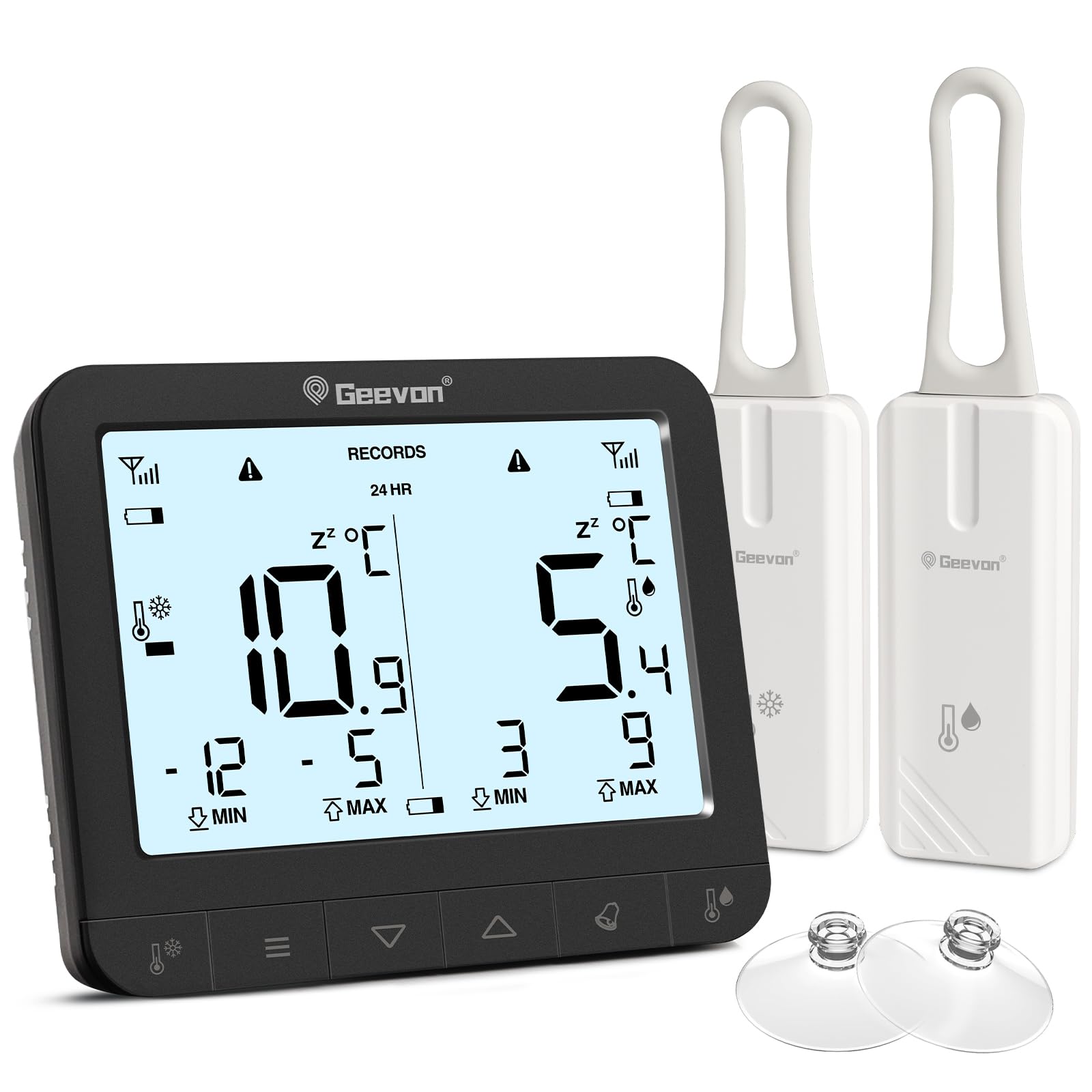
The image displays the main unit, two sensors, and accessories including suction cups for installation.
Упутства за подешавање
1. Инсталација батерије
For the Main Display Unit:
- Пронађите одељак за батерије на задњој страни главне јединице.
- Отворите поклопац батерије.
- Уметните 6 ААА батерије, водећи рачуна о исправном поларитету (+/-).
- Добро затворите поклопац батерије.
For the Wireless Sensors:
- Locate the battery compartment on the back of each sensor.
- Отворите поклопац батерије.
- Insert 1 CR2032 battery into each sensor, observing the correct polarity (+/-).
- Добро затворите поклопац батерије.
The image illustrates the battery compartments for both the main unit and the wireless sensors.
2. Постављање сензора
The wireless sensors can be placed inside your refrigerator, freezer, or any other area where temperature monitoring is desired. Ensure the sensors are not submerged in liquid and are placed in a location where they can transmit signals to the main unit.
- Вешање: Use the integrated loop to hang the sensor from a shelf or rack.
- Магнетни додатак: The sensors have built-in magnets for attachment to metallic surfaces.
- Ваздушне чаше: Attach the provided suction cups to the sensor for mounting on smooth surfaces like glass or plastic.

This image demonstrates different ways to position the wireless sensors within a refrigerator or freezer.
The main display unit can be placed on a countertop using its integrated stand or mounted on a metallic surface using its rear magnets.
Упутство за употребу
Дисплаи Оверview

The main display unit shows current temperatures for two channels, along with max/min records and status icons.
The display shows temperatures for two channels (CH1 and CH2), along with their respective maximum (MAX) and minimum (MIN) recorded temperatures. Signal strength indicators for each sensor and battery level indicators are also present.
1. Temperature Unit Selection (℃/℉)
On the back of the main display unit, locate the small "C/F" button. Press this button to toggle between Celsius (℃) and Fahrenheit (℉) temperature units.

This image highlights the C/F switch on the back of the main unit and other key features.
2. Max/Min Temperature Records
The display shows the maximum and minimum temperatures recorded over a 24-hour period. To view historical max/min records (since the last reset or power cycle), briefly press the "UP" or "DOWN" buttons on the main unit. To reset the max/min records, press and hold the "CLEAR" button (usually indicated by a trash can icon or similar) for a few seconds.
3. 2-Channel Alarm Setting
The thermometer allows you to set high and low temperature alarms for each channel.
- Briefly press the channel button (e.g., "CH1" or "CH2" button, or a general "Channel" button) to enter alarm setting mode for that channel.
- Use the "UP" and "DOWN" buttons to adjust the desired high and low temperature thresholds.
- Press and hold the "Alarm" button (often indicated by a bell icon) to toggle the alarm function ON or OFF for the selected channel.
- An audible alarm will sound if the temperature exceeds the set high threshold or falls below the set low threshold.

This image illustrates the alarm function, showing how to set upper and lower temperature limits for alerts.
4. Функција позадинског осветљења
To illuminate the display for easier reading in low-light conditions, touch the light bulb icon on the top of the main unit. The backlight will activate for approximately 10 seconds.
Кључне карактеристике
- Dual Wireless Sensors: Monitor two separate locations simultaneously.
- Широк температурни опсег: Мери температуре од -40°C до 37°C (-40°F до 98.6°F).
- Макс./мин. запис: Tracks the highest and lowest temperatures recorded over 24 hours or historically.
- Звучни аларми: Alerts you when temperatures exceed or fall below preset thresholds.
- Индикатор слабе батерије: Displays icons for low battery on both the main unit and sensors.
- Позадинско осветљење: Provides temporary illumination for clear reading in dim environments.
- Разноврстан пласман: Main unit features a stand and magnets; sensors can be hung, magnetically attached, or secured with suction cups.
The thermometer is suitable for various applications, including refrigerators, freezers, and wine coolers.
Одржавање
- Чишћење: Обришите главну јединицу и сензоре меком крпомamp cloth. Do not use abrasive cleaners or immerse the devices in water.
- Замена батерије: Replace batteries promptly when the low battery indicator appears on the display. Refer to the "Battery Installation" section for instructions.
- Складиштење: If storing the device for an extended period, remove all batteries to prevent leakage. Store in a cool, dry place.
Индикатор слабе батерије
The display unit features separate low battery indicators for the main unit and each sensor. When a battery icon appears, it indicates that the corresponding battery needs replacement.

This image highlights the low battery indicators for the sensors and the main display unit.
Решавање проблема
| Проблем | Могући узрок | Решење |
|---|---|---|
| Нема дисплеја на главној јединици. | Батерије су истрошене или неправилно постављене. | Проверите поларитет батерија и замените их новим ААА батеријама. |
| Sensor reading "---" or inaccurate. | Sensor batteries are dead, sensor is out of range, or interference. | Replace sensor CR2032 batteries. Move sensor closer to the main unit. Avoid placing near large metal objects or electronics that may cause interference. |
| Аларм се не оглашава. | Alarm function is off or thresholds are set too wide. | Ensure the alarm is enabled for the desired channel. Adjust alarm thresholds to appropriate levels. |
| Позадинско осветљење не ради. | Main unit batteries are low or depleted. | Replace main unit AAA batteries. |
Спецификације
| Бранд | Геевон |
| Број модела | 86218 |
| Димензије производа (главна јединица) | КСНУМКС к КСНУМКС к КСНУМКС цм (КСНУМКС к КСНУМКС к КСНУМКС инча) |
| Тежина | 310 грама (0.68 лбс) |
| Снага главне јединице | 6 к ААА батерије (укључене) |
| Снага сензора | 1 x CR2032 Battery per sensor (included) |
| Температурни опсег | -40°Ц до 37°Ц (-40°Ф до 98.6°Ф) |
| Прецизност мерења | ± 0.1 ℉/℃ |
| Дисплаи Типе | Дигитални ЛЦД |
| Посебне карактеристике | Low Battery Indicator, Backlit Display, Max/Min Record, 2-Channel Alarm |
| Материјал | акрилонитрил бутадиен стирен (АБС) |
Гаранција и подршка
Geevon is committed to providing high-quality products. For any questions, issues, or support needs regarding your Geevon Refrigerator Thermometer, please contact our customer service. We offer lifetime consultation service for our products.
Please refer to your purchase documentation or the official Geevon webсајт за конкретне услове гаранције и контакт информације.
Подршка на мрежи: Contact Seller (GEEVON UK)